1. Introduction
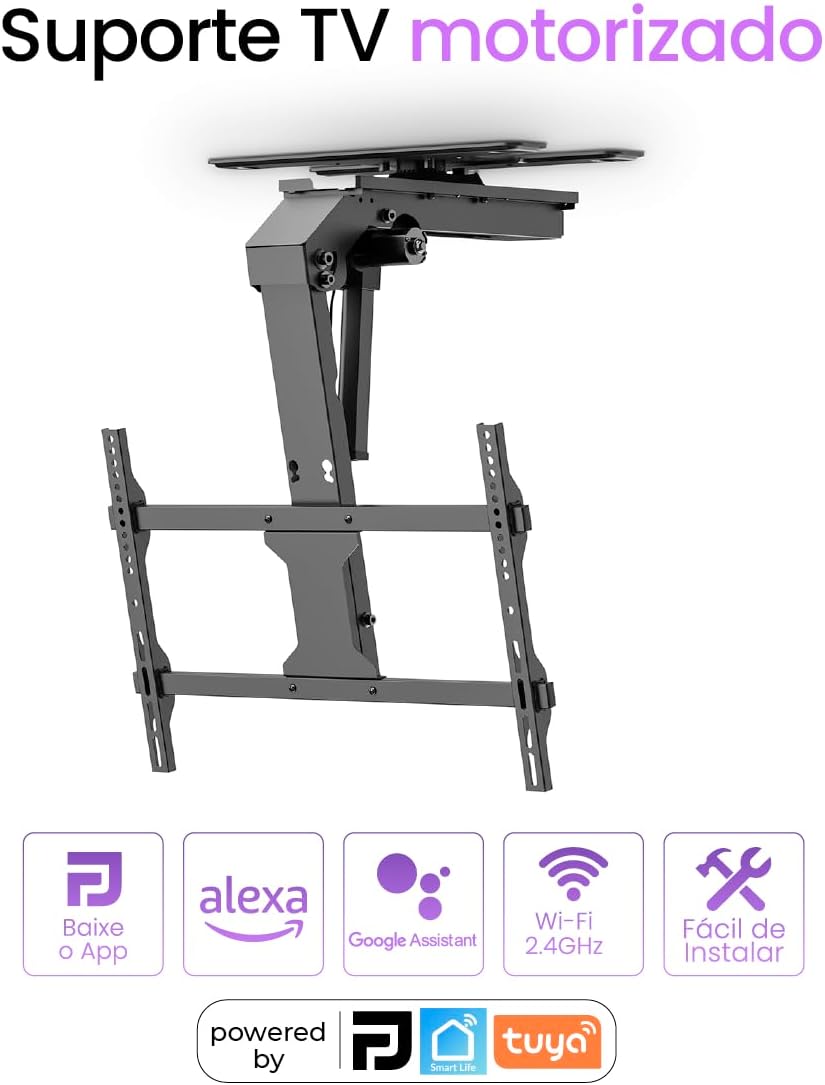
This manual provides detailed instructions for the installation, operation, and maintenance of your Panda Plus AMG-T6MX Motorized Electric Ceiling TV Mount. Designed for televisions ranging from 37 to 75 inches, this mount offers motorized rotation and tilt, controlled via a dedicated application or the included RF remote control. It also integrates with smart home systems like Alexa and Google Assistant for enhanced convenience. Please read this manual thoroughly before installation and use to ensure safe and optimal performance.
2. Safety Information
Important Safety Instructions:
- Ensure the mounting surface (ceiling) can safely support the combined weight of the mount and your television. Consult a professional if unsure.
- Do not exceed the maximum weight capacity of 45 kg (99 lbs).
- Verify that the VESA pattern of your TV is compatible with the mount.
- Follow all installation steps precisely. Improper installation can lead to equipment damage or personal injury.
- Keep children and pets away from the installation area.
- Disconnect power before performing any maintenance or adjustments.
- Avoid placing objects in the path of the TV's movement to prevent collisions. The mount features an automatic rebound function in case of collision.
3. Package Contents
Before beginning installation, please verify that all components listed below are present and undamaged:
- 1x Panda Plus AMG-T6MX Motorized Electric Ceiling TV Mount
- 1x RF Remote Control
- 1x Power Cable (3m)
- Screws, brackets, and installation accessories
- Instruction Manual (this document)
4. Specifications
| Brand | Panda Plus |
| Model | AMG-T6MX |
| Material | Steel, Aluminum, Plastic |
| Supported TV Sizes | 37" to 75" (flat or curved) |
| Maximum Weight Capacity | 45 kg (99 lbs) |
| VESA Compatibility | 200x100, 200x200, 300x200, 400x200, 300x300, 400x300, 600x200, 400x400, 600x300, 600x400 mm |
| Tilt Angle | 0° to -75° |
| Rotation Angle | +90° to -90° |
| Screen Level Adjustment | +2° to -2° |
| Power Input | AC 100-240V |
| Power Output | DC 29V |
| Connectivity | Wi-Fi (2.4GHz), App (Panda Plus, Tuya, Smart Life), RF Remote Control |
| Smart Home Integration | Alexa, Google Assistant |
| Dimensions (folded) | 759 x 664 x 503 mm (29.9" x 26.1" x 19.8") |
| Product Weight | 15.5 kg |
| Certifications | CE, FCC, RoHS, ANATEL: 07870-24-13626 |


5. Setup and Installation
Proper installation is crucial for the safety and functionality of your motorized TV mount. Please follow these steps carefully. It is recommended to have two people for installation.
5.1 Pre-Installation Checks
- Identify the exact mounting location on your ceiling. Ensure it is structurally sound and can support the weight.
- Confirm your TV's size (37-75 inches) and weight (up to 45kg) are within the mount's specifications.
- Check your TV's VESA mounting pattern for compatibility.
- Gather all necessary tools (drill, screwdriver, measuring tape, pencil, level).
5.2 Mounting the Ceiling Plate
- Use the provided template (if applicable) or measure and mark the drilling points on the ceiling. Ensure the marks align with the ceiling joists or a reinforced area.
- Drill pilot holes to the specified depth (e.g., 5.5 cm as shown in the video).
- Secure the ceiling plate to the ceiling using the appropriate screws and washers. Tighten all screws firmly.

5.3 Assembling the TV Bracket
- Attach the horizontal support bars to the main bracket using the provided screws and tools.
- Secure the vertical TV mounting arms to the horizontal bars, ensuring they match your TV's VESA pattern.

5.4 Attaching the TV to the Mount
- Carefully place your TV face down on a soft, clean surface.
- Attach the assembled TV bracket to the back of your television using the appropriate VESA screws. Ensure a secure fit.
- With assistance, lift the TV and hook the TV bracket onto the ceiling mount. Secure it with any safety screws or locking mechanisms.

5.5 Cable Management
Route all necessary cables (power, HDMI, etc.) through the integrated cable management system to maintain a clean and organized appearance.

5.6 Installation Video Guide
For a visual guide on the installation process, please refer to the official installation video below. This video demonstrates the steps for mounting the unit and attaching the TV.
6. Operating Instructions
Your Panda Plus AMG-T6MX mount offers multiple control options for convenience.
6.1 Using the RF Remote Control
- Power On/Off: Press the power button to extend or retract the TV.
- Tilt Adjustment: Use the designated tilt buttons to adjust the screen angle from 0° to -75°.
- Rotation Adjustment: Use the rotation buttons to swivel the TV +90° to -90°.
- Memory Presets: The remote may include buttons for saving and recalling preferred positions. Refer to the remote's specific instructions for programming.
6.2 Using the Mobile Application (Panda Plus, Tuya, Smart Life)
- Download the "Panda Plus", "Tuya Smart", or "Smart Life" app from your smartphone's app store.
- Register or log in to your account.
- Add the device: Follow the in-app instructions to connect your TV mount to your home Wi-Fi network (2.4GHz).
- Once connected, you can control all mount functions (extend, retract, tilt, rotate) directly from the app.
- The app allows for advanced features such as setting schedules, creating scenes, and fine-tuning movement parameters.
6.3 Smart Home Integration (Alexa, Google Assistant)
- Ensure your TV mount is successfully connected to the Tuya Smart or Smart Life app.
- Open your Alexa or Google Home app.
- Enable the "Tuya Smart" or "Smart Life" skill/service.
- Link your Tuya/Smart Life account with Alexa/Google Assistant.
- Discover devices. Your TV mount should appear as a controllable device.
- You can now use voice commands such as:
- "Alexa, turn on the TV mount."
- "Hey Google, retract the TV."
- "Alexa, set TV mount to position 1." (if presets are configured)
7. Maintenance
Regular maintenance ensures the longevity and smooth operation of your TV mount.
- Cleaning: Wipe the mount and TV surfaces with a soft, dry cloth. Do not use abrasive cleaners or solvents.
- Inspection: Periodically check all screws and connections to ensure they are tight. Re-tighten if necessary.
- Cable Check: Ensure cables are not pinched or frayed. Adjust cable management as needed.
- Motor Operation: If you notice any unusual noises or jerky movements, discontinue use and consult the troubleshooting section or contact customer support.
8. Troubleshooting
If you encounter any issues with your Panda Plus AMG-T6MX mount, refer to the following common problems and solutions:
- Mount does not respond to remote/app:
- Check if the mount is powered on and connected to a power source.
- Replace batteries in the RF remote control.
- Ensure your smartphone is connected to the internet and the app is updated.
- Verify the mount is connected to your Wi-Fi network (2.4GHz). Try restarting your router.
- TV movement is jerky or incomplete:
- Check for any obstructions in the path of the TV.
- Ensure the TV weight does not exceed the maximum capacity.
- Inspect all mounting screws and connections for tightness.
- Smart home integration not working:
- Confirm the Tuya Smart/Smart Life skill is enabled and linked in your Alexa/Google Home app.
- Ensure the mount is online and controllable via the Tuya/Smart Life app.
- Try re-discovering devices in your smart home app.
If the problem persists after trying these solutions, please contact Panda Plus customer support for further assistance.
9. Warranty and Support
The Panda Plus AMG-T6MX Motorized Electric Ceiling TV Mount comes with a manufacturer's warranty of 3 months from the supplier. Please retain your proof of purchase for warranty claims.
For technical support, warranty inquiries, or any other questions, please refer to the contact information provided with your purchase or visit the official Panda Plus website.