
Introduction
Thank you for choosing the Jesebang YT18 Wireless Earbuds. These earbuds are designed to provide a high-quality audio experience with advanced features such as Bluetooth 5.4 connectivity, Environmental Noise Cancellation (ENC) for clear calls, IP7 waterproofing, and a long-lasting 48-hour battery life. This manual will guide you through the setup, operation, and maintenance of your new earbuds to ensure optimal performance and enjoyment.
What's in the Box
Please check the package contents to ensure all items are present:
- 1 x Portable Charging Box
- 1 x USB-C Charging Cable
- 1 x User Manual
- 2 x YT18 Headphones (Left and Right)
- 3 x Pairs of Silicone Earplugs (S / M / L)

Image: Package contents of the Jesebang YT18 Wireless Earbuds.
Product Overview
The Jesebang YT18 Wireless Earbuds feature a comfortable over-ear design with ear hooks for a secure fit, making them ideal for sports and active lifestyles. The charging case includes a dual LED digital display to show battery levels for both earbuds and the case itself.
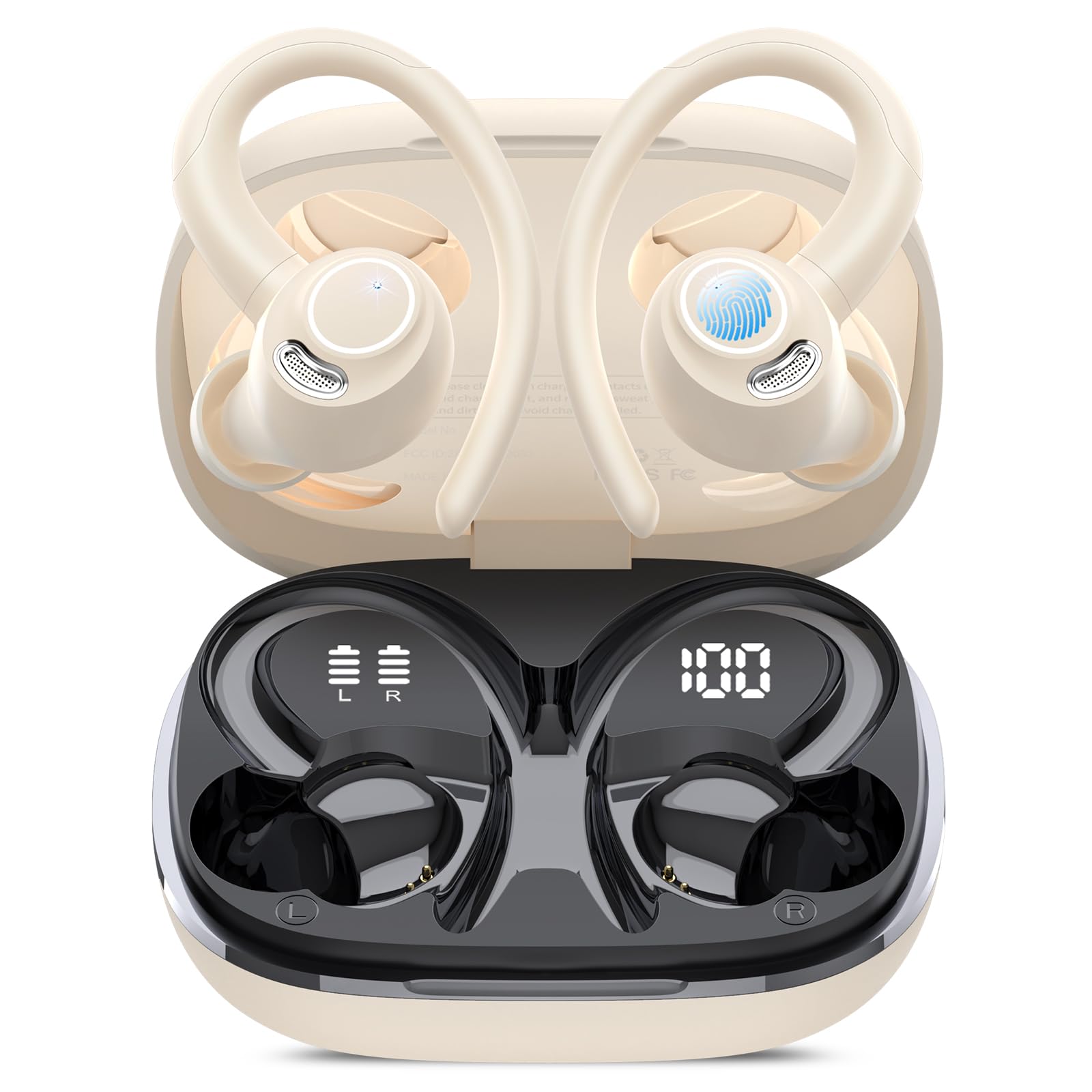
Image: Jesebang YT18 Wireless Earbuds and Charging Case.
Sound Quality Components

Image: Internal components contributing to the unique stereo sound quality.
The earbuds are equipped with 14.2mm dynamic drivers, composite diaphragms, and 1080DB sensitivity to deliver deep bass, balanced mids, and clear highs for an enhanced listening experience.
Environmental Noise Cancellation (ENC)

Image: Dual ENC Noise Cancellation Microphones.
Each earbud features 4 ENC noise-canceling microphones, effectively filtering out over 80% of external noise to ensure clear voice transmission during calls, even in noisy environments.
Setup & Pairing
Initial Charging
Before first use, fully charge the earbuds and the charging case. Connect the provided USB-C cable to the charging port on the case and a power source. The LED display on the case will indicate the charging status.

Image: USB-C Charging for the case and earbuds.
First-Time Pairing
- Ensure your device's Bluetooth is turned on.
- Open the charging case and remove both earbuds. They will automatically enter pairing mode.
- On your device, search for Bluetooth devices and select "YT18" from the list.
- Once connected, the earbuds will automatically pair with your device every time you remove them from the case.

Image: One-step Auto Pairing process.
Operating Instructions
Wearing the Earbuds
To ensure the best sound quality and a secure fit, choose the correct size silicone earplugs (S, M, L) and adjust the ear hooks:
- Select the ear tip size that provides a comfortable and snug seal in your ear canal.
- Place the earbud into your ear, ensuring the ear tip is properly seated.
- Gently wrap the flexible ear hook over and behind your ear until it feels secure.
- Adjust the earbud and hook for optimal comfort and stability.

Image: Guide to wearing the earbuds stably.
Smart Touch Controls
The earbuds feature high-precision touch sensors for easy control:
- Play/Pause: Tap twice on either earbud.
- Next Track: Press and hold the right earbud for 2 seconds.
- Previous Track: Press and hold the left earbud for 2 seconds.
- Volume Up: Single tap on the right earbud.
- Volume Down: Single tap on the left earbud.
- Answer Call: Tap once on either earbud.
- Hang Up Call: Press and hold either earbud for 2 seconds.
- Activate Voice Assistant (Siri): Tap three times on either earbud.

Image: Smart Touch Control functions.
Charging
The Jesebang YT18 earbuds offer extended battery life and convenient charging features:
- Earbud Playtime: Up to 8 hours on a single charge.
- Total Playtime with Charging Case: Up to 48 hours.
- Charging Time: Approximately 1.5 hours for a full charge.
Dual LED Digital Display
The charging case features a dual LED display that clearly shows the remaining battery percentage of the charging case and the individual charge status of each earbud (L/R). This allows you to monitor battery levels and avoid unexpected power loss.

Image: 48H Long Playtime and LED Display.
Maintenance & Care
IP7 Waterproof Rating
The earbuds are IP7 waterproof, meaning they can withstand sweat and rain, making them suitable for workouts and outdoor activities. However, the charging case is not waterproof. Avoid submerging the earbuds in water for extended periods.

Image: IP7 Dust Resistant and Water Resistant.
Cleaning
Regularly clean your earbuds and charging case to maintain optimal performance and hygiene:
- Use a soft, dry, lint-free cloth to wipe the earbuds and charging case.
- Remove ear tips and clean them with mild soap and water, then dry thoroughly before reattaching.
- Avoid using abrasive materials or harsh chemicals.
Troubleshooting
If you encounter any issues with your Jesebang YT18 Wireless Earbuds, please refer to the following common solutions:
- Earbuds not pairing: Ensure both earbuds are fully charged. Place them back in the case, close it, then open it again and remove them to re-enter pairing mode. Check your device's Bluetooth settings to ensure "YT18" is selected.
- No sound: Check the volume levels on both your device and the earbuds. Ensure the earbuds are properly connected to your device.
- Charging issues: Verify the USB-C cable is securely connected to both the case and the power source. Try a different charging cable or adapter.
- Poor call quality: Ensure the earbuds are clean and the microphones are not obstructed. Move to an area with less background noise.
- Earbuds falling out: Experiment with the different sizes of silicone earplugs provided to find the best fit for your ears. Ensure the ear hooks are properly adjusted over your ears.
Specifications
| Model Name | YT18 |
| Brand | Jesebang |
| Connectivity Technology | Wireless (Bluetooth 5.4) |
| Bluetooth Range | Up to 15 meters |
| Audio Driver Size | 14.2 Millimeters |
| Noise Control | ENC Noise Cancellation, Sound Isolation |
| Battery Life (Earbuds) | Up to 8 Hours |
| Battery Life (with Case) | Up to 48 Hours |
| Charging Time | 1.5 Hours |
| Water Resistance Level | IP7 Waterproof |
| Control Method | Touch |
| Ear Placement | Over Ear |
| Form Factor | In Ear |
| Material | Silicone |
Warranty & Support
For warranty information and customer support, please refer to the contact details provided in the product packaging or visit the official Jesebang website. Keep your purchase receipt for warranty claims.

