
1. Introduction
Thank you for purchasing the Donner MT-1 All-in-One PA Speaker. This manual provides essential information for the safe and effective use of your new PA system. The Donner MT-1 delivers high-output sound suitable for small-scale live performances, with a rated output of 80W and a maximum output of 300W. Featuring two 2.5-inch tweeters and one 8-inch woofer, the MT-1 speaker reproduces a wide range of sounds, from crisp highs to powerful lows. Weighing only 8.5kg, its ergonomically designed recessed handle allows for easy portability and outdoor use. The built-in rechargeable battery provides 4 to 6 hours of operation without an adapter. The dedicated Donner MT-1 app (compatible with Android and iOS) enables remote control of the PA system, allowing adjustments for volume, EQ, reverb, and echo. With Bluetooth audio input, you can wirelessly stream music from your smartphone or other devices, and even easily set up karaoke when combined with a microphone.
2. Key Features
- High Power Output: Maximum 300W, Rated 80W for clear and robust sound.
- Wide Frequency Response: 30Hz-20kHz for full-range audio reproduction.
- Versatile Inputs: Two XLR/Standard Phone Combo Jacks, Bluetooth audio input.
- Optimized Speaker Configuration: Two 2.5-inch/4Ω tweeters and one 8-inch/2Ω woofer.
- Phantom Power: +48V phantom power supported on MIC 1 terminal for condenser microphones.
- Portable Design: Lightweight at 8.5kg with an ergonomic recessed handle for easy transport.
- Rechargeable Battery: Built-in 12V 5500mAh battery for 4-6 hours of continuous use (approx. 2 hours at max output).
- App Control: Dedicated Donner MT-1 app (Android/iOS) for remote adjustment of volume, EQ, reverb, and echo.
- Stand Mountable: Equipped with a 35mm PA speaker stand socket.
3. Setup Guide
3.1 Unpacking and Placement
Carefully remove the MT-1 speaker from its packaging. Ensure all accessories are present. Place the speaker on a stable, flat surface or mount it on a compatible 35mm PA speaker stand. The MT-1 offers flexible placement options to suit various environments.

Image: The Donner MT-1 speaker can be positioned upright, tilted back as a monitor, or mounted on a stand.
3.2 Powering On and Charging
Before initial use, fully charge the built-in battery using the provided 18V/2A power adapter. The charging indicator will show the battery status. A full charge typically provides 4-6 hours of continuous use, or approximately 2 hours at maximum output.

Image: The Donner MT-1 is lightweight and features a rechargeable battery for easy outdoor use.
3.3 Connecting Audio Sources
The MT-1 features multiple input options:
- XLR/Standard Phone Combo Jacks (x2): Connect microphones or instruments. MIC 1 supports +48V phantom power for condenser microphones.
- AUX Input: Use a 3.5mm stereo cable to connect external audio devices.
- USB Input: Connect USB devices for audio playback.
- Bluetooth: Pair your smartphone or other Bluetooth-enabled device for wireless audio streaming.
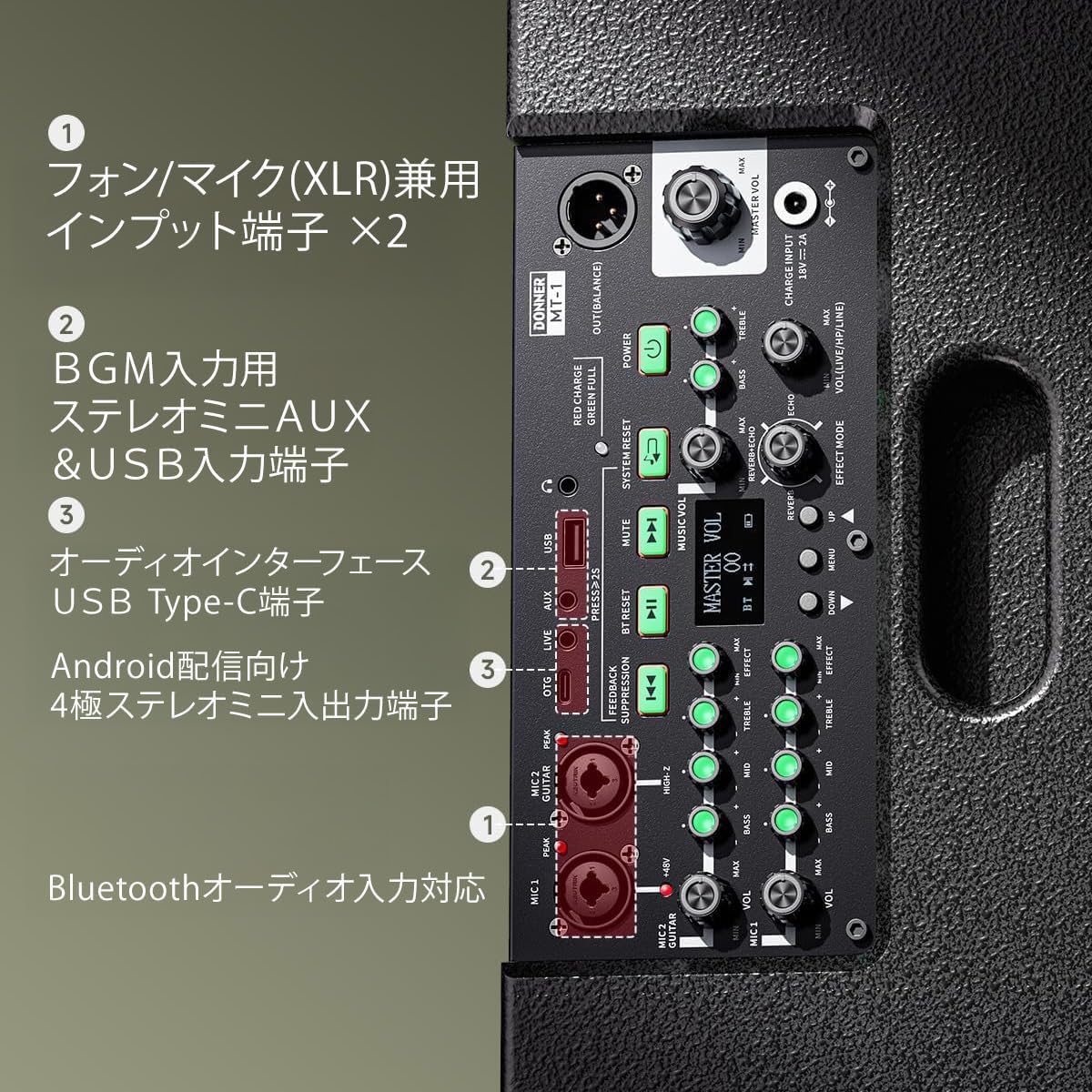
Image: Detailed view of the MT-1's input and control panel.
4. Operating Instructions
4.1 Basic Controls
The MT-1 features intuitive controls on its top panel for quick adjustments. These include individual volume controls for each input, master volume, EQ (Treble, Mid, Bass), Reverb, and Echo effects.
4.2 Bluetooth Pairing
- Turn on the MT-1 speaker.
- Activate Bluetooth on your smartphone or audio device.
- Press the Bluetooth button on the MT-1 control panel. The Bluetooth indicator will flash.
- Select "Donner MT-1" from the list of available devices on your smartphone.
- Once paired, the Bluetooth indicator will remain solid, and you can stream audio wirelessly.
4.3 Using the Dedicated App
Download the "Donner MT-1" app from your device's app store (Android/iOS). The app allows for remote control of various parameters, including:
- Volume levels for all inputs.
- Equalization (EQ) settings.
- Reverb and Echo effects.
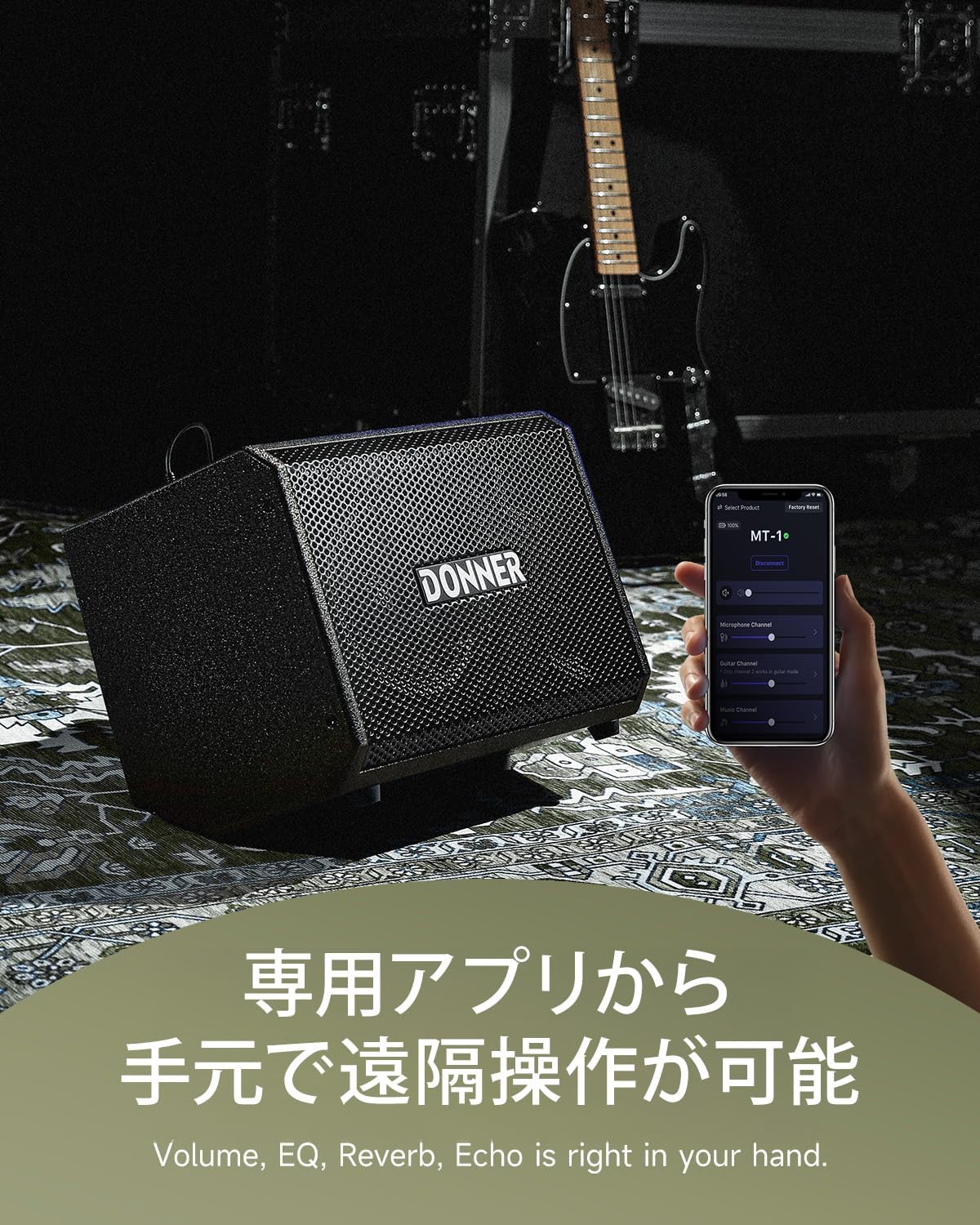
Image: Remote operation of the MT-1 via the dedicated app.
4.4 Speaker Components
The MT-1 is engineered with high-quality components to deliver superior sound. It features two 2.5-inch treble speakers and an 8-inch woofer for a balanced and powerful audio experience.

Image: Internal components of the Donner MT-1 speaker.
5. Maintenance
5.1 Cleaning
Regularly clean the speaker's exterior with a soft, dry cloth. Avoid using abrasive cleaners, solvents, or waxes, as these can damage the finish. Ensure no liquids enter the speaker grilles or control panel.
5.2 Storage
When not in use, store the MT-1 in a cool, dry place away from direct sunlight, extreme temperatures, and high humidity. If storing for an extended period, ensure the battery is partially charged (around 50%) to prolong its lifespan. Recharge the battery every few months to prevent deep discharge.
5.3 Battery Care
To maximize battery life, avoid completely draining the battery frequently. Charge the unit when the battery indicator is low. Do not expose the battery to excessive heat or cold.
6. Troubleshooting
| Problem | Possible Cause | Solution |
|---|---|---|
| No sound output | Power off; Volume too low; Incorrect input selected; Cable issue | Ensure power is on; Increase master and channel volumes; Select correct input; Check all cable connections. |
| Bluetooth not connecting | Not in pairing mode; Device too far; Interference | Press Bluetooth button to enter pairing mode; Move device closer to speaker; Avoid other wireless devices. |
| Short battery life | High volume usage; Old battery; Not fully charged | Reduce volume; Ensure full charge before use; Consider battery replacement if significantly degraded. |
| Distorted sound | Input gain too high; Master volume too high; Faulty cable/instrument | Reduce input gain and master volume; Test with different cables/instruments. |
7. Specifications
| Feature | Detail |
|---|---|
| Maximum Output | 300W |
| Rated Output | 80W |
| Frequency Response | 30Hz – 20kHz |
| Inputs | XLR/Standard Phone Combo Jack ×2, Bluetooth |
| Tweeters | 2.5-inch / 4Ω ×2 |
| Woofer | 8-inch / 2Ω |
| Phantom Power | MIC 1 terminal only, +48V |
| Power Input | 18V/2A |
| Stand Socket | 35mm PA speaker stand socket |
| Battery Capacity | 12V 5500mAh |
| Battery Life | 4-6 hours (continuous use), approx. 2 hours (max output) |
| Weight | 8.5kg |
8. Warranty and Support
For warranty information and technical support, please refer to the official Donner website or contact your local dealer. Keep your purchase receipt as proof of purchase for any warranty claims.


