
Product Overview
The Shark PowerDetect NeverTouch Pro robot vacuum and mop is designed for comprehensive floor cleaning with minimal user intervention. This 2-in-1 system vacuums and mops, automatically managing debris and water for extended periods.
- Hands-Free Cleaning: Automatically empties debris into a 60-day capacity bin, refills its water tank for up to 30 days, and washes and dries the mopping pad after each cleaning cycle.
- Intelligent Cleaning Technologies: Features five PowerDetect technologies to target hidden debris, stuck-on stains, and optimize cleaning for various floor types.
- Enhanced Coverage: NeverStuck Technology allows the robot to lift itself over obstacles and thresholds, and keeps the mop pad above carpets to prevent wet messes.
- Targeted Cleaning: DirtDetect identifies areas with more debris for boosted vacuuming, and targets stained areas for enhanced mopping.
- Advanced Edge Cleaning: EdgeDetect blasts air to push debris from edges into the cleaning path during vacuuming, and extends the mop pad for edge-to-edge mopping.
- Pet-Friendly Features: The NeverTouch Pro Base captures 99.97% of pet allergens and dust, and includes Odor Neutralizer Technology for a fresher home environment.

The Shark PowerDetect NeverTouch Pro Robot Vacuum & Mop Combo AV2800ZEBK, featuring its self-empty and self-refill base.
Setup
Unboxing and Initial Placement
Carefully remove all components from the packaging. Place the NeverTouch Pro Base against a wall in an open area with good Wi-Fi coverage. Ensure there is adequate space around the base for the robot to dock and maneuver.
Base and Robot Preparation
- Fill Clean Water Tank: Add 12 oz. of Shark-approved cleaning solution and fill with cold water to the MAX fill line in the Clean Water Tank located in the base.
- Install Odor Neutralizer Cartridge: Insert the provided Odor Neutralizer Cartridge into its designated slot in the base.
- Attach Side Brushes: Snap the two Robot Side Brushes onto the robot.
- Place Robot on Base: Position the robot onto the base to begin charging. The robot will automatically charge and prepare for its first cleaning cycle.
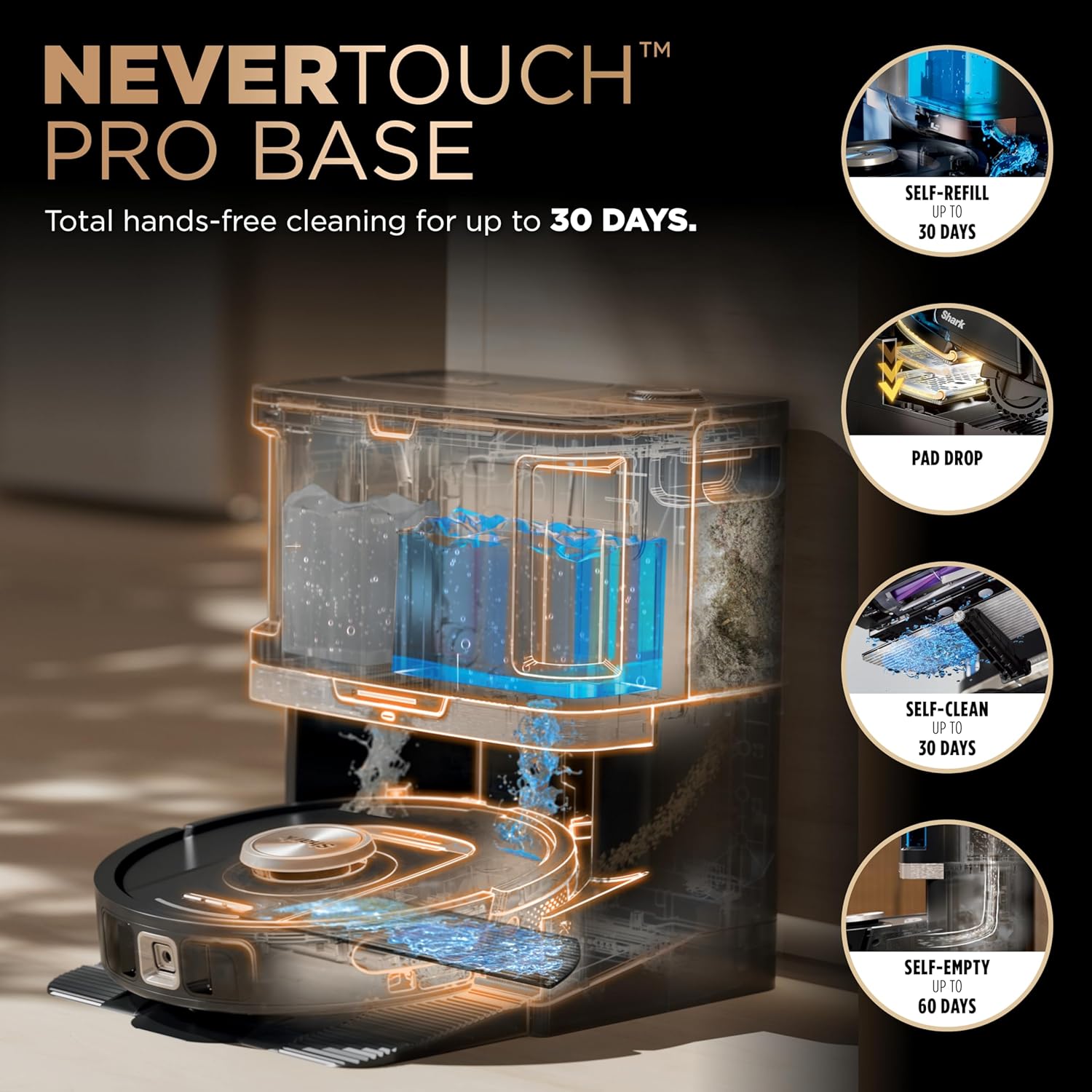
The Shark NeverTouch Pro Base with the robot docked, showing the clean and dirty water tanks, and the self-empty bin.
App Connection and Home Mapping
Download the SharkClean app from your smartphone's app store. Follow the in-app instructions to connect your robot to your home Wi-Fi network. The robot will perform an initial mapping run to create a detailed map of your home, allowing for customized cleaning zones and no-go areas.
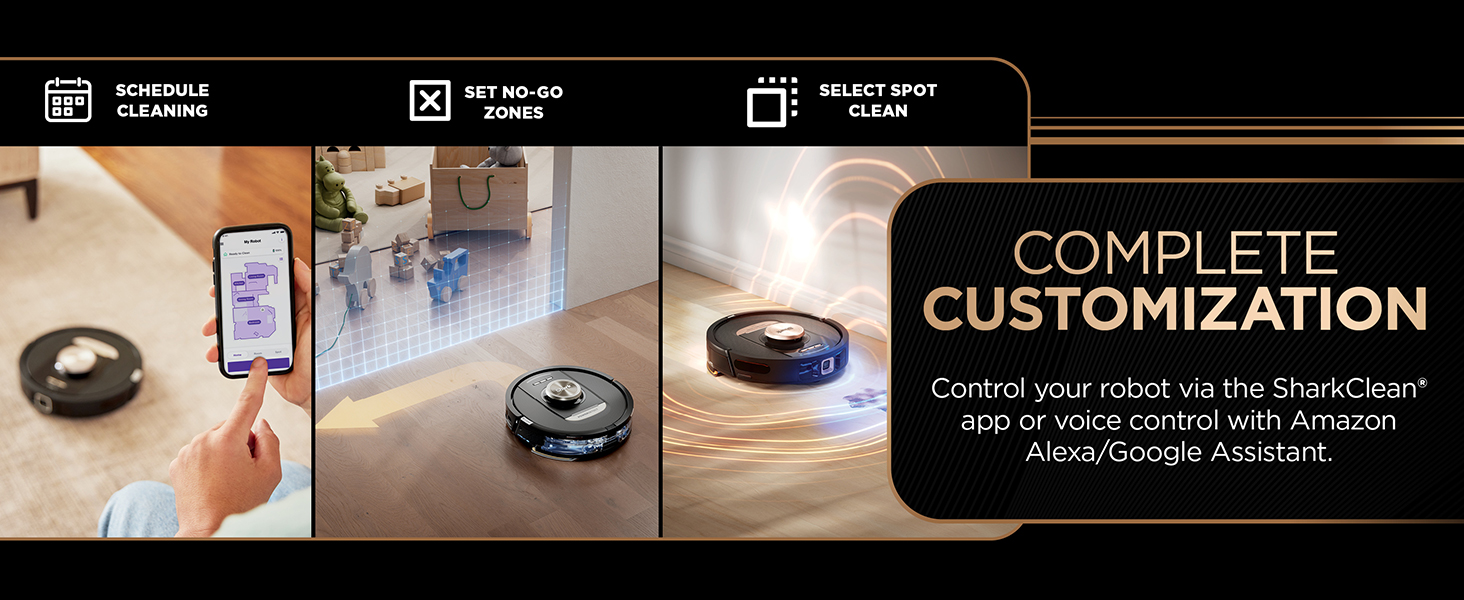
The SharkClean app interface demonstrating scheduling, setting no-go zones, and selecting spot clean areas for complete customization.
Operating Instructions
Starting a Cleaning Cycle
- Via Robot Buttons: Press the Clean button on the robot for a full home clean.
- Via SharkClean App: Use the app to start, pause, or stop cleaning. Select specific rooms, zones, or a full home clean.
- Voice Control: Integrate with Amazon Alexa or Google Assistant for voice-activated cleaning commands.
Cleaning Modes
- Vacuum Only: The robot will only vacuum, ideal for carpets and dry debris.
- Mop Only: The robot will only mop, suitable for hard floors.
- Vacuum & Mop Combo: The robot will perform both vacuuming and mopping simultaneously, adapting to different floor types.

The robot performing Sonic Mopping, scrubbing 100 times per minute to remove stuck-on stains.
Smart Navigation and Obstacle Avoidance
The robot utilizes 360° LiDAR vision for precise home mapping and navigation. Object Detect advanced 3D sensors help it identify and avoid obstacles, preventing collisions and getting stuck. NeverStuck Technology allows the robot to lift its mop pad when transitioning from hard floors to carpets, ensuring no wet messes on rugs.

The robot's advanced 3D sensor detecting and avoiding objects like pet bowls during cleaning.

NeverStuck Technology in action, showing the robot lifting its pad over thresholds and carpets to prevent wet messes.
PowerDetect Technologies
- DirtDetect: Automatically identifies areas with concentrated dirt and boosts vacuuming performance for a deeper clean.
- StainDetect: Focuses on areas with stains, boosting mopping performance with multiple passes.
- EdgeDetect: Enhances cleaning along walls and corners by blasting air to dislodge debris and extending the mop pad.
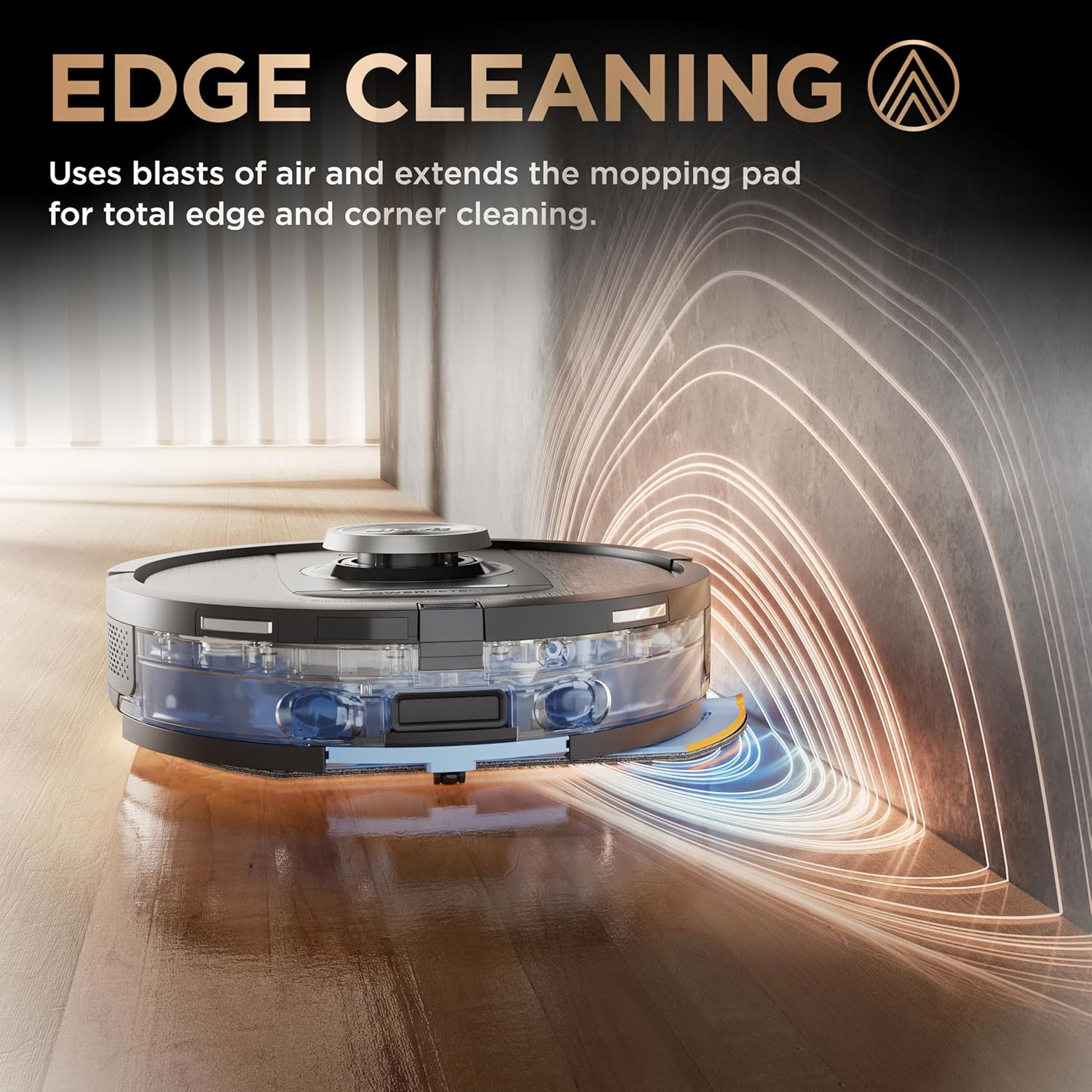
The robot performing Edge Cleaning, using air blasts and an extended mop pad for thorough cleaning along edges and corners.
Maintenance
Automated Maintenance
- Self-Empty: The robot automatically empties collected debris into the base's 60-day capacity dust bin after each cleaning cycle.
- Self-Refill: The base automatically refills the robot's water tank with clean solution for up to 30 days of mopping.
- Self-Clean Pad Wash & Dry: After mopping, the base washes and dries the mopping pad, ensuring it's clean and ready for the next use.

The robot automatically picking up and dropping off the mopping pad for hands-free cleaning.
Manual Maintenance (as needed)
- Base Dust Bin: Empty the base dust bin every 60 days or as needed. Press the release button and slide out the bin to empty debris into the trash.
- Greywater Tank: Empty the greywater tank every 30 days or as needed. Clean with cold water.
- Pre-Motor Filters: Rinse foam and felt filters with cold water ONLY and air-dry for 24 hours. Clean every 30 days or as needed. Replace every 6 months.
- Post-Motor Filters: Remove post-motor filter door and pull the tab to remove the filter. Tap clean over the trash. Clean every 6 months or as needed. Replace every year or as needed.
- Odor Neutralizer Cartridge: Replace as needed to maintain fresh scent.
- Robot Side Brushes: Inspect regularly for wear and tear. Replace as needed.
Video demonstrating the self-empty, self-clean, and self-dry features of the Shark PowerDetect NeverTouch Pro system, including how to empty the dust bin and refill water tanks.
Video highlighting the 'NeverTouch' aspects of the robot, including self-refilling and auto-cleaning in action, showcasing the minimal interaction required from the user.
Troubleshooting
- Robot Not Charging: Ensure the robot is correctly docked and the base is powered. Check the charging contacts on both the robot and the base for any obstructions.
- Poor Cleaning Performance: Check the dust bin and water tanks for proper levels. Clean or replace filters as needed. Inspect the brushroll and side brushes for tangled hair or debris.
- Robot Getting Stuck: Ensure the floor is clear of small objects, cables, or thick rugs that might impede movement. Utilize the app to set no-go zones around problematic areas.
- Mop Pad Not Cleaning Effectively: Ensure the clean water tank has sufficient solution and the mop pad is correctly attached and clean.
- App Connectivity Issues: Verify your Wi-Fi network is active and the robot is within range. Restart both the robot and your router if issues persist.
Video detailing the sensors and buttons on the Shark Robot Vacuum and Mop Combo, which can be helpful for diagnosing operational issues.
Specifications
| Brand | Shark |
| Model Name | PowerDetect 2-in-1 Robot Vacuum and Mop |
| Model Number | AV2800ZEBK |
| Surface Recommendation | Carpets & Hardfloors |
| Special Feature | Wet/Dry |
| Color | Black |
| Controller Type | App Control |
| Filter Type | Cloth |
| Battery Life | 120 minutes |
| Battery Type | Lithium Ion |
| Voltage | 120 Volts |
| Capacity | 0.33 Quarts |
| Item Dimensions L x W x H | 18.8"L x 14.33"W x 17.56"H |
| Item Weight | 25 Pounds |
| Included Components | 2x Odor Neutralizer Cartridge, Multi-Surface Cleaner Starter 12 oz Bottle, Nevertouch Pro Base, Robot Side Brushes (2 pack), Shark PowerDetect Robot Vacuum and Mop, Shark Robot Antimicrobial Mopping Pads (2 pack) |
Warranty & Support
For further assistance, please call our dedicated team at +1-888-668-9600. You can also scan the QR code below or visit sharkclean.com/support for how-to videos, full instructions, troubleshooting, FAQs, and replacement parts.

Scan this QR code for quick access to the SharkClean support website.


