
Introduction
This manual provides detailed instructions for the LIGE DM4-C1-US GPS Smart Watch. Please read this manual thoroughly before using your device to ensure proper operation and to maximize its features. This smart watch is designed for active individuals, offering advanced GPS capabilities, health monitoring, and various sports modes.
Package Contents
Verify that all items are present in your product packaging:
- LIGE DM4-C1-US Smart Watch
- Leather Strap
- Silicone Strap
- Strap Accessories
- Charging Cable
- User Manual (this document)
Setup
1. Charging the Device
Before initial use, fully charge your smart watch. Connect the magnetic charging cable to the charging contacts on the back of the watch and plug the USB end into a power adapter (not included) or a computer's USB port. The watch display will indicate charging status.
Note: A full charge typically takes approximately 2.5 hours and provides up to 7 days of normal usage or 30 days of standby time.
2. App Installation and Pairing
To unlock the full functionality of your LIGE DM4-C1-US Smart Watch, you need to install the companion application on your smartphone.
- Download the App: Scan the QR code provided in the watch packaging or visit https://app.uteasy.com/app-download/GloryFitPro/download/index.html to download the "GloryFitPro" app from the Apple App Store or Google Play Store.
- Enable Bluetooth: Ensure Bluetooth is enabled on your smartphone.
- Open GloryFitPro: Launch the app and follow the on-screen instructions to create an account or log in.
- Add Device: In the app, navigate to the 'Device' section and select 'Add Device'. The app will search for nearby devices.
- Select and Pair: Select 'DM4' or 'DM3' from the list of found devices and confirm the pairing request on both your phone and the watch.
- Grant Permissions: Allow all necessary permissions requested by the app for full functionality, including notifications and location services.
- Enable Call Audio: For Bluetooth calling, go to your phone's Bluetooth settings, find the paired watch, and ensure 'Call Audio' is enabled.

Image: Step-by-step guide on connecting the smart watch to the GloryFitPro app.
Operating Instructions
1. Basic Navigation
- Touchscreen: Swipe left/right, up/down to navigate menus and screens. Tap to select.
- Side Buttons: The watch features multiple physical buttons. Refer to the watch interface for specific button functions (e.g., Power, Back, Sport).
2. Display Features
- 1.43" AMOLED HD Display: Provides vibrant colors and clear visibility.
- Always-On Display (AOD): Configure AOD settings in the watch or app to keep the time visible. Note that AOD impacts battery life.
- Customizable Watch Faces: Choose from a wide variety of watch faces via the GloryFitPro app. You can also upload personal photos to create custom watch faces.

Image: Customizable watch faces and Always-On Display options.
3. Communication Features
- Bluetooth Calling: Make and receive calls directly from your watch after successful pairing and enabling call audio.
- Notifications: Receive alerts for incoming calls, messages, and app notifications from your paired smartphone.
- Smart Voice Assistant: Interact with your watch using voice commands for tasks like checking weather or making calls.

Image: Bluetooth calling, voice assistant, and message reminders on the smart watch.
4. Health Monitoring
The watch utilizes precise sensors for continuous health tracking:
- Heart Rate Monitoring: Tracks your heart rate 24/7.
- Blood Oxygen (SpO2) Monitoring: Measures blood oxygen levels.
- Sleep Tracking: Records deep and light sleep cycles to help improve sleep quality.
- Activity Tracking: Monitors steps, distance, and calories burned.
Note: Health monitoring data is for general health and fitness reference only and should not be used for medical diagnosis or treatment.

Image: Health monitoring features including heart rate and sleep tracking.
5. Sports Modes and GPS
The watch supports over 170 sports modes, providing detailed data tracking for each activity.
- 170+ Sports Modes: Includes running, cycling, hiking, swimming, yoga, and more.
- Built-in GPS: Tracks your route, speed, distance, and calorie burn in real-time during outdoor activities. Supports GLONASS, Beidou, Galileo, NAVIC, and QZSS satellite systems.
- GPS Route Tracking: Activate GPS in open areas for accurate route tracking. The watch can track activity paths but does not navigate or draw maps directly.

Image: GPS tracking functionality for outdoor activities, showing route and fitness data.
Video: Demonstration of the LIGE DM4 GPS sports smart watch features, including compass and flashlight functions during outdoor activities.
6. Outdoor Features
- Compass: Provides accurate directional readings.
- Altimeter: Tracks your current altitude and displays altitude trends.
- Barometric Pressure: Measures current air pressure and shows trends.
- LED Flashlight: A powerful built-in flashlight suitable for various situations, including camping or emergencies.
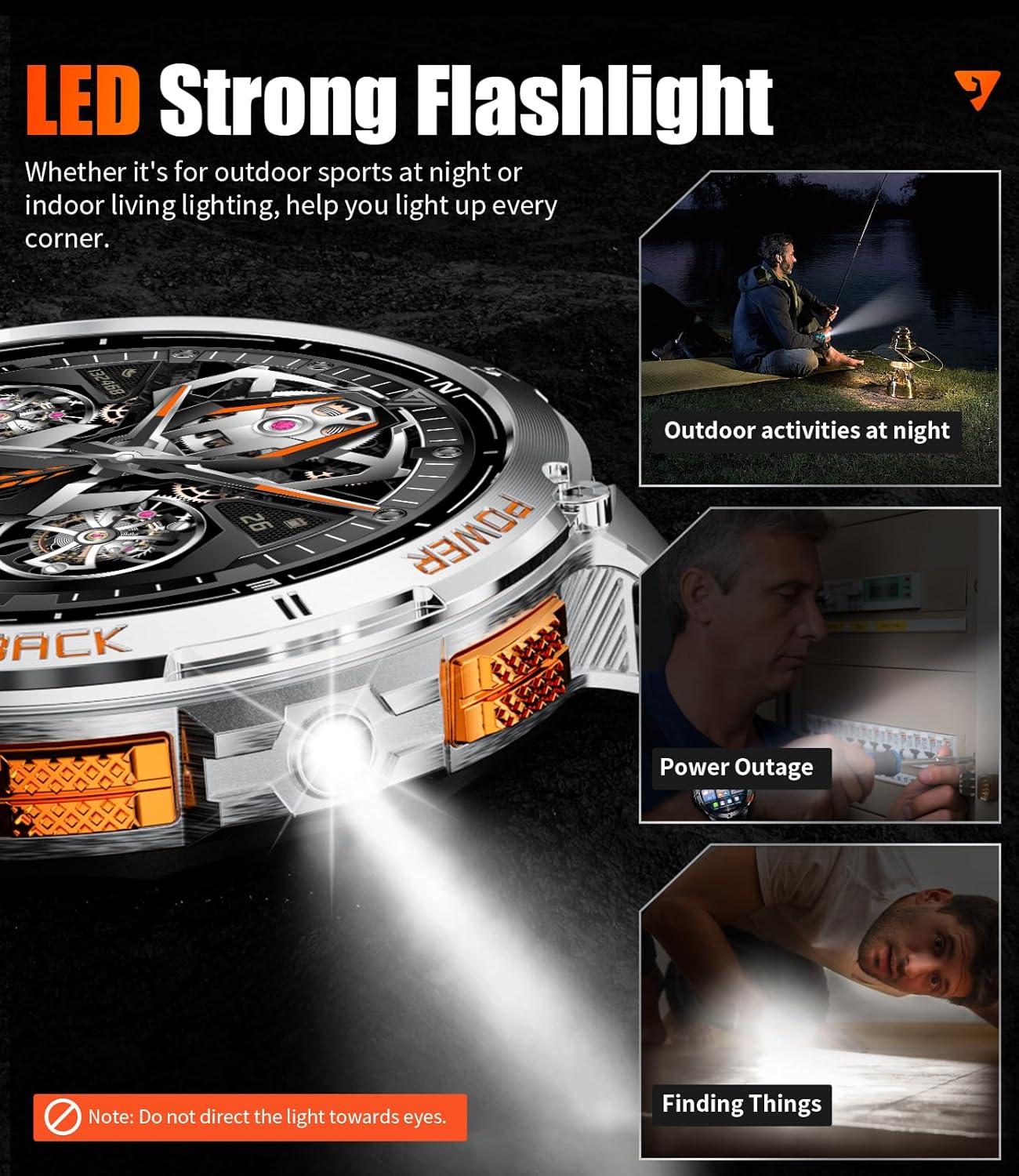
Image: LED flashlight feature of the smart watch in various low-light scenarios.
Video: Overview of the DM4 1.43'' AMOLED GPS military smart watch, highlighting its flashlight and other features.
7. Other Functions
The LIGE DM4-C1-US Smart Watch includes additional useful features:
- Music Control: Control music playback on your smartphone.
- Camera Control: Remotely trigger your smartphone's camera shutter.
- Weather Forecast: Get real-time weather updates.
- Stopwatch & Timer: Essential tools for timing activities.
- Calculator: Perform basic calculations directly on your watch.
- World Clock: View times in different time zones.
- Find My Phone: Locate your paired smartphone.
Maintenance
1. Water Resistance (IP68)
The LIGE DM4-C1-US Smart Watch has an IP68 water resistance rating, making it suitable for swimming and exposure to rain or splashes. It also features a dedicated swim mode.
- Swim Mode: Designed to track swimming strokes, lap count, speed, and calorie burn.
- Important Note: While IP68 rated, the watch is not suitable for diving or use in seawater. Avoid hot water, steam, or high-pressure water jets.

Image: Durability features of the smart watch, including water resistance and military-grade standards.
2. Cleaning and Care
- Regularly clean the watch and straps with a soft, damp cloth.
- Ensure the charging contacts are clean and dry before charging.
- Avoid exposing the watch to extreme temperatures or direct sunlight for prolonged periods.
3. Battery Care
- Do not disassemble or attempt to replace the battery yourself. Contact customer support for battery-related issues.
- Avoid completely draining the battery frequently to prolong its lifespan.
Troubleshooting
If you encounter issues with your LIGE DM4-C1-US Smart Watch, refer to the following common solutions:
- Connectivity Issues: Ensure Bluetooth is enabled on your phone, the watch is within range, and the GloryFitPro app is running. Try unpairing and re-pairing the device.
- Inaccurate Health Data: Ensure the watch is worn snugly on your wrist. Environmental factors and individual physiology can affect sensor readings. Remember, data is for reference only.
- Notifications Not Appearing: Check app permissions on your phone to ensure GloryFitPro has access to notifications. Verify notification settings within the app and on the watch.
- GPS Not Tracking: Ensure you are in an open outdoor area for GPS signal acquisition.
- Short Battery Life: Reduce screen brightness, disable Always-On Display, limit frequent heart rate monitoring, and close unused apps on the watch.
For persistent issues, consult the GloryFitPro app's help section or contact LIGE customer support.
Specifications
| Feature | Specification |
|---|---|
| Model Number | DM4-C1-US |
| Display | 1.43 Inches AMOLED HD |
| Battery Capacity | 600 mAh Lithium Polymer |
| Battery Life | Up to 7 days (normal use), 30 days (standby) |
| Water Resistance | IP68 |
| GPS | Built-in GPS (GLONASS, Beidou, Galileo, NAVIC, QZSS) |
| Connectivity | Bluetooth 4.0 |
| Compatibility | iOS 11.0+ (calls iOS 13+), Android 5.0+ |
| Special Features | Compass, LED Flashlight, Swimming Mode, 170+ Sports Modes, Health Monitoring (HR, SpO2, Sleep), Bluetooth Calling, Voice Assistant, Altimeter, Barometric Pressure |
| Durability Standard | U.S. MIL-STD-810H Quality |
| Item Weight | 3.17 ounces |
Warranty and Support
LIGE provides comprehensive support for your smart watch:
- Warranty: Your LIGE DM4-C1-US Smart Watch comes with a 24-month warranty from the date of purchase.
- Online Support: 24-hour online support is available for any questions or issues you may encounter.
- Contact: For assistance with accessories, quality concerns, operational questions, or charging problems, please contact the LIGE Customer Service Team. They aim to provide a solution within 24 hours.
Please retain your proof of purchase for warranty claims.


