
1. Introduction
This manual provides essential instructions for the safe and effective use of your Soulor CY20 5000A Portable Car Jump Starter. Please read this manual thoroughly before operation and retain it for future reference. This device is designed to jump-start 12V vehicles, serve as a portable power bank, and provide emergency lighting.
2. Package Contents
Verify that all items listed below are included in your package:
- 1x Soulor CY20 Jump Starter
- 1x Smart Jumper Cables
- 1x USB-A to USB-C Cable
- 1x User Manual (this document)
- 1x Storage Bag

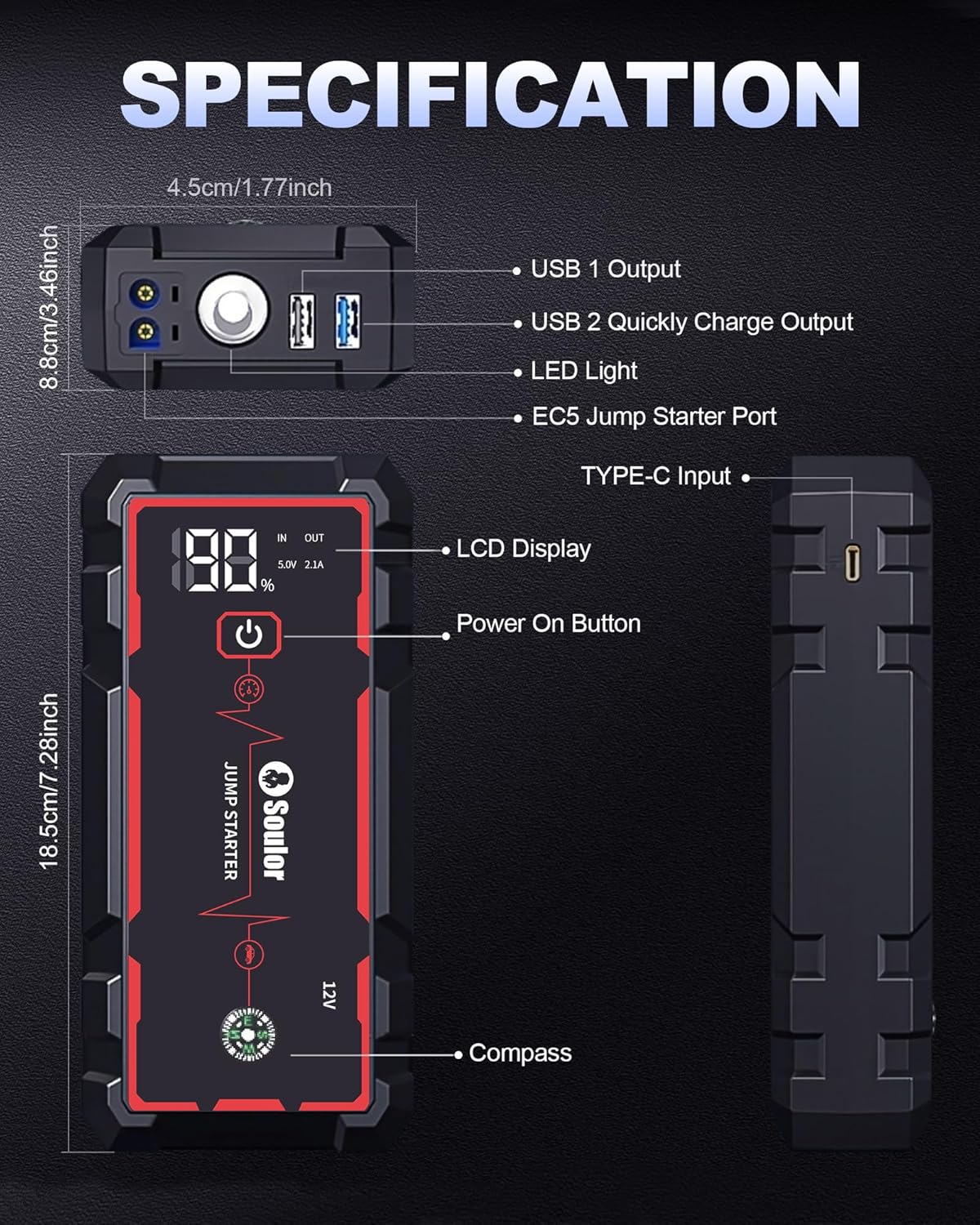
3. Product Features
- Powerful Jump Starting: Capable of jump-starting 12V vehicles up to 40 times on a single charge. Supports up to 8.0L gas and 6.0L diesel engines. Operates reliably in temperatures from -4°F to 140°F. Features a built-in Forced Start function for severely depleted car batteries.
- 7-in-1 Multi-Functional Device: Functions as a jump starter, 3-mode LED torch (flashlight, strobe, SOS), compass, and portable power bank.
- Quick Charge Power Bank: Equipped with dual USB-A ports (one fast-charge) and a USB-C port for rapid charging of phones, tablets, and other devices.
- LCD Smart Display Screen: A 2.0-inch screen displays real-time remaining power and output status.
- 3-Mode LED Flashlight: Includes Flashlight, Strobe Light, and SOS Light modes for emergency situations.
- 14-in-1 Intelligent Safety Protections: Integrated protections against incorrect connections, sparks, reverse polarity, over-discharge, over-current, short circuit, over-charge, over-temperature, low voltage, reverse charge, low temperature, over-power, and impedance mismatch.


4. Specifications
| Brand | Soulor |
| Model | CY20 |
| Peak Output Current | 5000 Amps |
| Product Dimensions | 8.9"D x 5.03"W x 3.86"H |
| Item Weight | 1.61 pounds (0.73 Kilograms) |
| Battery Type | Lithium Polymer (1 required, included) |
| Engine Compatibility | Up to 8.0L Gas, 6.0L Diesel |
| Operating Temperature | -4°F to 140°F |

5. Safety Information
Your Soulor CY20 Jump Starter is equipped with 14 intelligent safety protections to ensure safe operation. Always follow these guidelines:
- Do not short-circuit the jumper clamps.
- Do not expose the device to extreme temperatures outside the specified operating range.
- Keep out of reach of children.
- Ensure proper connection of positive (+) and negative (-) terminals.
Important Notes:
- Before the first charge, fully discharge the device.
- It is recommended to jump-start only when the battery charge is above 75% to ensure reliable and successful ignition.
- Charge the device every 3 months to maintain battery health.
6. Setup and Charging
6.1 Initial Charging
Upon receiving your Soulor CY20, fully discharge it before its first charge. Use the provided USB-A to USB-C cable to charge the unit. The LCD screen will indicate the charging progress.
6.2 Connecting Jumper Cables
The smart jumper cables connect to the EC5 jump starter port on the unit. Ensure the connection is firm before attaching to a vehicle battery.

7. Operating Instructions
7.1 Jump Starting a Vehicle
- Ensure the jump starter is adequately charged (above 75% recommended).
- Connect the smart jumper cables to the EC5 port on the jump starter.
- Connect the RED clamp to the vehicle's positive (+) battery terminal.
- Connect the BLACK clamp to the vehicle's negative (-) battery terminal.
- If the vehicle battery is severely depleted, press the 'Forced Start' button on the smart cable for 3 seconds until the indicator light turns green.
- Start the vehicle within 30 seconds after the indicator light changes to a constant green.
- Once the vehicle starts, immediately remove the jumper cables from the car battery, then disconnect from the jump starter.
7.2 Using as a Portable Power Bank
Connect your electronic devices (phone, tablet, etc.) to the USB-A or USB-C output ports on the jump starter using their respective charging cables. The device will automatically begin charging.
7.3 Using the LED Flashlight
Press and hold the power button on the jump starter to turn on the flashlight. Short press the power button to cycle through the modes: Flashlight (steady light), Strobe Light, and SOS Light. Press and hold again to turn off.
8. Maintenance
To ensure the longevity and optimal performance of your Soulor CY20 Jump Starter:
- Store the device in its provided storage bag when not in use.
- Recharge the unit every 3 months, even if not used, to keep the lithium polymer battery in good condition.
- Clean the exterior with a soft, dry cloth. Do not use harsh chemicals or abrasives.
9. Troubleshooting
If you encounter issues with your Soulor CY20 Jump Starter, consider the following:
- Device not turning on: Ensure the unit is charged. Connect it to a power source using the USB-C cable.
- Vehicle not starting: Check that the jumper cables are securely connected to both the jump starter and the vehicle battery terminals (red to positive, black to negative). Ensure the jump starter has sufficient charge (above 75%). If the battery is completely dead, use the Forced Start function.
- Indicator lights not behaving as expected: Refer to the smart cable's indicator light guide for specific meanings (e.g., solid green for ready to start, flashing for error).
- Charging issues: Verify the USB-C cable and power adapter are functioning correctly.
For further assistance, please contact customer support.
10. Warranty and Support
Your Soulor CY20 Jump Starter is backed by a 24-month service warranty. For any questions, technical support, or warranty claims, please contact our customer support team. We offer 24 hours and 7 days customer support for your peace of mind.
Contact information can typically be found on the product packaging or the official Soulor website.