
Introduction
This manual provides detailed instructions for the proper use and maintenance of your ORDRO M5 Handheld Camcorder. Please read this manual thoroughly before operating the device to ensure optimal performance and longevity.
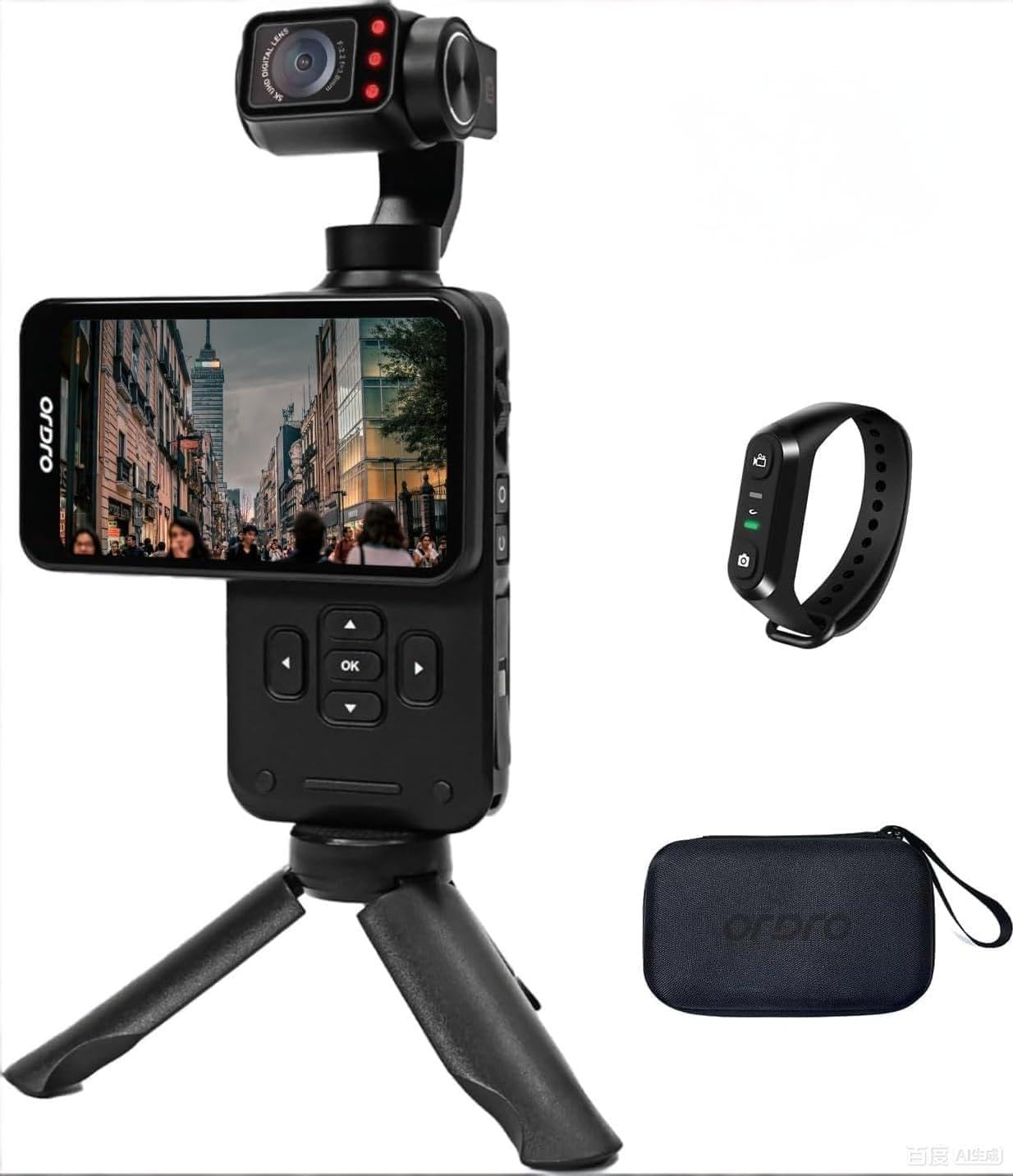
Figure 1: ORDRO M5 Handheld Camcorder Overview
1. Setup
1.1 Charging the Battery
The ORDRO M5 camcorder is equipped with a built-in battery. Before first use, fully charge the device. Connect the camcorder to a power source using the provided USB cable. The charging indicator will illuminate during charging and turn off when complete. A full charge provides approximately 150 minutes of 4K/60FPS recording time.

Figure 2: Charging the ORDRO M5 Camcorder
1.2 Inserting a Micro SD Card
The camcorder supports Micro SD cards for storage. Locate the Micro SD card slot, typically on the side or bottom of the device. Insert the card with the gold contacts facing down until it clicks into place. Ensure the card is rated V60 or higher for optimal 5K video recording performance. A 64GB card is typically included.
1.3 Powering On/Off
To power on the camcorder, press and hold the power button until the screen illuminates. To power off, press and hold the power button again until the device shuts down.
2. Operating Instructions
2.1 Basic Recording
After powering on, the camcorder enters standby mode. Press the record button to start recording. Press it again to stop. The device supports 5K at 30fps and 4K at 60fps video resolutions.
2.2 3.5-inch Rotating Touch Screen
The 3.5-inch IPS touch screen allows for intuitive control and framing. It can be rotated to switch between horizontal (16:9) and vertical (9:16) shooting orientations, ideal for various platforms like YouTube and TikTok.

Figure 3: Horizontal and Vertical Screen Rotation
2.3 3-Axis Mechanical Gimbal Stabilization
The integrated 3-axis mechanical gimbal provides stable and smooth video footage, even during movement such as hiking or running. This reduces camera shake significantly compared to electronic stabilization.

Figure 4: Gimbal Stabilization in Action
Gimbal Modes:
- PF Mode (Pan Following): The camera pans horizontally while maintaining a stable vertical axis.
- TF Mode (Tilt Following): The camera tilts vertically while maintaining a stable horizontal axis.
- L Mode (Lock Mode): The camera maintains a fixed orientation, locking both pan and tilt.
- POV Mode (Full Following): The camera follows all movements of the handle (pan, tilt, roll).
- PTZ (Pan-Tilt-Zoom): Allows for controlled movement of the camera's pan, tilt, and zoom functions. Speed settings include Smooth, Regular, and Sport.
2.4 Face Tracking
Activate face tracking by touching the screen to select a face. The camcorder will then automatically lock onto and follow the detected face, keeping it centered in the frame.

Figure 5: Face Tracking Functionality
2.5 Infrared Night Vision
For recording in low-light or dark conditions, activate the infrared night vision function. The camcorder utilizes built-in IR lights to capture clear black and white footage in environments with minimal ambient light.

Figure 6: Infrared Night Vision Operation
2.6 Wide Dynamic Range (WDR) and AE-L Exposure Lock
- WDR: Enhances image quality by capturing more detail in both bright and dark areas of a scene, preventing overexposure in highlights and underexposure in shadows.
- AE-L (Exposure Lock): Locks the exposure settings to prevent automatic adjustments, useful in scenes with challenging lighting conditions or when consistent exposure is desired.
2.7 Additional Features
- 120° Wide-Angle Lens: Captures a broader field of view, suitable for vlogging, landscapes, and group shots.
- Time-Lapse Shooting: Records a sequence of images over time and compiles them into a video.
- Continuous Shooting: Captures multiple photos in quick succession.
- Long Exposure: Allows for extended shutter speeds to capture more light in dark environments or create motion blur effects.
- White Balance: Adjusts color temperature to ensure accurate color reproduction under different lighting conditions.
- Slow Motion: Records video at a higher frame rate to play back in slow motion.
- EV Exposure Compensation: Manually adjusts the exposure level to brighten or darken the image.
3. Maintenance
3.1 Cleaning
- Use a soft, dry cloth to clean the camcorder body.
- For the lens and screen, use a specialized lens cleaning cloth and solution. Avoid abrasive materials.
- Do not use strong detergents or solvents.
3.2 Storage
- Store the camcorder in a cool, dry place away from direct sunlight and extreme temperatures.
- Remove the Micro SD card if storing for extended periods.
- Ensure the battery is partially charged (around 50%) before long-term storage to preserve battery health.
4. Troubleshooting
4.1 Common Issues and Solutions
- Camcorder does not power on:
- Ensure the battery is fully charged.
- Press and hold the power button for several seconds.
- Cannot record video:
- Check if a Micro SD card is inserted correctly.
- Verify that the Micro SD card has sufficient free space.
- Ensure the Micro SD card is not write-protected.
- Video footage is shaky despite gimbal:
- Ensure the gimbal is calibrated correctly (refer to device settings).
- Avoid extreme or sudden movements that exceed the gimbal's stabilization capabilities.
- Poor image quality in low light:
- Activate Infrared Night Vision mode.
- Adjust EV exposure compensation if necessary.
- Touch screen unresponsive:
- Restart the camcorder.
- Ensure the screen is clean and dry.
5. Specifications
| Feature | Detail |
|---|---|
| Brand | ORDRO |
| Model Number | WXM5 |
| Video Capture Resolution | 5K (5120 Pixels), 4K |
| Photo Sensor Technology | CMOS (1/2.5-inch) |
| Effective Still Resolution | 48 MP |
| Image Stabilization | 3-Axis Mechanical Gimbal |
| Screen Size | 3.5-inch IPS Touch Screen (Rotatable) |
| Lens Type | 120° Wide Angle (Minimum/Maximum Focal Length: 3mm, Minimum/Maximum Aperture: 2.2f) |
| Flash Memory Type | Micro SD (V60, UHS Speed Class 3 recommended) |
| Video Capture Format | MP4 |
| Supported Audio Format | AAC, MP3 |
| Battery Average Life | 150 minutes (4K/60FPS) |
| Connectivity Technology | USB |
| Special Features | IR Night Vision, WDR, Face Tracking, Time-Lapse, Continuous Shooting, AE-L Exposure Lock, Long Exposure, White Balance, Slow Motion, EV Exposure Compensation |
| Form Factor | Handheld |
| Water Resistance Level | Not Water Resistant |
6. Warranty Information
The ORDRO M5 Handheld Camcorder comes with a 1-Year Manufacturer's Warranty from the date of purchase. This warranty covers defects in materials and workmanship under normal use. It does not cover damage caused by misuse, accidents, unauthorized modifications, or natural disasters.
Please retain your proof of purchase for warranty claims. For detailed warranty terms and conditions, refer to the official ORDRO website or contact customer support.
7. Customer Support
If you encounter any issues or have questions regarding your ORDRO M5 camcorder that are not addressed in this manual, please contact ORDRO customer support. Contact information can typically be found on the official ORDRO website or on the product packaging.
When contacting support, please have your product model number (WXM5) and purchase details ready.
