
1. Introduction
Thank you for choosing the Fachixy FC-100 Wireless Gaming Headset. This headset is designed to provide a high-quality audio experience for gaming and multimedia across various platforms. Please read this manual carefully to ensure proper setup and operation.
What's in the Box:
- 2.4G Wireless Gaming Headset
- USB Dongle
- USB Charging cable
- User Manual
2. Product Overview and Features
The Fachixy FC-100 headset offers versatile connectivity, superior sound, and comfortable design for extended use.
Key Features:
- Dual Connection Modes: Supports 2.4GHz wireless via USB dongle and Bluetooth 5.4 for broad compatibility.
- Low-Latency Gaming: 2.4GHz wireless connection provides ultra-low latency (under 20ms) for a responsive gaming experience.
- Stereo Surround Sound: Equipped with 50mm high-density dual neodymium audio drivers for clear, immersive sound.
- Long Battery Life: Up to 50 hours of battery life (RGB off) with a 2.5-hour fast charging time.
- Adjustable Noise-Canceling Microphone: Omnidirectional microphone with excellent noise control for clear communication.
- Comfortable Design: Soft protein earmuffs and padded headband for extended wear.

Image: The headset's 50mm neodymium magnet drivers deliver unparalleled sound clarity, allowing users to hear every detail in their audio experience.

Image: The noise-canceling microphone effectively reduces environmental noise by up to 95%, ensuring clear and undisturbed voice communication.

Image: Designed for comfort, the headset features soft protein earmuffs with a breathable 3D structure, soft memory foam, and an adjustable slider, weighing only 248 grams.

Image: The headset provides high-quality stereo surround sound, optimized for both immersive game mode and clear music mode experiences.
3. Setup Instructions
3.1. 2.4GHz Wireless Connection (Dongle Mode)
This mode offers ultra-low latency for optimal gaming performance.
- Insert the 2.4GHz USB dongle into an available USB port on your PC, PS4, PS5, or compatible laptop.
- Power on the headset by long-pressing the power button (usually 3 seconds). The headset will automatically attempt to connect to the dongle.
- Once connected, the indicator light on the headset will show a stable color (refer to LED indicator section for details).
- Adjust audio settings on your device to ensure the headset is selected as the input and output device.
Note: 2.4G Dongle mode is NOT compatible with Xbox devices.
3.2. Bluetooth Connection
Use Bluetooth mode for connection with Switch and most mobile devices.
- Ensure the headset is powered on.
- Long press the Mic button for 2 seconds to switch from 2.4G mode to Bluetooth mode. The indicator light will flash, indicating pairing mode.
- On your device (Switch, smartphone, tablet), go to Bluetooth settings and search for available devices.
- Select "Fachixy FC-100" from the list to pair. Once connected, the indicator light will stabilize.
Important Compatibility Notes:
- The microphone of the headset is not available for Switch in Bluetooth mode.
- Bluetooth mode is not compatible with PS4 or PS5 consoles.
- Neither 2.4G Dongle nor Bluetooth mode is compatible with Xbox devices.
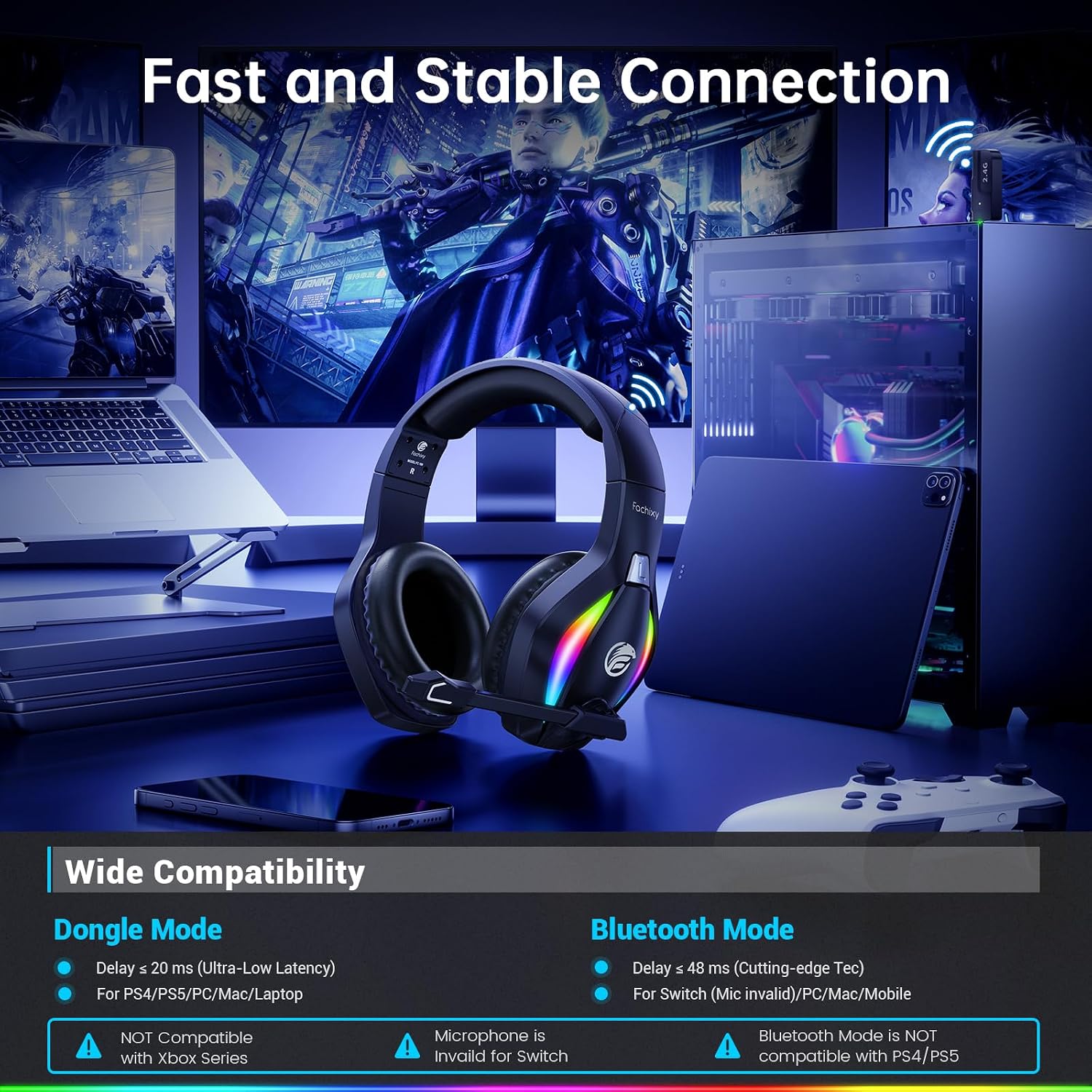
Image: The headset offers fast and stable connections with wide compatibility, supporting Dongle Mode for PC/PS4/PS5/Laptop and Bluetooth Mode for Switch (mic invalid)/PC/Mac/Mobile. Xbox devices are not supported.
4. Operating Instructions
4.1. Controls

Image: Overview of the headset's versatile and easy-to-use controls, including power, microphone, mode switching, LED, volume, and charging port.
- Power Button (Multi-function Button):
- Long press 3 seconds: Turn on
- Long press 4 seconds: Turn off
- Single click: Play/Pause, Answer/Hang up call
- Triple clicks: Previous Track
- Double clicks: Next Track
- Long press 2 seconds: Reject call
- Mic Button:
- Single click: Mic on/off
- Long press 2 seconds: Switch between Bluetooth and 2.4G modes
- LED Button:
- Single click: Turn on/off LED lights
- Double clicks: Switch between Game mode and Music mode
- Long press 3 seconds: Re-pairing (Bluetooth mode)
- Volume Control: Use the dedicated volume wheel or buttons to adjust audio levels.
- Microphone Adjustment: The long and flexible microphone design can be adjusted by 120° rotation for optimal positioning.
4.2. Charging the Headset
The headset features a 1200mAh battery for extended usage.
- Connect the included USB Charging cable to the Type-C Charging Port on the headset.
- Connect the other end of the USB cable to a compatible USB power source (e.g., computer USB port, wall adapter).
- A full charge takes approximately 2.5 hours.
- When the battery charge drops below 10%, a voice alert will notify you.

Image: The headset's 1200mAh battery provides up to 50 hours of game time (RGB off) or 40 hours with RGB on, and charges fully in 2.5 hours via Type-C.
5. Maintenance
To ensure the longevity and optimal performance of your Fachixy FC-100 headset, follow these maintenance guidelines:
- Cleaning: Use a soft, dry cloth to clean the headset. Avoid using harsh chemicals or abrasive materials.
- Storage: Store the headset in a cool, dry place away from direct sunlight and extreme temperatures.
- Handling: Handle the headset with care. Avoid dropping it or subjecting it to strong impacts.
- Water Exposure: The headset is not water-resistant. Avoid exposure to water or excessive moisture.
6. Troubleshooting
If you encounter issues with your headset, please refer to the following common solutions:
- No Sound/Poor Sound Quality:
- Ensure the headset is properly connected (2.4GHz dongle or Bluetooth).
- Check the volume levels on both the headset and your connected device.
- Verify that the headset is selected as the default audio output device in your device's sound settings.
- Re-pair the headset if using Bluetooth, or re-insert the USB dongle if using 2.4GHz.
- Microphone Not Working:
- Ensure the microphone is not muted (single click the Mic button).
- Check microphone settings on your device and ensure the headset is selected as the input device.
- Note: The microphone is not supported when connected to Nintendo Switch via Bluetooth.
- Connectivity Issues:
- Ensure the headset is within range of your device (up to 10 meters for Bluetooth).
- Avoid interference from other wireless devices.
- If switching between 2.4G and Bluetooth, long press the Mic button for 2 seconds to ensure the correct mode is active.
- Note: Neither 2.4G Dongle nor Bluetooth mode is compatible with Xbox devices. Bluetooth mode is not compatible with PS4/PS5 consoles.
- Headset Not Charging:
- Ensure the charging cable is securely connected to both the headset and the power source.
- Try a different USB port or charging adapter.
- Verify the charging cable is not damaged.
7. Specifications
| Model Name | FC-100 |
| Connectivity Technology | Wireless (2.4GHz Wireless, Bluetooth 5.4) |
| Audio Driver Type | Dynamic Driver (50mm Neodymium) |
| Battery Life | Up to 50 Hours (RGB off) |
| Charging Time | 2.5 Hours |
| Noise Control Features | Noise Cancellation (Microphone) |
| Earpiece Shape | Over Ear |
| Material | Acrylonitrile Butadiene Styrene (ABS), Leather, Polycarbonate (PC) |
| Item Weight | 14.4 ounces |
| Compatible Devices | PC, PS4, PS5, Switch (audio only), Mac, Laptop, Mobile |
| Water Resistance Level | Not Water Resistant |
| UPC | 673658101360 |
8. Warranty and Support
For warranty information and customer support, please refer to the official Fachixy website or contact the retailer where you purchased the product. Keep your proof of purchase for warranty claims.

