
Important Safety Information
Please read all instructions carefully before installation and use. Retain this manual for future reference.
- Electrical Safety: Ensure the vehicle's power is disconnected before making any electrical connections to prevent short circuits or damage.
- Mounting: Securely mount the sound bar and speakers using the provided brackets. Improper mounting can lead to detachment during vehicle operation, causing injury or damage.
- Wiring: Follow the wiring diagram precisely. Incorrect wiring can cause malfunction or electrical hazards. Ensure all connections are insulated and protected from environmental elements.
- Water Resistance: This product is IP66 rated for water and dust resistance. While designed for outdoor use, avoid submerging the unit. Ensure all covers and connections are sealed properly.
- Subwoofer Note: The subwoofer is designed to produce low-frequency sounds only. It cannot produce mid or high-range frequencies. For optimal audio performance, the full system (subwoofer and speakers) must be connected.
- Tweeter Protection: Do not press the tweeter on the speakers to avoid damage. Remove any protective labels before use.
Package Contents
Verify all items are present before beginning installation:
- 16-inch Soundbar Subwoofer (x1)
- 4" Full-range Speakers (x2)
- Mounting Kits (Brackets, Screws, Allen Wrench)
- Remote Control (x1)
- User Guide (x1)
- Spare Extendable Cable (x1)
- Connectors
- Fuse (10A, x2)

Image: All components included in the Ehaho 2.1CH Stereo UTV Sound Bar package, laid out on a table.
Specifications
| Brand | Ehaho |
| Model Number | MT-4221 |
| Speaker Maximum Output Power | 550 Watts (Peak) |
| Number of Audio Channels | 2.1 |
| Speaker Type | Subwoofers and Full-range Speakers |
| Subwoofer Diameter | 4 Inches (x2, rectangular soundbar) |
| Speaker Size | 4 Inches (x2, full-range speakers) |
| Connectivity Technology | Bluetooth 5.0, USB, 3.5mm Auxiliary |
| Bluetooth Range | 33 Feet (10 Meters) |
| Input Voltage | 12 Volts (DC) |
| Water Resistance Level | IP66 (Waterproof and Dustproof) |
| Additional Features | Dynamic RGB Lights (7 colors), Remote Control, Adjustable Mounting Brackets (1-2 inch) |
| Item Dimensions (D x W x H) | 3.85"D x 16"W x 4.99"H (Soundbar) |
| Compatible Devices | Laptop, MP3 Player, Smartphone, Tablet, USB devices |
| Compatible Vehicle Types | ATV, UTV, Golf Cart, Marine, Truck |

Image: Detailed dimensions of the soundbar, speakers, mounting brackets, and included cables.
Setup & Installation
This section guides you through the physical installation and initial setup of your Ehaho UTV Sound Bar system.
1. Mounting the Sound Bar and Speakers
- Select Mounting Location: Choose a secure location on your vehicle's roll cage or frame. The adjustable mounting brackets are suitable for bars ranging from 1 inch to 2 inches in diameter.
- Attach Brackets: Secure the mounting brackets to the sound bar and individual speakers using the provided screws and Allen wrench. Ensure they are tightened firmly.
- Position Components: Place the sound bar and speakers in your desired positions on the vehicle's bars. The sound bar is typically mounted centrally, with speakers on either side for optimal stereo separation.
- Secure to Vehicle: Fasten the brackets to the vehicle's roll cage. Tighten all screws to ensure the components are stable and will not vibrate loose during operation.
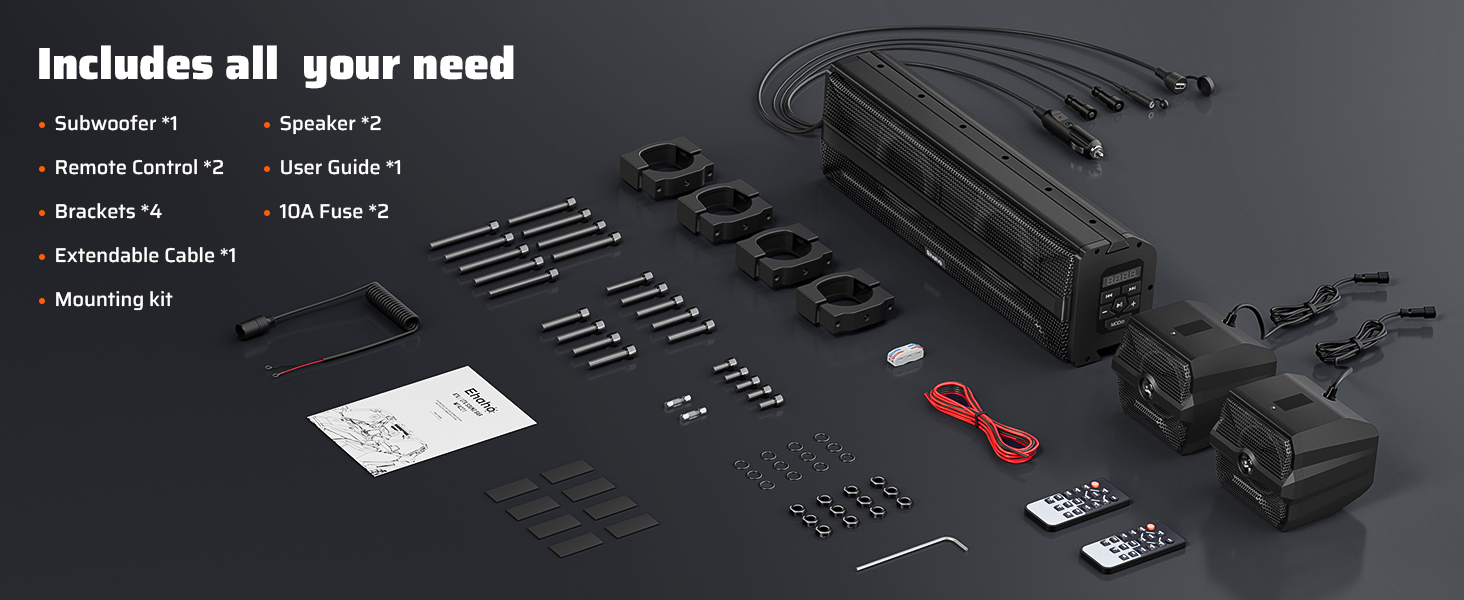
Image: A UTV with the sound bar and speakers mounted on the roll cage, demonstrating a typical installation setup.
Video: An animated guide demonstrating the installation process of the Ehaho UTV Sound Bar and speakers onto a vehicle's roll cage.
2. Wiring Connections
Proper wiring is crucial for functionality and safety. Ensure the wiring harness is assembled according to the instructions in the manual before use.
- Connect Speakers to Sound Bar: Use the provided speaker cables to connect the two full-range speakers to the designated ports on the sound bar.
- Power Connection Options:
- Cigarette Lighter: For quick installation, connect the included cigarette lighter power connector to a 12V power outlet in your vehicle.
- Direct Battery Connection: For a more permanent installation, connect the main power cord directly to your vehicle's 12V battery. Ensure the inline fuse is properly installed for protection.
- Cable Management: Use zip ties (if provided or acquired separately) to neatly secure all cables, preventing them from interfering with vehicle operation or being damaged.

Image: Diagram illustrating the various input options and power connection methods for the sound bar system.
Operating Instructions
Learn how to use your Ehaho UTV Sound Bar system for an enhanced audio experience.
1. Power On/Off
- Press the Power button on the sound bar's control panel or the remote control to turn the unit on or off.
2. Bluetooth Pairing
- Ensure the sound bar is powered on.
- Press the MODE button on the control panel or remote until "BT" (Bluetooth) appears on the display.
- On your mobile device, enable Bluetooth and search for available devices. Select "Ehaho Sound Bar" to pair.
- Once paired, the sound bar will indicate a successful connection, and you can begin streaming audio.
Tip: When Bluetooth is not connected, the panel characters will flash, indicating that Bluetooth is waiting for a connection.

Image: Visual representation of Bluetooth 5.0 connectivity with a smartphone, showing the 33ft control range.
3. USB Playback
- Insert a USB drive containing MP3 or WMA music files into the USB port on the sound bar.
- Press the MODE button until "USB" appears on the display. The system will automatically begin playing music.
Tip: The USB mode requires connection to a USB device and will automatically be skipped if no device is connected. The default mode is Bluetooth.

Image: Illustration of connecting a USB device to the sound bar for music playback.
4. AUX Input
- Connect your audio device (e.g., MP3 player, smartphone) to the 3.5mm AUX input port using an auxiliary cable.
- Press the MODE button until "AUX" appears on the display. Audio will play from your connected device.
Tip: The AUX mode requires connection to an AUX device and will automatically be skipped if no device is connected. The default mode is Bluetooth.

Image: Diagram showing how to connect an audio device via the 3.5mm AUX input.
5. Remote Control Functions
The included remote control provides convenient access to all functions:
- Power (Red Button): Turns the unit on/off.
- MODE (+/-): Cycles through input modes (Bluetooth, USB, AUX).
- VOL (+/-): Adjusts the volume level.
- EQ: Cycles through equalizer presets.
- Play/Pause (►►): Plays or pauses current track.
- Previous/Next Track (◄◄ / ►►): Skips to the previous or next track.
- COLOR (+/-): Changes the RGB light color.
- SPEED (+/-): Adjusts the speed of dynamic light effects.
- BRIGHT (+/-): Adjusts the brightness of the lights.
- DEMO: Activates a demonstration mode for RGB lights.
- SYN: Synchronizes light effects.

Image: The remote control showing buttons for power, mode, volume, track control, and RGB light adjustments.
6. Dynamic RGB Lighting
- The subwoofer features RGB LED lights on its center and sides, creating dynamic effects.
- The full-range speakers include blue LED lights that change brightness with the volume level.
- Use the remote control to customize light colors, speed, and brightness to match your preference.

Image: Multiple Ehaho sound bars and speakers displaying various beat-synced RGB light colors.
Maintenance
To ensure the longevity and optimal performance of your sound system:
- Cleaning: Wipe the unit with a soft, damp cloth. Avoid using harsh chemicals or abrasive cleaners.
- Water Exposure: While waterproof, it is recommended to clean off mud and debris after off-road use to prevent buildup.
- Connection Checks: Periodically inspect all wiring connections for tightness and signs of wear or corrosion.
- Storage: If storing the vehicle for extended periods, ensure the sound system is clean and disconnected from power.

Image: An ATV splashing through water, highlighting the IP66 waterproof and dustproof features of the sound bar.
Troubleshooting
If you encounter issues, refer to the following common problems and solutions:
| Problem | Possible Cause | Solution |
|---|---|---|
| No power | Loose power connection, blown fuse, vehicle power off. | Check all power connections. Inspect and replace the fuse if blown. Ensure vehicle ignition is on. |
| No sound | Volume too low, incorrect input mode, speakers disconnected, Bluetooth not paired. | Increase volume. Select correct input mode (BT, USB, AUX). Verify speaker connections. Re-pair Bluetooth device. |
| Poor sound quality | Loose speaker connections, damaged cables, audio source quality. | Check speaker wiring. Try a different audio source. Ensure cables are not damaged. |
| Bluetooth not connecting | Device too far, interference, sound bar not in pairing mode. | Move device closer to sound bar. Ensure no strong interference sources. Put sound bar in BT mode. |
| Lights not working | Lights turned off, incorrect mode, power issue. | Check remote control settings for lights. Ensure unit is powered on. |
Warranty and Support
This Ehaho 2.1CH Stereo UTV Sound Bar (MT-4221) comes with a 1-Year Warranty from the date of purchase.
The warranty covers manufacturing defects and malfunctions under normal use. It does not cover damage caused by improper installation, misuse, accidents, or unauthorized modifications.
For warranty claims or technical support, please contact Ehaho customer service through your retailer or the official Ehaho website. Please have your purchase receipt and product model number (MT-4221) ready.
Product Videos
Watch these official videos for additional guidance and product demonstrations.
Ehaho 2.1CH Stereo UTV Sound Bar with Subwoofer - Installation & Features
Video: This video provides a detailed overview of the Ehaho 2.1CH Stereo UTV Sound Bar, including its features and a visual guide for installation.
Ehaho 2.1CH Stereo UTV Sound Bar (Subwoofer) and Speakers - Product Showcase
Video: A short showcase of the Ehaho 2.1CH Stereo UTV Sound Bar system, highlighting its design and lighting effects.
