
Introduction
This manual provides detailed instructions for the setup, operation, maintenance, and troubleshooting of your GMKtec G3 Plus Mini PC. Please read this manual thoroughly before using the device to ensure proper functionality and to maximize your user experience.

Image: The GMKtec G3 Plus Mini PC, displaying its compact design and various connectivity ports on the front and rear panels.
Package Contents
Verify that all items listed below are present in your product packaging. If any items are missing or damaged, please contact GMKtec customer support.
- GMKtec Nucbox G3 Plus Mini PC (16GB RAM, 256GB SSD)
- VESA Mount with Screws
- HDMI Cable
- Power Adapter
- User Manual (this document)

Image: All components included in the retail packaging for the GMKtec G3 Plus Mini PC, including the mini PC, power adapter, HDMI cable, VESA mount, and user manual.
Setup Instructions
- Connect to a Display: Use the provided HDMI cable to connect the Mini PC to a monitor, TV, or projector. The device supports dual 4K@60Hz displays.
- Connect Peripherals: Connect your keyboard, mouse, and other USB devices to the available USB 3.2 ports.
- Network Connection:
- Wired: Connect an Ethernet cable to the 2.5GbE RJ45 port for a wired network connection.
- Wireless: The Mini PC supports WiFi 6. Once powered on, you can configure the wireless connection through the operating system settings.
- Power On: Connect the power adapter to the DC 12V 3A port on the Mini PC, then plug the adapter into a power outlet. Press the power button on the front of the device.
- Initial Boot: The system will boot up. Follow the on-screen instructions for the initial setup of the operating system (e.g., OS Pro).

Image: A detailed diagram illustrating the various ports on the GMKtec G3 Plus Mini PC, including USB 3.2, HDMI, Giga LAN (RJ45 2.5G), 3.5mm Audio, DC 12V 3A power input, and security lock slot.
Operating Instructions
Power Management
- Power On: Press the power button on the front panel.
- Shut Down: Use the operating system's shutdown function. Do not unplug the power adapter directly without proper shutdown to prevent data loss.
- Restart: Use the operating system's restart function.
- Sleep Mode: The device can enter sleep mode via the operating system.
- Wake On LAN (WoL): This feature allows the Mini PC to be powered on remotely over a network. Ensure it is enabled in the BIOS/UEFI settings and configured in your network environment.
- Auto Power On: The device can be configured to automatically power on when power is supplied. This setting is typically found in the BIOS/UEFI.
Connecting to Displays
The GMKtec G3 Plus supports dual display output via its two HDMI 2.0 ports. Each port can support up to 4K resolution at 60Hz.
- Connect your primary display to one HDMI port.
- Connect your secondary display to the other HDMI port.
- Configure display settings (extend, duplicate, or primary only) within your operating system.

Image: The GMKtec G3 Plus Mini PC demonstrating its dual 4K@60Hz display capability by being connected to two separate monitors, extending the desktop across both screens.
Network and Bluetooth
- WiFi 6: Provides high-speed wireless connectivity. Access network settings in your OS to connect to available Wi-Fi networks.
- Bluetooth 5.2: Allows connection to various wireless peripherals such as keyboards, mice, and audio devices. Pair devices through the Bluetooth settings in your OS.
- 2.5GbE Ethernet: For a stable and high-speed wired network connection, plug an Ethernet cable into the RJ45 port.

Image: An illustration emphasizing the GMKtec G3 Plus Mini PC's support for WiFi 6 and Bluetooth 5.2, showing improved speed and connectivity compared to older standards.
Maintenance
- Cleaning: Use a soft, dry cloth to clean the exterior of the Mini PC. Avoid liquid cleaners directly on the device. Use compressed air to clear dust from vents periodically.
- Ventilation: Ensure the cooling vents are not obstructed to prevent overheating. Maintain adequate space around the device for airflow.
- Software Updates: Regularly update your operating system and drivers to ensure optimal performance and security.
- Data Backup: Periodically back up important data to an external drive or cloud storage.
- Storage Expansion: The Mini PC supports an additional M.2 2242 SATA SSD (not included) for storage expansion, up to 2TB. Refer to the internal components diagram for location.

Image: An exploded view diagram of the GMKtec G3 Plus Mini PC, showing its internal components such as the DDR4 RAM, 256GB SSD, M.2 2242 SATA slot, cooling fan, and cooling vents.
Troubleshooting
- No Power:
- Ensure the power adapter is securely connected to both the Mini PC and a working power outlet.
- Verify the power outlet is functional by testing with another device.
- No Display:
- Check HDMI cable connections at both the Mini PC and the monitor.
- Ensure the monitor is powered on and set to the correct input source.
- Try a different HDMI cable or monitor if available.
- No Internet Connection:
- For wired connection, ensure the Ethernet cable is properly connected and your router is working.
- For wireless connection, check Wi-Fi settings in the OS, ensure Wi-Fi is enabled, and you are connected to the correct network with the correct password.
- Restart your router/modem.
- Slow Performance:
- Close unnecessary applications running in the background.
- Check for available operating system updates.
- Ensure adequate ventilation to prevent thermal throttling.
- Run a disk cleanup or defragmentation tool (if applicable to your OS/storage type).
If you encounter issues not covered here, please refer to the support section for further assistance.
Specifications
| Feature | Specification |
|---|---|
| Model | G3 PLUS |
| Processor | Intel Twin Lake N150 (4 Cores, 4 Threads, 6MB Cache, up to 3.6GHz) |
| RAM | 16GB DDR4 (3200 MHz) |
| Storage | 256GB PCIe 3.0 M.2 2280 NVMe SSD (Expandable with M.2 2242 SATA SSD up to 2TB) |
| Graphics | Intel Graphics (max 1000MHz), supports 4K video playback and AV1 decoding |
| Video Output | 2 x HDMI 2.0 (4K@60Hz Dual Display) |
| USB Ports | 4 x USB 3.2 (up to 5Gbps/S) |
| Audio | 1 x 3.5mm Audio Jack |
| Network |
|
| Operating System | OS Pro (Compatible with Linux, Proxmox, Ubuntu, ESXI VMware) |
| Special Features | Wake On LAN, PXE Boot, RTC Wake, Auto Power On |
| Power Input | DC 12V 3A |
| Dimensions (Package) | 6.42 x 6.18 x 4.09 inches |
| Weight (Item) | 1.98 pounds |
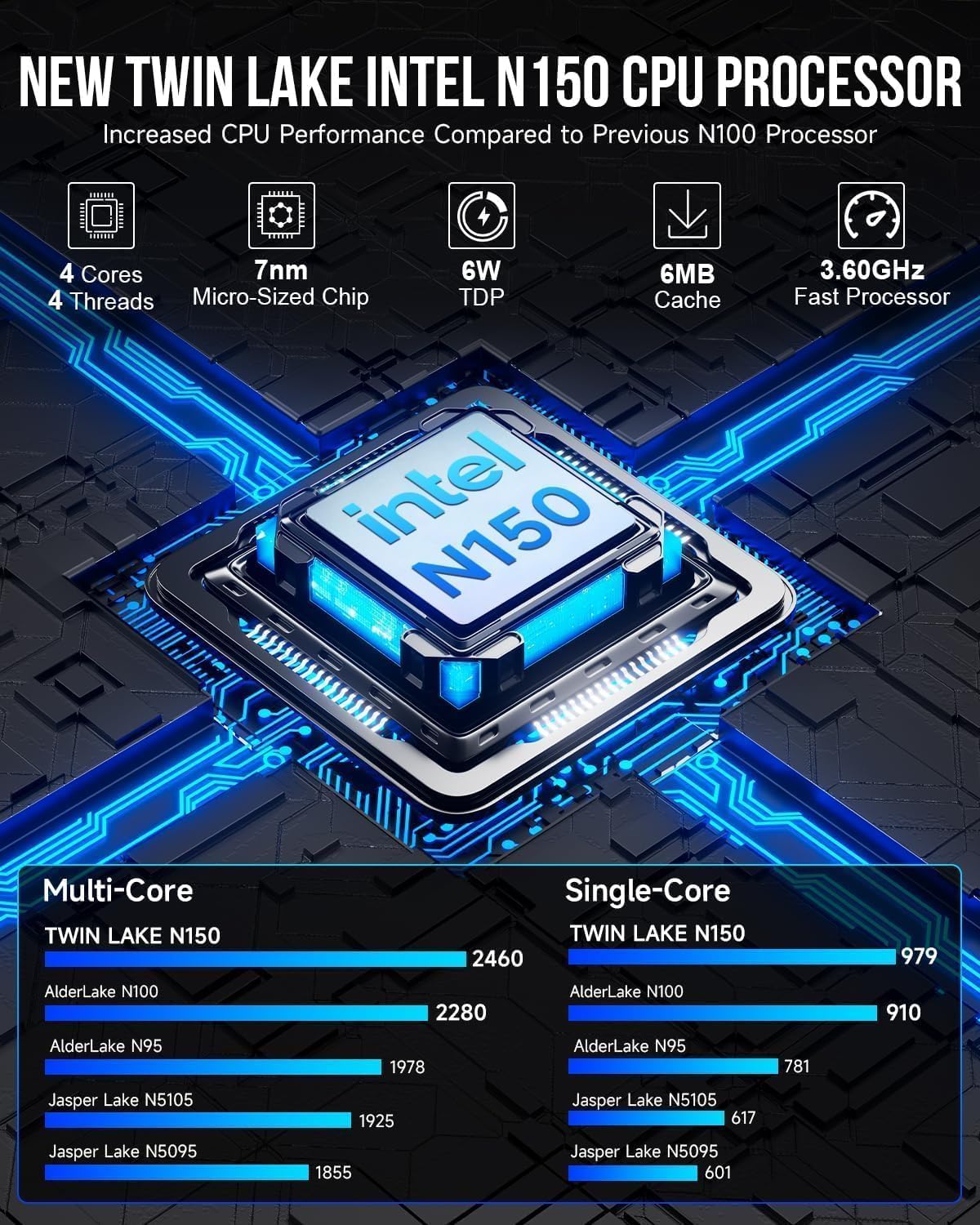
Image: A graphic detailing the specifications and performance improvements of the Intel Twin Lake N150 CPU compared to previous generations like N100 and N95.

Image: A visual representation of the 2.5G High Speed Ethernet performance, showing read-write and transmission speeds compared to 1000Mbps Ethernet.
Warranty Information
GMKtec provides a 1-year limited warranty for the G3 Plus Mini PC, effective from the date of purchase. This warranty covers defects in design and workmanship. Please retain your proof of purchase for warranty claims.
The warranty does not cover damage caused by:
- Accident, abuse, misuse, or improper installation.
- Unauthorized repairs or modifications.
- Power surges or electrical issues not related to the device itself.
- Natural disasters or acts of God.
Support
For technical assistance, warranty claims, or any questions regarding your GMKtec G3 Plus Mini PC, please contact our professional after-sales team.
- Email Support: support@gmktec.com
- Online Support: Visit the official GMKtec website for FAQs and additional resources.
When contacting support, please provide your product model (G3 PLUS) and a detailed description of the issue.


