
LIGE TX3-G
LIGE TX3-G Smart Watch User Manual
Model: TX3-G
1. Introduction and Overview
This manual provides essential instructions for the setup, operation, and maintenance of your LIGE TX3-G Smart Watch. The TX3-G is a robust smartwatch designed for active lifestyles, featuring a 1.73-inch AMOLED display, Bluetooth calling capabilities, extensive health monitoring, and over 110 sports modes.
Equipped with a 900mAh battery, the LIGE TX3-G offers extended usage and standby times, ensuring reliable performance for daily activities, outdoor adventures, and high-intensity use. Its durable full-metal construction and advanced features make it a versatile companion for various scenarios.
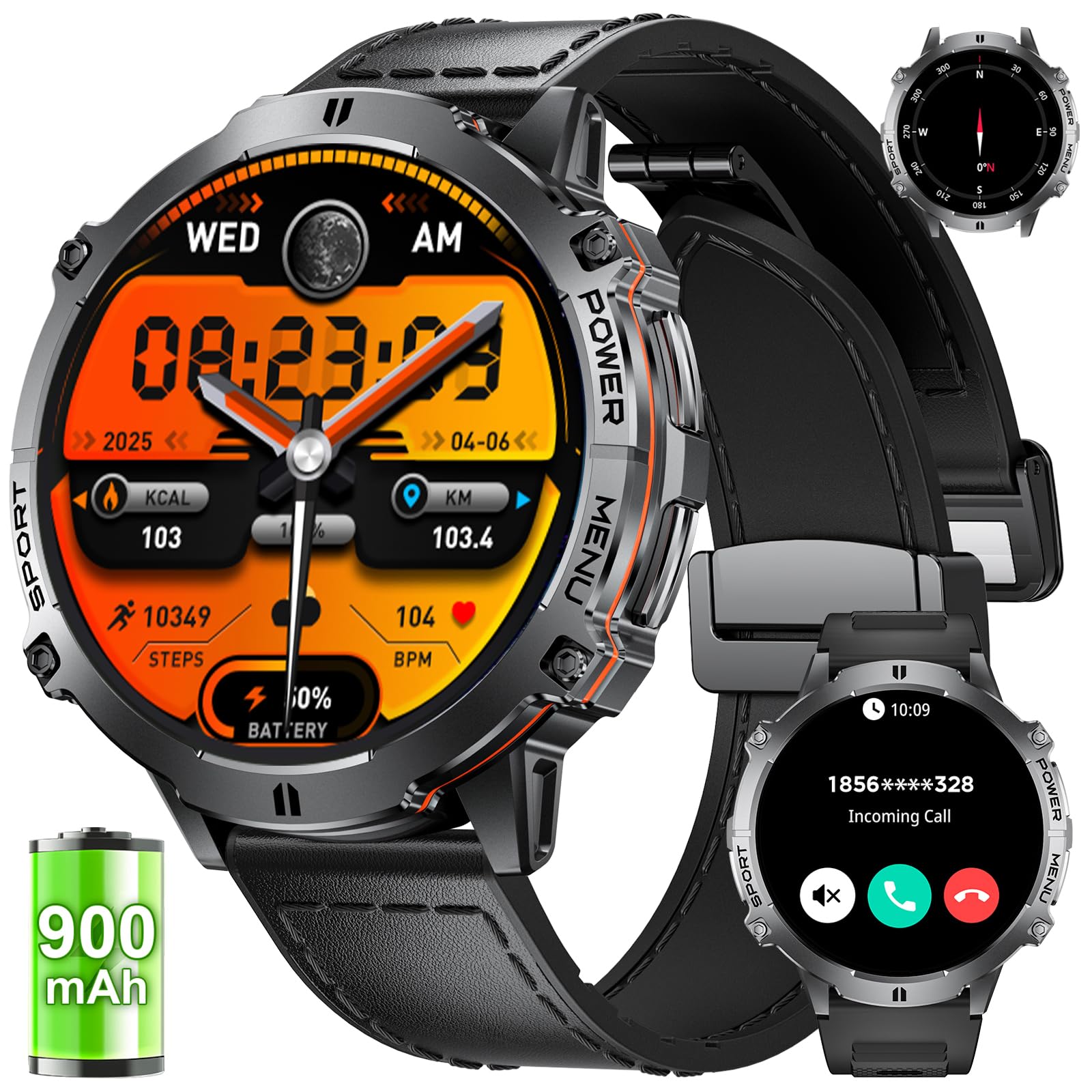
Image 1.1: LIGE TX3-G Smart Watch with various display modes.
2. Package Contents
Before proceeding with setup, please verify that all items are present in your package:
- 1 x LIGE TX3-G Smart Watch
- 1 x Charging Cable
- 1 x Watch Band (pre-installed or separate)
- 1 x User Manual (this document)
- Bracelet extension accessories and tools (if applicable)

Image 2.1: Contents of the LIGE TX3-G Smart Watch package.
3. Setup Instructions
3.1 Charging the Smart Watch
Before first use, fully charge your LIGE TX3-G Smart Watch. Connect the provided charging cable to the charging port on the back of the watch and to a standard USB power adapter (not included). The watch display will indicate charging status.
- Charging Time: Approximately 3 hours for a full charge.
- Battery Life: Up to 30 days of efficient working time, 60+ days standby.

Image 3.1: Smart Watch charging illustration and battery life details.
3.2 App Installation and Pairing
To unlock the full functionality of your LIGE TX3-G Smart Watch, you need to install the companion application on your smartphone. The watch is compatible with Android and iOS 9.0 and above smartphones.
- Download the App: Scan the QR code provided in the manual or on the watch packaging, or search for the official LIGE app in your smartphone's app store (Google Play Store for Android, Apple App Store for iOS).
- Create Account: Open the app and follow the on-screen instructions to create a user account.
- Enable Bluetooth: Ensure Bluetooth is enabled on your smartphone.
- Pair the Watch: In the app, navigate to the device pairing section. Select your LIGE TX3-G from the list of available devices. Confirm the pairing request on both your phone and the watch.
For a visual guide on connecting your watch, please refer to the connection video available on the product page or through the app's help section.
4. Operating Instructions
4.1 Basic Navigation
The LIGE TX3-G features a 1.73-inch full-touch high-definition AMOLED display and physical buttons for navigation.
- Touchscreen: Swipe left/right, up/down to navigate through menus and notifications. Tap to select items.
- Side Buttons: Typically, one button serves as a power/back button, while others may provide quick access to sports modes or specific functions. Refer to the on-screen prompts for specific button functionalities.
- Wrist Lift: The watch supports wrist lifting to brighten the screen for quick viewing.
4.2 Bluetooth Calls and Message Notifications
With advanced Bluetooth 5.3 technology, the watch allows for direct calls and real-time message alerts.
- Making/Receiving Calls: Use the built-in microphone and high-definition speakers to make or receive calls directly from your watch. You can access contacts and view call logs.
- Notifications: Receive text messages and notifications from various applications (e.g., WhatsApp, Twitter, Facebook, Instagram) directly on your watch.

Image 4.1: Bluetooth call and message notification features.
4.3 AI Voice Assistant
The watch can activate your phone's voice assistant for hands-free control.
- Activation: Follow the instructions in the app to enable and configure the AI voice assistant.
- Commands: Use voice commands for tasks such as making calls, playing music, checking weather, or setting alarms.

Image 4.2: AI Voice Assistant in action.
4.4 Watch Faces and Customization
Personalize your watch with a variety of watch faces.
- Selection: Choose from over 200 available dials through the companion app.
- Customization: Upload your favorite photos to create exclusive custom watch faces.

Image 4.3: Watch face customization options.
5. Health Monitoring
The LIGE TX3-G Smart Watch features a built-in advanced sensor chip for comprehensive health tracking. Note: Monitoring data is for reference only and cannot be used for medical diagnosis.
5.1 Heart Rate Monitoring
Continuously monitors your heart rate throughout the day, providing real-time data and historical trends via the app.

Image 5.1: Heart rate monitoring interface.
5.2 Sleep Monitoring
Tracks the length and quality of your sleep, distinguishing between deep sleep and light sleep. View detailed sleep reports in the app to help improve your sleep habits.

Image 5.2: Sleep monitoring data.
5.3 Other Health Features
- Blood Oxygen Monitoring: Measures blood oxygen levels.
- Sedentary Reminder: Alerts you to move after periods of inactivity.
- Drink Water Reminder: Prompts you to stay hydrated.
6. Sports Modes and Activity Tracking
The LIGE TX3-G supports over 110 sports modes to track your progress and provide detailed insights into your daily activity.
- Activity Tracking: Records steps, calories burned, distance covered, and active minutes.
- Sports Modes: Select specific modes for activities like running, cycling, hiking, badminton, and more to get tailored data.

Image 6.1: Overview of 110+ sports modes and activity tracking.
6.1 Outdoor Features
- Compass: Provides directional guidance for outdoor navigation.
- Barometer: Measures air pressure, useful for altitude tracking.
- Weather Forecast: Displays current weather conditions and forecasts.

Image 6.2: Outdoor features like compass and barometer.
7. Maintenance
7.1 Cleaning and Care
To maintain the performance and appearance of your watch:
- Wipe the watch and strap regularly with a soft, dry cloth.
- Avoid using harsh chemicals or abrasive materials for cleaning.
- Ensure the charging contacts are clean and dry before charging.
7.2 Water Resistance
The LIGE TX3-G Smart Watch is 5ATM waterproof, making it suitable for swimming and exposure to rain or splashes. However, it is not recommended for diving or high-pressure water activities.

Image 7.1: Water resistance and durability features.
8. Troubleshooting
If you encounter issues with your LIGE TX3-G Smart Watch, refer to the following common solutions:
| Problem | Possible Solution |
|---|---|
| Watch not turning on | Ensure the watch is fully charged. Connect to the charger for at least 30 minutes. |
| Unable to pair with phone | Check if Bluetooth is enabled on your phone. Ensure the watch is within range. Restart both the watch and phone. Reinstall the app if necessary. |
| Inaccurate health data | Ensure the watch is worn snugly on your wrist. Clean the sensor on the back of the watch. Remember, data is for reference only. |
| Notifications not received | Check app notification permissions on your phone. Ensure the watch is connected via Bluetooth. Verify notification settings within the LIGE app. |
| Short battery life | Reduce screen brightness. Disable unnecessary features like continuous heart rate monitoring if not needed. Ensure background app usage is optimized. |
If the problem persists, please contact customer support for further assistance.
9. Specifications
| Feature | Detail |
|---|---|
| Model Number | TX3-G |
| Display Size | 1.73 Inches |
| Display Type | AMOLED |
| Battery Capacity | 900 mAh |
| Connectivity | Bluetooth 5.3 |
| Operating System | AsteroidOS |
| Memory Storage Capacity | 128 MB |
| Water Resistance | 5ATM |
| Special Features | Activity Tracker, Music Player, Notifications, Phone Call, Weather Forecast, AI Voice Assistant, Compass, Barometer |
| GPS | No GPS |
| Item Weight | 8.1 ounces |
| Manufacturer | LIGE |
10. Warranty and Support
LIGE is committed to providing quality products and customer satisfaction. While specific warranty details may vary by region, we offer dedicated customer support for any issues you may encounter.
- Customer Service: If you experience any problems after receiving your LIGE TX3-G Smart Watch, please contact our customer support team. We aim to respond to all inquiries within 24 hours.
- Contact Information: Refer to the contact details provided on the product packaging or the official LIGE website for support.
Related documentsTX3-G


Ask a question about this manual
Ask about setup, troubleshooting, compatibility, parts, safety, or missing instructions. Manuals+ will review the question and use this page’s manual context to help answer it.