
1. Introduction
The GOOZEEZOO TEF6686 Pocket Mini Radio V2.2 is an advanced all-band radio receiver designed for superior listening experiences. It features full-band reception across FM (65-108 MHz), AM (522-1620 kHz), SW (1700-27000 kHz), and LW (144-519 kHz) bands, offering enhanced anti-interference performance. Equipped with an intuitive 2.4-inch touchscreen color display and a durable CNC aluminum alloy shell, this ultra-portable radio is ideal for various activities, from outdoor adventures to daily use. It includes RDS functionality for station and program information, a built-in 4Ω 2W speaker, a 3.5mm headphone jack, and a 1000mAh battery with convenient USB Type-C charging.
2. What's in the Box
- TEF6686 Pocket Mini Radio V2.2
- Telescopic Antenna (SMA interface)
- USB Type-C Charging Cable
- Quick Start Guide
3. Product Overview
Familiarize yourself with the key components and controls of your TEF6686 radio.
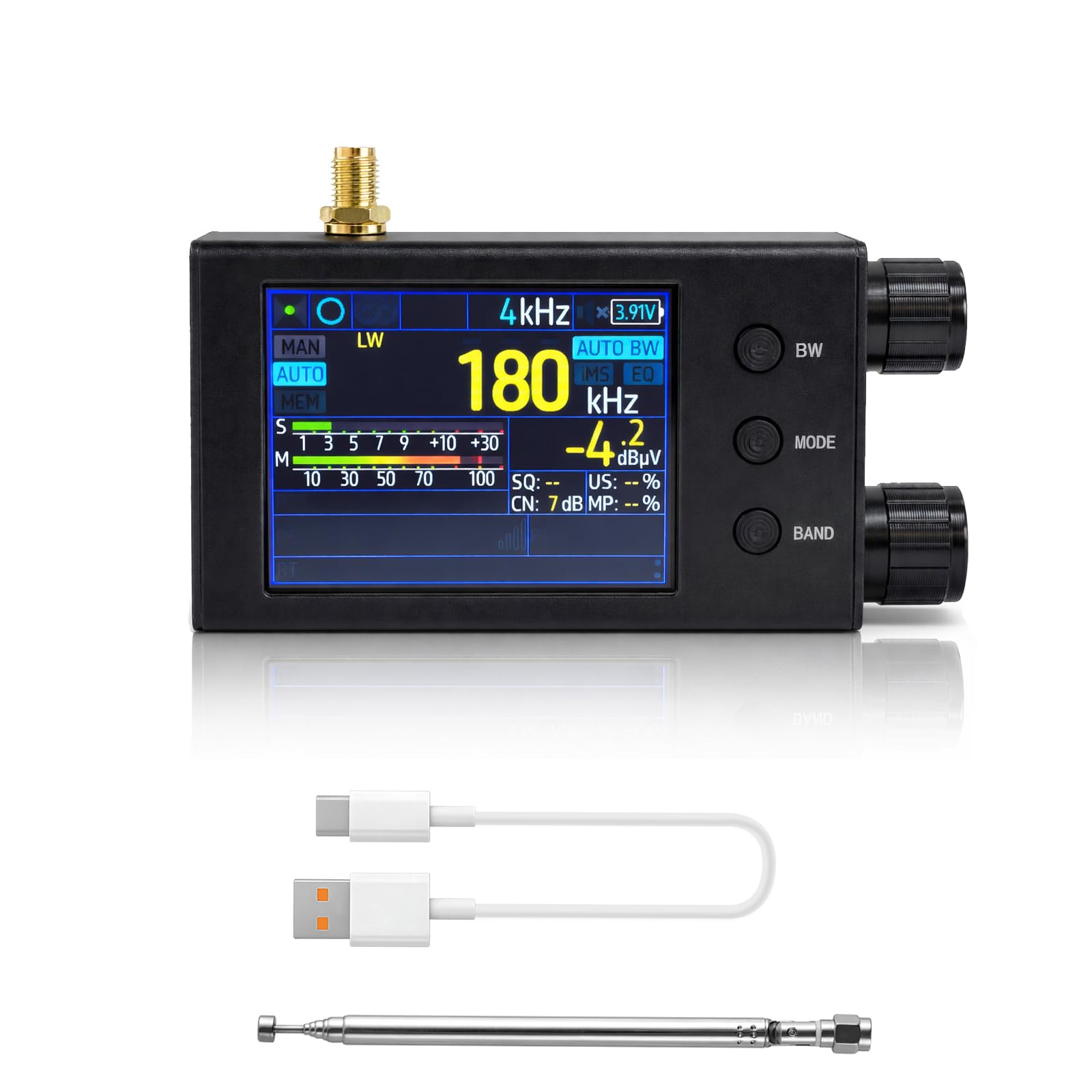
Figure 1: Front View with Antenna. The GOOZEEZOO TEF6686 Pocket Mini Radio V2.2 features a 2.4-inch touchscreen color display. This image shows the front of the radio with its telescopic antenna extended, illustrating its multi-band reception capabilities (FM, AM, SW, LW) and signal strength indicators.

Figure 2: Side View with Ports. This side view highlights the radio's connectivity options, including a 3.5mm headphone jack for private listening, a built-in 4Ω 2W speaker for clear audio output, and a USB-C port for charging and data transfer.

Figure 3: Rotary Knob Functions. The upper rotary knob is used for frequency tuning and adjusting various settings. The lower rotary knob controls power on/off and volume.

Figure 4: Button Functions. The BW button toggles mono/stereo and adjusts bandwidth. The MODE button switches tuning modes and accesses the settings menu. The BAND button changes frequency bands and displays station information.
4. Setup
4.1 Charging the Battery
The TEF6686 radio is powered by a 1000mAh battery. To charge, connect the supplied USB Type-C cable to the radio's USB-C port and a compatible USB power source (e.g., computer, wall adapter). The charging status indicator light will provide feedback. A full charge provides approximately 4-5 hours of continuous use.

Figure 5: Charging the Radio. The radio is shown charging via its USB-C port, emphasizing its 1000mAh battery capacity, which provides approximately 4-5 hours of continuous use. A battery icon and a clock icon with "5H" indicate battery life.
4.2 Connecting the Antenna
Attach the supplied telescopic antenna to the SMA interface on the top of the radio. For enhanced reception, especially on shortwave bands, an external antenna can be connected to this interface.

Figure 6: Antenna Connection. The radio is shown with an external antenna connected to its SMA interface, demonstrating its capability to enhance signal input for improved reception.
5. Operating Instructions
5.1 Power On/Off & Volume Control
- Power On: Rotate the lower rotary knob clockwise until the screen illuminates.
- Power Off: Rotate the lower rotary knob counter-clockwise until it clicks off.
- Volume Adjustment: While powered on, rotate the lower rotary knob to adjust the audio volume.
5.2 Frequency Tuning
- Fine Tuning: Rotate the upper rotary knob to fine-tune the frequency when listening to FM, AM, or SW stations.
- Fast Tuning: Rotate the upper rotary knob quickly for faster frequency changes.
5.3 Band Selection
- Short Press BAND: Toggle between available bands: FM, LW, MW, SW, and OIRT.
5.4 Mode Selection
- Short Press MODE: Switch between manual tuning (MAN), automatic tuning (AUTO), and stored station mode (MEM).
- Long Press MODE: Open the Settings Menu for more advanced features like language settings and system preferences.
5.5 Bandwidth Adjustment
- Short Press BW: Toggle between mono and stereo audio output.
- Long Press BW: Access the bandwidth selection menu. Use the rotary knob to select the desired bandwidth (e.g., 56 kHz to 311 kHz) and press OK to confirm.

Figure 7: Bandwidth Selection. This image illustrates the adjustable bandwidth feature, accessible via the BW button. Users can select various bandwidths from 56 kHz to 311 kHz to optimize reception quality for different stations and signal conditions.
5.6 RDS Functionality
The radio supports full RDS/RBDS decoding, displaying station and program information, AF automatic frequency switching, TA traffic announcements, and RT text display.

Figure 8: RDS Settings. The radio's 2.4-inch touchscreen displays the RDS (Radio Data System) settings menu, allowing users to configure options like RDS error display, region, RT buffering, and auto-sorting of alternative frequencies.
5.7 Settings Menu
Long press the MODE button to enter the settings menu. Here you can customize various aspects of the radio's operation, including display brightness, screensaver time, and multi-language support.
Video 1: Basic Operation and Menu Navigation. This video demonstrates the basic operation of the GOOZEEZOO TEF6686 Pocket Mini Radio V2.2. It shows the power-on sequence, tuning through AM frequencies using the rotary knob, and adjusting the audio bandwidth via the touchscreen menu.
Video 2: Detailed Tuning and Bandwidth Adjustment. This video provides a detailed demonstration of the GOOZEEZOO TEF6686 Pocket Mini Radio V2.2's tuning capabilities. It illustrates how to navigate different frequency bands (FM, MW, SW) and adjust bandwidth settings for optimal audio clarity.
6. Specifications
| Feature | Detail |
|---|---|
| Brand | GOOZEEZOO |
| Model Number | TEF6686 |
| Color | Black |
| Product Dimensions | 45"L x 2.7"W x 1.1"H (115 x 68 x 27 mm) |
| Radio Bands Supported | FM (65-108 MHz), AM (522-1620 kHz), SW (1700-27000 kHz), LW (144-519 kHz) |
| Display Type | LCD (2.4-inch Touchscreen Color Display) |
| Speaker Maximum Output Power | 2 Watts (4Ω 2W speaker) |
| Battery | 1000mAh (1 A battery included) |
| Connectivity Technology | USB Type-C |
| Enclosure Material | CNC Aluminum Alloy |
| Special Feature | Lightweight, Portable, Rechargeable, RDS |
7. Maintenance
- Cleaning: Use a soft, dry cloth to clean the radio's surface. Avoid abrasive cleaners or solvents.
- Storage: Store the radio in a cool, dry place away from direct sunlight and extreme temperatures.
- Battery Care: For optimal battery life, avoid fully discharging the battery frequently. Charge regularly.
- Antenna: Handle the telescopic antenna with care to prevent bending or breakage.
8. Troubleshooting
- No Power: Ensure the battery is charged. Connect the radio to a USB power source.
- Poor Reception: Extend the telescopic antenna fully. Try repositioning the radio or connecting an external antenna. Adjust bandwidth settings in the menu.
- No Audio from Speaker: Check the volume level. If headphones are plugged in, the speaker will be muted.
- Touchscreen Unresponsive: Try restarting the radio. Ensure the screen is clean and dry.
9. Warranty & Support
The GOOZEEZOO TEF6686 Pocket Mini Radio V2.2 comes with a 1-Year Manufacturer Warranty.
For technical support, troubleshooting assistance, or warranty claims, please contact GOOZEEZOO customer service through your purchase platform or visit the official GOOZEEZOO website for contact information.
