
1. Introduction and Overview
The Emliviar Solar Lamp Post Light is an outdoor lighting solution designed for efficiency and convenience. It features solar-powered operation, dusk-to-dawn functionality, and remote control for customizable settings. Constructed with durable materials, it is suitable for various outdoor environments.
Key Features:
- Solar-Powered: Equipped with an efficient solar panel and a 3600mAh/3.7V Li-ion rechargeable battery, providing up to 13 hours of illumination after 8-10 hours of charging.
- Remote Control: Allows for on/off control, brightness adjustment (10% to 100% with 30%, 50%, 80% options), and timer settings (3/5/8 hours).
- Weather Resistant: IP43 waterproof rating, made from durable aluminum and seeded glass, suitable for all-weather outdoor use.
- Integrated LED Bulb: Includes a 2700K LED light bulb (Max 4W). Note: Only compatible with ST64 LED bulbs (ASIN: B0F2HWRPP9).
- Easy Installation: No wiring required, supports both pole mount and pier mount (mounts not included).
2. What's in the Box
- 1 x Post Lamp
- 1 x LED Bulb
- 1 x Remote Control
- 1 x Instruction Manual
- 1 x Installation Accessories Pack
3. Safety Information
- Read all instructions carefully before installation and use.
- Ensure the product is installed in a location that receives ample direct sunlight for optimal charging.
- Do not attempt to modify or disassemble the product beyond what is described in this manual.
- Keep away from open flames or extreme heat sources.
- Dispose of batteries according to local regulations.
4. Setup and Installation
This solar lamp post light is designed for easy, wire-free installation. It can be mounted on a 3.3-inch pole or a 3-inch pier mount base (mounts are not included).
Installation Steps:
- Unpack Components: Carefully remove all items from the packaging.
- Install the LED Bulb: Before mounting, ensure the included LED bulb is securely screwed into the socket.
- Activate the Lamp: Locate the ON/OFF switch, typically found near the bulb socket or under the solar panel. Switch it to the 'ON' position for initial use.
- Mount the Lamp: Secure the lamp head onto your existing 3.3-inch pole or 3-inch pier mount base using the provided installation accessories. Ensure it is stable and upright.
- Position for Sunlight: Place the installed lamp in a location that receives maximum direct sunlight throughout the day for optimal charging.
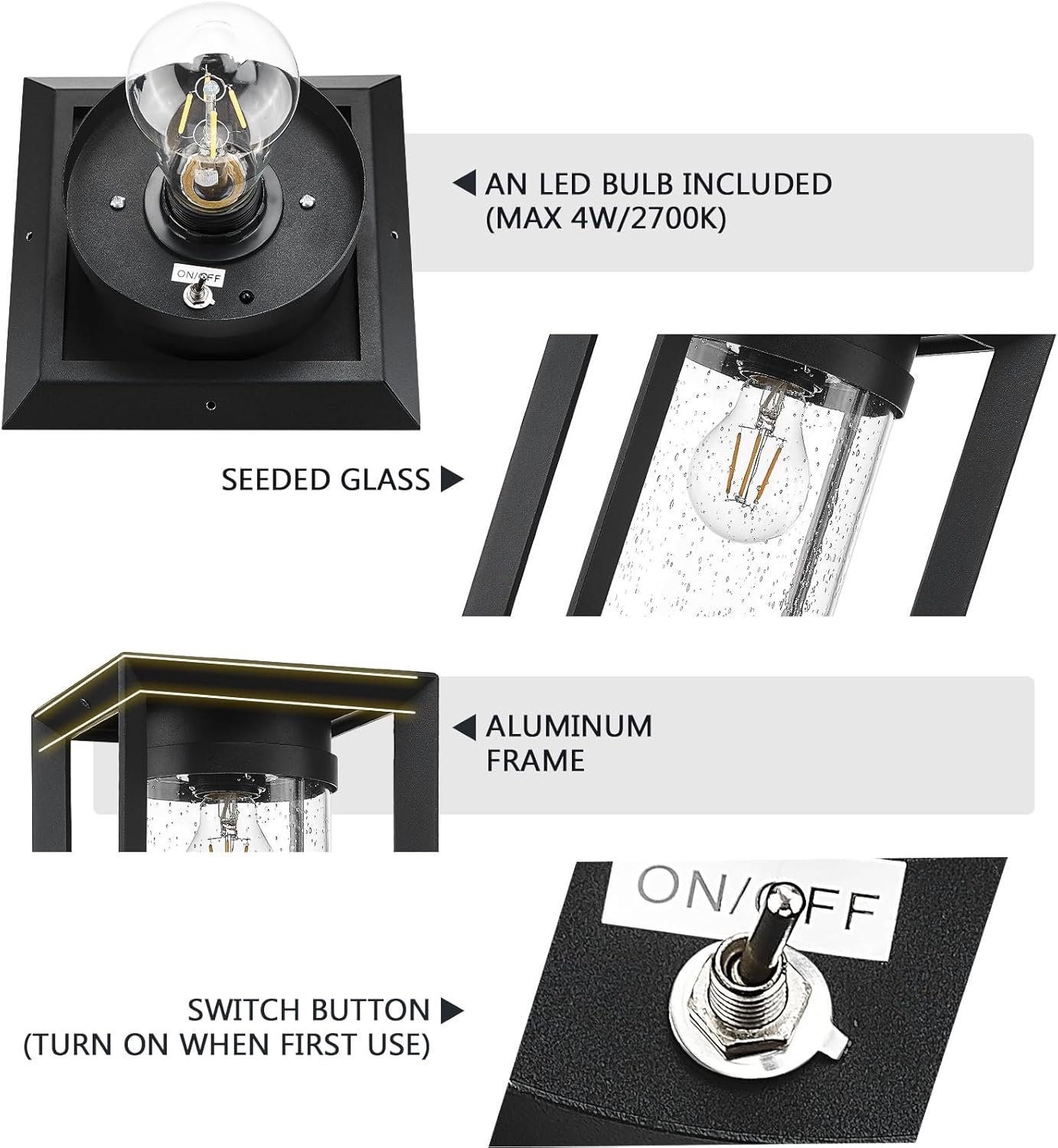
Figure 1: Internal components and ON/OFF switch. Ensure the switch is ON before first use.
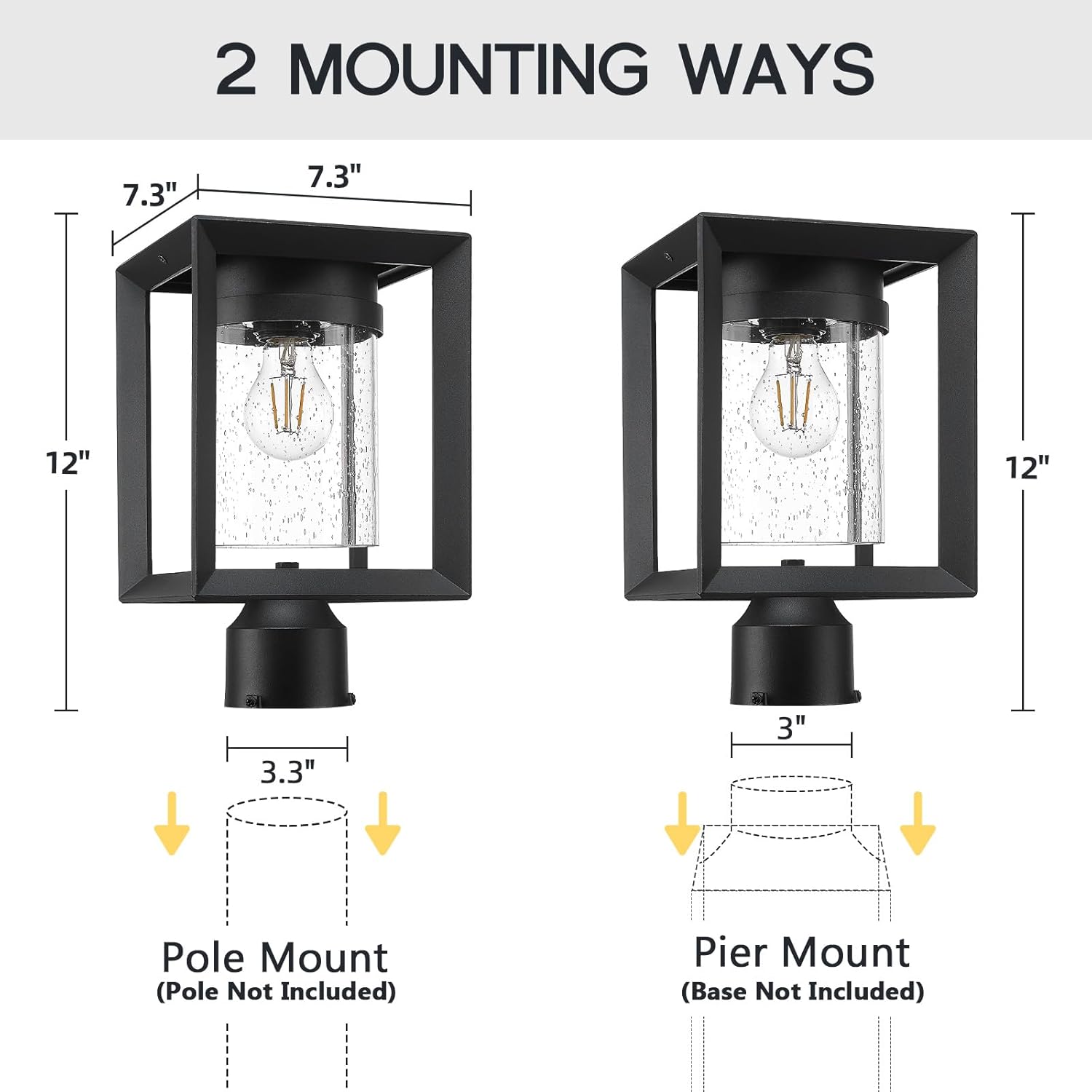
Figure 2: Pole mount and pier mount options. Compatible with 3.3-inch pole or 3-inch post mount base (not included).
Video 1: Official Emliviar video demonstrating the installation and features of the YXE311P-SL BK solar post light.
5. Operating Instructions
Once installed and charged, the Emliviar Solar Lamp Post Light operates automatically from dusk to dawn. The included remote control provides additional functionality.
Remote Control Functions:
- ON/OFF: Press to manually turn the light on or off.
- Brightness Adjustment: Use the '+' and '-' buttons to adjust brightness from 10% to 100%. Dedicated buttons for 30%, 50%, and 80% brightness are also available.
- Timer Settings: Set the light to turn off automatically after 3, 5, or 8 hours.

Figure 3: Remote control functions for brightness and timer settings.
6. Maintenance
To ensure optimal performance and longevity of your solar lamp post light, follow these maintenance guidelines:
- Clean Solar Panel: Regularly wipe the solar panel with a soft, damp cloth to remove dust, dirt, or debris. A clean panel ensures efficient charging.
- Clean Glass: Clean the seeded glass enclosure periodically to maintain light output and aesthetic appeal.
- Inspect for Damage: Periodically check the lamp for any signs of physical damage or wear.
- Battery Care: The integrated Li-ion battery is designed for long-term use. If the light performance significantly degrades over time, it may indicate the battery needs replacement (consult manufacturer for service).
7. Troubleshooting
If your Emliviar Solar Lamp Post Light is not functioning as expected, consider the following common issues and solutions:
- Light does not turn on at night:
- Ensure the ON/OFF switch is in the 'ON' position.
- Verify the solar panel is receiving at least 8-10 hours of direct sunlight daily. Relocate if necessary.
- Check for obstructions (e.g., leaves, dirt) on the solar panel and clean it.
- Confirm the LED bulb is securely screwed in.
- Light is dim or only stays on for a short period:
- The battery may not be fully charged. Ensure adequate direct sunlight exposure for several days.
- Environmental factors like heavy cloud cover or short winter days can reduce charging efficiency.
- If using the remote, check if a lower brightness setting or timer is activated.
- Remote control not working:
- Ensure there are no obstructions between the remote and the lamp.
- Check and replace the remote control battery if needed.
8. Specifications
| Feature | Detail |
|---|---|
| Brand | Emliviar |
| Model Number | YXE311P-SL BK |
| Dimensions (L x W x H) | 7.3" x 7.3" x 12" |
| Material | Aluminum, Glass |
| Finish Type | Matte Black |
| Power Source | Solar Powered |
| Battery Capacity | 3600mAh/3.7V Li-ion |
| Charging Time | 8-10 hours (direct sunlight) |
| Illumination Time | Up to 13 hours |
| Light Source | LED (2700K Warm White, Max 4W) |
| Bulb Base | E26 (compatible only with ST64 LED bulbs) |
| Brightness | 400 Lumens |
| Control Method | Remote Control |
| Water Resistance Level | IP43 (Water Resistant) |
| Installation Type | Freestanding (Pole/Pier Mount) |
| Required Assembly | No |
9. Warranty and Support
This Emliviar product comes with a 1-year manufacturer's warranty from the date of purchase. This warranty covers defects in materials and workmanship under normal use.
For warranty claims, technical support, or any questions regarding your product, please contact Emliviar customer service through their official website or the retailer where the product was purchased. Please have your model number (YXE311P-SL BK) and proof of purchase ready.