
1. Important Safety Instructions
Always follow basic safety precautions when using electrical tools to reduce the risk of fire, electric shock, and personal injury.
- Read the entire manual: Understand all instructions and warnings before operating the scroll saw.
- Wear eye protection: Always wear safety glasses or goggles.
- Secure workpiece: Ensure the material being cut is stable and properly supported.
- Keep hands clear: Never place hands or fingers near the blade while the saw is operating.
- Unplug before adjustments: Disconnect the power cord before changing blades, making adjustments, or performing maintenance.
- Maintain a clean workspace: Cluttered areas and benches invite accidents.
- Avoid accidental starting: Ensure the switch is in the OFF position before plugging in the tool.
- Use the right tool: Do not force the tool or attachment to do a job for which it was not designed.
- Do not overreach: Keep proper footing and balance at all times.
- Store idle tools: When not in use, tools should be stored in a dry, high, or locked-up place, out of reach of children.
- Check for damaged parts: Before further use of the tool, a guard or other part that is damaged should be carefully checked to determine that it will operate properly and perform its intended function.
2. Product Overview and Components
The KOKEBREN 16-Inch Scroll Saw is designed for precision cutting in various materials such as wood, acrylic, and plastics. It features a tilting table, adjustable speed, and an integrated LED light for enhanced visibility.

Figure 2.1: Overall view of the KOKEBREN 16-Inch Scroll Saw. This image shows the complete scroll saw unit, highlighting its red body, gray tilting table, flexible LED work light, and the clear blade guard.
Key Features:
- Versatile Tilting Surface: The 415×250mm steel table can tilt from 0-45°, allowing for precise angled cuts.
- Clear Illumination System: An integrated LED light brightens the work area for improved visibility and accuracy.
- Debris Control Setup: A built-in dust port helps keep the workspace clean by minimizing sawdust and debris.
- Flexible Speed Settings: The motor offers variable speeds from 500-1600 SPM, adjustable for different material types.
- Reliable Cutting Performance: Engineered for smooth, vibration-free operation, suitable for intricate designs.
Component Identification:
- Blade Guard: Clear plastic guard protecting the blade area.
- Hold-Down Foot: Secures the workpiece against the table.
- Blade Tension Knob: Adjusts the tension of the scroll saw blade.
- Tilting Table: Work surface that can be angled.
- Angle Scale and Lock: Indicates the table tilt angle and secures it.
- ON/OFF Switch: Power control for the saw.
- Variable Speed Control Knob: Adjusts the strokes per minute (SPM).
- Dust Port: Connection point for a dust collection system.
- LED Work Light: Flexible light for illuminating the cutting area.

Figure 2.2: Detail of the blade area, showing the blade, hold-down foot, and clear blade guard. This view emphasizes the precision components for cutting.
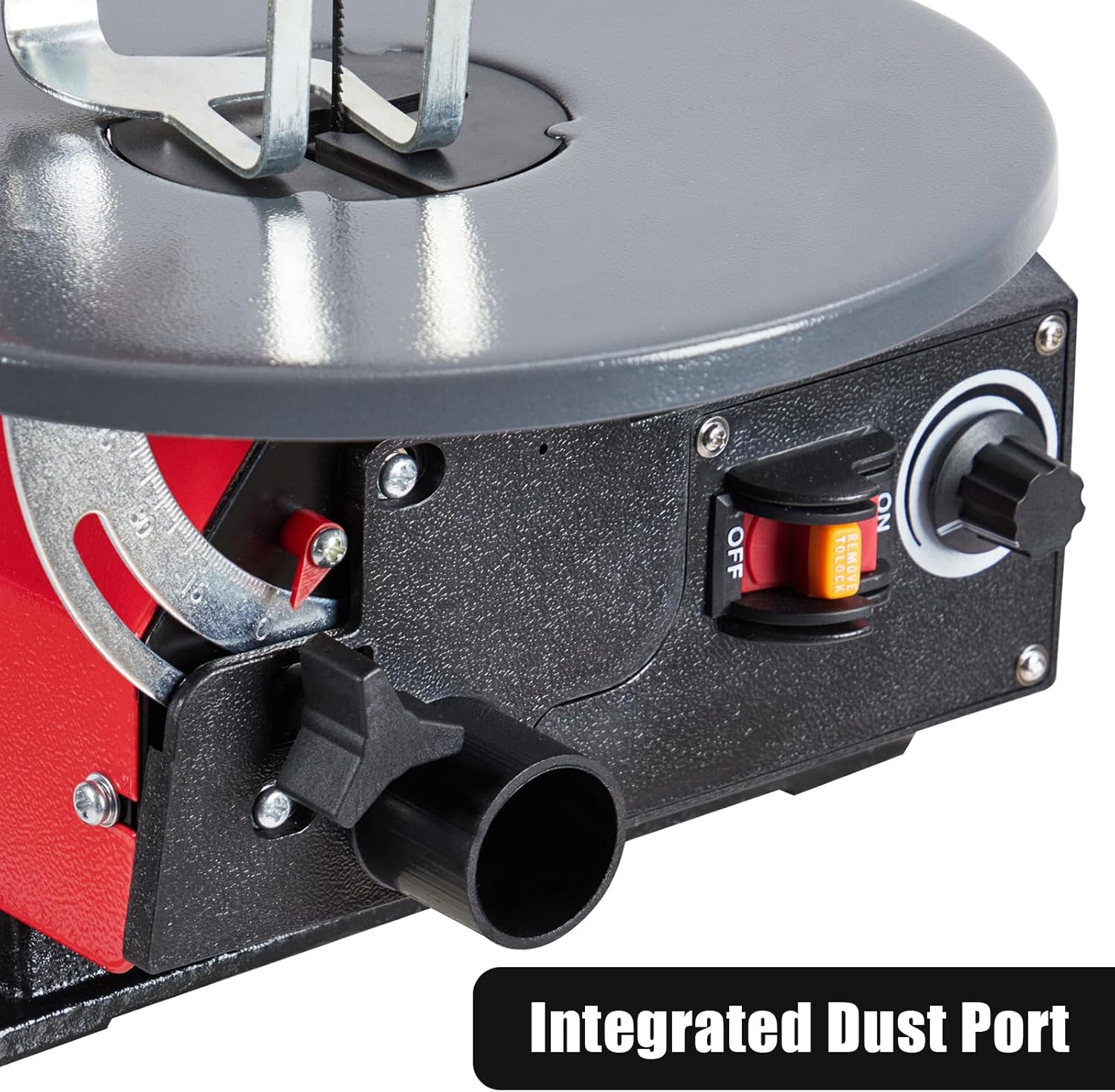
Figure 2.3: View of the integrated dust port and variable speed control knob. This image highlights the debris management and speed adjustment features.

Figure 2.4: The scroll saw with its table tilted, demonstrating the adjustable angle feature for bevel cuts. The LED light is also visible.

Figure 2.5: A hand adjusting the variable speed control knob, illustrating the ease of changing cutting speed. The ON/OFF switch is also shown.
3. Technical Specifications
| Feature | Specification |
|---|---|
| Brand | KOKEBREN |
| Model Number | ABpMpBjKgCas9v8C0PYuRg3zgifi |
| Blade Material | Stainless Steel |
| Surface Recommendation | Wood, Acrylic, Plastics (Note: Original data listed "Metal" which is incorrect for a scroll saw, corrected to common scroll saw materials) |
| Power Source | Corded Electric |
| Included Components | Case (as per product data) |
| Product Dimensions (L x W x H) | 25.98" x 12.99" x 14.37" |
| Item Weight | 26.01 Pounds |
| Table Tilt Range | 0-45° |
| Variable Speed | 500-1600 SPM (Strokes Per Minute) |
| UPC | 199641635020 |
4. Setup Guide
Before operating your KOKEBREN Scroll Saw, ensure it is properly set up and secured.
4.1 Unpacking and Assembly
- Carefully remove all components from the packaging.
- Inspect the saw for any shipping damage. If damage is found, do not operate and contact customer support.
- Place the scroll saw on a stable, level workbench. It is recommended to bolt the saw to the workbench for maximum stability and reduced vibration during operation.
- Attach the LED work light by inserting its base into the designated slot and tightening any securing screws. Adjust the flexible arm to your preferred position.
4.2 Blade Installation
Always ensure the saw is unplugged before installing or changing blades.
- Loosen the blade tension knob to release any existing blade tension.
- Open the blade clamp on the upper and lower arms.
- Insert the new scroll saw blade into the lower blade clamp, ensuring the teeth are pointing downwards towards the table. Tighten the clamp securely.
- Thread the blade through the hole in the work table.
- Attach the upper end of the blade into the upper blade clamp and tighten securely.
- Adjust the blade tension knob until the blade is taut but not overly stressed. A properly tensioned blade will produce a clear "ping" sound when plucked.
- Lower the blade guard and adjust the hold-down foot so it rests gently on the workpiece surface when the blade is at its lowest point.

Figure 4.1: Detail of the blade installation area, showing the blade, hold-down foot, and table opening. Proper blade orientation is crucial for effective cutting.
5. Operating Instructions
Familiarize yourself with the controls and practice on scrap material before beginning your project.
5.1 Basic Operation
- Connect Power: Plug the scroll saw into a grounded electrical outlet.
- Adjust LED Light: Position the flexible LED light to illuminate your cutting line.
- Turn On: Flip the ON/OFF switch to the "ON" position.
- Adjust Speed: Rotate the variable speed control knob to select the appropriate SPM for your material. Slower speeds are generally for thicker or harder materials, while faster speeds are for thinner or softer materials.
- Begin Cutting: Gently feed the workpiece into the blade. Do not force the material; allow the blade to cut at its own pace. Guide the material smoothly along your desired cutting line.
- Turn Off: When finished, flip the ON/OFF switch to the "OFF" position and wait for the blade to come to a complete stop before removing the workpiece or making adjustments.

Figure 5.1: A user demonstrating the operation of the scroll saw, carefully guiding a wooden workpiece. This illustrates proper hand placement and focus during cutting.
5.2 Tilting Table Operation
The tilting table allows for bevel cuts at angles from 0° to 45°.
- Unplug the saw.
- Locate the table lock knob and angle scale beneath the table.
- Loosen the table lock knob.
- Carefully tilt the table to the desired angle, referencing the angle scale.
- Once the desired angle is set, tighten the table lock knob securely.
- Ensure the blade guard and hold-down foot are adjusted appropriately for the new table angle and workpiece thickness.
Figure 5.2: The scroll saw with its table tilted, demonstrating the adjustable angle feature for bevel cuts. The angle scale is visible for precise adjustments.
5.3 Using the Dust Port
For a cleaner workspace and improved visibility, connect a shop vacuum or dust collection system to the integrated dust port.
- Attach a standard vacuum hose to the dust port located on the side of the saw.
- Turn on your dust collection system before operating the scroll saw.

Figure 5.3: A close-up view of the integrated dust port, ready for connection to a dust collection system. This feature helps maintain a clean work area.
6. Maintenance
Regular maintenance ensures the longevity and optimal performance of your scroll saw. Always unplug the tool before performing any maintenance.
- Cleaning: After each use, clear sawdust and debris from the table, blade area, and motor vents using a brush or compressed air. Do not use solvents that could damage plastic parts.
- Blade Replacement: Replace dull or broken blades promptly. Refer to Section 4.2 for blade installation instructions.
- Lubrication: Periodically apply a small amount of light machine oil to moving parts, such as the blade arms and pivot points, to ensure smooth operation. Avoid lubricating the motor.
- Cord Inspection: Regularly inspect the power cord for any signs of damage, cuts, or fraying. Replace damaged cords immediately.
- Table Waxing: Apply a thin coat of paste wax to the work table periodically to reduce friction and prevent rust.
7. Troubleshooting
This section addresses common issues you might encounter with your scroll saw. For problems not listed here, contact customer support.
| Problem | Possible Cause | Solution |
|---|---|---|
| Saw does not start | No power; ON/OFF switch not engaged; faulty power cord. | Check power connection and outlet; ensure switch is ON; inspect power cord for damage. |
| Blade breaks frequently | Incorrect blade tension; forcing workpiece; wrong blade type for material; dull blade. | Adjust blade tension; reduce feeding pressure; use appropriate blade; replace dull blade. |
| Rough or uneven cuts | Dull blade; incorrect speed setting; excessive feeding pressure. | Replace blade; adjust speed; reduce feeding pressure. |
| Excessive vibration | Saw not securely mounted; loose components; unbalanced blade. | Ensure saw is bolted to workbench; check all fasteners; replace blade if bent. |
| Dust accumulation | Dust port not connected; dust collection system off or clogged. | Connect dust collection; turn on system; clear any clogs. |
8. Warranty and Customer Support
KOKEBREN products are manufactured to high-quality standards. For warranty information, please refer to the documentation included with your purchase or visit the official KOKEBREN website.
If you require assistance, have questions about your scroll saw, or need to order replacement parts, please contact KOKEBREN customer support:
- Website: www.kokebren.com (Hypothetical link)
- Email: support@kokebren.com (Hypothetical email)
- Phone: 1-800-XXX-XXXX (Hypothetical number)
Please have your model number (ABpMpBjKgCas9v8C0PYuRg3zgifi) and purchase date available when contacting support.