
1. Introduction
Thank you for choosing the EWEADN F61 60% Wired RGB Backlit Gaming Keyboard. This compact keyboard is designed for efficiency and performance, offering a comfortable typing experience with vibrant RGB lighting. This manual provides essential information for setting up, operating, and maintaining your new keyboard.
2. Package Contents
- EWEADN F61 60% Gaming Keyboard
- Detachable Type-C USB Cable
- User Manual
3. Setup
- Connect the Cable: Locate the Type-C port on the keyboard. Connect the detachable Type-C USB cable to the keyboard and the other end (USB-A) to an available USB port on your computer (PC, laptop, Mac) or compatible device (phone, tablet).

Image: Connecting the detachable Type-C USB cable to the keyboard for a stable, low-latency connection.
- Plug and Play: The keyboard is plug-and-play compatible with Windows and Mac dual systems. No additional drivers are typically required. Your computer should automatically recognize the device.
- Adjust Ergonomics: Flip out the dual-layer feet on the underside of the keyboard to adjust the typing angle for comfort. There are two angle options: 7 degrees and 15 degrees.

Image: The underside of the keyboard showing the dual-layer feet that can be adjusted for preferred typing angles.
4. Operation
4.1 RGB Lighting Control
The EWEADN F61 keyboard features vibrant RGB backlighting with multiple effects and brightness levels. Use the following key combinations to customize your lighting:
- FN + Backspace: Switch backlight On/Off.
- FN + INS: Switch between 6 different lighting effects.
- FN + PGUP/PGDN: Adjust light brightness (5 levels).
- FN + O/L: Adjust light speed.
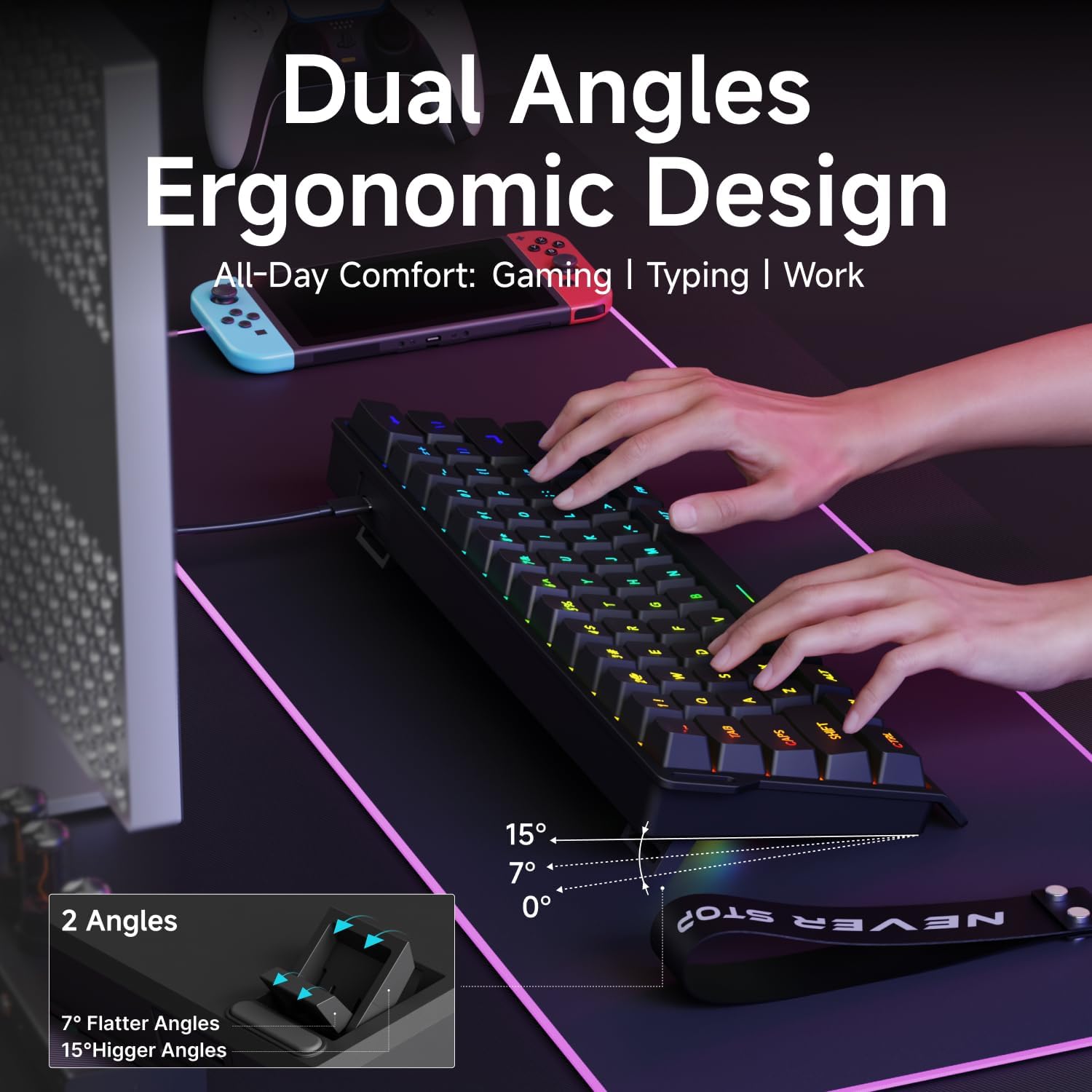
Image: The EWEADN F61 keyboard showcasing its 8 constant backlights and 5 dynamic lighting effects.
4.2 Function Key Combinations
Due to its 60% compact design, many functions are accessed via the 'FN' key in combination with other keys. Refer to the table below for common shortcuts:
| Key Combination | Function |
|---|---|
| FN + WIN | Lock Windows Key |
| FN + R | Print Screen |
| FN + T | Pause |
| FN + Y | Insert |
| FN + U | Home |
| FN + I | End |
| FN + Z | Previous Track |
| FN + X | Next Track |
| FN + C | Stop |
| FN + V | Play/Pause |
| FN + B | Volume Down |
| FN + N | Volume Up |
| FN + M | Mute |
| FN + Backspace | Delete |
5. Features
- Compact 60% Design: The F61 features a space-saving layout, retaining essential keys while minimizing footprint. This makes it ideal for gaming, office use, or travel, freeing up desk space.

Image: Visual comparison highlighting the 60% compact design of the EWEADN F61 keyboard, saving significant desk space.
- Wired Connection: Connects via a detachable Type-C cable, ensuring a stable, continuous, and ultra-low input delay. This wired connection is reliable for competitive gaming and precise typing.
Video: Demonstrates the wired connection of the EWEADN F61 60% RGB Backlit Gaming Keyboard, highlighting its plug-and-play functionality and compatibility.
- RGB Backlighting: Offers 6 backlight effects and 5 brightness levels. Dual-layer injection PBT keycaps ensure characters are bright, translucent, and resistant to fading, enhancing visibility in dark environments.
Video: Showcases the vibrant RGB lighting and clear keycaps of the EWEADN F61 keyboard, ideal for dark environments.
- Ergonomic Design & Mechanical Feel: Designed for comfortable extended use, fitting perfectly to your fingertips. Advanced mechanical-like technology provides a satisfying typing feel while maintaining the quietness of a membrane keyboard.

Image: An illustration demonstrating the dual ergonomic angles (7° and 15°) of the EWEADN F61 keyboard for enhanced comfort during use.
- Wide Compatibility: Supports WIN & MAC dual systems, connecting to laptops, PCs, mobile phones, and tablets. Its portable size makes it easy to carry.
Video: Highlights the compact 60% design of the EWEADN F61, emphasizing its space-saving benefits and portability for gaming and travel.
6. Specifications
| Feature | Detail |
|---|---|
| Model Number | F61 |
| Connectivity Technology | USB-C (Wired) |
| Keyboard Description | Membrane |
| Keycap Material | PBT (Dual-Layer Injection) |
| Backlighting | RGB (6 effects, 5 brightness levels) |
| Compatible Devices | Laptop, PC, Phone, Tablet |
| Operating Systems | Windows, Mac |
| Item Weight | 1.3 pounds |
| Package Dimensions | 13.39 x 6.34 x 1.85 inches |
| Material | Metal, Plastic |
7. Maintenance
- Cleaning: Use a soft, dry cloth to wipe the keyboard surface. For deeper cleaning, use compressed air to remove dust and debris from between the keycaps. Avoid using harsh chemicals or abrasive materials.
- Cable Care: Handle the detachable Type-C cable with care. Avoid sharp bends or excessive pulling to prevent damage.
- Storage: When not in use, store the keyboard in a clean, dry place away from extreme temperatures and direct sunlight.
8. Troubleshooting
- Keyboard Not Responding:
- Ensure the USB-C cable is securely connected to both the keyboard and the computer.
- Try connecting the keyboard to a different USB port on your computer.
- Test the keyboard on another computer to rule out a computer-specific issue.
- RGB Lights Not Working/Incorrect:
- Press FN + Backspace to ensure the backlight is turned on.
- Use FN + INS to cycle through different lighting effects.
- Adjust brightness with FN + PGUP/PGDN.
- Specific Keys Not Working:
- Check for any physical obstructions under the keycap.
- Ensure the keyboard is clean and free of debris.
9. Warranty and Support
The EWEADN F61 keyboard comes with a 360-day manufacturer's warranty.
For any questions, troubleshooting assistance, or support, please contact us via email:
Email Support: eweadnkeyboard@outlook.com


