
1. Introduction
The Sofirn HS21 is a high-performance, rechargeable headlamp designed for a wide range of outdoor and work activities. It features multiple lighting modes, including a powerful spot beam, a wide floodlight, and a red light option, delivering up to 2200 lumens of brightness. Built with durability and user convenience in mind, the HS21 is waterproof and impact-resistant, making it a reliable companion for hiking, camping, fishing, hunting, and emergency situations.

Image: Sofirn HS21 Headlamp overview highlighting key features like 2200 lumens, USB-C charging, and 230-meter beam distance.
2. Package Contents
Please check the package for the following items:
- 1 x Sofirn HS21 Headlamp (battery included)
- 1 x Headband
- 1 x USB-C Charging Cable
- 1 x User Manual

Image: Illustration of the Sofirn HS21 package contents, including the headlamp, headband, USB-C charging cable, and user manual.
3. Product Overview
The HS21 headlamp is engineered for versatility and robust performance. It integrates multiple light sources and intuitive controls for various lighting needs.
Components
- Adjustable Headband: For comfortable and secure fit.
- Push-Touch Switch: Controls power and brightness levels.
- Rotary Switch: Selects between different lighting modes (Red, Spot, Flood, Spot & Flood).
- USB-C Charging Port: For convenient and fast recharging.
- Full Metal Body: Ensures durability and heat dissipation.
- TIR Lens: For efficient light distribution.
- LEDs: Features 3 red LEDs, 6 x 5000K LEDs (for floodlight), and 1 x 6000-6500K LED (for spotlight).

Image: Exploded view of the Sofirn HS21 headlamp, detailing its various components and their functions.
Key Features
- Multi-functional Output: Spot, flood, and red light modes, with a combined output of up to 2200 lumens.
- Red Light: Three red LEDs help preserve night vision and reduce insect attraction.
- USB-C Rechargeable: Built-in USB-C port for quick and convenient charging.
- Durable Construction: Made from aerospace-grade aluminum alloy, IP66 waterproof, and 1-meter impact resistant.
- Rotary Switch: Easy and intuitive switching between light modes.
- Motion Sensor: Equipped with a motion sensor for hands-free operation (specific operation details not provided, refer to product packaging for advanced features).
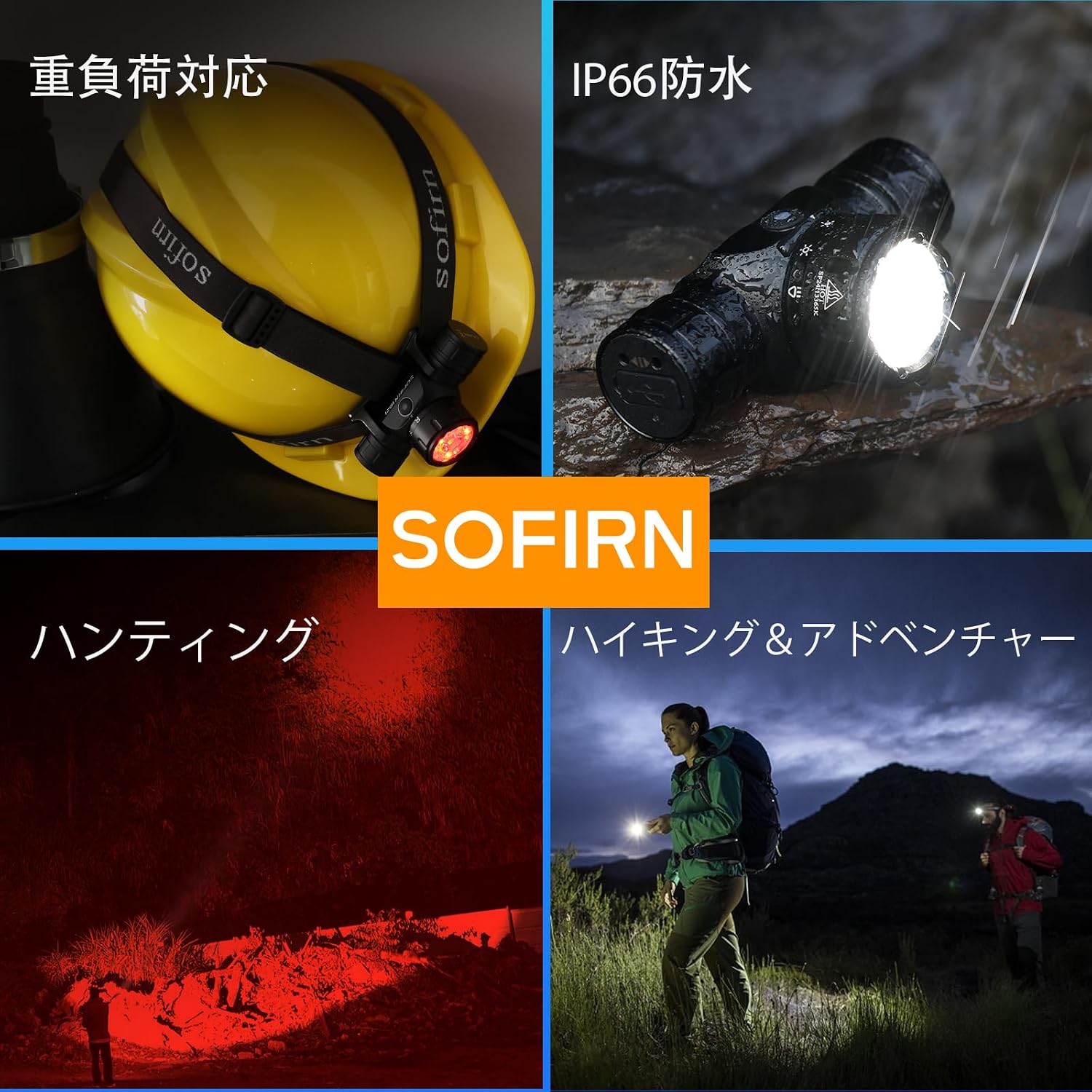
Image: The Sofirn HS21 headlamp showcasing its robust design, IP66 waterproof rating, and versatility for activities like hunting and hiking.
4. Setup
4.1 Initial Charging
Before first use, fully charge the headlamp. Connect the supplied USB-C cable to the headlamp's charging port and to a USB power source. The indicator light will show charging status (see Section 6 for details).
4.2 Attaching the Headband
Thread the adjustable headband through the designated slots on the headlamp holder. Adjust the strap to ensure a comfortable and secure fit on your head or helmet.

Image: The Sofirn HS21 headlamp demonstrating its 130-degree adjustable angle for optimal light direction and ergonomic design for comfortable wear.
5. Operation
5.1 Power On/Off
Press and hold the push-touch switch for approximately 0.5 seconds to turn the headlamp ON or OFF.
5.2 Mode Switching (Rotary Switch)
Rotate the rotary switch on the side of the headlamp to cycle through the main lighting modes:
- Red Light: Ideal for preserving night vision and minimizing disturbance.
- Spotlight: Concentrated beam for long-distance illumination.
- Floodlight: Wide, even beam for close-range and peripheral vision.
- Spot & Flood Combined: Maximum brightness and coverage.

Image: The Sofirn HS21 headlamp illustrating the rotary switch mechanism for changing between different light modes.

Image: Visual representation of the rotary switch and the distinct illumination patterns for red light, spotlight, floodlight, and combined modes.
5.3 Brightness Adjustment (Push-Touch Switch)
While the headlamp is ON, short press the push-touch switch to cycle through brightness levels (Low, Mid, High, Turbo) within the currently selected mode. The headlamp will remember the last used brightness level for each mode.

Image: The push-touch switch on the Sofirn HS21 headlamp, illustrating how to adjust brightness levels.
5.4 Red Light Function
The dedicated red light mode (activated via the rotary switch) is designed to protect your night vision and is less disruptive to wildlife. It is particularly useful for night fishing, stargazing, or any activity where maintaining dark adaptation is crucial.

Image: The Sofirn HS21 headlamp emitting 620nm red light, demonstrating its effectiveness in preserving night vision and being suitable for outdoor activities.
5.5 Motion Sensor (If applicable)
The Sofirn HS21 is equipped with a motion sensor for hands-free operation. Please refer to the specific instructions on the product packaging or manufacturer's website for details on how to activate and use this feature, as its operation may vary.
6. Charging
The HS21 headlamp features a built-in USB-C charging port for convenient recharging. Use the provided USB-C cable to connect the headlamp to any standard USB power adapter (e.g., phone charger, power bank, computer USB port).
6.1 Charging Indicator
The power indicator light provides feedback on the battery status and charging process:
- Green Light (Solid): 60% - 100% battery remaining.
- Red Light (Solid): 20% - 60% battery remaining.
- Red Light (Flashing): Less than 20% battery remaining.
- During charging, the indicator will show the current battery level. It will turn solid green when fully charged.

Image: The Sofirn HS21 headlamp connected via its USB-C port for charging, indicating the charging process.

Image: The smart power indicator on the Sofirn HS21, displaying battery status with different light colors and patterns.
7. Maintenance
- Cleaning: Wipe the headlamp with a clean, soft cloth. For stubborn dirt, use a slightly damp cloth. Do not use harsh chemicals or abrasive materials.
- Storage: Store the headlamp in a cool, dry place away from direct sunlight and extreme temperatures. If storing for an extended period, charge the battery every 3-6 months to maintain battery health.
- Water Resistance: While the HS21 is IP66 waterproof, avoid prolonged submersion in water. Ensure the USB-C port cover is securely closed to prevent water ingress.
8. Troubleshooting
- Headlamp not turning on:
- Ensure the battery is charged.
- Check if the battery is correctly inserted (if removable).
- Press and hold the power button for 0.5 seconds.
- Light is dim or flickering:
- The battery may be low. Recharge the headlamp.
- Ensure the lens is clean.
- Charging not working:
- Check the USB-C cable and power adapter for damage.
- Ensure the cable is fully inserted into both the headlamp and the power source.
- Try a different USB-C cable or power adapter.
9. Specifications
| Feature | Detail |
|---|---|
| Brand Name | Sofirn |
| Model Number | HS21 (SFHS210728) |
| Color | Black |
| Max Output | 2200 Lumens |
| Product Dimensions | 36D x 36W x 65H mm (6.5L x 3.6W x 3.6H cm) |
| Battery Type | Lithium Polymer |
| Number of Batteries | 1 (included) |
| Included Components | USB Cable |
| Waterproof Rating | IP66 |
| Impact Resistance | 1 Meter |
| Country of Origin | China |
| ASIN | B0FKG5FTVR |
10. Safety Information
- Do not shine the light directly into eyes, as it can cause temporary vision impairment.
- Keep out of reach of children.
- Do not disassemble the headlamp; this may void the warranty and cause damage.
- Use only the recommended charging cable and power sources.
- Avoid exposing the headlamp to extreme heat or open flames.
11. Warranty and Support
For warranty information and customer support, please refer to the documentation included with your product or visit the official Sofirn website. Keep your purchase receipt as proof of purchase.


