Introduction
This manual provides detailed instructions for the setup, operation, and maintenance of your eufy Baby Monitor E20 Add-On Camera. Designed for comprehensive monitoring, this camera offers 2K HD resolution, extensive pan and tilt capabilities, 4x digital zoom, and reliable night vision. Its built-in 5000mAh battery ensures portability and continuous operation, even without a constant power source. The camera supports both Wi-Fi and local connections for flexible monitoring options.
What's in the Box
Your eufy Baby Monitor E20 Add-On Camera package includes the following items:
- eufy Baby Monitor E20 Add-On Camera
- Power Adapter
- USB-C Charging Cable
- Wall Mount Bracket
- Mounting Screws and Wall Anchors
- Positioning Sticker
- Quick Start Guide

Image: The eufy Baby Monitor E20 Add-On Camera shown with its included accessories, including the camera unit, power adapter, USB-C cable, and mounting hardware.
Product Features
2K HD Resolution with Pan & Tilt
Experience crystal-clear 2K HD video quality, allowing you to see every detail of your baby. The camera features a 330° horizontal pan and 60° vertical tilt, providing extensive coverage of the room. Combined with 4x digital zoom, you can closely monitor your child's activities.

Image: The eufy Baby Monitor E20 camera providing a clear 2K HD view of a baby sleeping in a crib, demonstrating its detailed monitoring capabilities day and night.
Hybrid Monitoring & Split-Screen Functionality
The monitor offers flexible connectivity, allowing you to check on your baby from anywhere at home with or without Wi-Fi. Stay connected through the app and share access with up to 5 family members. If you have multiple cameras (sold separately), you can monitor both simultaneously using the split-screen feature on the parent unit.
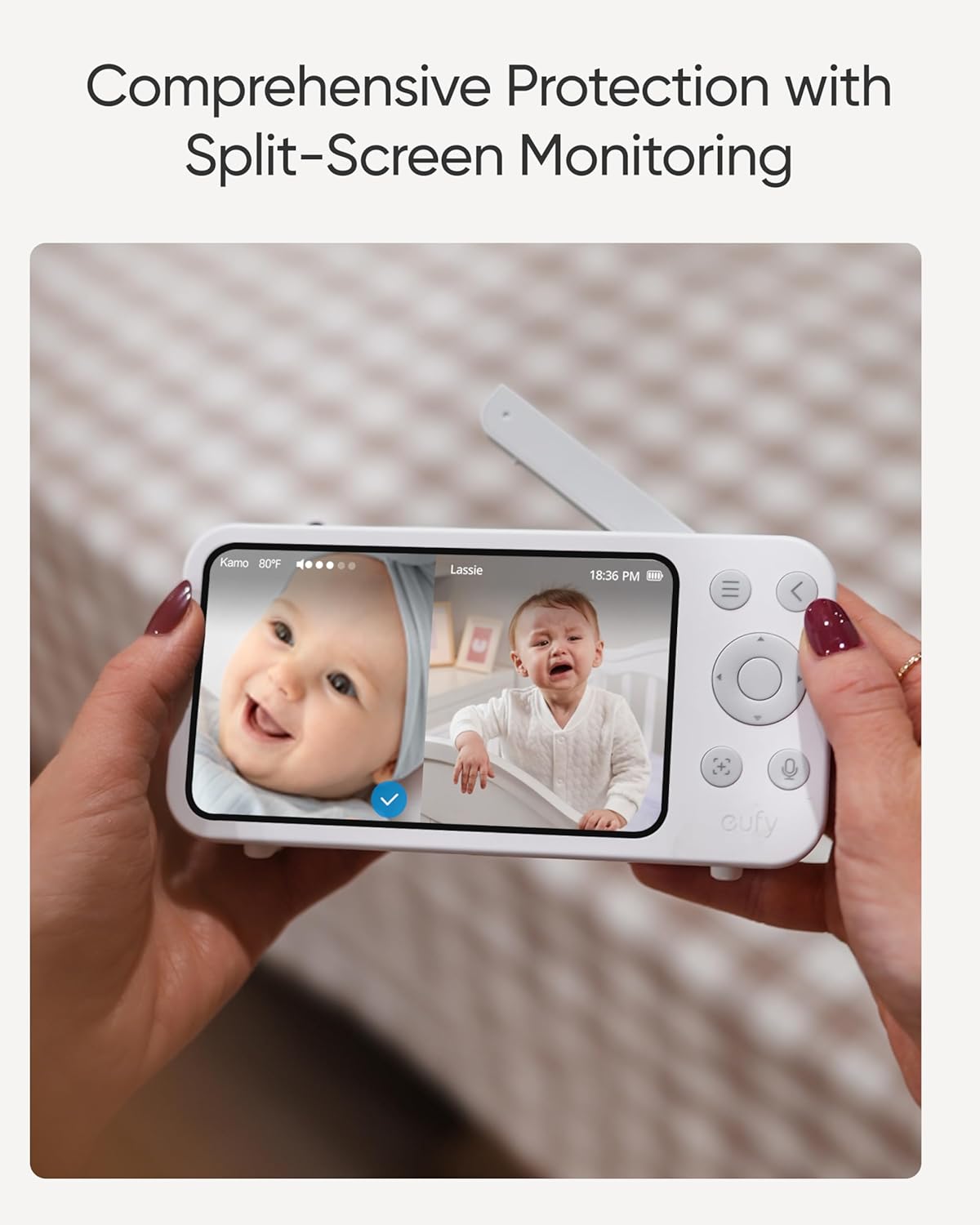
Image: The eufy Baby Monitor E20 parent unit displaying a split-screen view, showing two different babies in their cribs, highlighting the comprehensive protection feature.
Portable with Built-in Battery
Equipped with a 5000mAh built-in battery, the camera can be easily moved around your home or taken on trips. This ensures continuous monitoring even during power outages or when traveling to locations without readily available power outlets.

Image: The eufy Baby Monitor E20 camera being held in a hand and then placed on a table, illustrating its portability and ease of use for travel or moving around the house.
Enhanced Privacy and Security
A dedicated switch allows you to cut off Wi-Fi for a secure, private local connection. With RSA-1024 and AES-128 encryption, your data is protected from unauthorized access. Recordings can be saved to a local SD card (not included) for absolute peace of mind.

Image: The eufy Baby Monitor E20 camera with a close-up on its Wi-Fi off switch, emphasizing its full privacy and security features.
Noiseless Smart Monitoring
The camera incorporates active noise reduction technology, reducing background noise by 20 dB for clearer audio. It also supports 24/7 recording via the app to help identify any sleep patterns or issues.
Setup Guide
Initial Setup and Pairing
- Charge the Devices: Connect both the camera and the parent unit to their respective power adapters and charge them fully before first use.
- Power On: Press and hold the power button on both the camera and the parent unit to turn them on.
- Automatic Pairing: The camera and parent unit are pre-paired at the factory. They should automatically connect within seconds. If not, refer to the troubleshooting section for manual pairing instructions.
- Insert SD Card (Optional): For local video storage, gently insert a Class 10 microSD card (up to 128GB, not included) into the camera's SD card slot.
Video: An official eufy video introducing the Baby Monitor E20, demonstrating its features and initial setup process.
App Connection (Optional)
For remote monitoring and advanced features, download the eufy Baby app from your smartphone's app store. Follow the in-app instructions to connect your camera to your home Wi-Fi network. Ensure your Wi-Fi is 2.4GHz compatible.
Operating Instructions
Camera Control
- Pan & Tilt: Use the directional buttons on the parent unit or the app to remotely adjust the camera's viewing angle (330° horizontal, 60° vertical).
- Zoom: Activate the 4x digital zoom feature to get a closer look at your baby.
- Two-Way Talk: Press and hold the microphone button on the parent unit or use the app to speak to your baby. The camera's built-in microphone will transmit your voice.
- White Noise: The camera can play various white noise sounds to help soothe your baby to sleep. Access this feature through the parent unit's menu or the app.
- Night Vision: The camera automatically switches to night vision in low-light conditions, providing clear black-and-white video.
Alerts and Monitoring
- Sound Alerts: Configure alert settings to be notified on the parent unit or app if loud sounds are detected in the baby's room.
- Temperature Monitoring: The parent unit displays the room temperature, helping you ensure a comfortable environment for your baby.
Mounting and Installation
The eufy Baby Monitor E20 camera can be placed on a flat surface or wall-mounted for optimal viewing. Use the provided wall mount bracket, screws, and positioning sticker to securely install the camera.
- Choose Location: Select a location that provides a clear view of the crib and is out of reach of children.
- Use Positioning Sticker: Affix the positioning sticker to the wall at your desired mounting height.
- Drill Holes: Drill pilot holes at the marked spots on the sticker. Insert wall anchors if necessary.
- Attach Bracket: Secure the wall mount bracket to the wall using the provided screws.
- Mount Camera: Align the camera with the bracket and slide it into place until it clicks securely.
Video: An official eufy video demonstrating how to mount the Baby Monitor E20 camera to a wall, providing visual guidance for installation.
Specifications
| Feature | Detail |
|---|---|
| Model Name | eufy 2K Camera for baby monitor E20 |
| Connectivity Technology | Wi-Fi |
| Special Feature | HD Resolution, 330° Pan, 60° Tilt, 4x Zoom, Night Vision, Two-Way Audio, White Noise |
| Power Source | Battery Powered (5000mAh built-in battery) |
| Mounting Type | Wall Mount |
| Product Dimensions | 3.07 x 3.15 x 4.33 inches |
| Item Weight | 1.57 pounds |
| Color | White |
Troubleshooting
No Connection Between Camera and Parent Unit
- Ensure both devices are powered on and fully charged.
- Move the parent unit closer to the camera to check if it's a range issue.
- Perform manual pairing: Access the menu on the parent unit, navigate to "Add Camera," and follow the on-screen instructions to re-pair.
Poor Video Quality
- Check for obstructions between the camera and the parent unit.
- Ensure the camera lens is clean and free from dust or smudges.
- If using Wi-Fi, check your network signal strength.
No Sound or Distorted Audio
- Adjust the volume level on the parent unit.
- Ensure the camera's microphone is not obstructed.
- Check audio settings in the parent unit's menu or app.
Warranty and Support
For warranty information, technical support, or further assistance, please refer to the official eufy Security website or contact their customer service. Keep your purchase receipt for warranty claims.
- Online Support: Visit the eufy Security Support Page for FAQs and troubleshooting guides.
- Contact Customer Service: Refer to your Quick Start Guide for regional contact details.


