
1. Introduction
The Trucozie Large Pet Air Purifier T555 is designed to improve air quality in large indoor spaces, up to 3000 square feet. It features a 3-in-1 filtration system, including a pet-specific pre-filter, H13 True HEPA filter, and activated carbon with bio-enzymes, to effectively capture pet hair, dander, pollen, smoke, dust, and odors. This device also offers smart Wi-Fi control and a quiet sleep mode for optimal performance and user convenience.

Image: The Trucozie Large Pet Air Purifier T555, a white unit with a digital display and subtle pet paw print designs, shown alongside a golden retriever and a cat, with a smartphone displaying the air purifier's control application.
2. Setup
2.1 Unboxing and Filter Installation
Before initial use, remove the air purifier from its packaging. The filter comes wrapped in plastic and must be unwrapped before operation. The front cover is magnetically attached for easy access to the filter compartment.
- Carefully open the front cover of the air purifier.
- Remove the filter assembly, which will be sealed in a plastic bag.
- Unwrap the plastic from the filter.
- Insert the filter back into the unit, ensuring the honeycomb side faces inward.
- Close the front cover securely.

Image: Step-by-step visual guide for filter replacement, illustrating how to open the unit, remove the old filter, insert a new one, and close the cover.
2.2 Placement
Place the air purifier in a location where it can effectively circulate air. For optimal performance, ensure there is at least 20 inches of clear space around the unit, away from walls or obstructions, to allow for proper airflow.
3. Operating Instructions
3.1 Control Panel Overview
The control panel is located on the top of the unit and features touch-sensitive buttons for various functions. A digital display and color-coded indicator provide real-time air quality information.

Image: The air quality display on the Trucozie air purifier, showing a numerical PM2.5 index and corresponding color indicators for air quality levels (Very Good, Good, Moderate, Bad).
3.2 Modes and Fan Speed
- Power Button: Turns the unit on or off.
- Speed Button: Adjusts the fan speed. Multiple settings are available, from low to high, to suit your preference.
- Mode/Wi-Fi Button: Toggles between Auto mode, Sleep mode, and initiates Wi-Fi pairing.
- Auto Mode: The purifier automatically adjusts fan speed based on detected air quality.
- Sleep Mode: Reduces fan speed to the lowest setting (less than 23dB) and turns off indicator lights for quiet operation during rest.
3.3 Air Quality Indicator
The circular light on the front of the unit changes color to indicate real-time air quality:
- Blue (0-50): Very Good
- Green (51-100): Good
- Yellow (101-150): Moderate
- Red (151-500): Bad
3.4 Smart App Control (Tuya App)
The Trucozie T555 can be controlled remotely using the "Tuya" app. This allows you to:
- Turn the unit on/off.
- Switch between custom and sleep modes.
- Adjust fan speed.
- Monitor air quality.
- Receive filter replacement reminders.
Note: Please connect to the app within 8 seconds of turning on the device for successful pairing.
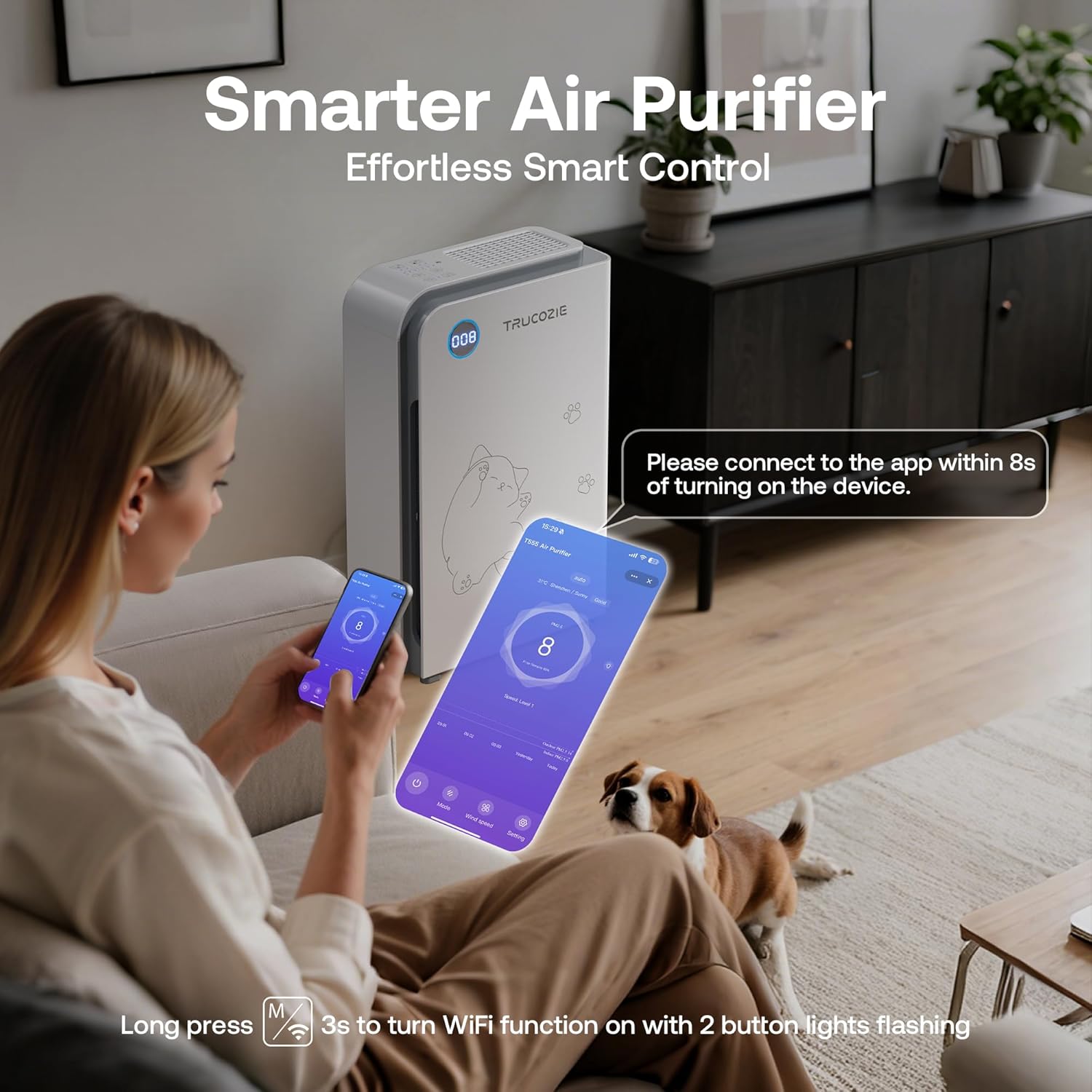
Image: A user interacting with the Trucozie air purifier via a smartphone app, demonstrating the smart control features.
3.5 Timer Function
Set the purifier to operate for a specific duration (e.g., 1, 4, or 8 hours) using the Timer button. This conserves energy by automatically turning off the unit after the set time.
3.6 Child/Pet Lock
Long press the Lock button for 3 seconds to activate or deactivate the child lock, preventing unintended changes to settings.
4. Filtration System
The Trucozie T555 utilizes a 3-in-1 filtration system for comprehensive air purification:
- Pet-Specific Pre-Filter Cotton: Located at the air inlet, this filter rapidly traps large particles like pet hair, dander, and dust, preventing them from re-entering the air and extending the life of subsequent filters.
- H13 True HEPA Filter: Captures 99.97% of airborne particles as small as 0.3 microns, including smoke, pollen, fine dust, and pet dander.
- Activated Carbon Filter with Bio-Enzymes: Effectively absorbs and breaks down various odors, such as pet odors, litter box smells, cooking fumes, and cigarette smoke.

Image: The Trucozie air purifier in a living room setting, with an overlay illustrating the H13 HEPA filter's effectiveness in capturing fine particles.

Image: A woman cleaning a litter box, with the Trucozie air purifier in the background, demonstrating the activated carbon filter's ability to absorb pet odors.
5. Maintenance
5.1 Filter Replacement and Cleaning
The air purifier will indicate when the filter needs attention. The pre-filter cotton can be cleaned regularly by washing or vacuuming. The H13 True HEPA and activated carbon filters should be replaced as indicated by the unit or app reminders.
- Filter Reset: After cleaning or replacing the filter, long press the Light/Reset button for 5 seconds to reset the filter timer.
6. Specifications
| Model Number | T555 |
| Brand | Trucozie |
| Color | White |
| Product Dimensions | 12"D x 16"W x 7"H |
| Weight | 20.35 Pounds |
| Coverage Area | Up to 3000 Square Feet (purified once/hour) |
| CADR | 205 CFM (350 m³/h) |
| Noise Level (Sleep Mode) | Less than 23dB |
| Certifications | CARB Certified, EPA Certified, ETL Certified, FCC Certified |
7. Product Overview Video
Video: An official product video from Trucozie US, providing a quick overview of the T555 Large Pet Air Purifier's features and design.
8. Warranty and Support
Each Trucozie air purifier includes a 12-month warranty. For customer service and technical support, please contact Trucozie US. They offer 7 days a week, 24 hours a day customer service and lifetime technical support.