
1. Important Safety Information
Please read all instructions carefully before using your new PhiloDeco Window Air Conditioner. Keep this manual for future reference.
- Always connect the unit to a grounded electrical outlet. Do not use extension cords or adapter plugs.
- Do not operate the air conditioner with a damaged power cord or plug.
- Ensure the unit is installed securely in the window opening to prevent falling.
- Do not block the air intake or exhaust vents.
- Keep children and pets away from the unit during operation.
- Unplug the unit before cleaning or performing any maintenance.
2. Packing List
Verify that all components listed below are included in your package. If any items are missing or damaged, please contact customer support.

Figure 2.1: Contents of the PhiloDeco 12000 BTU Window Air Conditioner package. This image displays the main air conditioner unit, remote control, insulation strip, window sash seal, foam top window gasket, sash lock, various screws (3/4", 3/8", 1/2"), top rail, lock frames, remote control batteries, and filler panels.
- Window Air Conditioner Unit (1)
- Remote Control (1)
- Insulation Strip (1)
- Window Sash Seal (1)
- Foam Top Window Gasket (1)
- Sash Lock (1)
- 3/4" Screws (4)
- 3/8" Screws (4)
- 1/2" Screws (3)
- Lock Frame (2)
- Remote Control Battery (2)
- Filler Panels (2)
- User Manual (1)
3. Installation Instructions
3.1 Window Requirements
This air conditioner is designed for installation in standard double-hung windows. Ensure your window meets the following dimensions:

Figure 3.1: Product dimensions and window installation requirements. The unit measures approximately 19.76" (width) x 15.16" (height) x 21.5" (depth). The power cord is 4.9 ft long. The air conditioner is designed for a standard double-hung window with a width between 23" and 36". The lower sash must allow for a minimum opening of 16" in height.
- Window Width: 23 inches to 36 inches (58.4 cm to 91.4 cm)
- Minimum Lower Sash Opening Height: 16 inches (40.6 cm)
3.2 General Installation Steps
- Prepare the Window: Clean the window sill and frame.
- Install Top Rail: Attach the top rail to the air conditioner unit using the provided screws.
- Place Unit in Window: Carefully lift the air conditioner and center it in the window opening. Ensure the bottom rail rests against the window sill.
- Extend Filler Panels: Slide out the side filler panels to fill the window opening.
- Secure Unit: Lower the window sash behind the top rail of the unit. Install the sash lock and lock frames to secure the unit and window.
- Seal Gaps: Apply the foam top window gasket and insulation strips to seal any gaps around the unit and filler panels, preventing air leakage.
4. Operating Instructions
4.1 Control Panel and Remote Control
The air conditioner can be operated using the control panel on the unit or the included remote control. The remote control offers full functionality for convenience.

Figure 4.1: Front view of the PhiloDeco 12000 BTU Window Air Conditioner and its remote control. The unit features an LED display and buttons for Fan Speed, Filter, Sleep, Timer, Mode, and Power. The remote control includes buttons for Power, Cool, Sleep, Fan Speed, Timer, ECO, Display, Auto, Up/Down temperature, and Fan Only.
4.2 Operating Modes
Your air conditioner offers multiple operating modes to suit various comfort needs:

Figure 4.2: Overview of available operating modes and features. This image highlights the 3 Fan Speed settings, 24-hour Timer, ECO Mode for energy saving, Cool Mode for active cooling, Dry Mode for dehumidification, Sleep Mode for quiet night operation, and a Cleaning Reminder for filter maintenance.
- Cool Mode: Provides powerful cooling. Adjust the temperature setting and fan speed for desired comfort.
- Fan Mode: Circulates air without cooling. Select from High, Medium, or Low fan speeds.
- Dry Mode (Dehumidifier): Reduces humidity in the room. The fan speed is automatically controlled in this mode.
- ECO Mode: Optimizes energy consumption. The unit will cycle on and off to maintain the set temperature efficiently.
- Sleep Mode: Designed for quiet operation and energy saving during sleep. The temperature will gradually increase over several hours.
4.3 Timer Function
The 24-hour timer allows you to program the unit to turn on or off automatically. This feature is useful for pre-cooling a room or ensuring the unit turns off after you leave.

Figure 4.3: The 24-hour timer feature and quiet operation of the air conditioner. The unit operates at a low noise level of 55dB, making it suitable for use during sleep.
4.4 Airflow Adjustment
Adjust the horizontal and vertical louvers on the front of the unit to direct the airflow as desired. This 4-way airflow cooling ensures even distribution of cool air throughout the room.
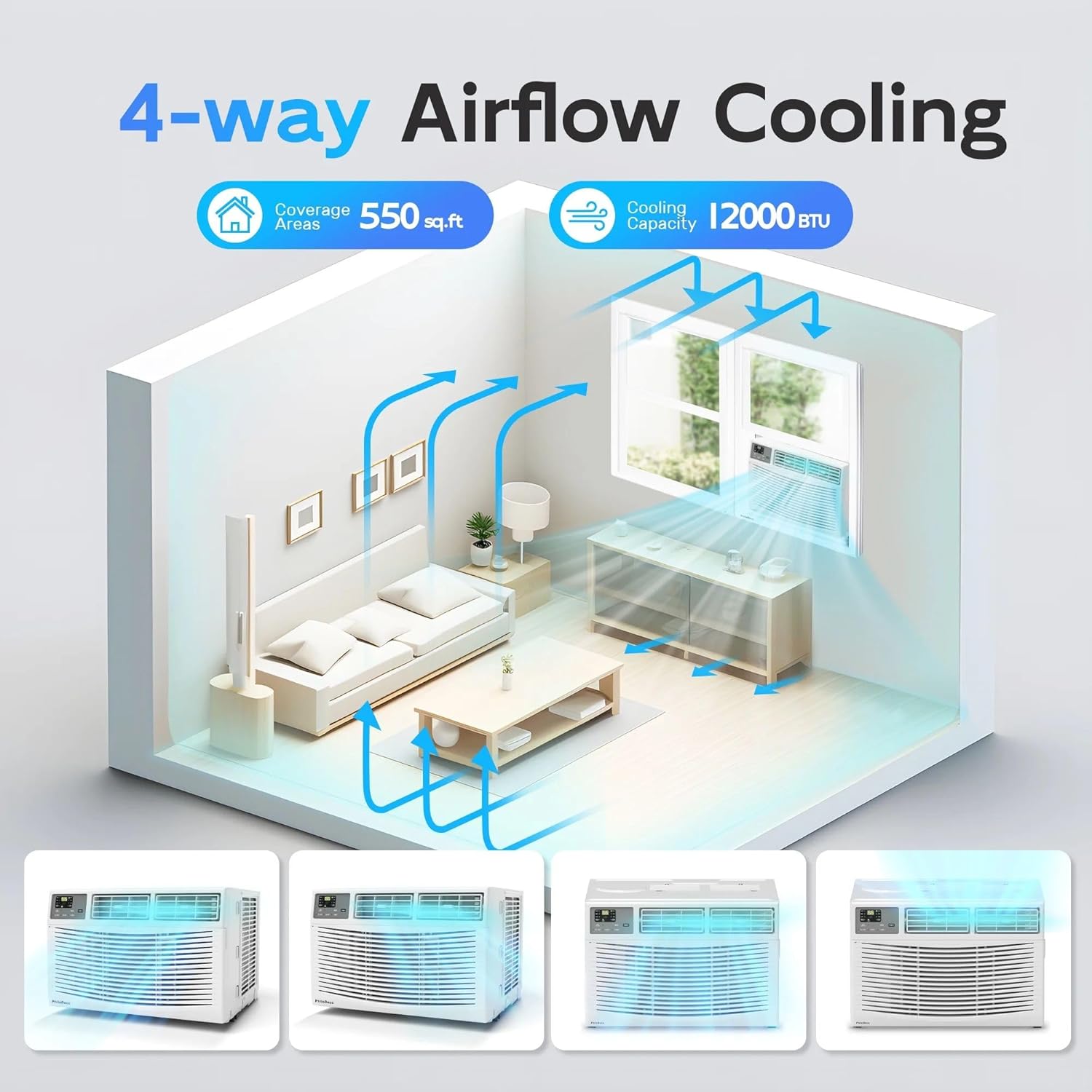
Figure 4.4: Illustration of the 4-way airflow cooling capability. The diagram shows how the 12000 BTU cooling capacity effectively covers an area of 550 sq ft by distributing air in multiple directions.
5. Maintenance
Regular maintenance ensures optimal performance and longevity of your air conditioner.
5.1 Air Filter Cleaning
The washable air filter should be cleaned regularly, typically every two weeks, or when the 'Filter' indicator light illuminates.
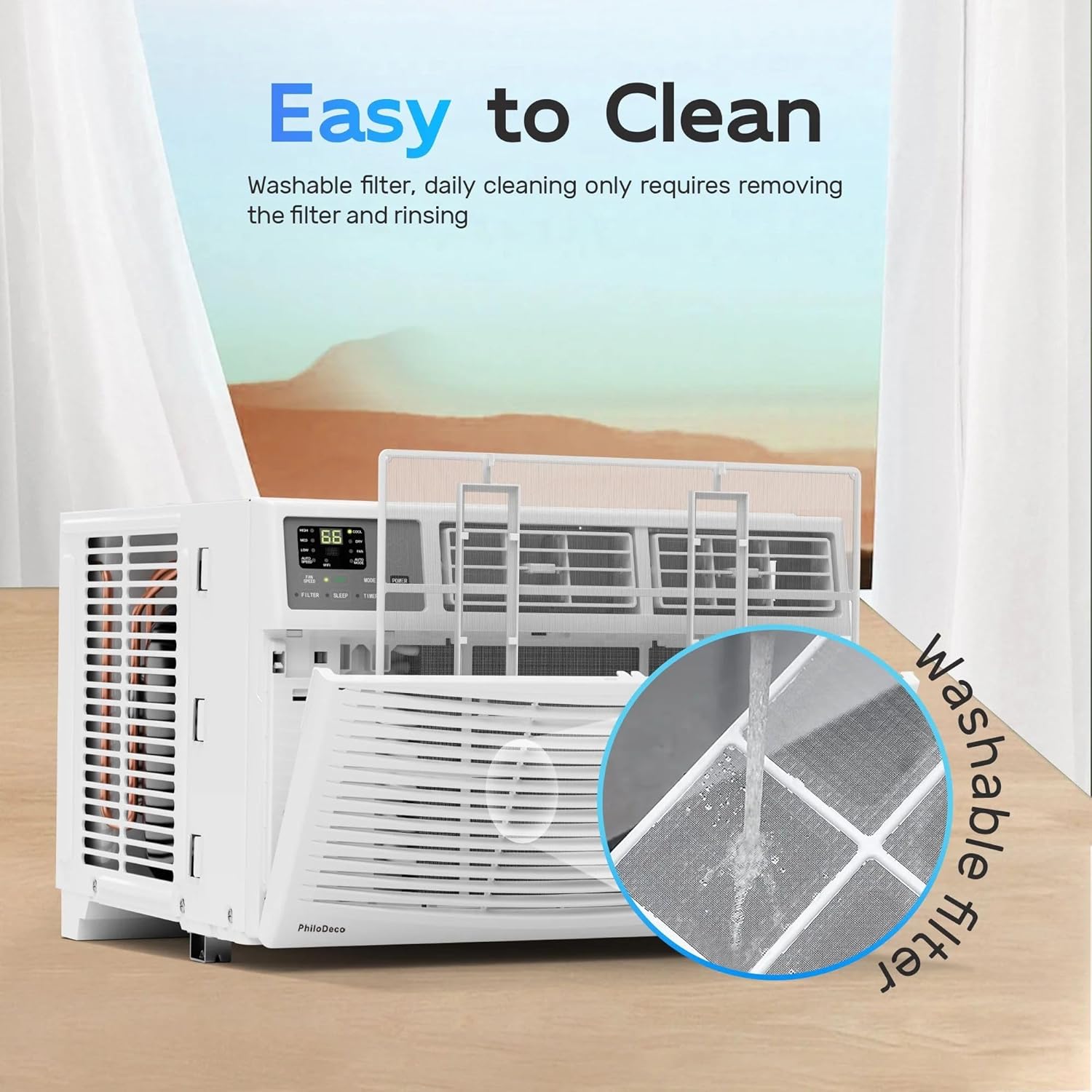
Figure 5.1: Steps for cleaning the washable filter. The image shows the filter being removed from the front of the unit and then being rinsed under running water to remove accumulated dust and debris.
- Unplug the Unit: Always disconnect power before cleaning.
- Remove Filter: Open the front panel and carefully slide out the air filter.
- Clean Filter: Rinse the filter under cool, running water. For heavy dirt, use a mild detergent and rinse thoroughly.
- Dry Filter: Allow the filter to air dry completely before reinserting. Do not expose to direct sunlight or heat.
- Reinstall Filter: Slide the dry filter back into its slot and close the front panel.
5.2 General Cleaning
- Exterior: Wipe the cabinet with a soft, damp cloth. Do not use harsh chemicals or abrasive cleaners.
- Coils: Periodically check the condenser coils at the rear of the unit for dirt and debris. Gently brush off any accumulation.
6. Troubleshooting Guide
Before contacting customer service, please refer to the following troubleshooting guide for common issues:
| Problem | Possible Cause | Solution |
|---|---|---|
| Unit does not turn on | No power; tripped circuit breaker; unit unplugged. | Check power cord connection; reset circuit breaker; ensure outlet is functional. |
| Insufficient cooling | Dirty air filter; blocked air vents; room too large; doors/windows open. | Clean air filter; clear obstructions; ensure room size is within capacity (550 sq ft); close doors/windows. |
| Unit is noisy | Loose installation; fan blade obstruction; normal operating sounds. | Ensure unit is securely installed; check for debris in fan; some operational sounds (e.g., refrigerant flow) are normal. |
| Water dripping outside | Normal condensation. | This is normal during high humidity operation. Ensure proper drainage. |
| Remote control not working | Dead batteries; obstruction between remote and unit. | Replace batteries; ensure clear line of sight to the unit's receiver. |
7. Product Specifications
Detailed technical specifications for the PhiloDeco 12000 BTU Window Air Conditioner.
| Feature | Specification |
|---|---|
| Brand | PHILODECO |
| Model Number | CJ12000BTU |
| Cooling Capacity | 12000 BTU |
| Coverage Area | Up to 550 Sq Ft |
| Item Weight | 46 Pounds |
| Product Dimensions (D x W x H) | 18.11" x 14.76" x 14.76" |
| Voltage | 110 Volts (DC) |
| Wattage | 110 Watts |
| Noise Level | 45 dB |
| Control Method | Remote Control, App |
| Seasonal Energy Efficiency Ratio (SEER) | 11.0 |
8. Warranty and Customer Support
For warranty information, technical support, or assistance with your PhiloDeco Window Air Conditioner, please refer to the warranty card included in your product packaging or contact PhiloDeco customer service directly. Contact details are typically available on the official PhiloDeco website or through your retailer.
When contacting support, please have your model number (CJ12000BTU) and purchase date readily available.