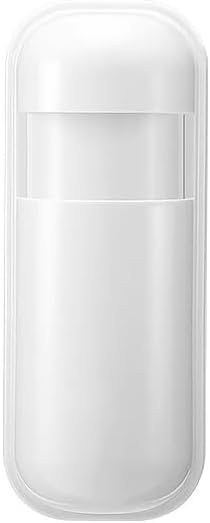
Image 1.1: The PGST P92R Motion Sensor, a compact white device.
The PGST P92R Motion Sensor is an expandable component designed for integration with the PGST Home Security System Host. This sensor utilizes infrared technology to detect movement within a specified area, enhancing the security of your premises. It is designed to distinguish between human movement and other disturbances, making it suitable for various indoor environments such as hallways and living rooms.
Image 1.2: PGST P92R Motion Sensor (right) alongside a door sensor (left), illustrating typical components of the security system.
Key Features:
Infrared sensing technology for motion detection.
Designed for integration with PGST Home Security System Host.
Expandable part for DIY security system customization.
Battery-powered operation.
2. Setup and Installation
2.1. Package Contents
Ensure all components are present:
1 x PGST P92R Motion Sensor
1 x Lithium Polymer battery (pre-installed or included separately)
Mounting accessories (if applicable)
2.2. Battery Installation
The P92R Motion Sensor requires one Lithium Polymer battery for operation. If not pre-installed, open the sensor casing carefully and insert the battery, observing correct polarity. Close the casing securely.
2.3. Physical Placement
Mount the motion sensor in an area where it can effectively detect movement, such as hallways, living rooms, or entry points. Avoid placing it near heat sources, direct sunlight, or areas with strong air currents, as these can cause false alarms. Ensure the sensor has a clear line of sight to the detection area.
2.4. Connecting to the PGST Home Security System Host
The P92R Motion Sensor must be paired with your PGST Home Security System Host. Follow these steps to add the sensor:
On the Host keypad, press SET.
Enter the system password (default is typically 6666), then press #.
Enter the accessory code for adding sensors, which is 23, then press #.
Enter the desired zone number for the sensor (e.g., 1-240), then press #.
Trigger the motion sensor (e.g., by waving your hand in front of it) to send a signal to the host. The host should confirm successful pairing.
Image 2.1: Instructions for adding accessories, including motion sensors, to the PGST system.
2.5. WiFi and Alarm Number Setup (Host System)
To enable app control and receive alerts, ensure your PGST Host System is connected to WiFi and alarm numbers are set up.
2.5.1. How to Set Up WiFi:
Host Operation: Press SET → 6666 → # → 00 → #.
Phone Operation (using Smart Life or Tuya Smart App): Open the app → Navigate to WiFi (2.4GHz) → Smart life APP → Add devices → Sensors → Alarm → WiFi → Blink Quickly. Follow the on-screen prompts to connect to your 2.4GHz WiFi network.
2.5.2. How to Set the Alarm Number:
This allows the system to call designated numbers during an alarm event.
On the Host keypad, press SET → 6666 → # → 51-56 (for different alarm numbers) → Number → #.
Image 2.2: Detailed steps for configuring WiFi and alarm contact numbers on the PGST Host System.
3. Operation
3.1. Arming and Disarming the System
The PGST Home Security System, to which the P92R Motion Sensor is connected, can be armed or disarmed via the keypad, remote control, or the mobile application.
Arm (Away): Activates all sensors, including motion sensors. Use when leaving the premises.
Stay Arm (Home): Activates perimeter sensors (e.g., door/window sensors) but typically bypasses interior motion sensors, allowing free movement inside.
Disarm: Deactivates all sensors.
Image 3.1: Main button functions on the PGST keypad for arming, disarming, and other controls.
3.2. Scheduled Arm/Disarm
You can customize specific time periods for automatic arming or disarming of your security system to align with your daily routine and security requirements.
Image 3.2: Illustration of setting custom arm and disarm schedules for the security system.
3.3. Mobile App Control
Manage your security system, including the P92R Motion Sensor, through the Smart Life or Tuya Smart application on your smartphone or tablet. The app provides real-time alerts and system status updates.
Image 3.3: The mobile app interface for monitoring and controlling the PGST security system.
3.4. Voice Control Integration
The PGST Home Security System supports voice control via Amazon Alexa and Google Assistant. This allows for convenient arming and disarming of your system using voice commands.
Image 3.4: Voice control functionality with Amazon Alexa and Google Assistant for the security system.
3.5. Emergency Features
The system includes features for emergency situations:
Preset Alarm Calls: The system can be configured to call up to five family numbers when an alarm is triggered, ensuring alerts are not missed.
SOS Button Support: For elderly users or in emergencies, an optional SOS button can be integrated. Pressing this button will send a reminder or alert to designated contacts.
Image 3.5: The system's capability to make alarm calls to pre-set family numbers.
Image 3.6: The SOS button feature for emergency alerts, beneficial for elderly users.
4. Maintenance
4.1. Battery Replacement
The P92R Motion Sensor is powered by a Lithium Polymer battery. When the battery level is low, the system will provide a low battery alert. To replace the battery:
Carefully open the sensor casing.
Remove the old Lithium Polymer battery.
Insert a new Lithium Polymer battery, ensuring correct polarity.
Close the sensor casing securely.
Image 4.1: The system indicates a low battery alert, prompting replacement.
4.2. Cleaning
To ensure optimal performance, periodically clean the exterior of the motion sensor with a soft, dry cloth. Do not use liquid cleaners or abrasive materials, as these can damage the sensor components.
5. Troubleshooting
Problem
Possible Cause
Solution
Motion sensor not detecting movement.
Incorrect placement or obstruction.
Low or dead battery.
Sensor not properly paired with the host.
System is disarmed or in 'Stay Arm' mode (bypassing motion sensors).
Ensure clear line of sight and optimal placement.
Replace the battery.
Re-pair the sensor with the host system (refer to Section 2.4).
Ensure the system is armed in 'Away' mode.
False alarms from motion sensor.
Sensor placed near heat sources, direct sunlight, or strong air currents.
Pets or small animals triggering the sensor.
Relocate the sensor away from environmental disturbances.
Adjust sensor sensitivity if possible (check host system settings) or place it higher to avoid pet detection.
Sensor disappears from the app or host system.
Connectivity issue between sensor and host.
Host system WiFi connection unstable.
Battery issue.
Check sensor battery.
Verify the host system's WiFi connection (refer to Section 2.5.1).
Attempt to re-pair the sensor with the host system (refer to Section 2.4).
Restart the host system and the mobile application.
No app alerts or calls during an alarm.
Host system not connected to WiFi or 4G GSM.
Alarm numbers not correctly set.
App notifications disabled.
Verify WiFi and 4G GSM connection on the host.
Check and re-enter alarm numbers (refer to Section 2.5.2).
Ensure app notifications are enabled on your smartphone.
6. Specifications
Feature
Detail
Model Number
P92R
Brand
PGST
Detection Technology
Infrared (PIR)
Power Source
Battery Powered
Battery Type
1 x Lithium Polymer (included)
Item Weight
0.16 ounces
Product Dimensions
1 x 1 x 1 inches (approximate)
Included Components
1 x P92R Motion Sensor
Compatible Devices
PGST Home Security System Host, Smartphone, Tablet
7. Warranty and Support
7.1. Warranty Information
Specific warranty details for the PGST P92R Motion Sensor may vary. Please refer to the warranty card included with your product or visit the official PGST website for the most current warranty terms and conditions.
7.2. Customer Support
For technical assistance, troubleshooting, or any inquiries regarding your PGST P92R Motion Sensor or the PGST Home Security System, please contact PGST customer support. Contact information can typically be found on the PGST official website or within the product packaging.
You can also visit the PGST Store on Amazon for additional product information and support resources.
Related Documents - P92R
Carbon Monoxide Gas Alarm Detector PG-C01/PG-C02/PG-C03/PG-C04/PG-C05 User Manual Comprehensive user manual for the PGST Carbon Monoxide Gas Alarm Detector models PG-C01, PG-C02, PG-C03, PG-C04, and PG-C05. Covers installation, operation, troubleshooting, maintenance, technical specifications, and important information about carbon monoxide.
PG-S01 Smoke Alarm User Manual | PGST Comprehensive user manual for the PGST PG-S01 Smoke Alarm, covering installation, operation, troubleshooting, and technical specifications. Ensure home safety with this reliable photoelectric smoke detector.
GSM & WiFi Alarm System User Manual User manual for the GSM & WiFi Alarm System, detailing features, setup, operation, and mobile app integration for the PG103 alarm host.
PGST PG-109 Alarm Host User Manual Comprehensive user manual for the PGST PG-109 Alarm Host security system, covering installation, operation, features like remote control, wireless detectors, app integration, and technical specifications.