
1. Introduction
This manual provides essential information for the assembly, operation, maintenance, and troubleshooting of your Jocoevol Farmhouse L Shaped Executive Desk, Model B11861. Please read these instructions carefully before assembly and use to ensure proper function and longevity of your product. Keep this manual for future reference.
2. Product Overview
The Jocoevol Farmhouse L Shaped Executive Desk is designed to provide a spacious and organized workspace. It features a robust construction with a farmhouse aesthetic, multiple storage options, and an integrated charging station for convenience.

Key Features:
- L-Shaped Design: Offers an expansive work surface for multi-monitor setups and various tasks.
- Integrated Charging Station: Equipped with USB ports, Type-C ports, and AC outlets for convenient device charging.
- Ample Storage: Includes multiple drawers, a file cabinet for letter/legal documents, and a hidden under-desk storage shelf.
- Durable Construction: Features a thickened solid wood base and desktop for stability and longevity.
- Farmhouse Aesthetic: Classic beadboard detailing and vintage-style pulls contribute to a warm and inviting appearance.
3. Specifications
| Feature | Detail |
|---|---|
| Brand | Jocoevol |
| Model Number | B11861 |
| Product Dimensions (D x W x H) | 21"D x 59"W x 30"H |
| Color | Antique White |
| Style | Farmhouse |
| Base Material | Engineered Wood |
| Top Material Type | Engineered Wood |
| Finish Type | Unfinished |
| Item Weight | 137 Pounds |
| Required Assembly | Yes |
| Special Features | 4 drawers, Built-In USB Outlet, Executive L Shaped Desk with Drawers, File Storage Drawer, Large Desktop |

4. Safety Information
Please adhere to the following safety guidelines during assembly and use:
- Read all instructions before beginning assembly.
- Ensure all parts are present and undamaged before assembly. Do not use if any parts are missing or broken.
- Assemble the desk on a soft, clean surface (e.g., carpet) to prevent scratches.
- Do not overtighten screws, as this may damage the material.
- Keep small parts away from children during assembly.
- Do not stand or sit on the desk.
- Distribute weight evenly on the desktop and shelves to prevent tipping.
- Ensure the charging station is properly connected to a grounded outlet and avoid liquid spills near electrical components.
5. Package Contents
Verify that all components are included in your package. While specific part lists vary, a typical package for this desk includes:
- Desktop panels (L-shaped sections)
- Side cabinets with drawers and doors
- Support panels and legs
- Drawer slides and hardware
- Charging station unit
- Assembly hardware (screws, dowels, cam locks, etc.)
- Headphone hook
- Assembly instructions manual
6. Assembly Instructions
Assembly of the Jocoevol Farmhouse L Shaped Executive Desk requires careful attention to detail. It is recommended to have two people for assembly. Please refer to the separate, detailed assembly guide included in your package for step-by-step visual instructions. The general process involves:
- Unpack and Identify: Carefully unpack all components and hardware. Lay them out and identify each part using the provided parts list.
- Assemble Base Units: Construct the two main cabinet base units, including drawer frames and cabinet structures.
- Install Drawers and Doors: Attach drawer slides, assemble drawers, and install them into the cabinet units. Mount cabinet doors.
- Connect Desktop Sections: Secure the L-shaped desktop panels to the assembled base units and central support.
- Install Charging Station: Integrate the charging station into the designated desktop cutout and connect necessary wiring.
- Final Touches: Attach any remaining accessories like the headphone hook and ensure all connections are secure.


7. Operating Instructions
7.1 Using the Charging Station
The integrated charging station provides convenient power access for your electronic devices. To use:
- Ensure the desk's power cord is securely plugged into a functional, grounded wall outlet.
- Connect your devices to the available USB ports, Type-C ports, or AC outlets.
- Use the cable organizer to manage cords and reduce clutter.

7.2 Utilizing Storage Drawers and Cabinets
The desk offers various storage solutions to keep your workspace organized:
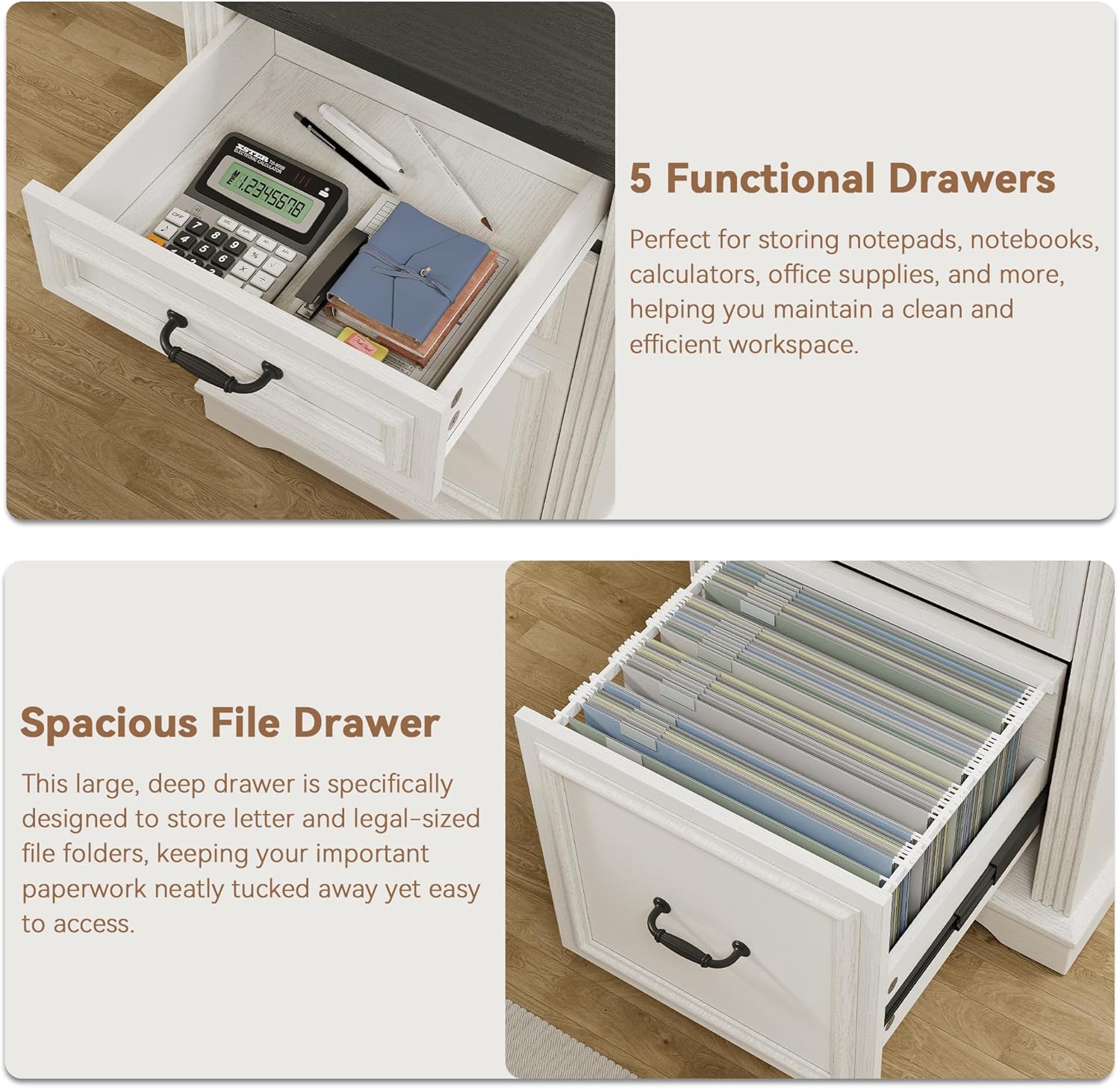
- Functional Drawers: Use the smaller drawers for office supplies such as pens, notebooks, and calculators.
- Spacious File Drawer: The bottom drawer is designed to accommodate letter and legal-sized hanging file folders for important documents.
- Hidden Under-Desk Storage Shelf: This shelf provides discreet storage for items you want to keep within reach but out of sight.
- Large Storage Cabinet: The cabinet offers adjustable shelving for bulkier items or binders.

8. Maintenance
Proper care will help maintain the appearance and functionality of your desk:
- Cleaning: Wipe the desk surfaces with a damp cloth. Avoid harsh chemicals or abrasive cleaners that may damage the finish.
- Spills: Clean up spills immediately to prevent staining or damage to the wood.
- Heat and Moisture: Avoid placing hot items directly on the desktop. Use coasters for drinks to prevent water rings.
- Hardware Check: Periodically check and tighten all screws and fasteners to ensure stability.
- Sunlight Exposure: Avoid prolonged direct sunlight exposure to prevent fading or discoloration of the finish.
9. Troubleshooting
If you encounter issues with your desk, refer to the following common problems and solutions:
| Problem | Possible Cause | Solution |
|---|---|---|
| Desk is wobbly | Loose fasteners; uneven floor | Tighten all assembly screws. Ensure the desk is on a level surface; use shims if necessary. |
| Drawers do not slide smoothly | Improperly installed slides; obstruction | Check that drawer slides are correctly aligned and installed. Remove any obstructions. |
| Charging station not working | Power cord not plugged in; faulty outlet; device issue | Ensure the desk's power cord is fully plugged into a working wall outlet. Test the outlet with another device. Check device's charging cable. |
| Parts missing or damaged upon arrival | Shipping damage; packaging error | Do not proceed with assembly. Contact Jocoevol customer support immediately for replacement parts. |
10. Warranty and Support
For information regarding product warranty, please refer to the warranty card included with your purchase or visit the official Jocoevol website. If you require assistance with assembly, have questions about product functionality, or need to report missing/damaged parts, please contact Jocoevol customer support. Contact details can typically be found on the product packaging or the brand's official website.