1. Product Overview
The WAMPAT 59" Modern Executive Desk is designed for home office and study environments, offering a spacious work surface and integrated storage solutions. This desk features a contemporary design with a wood finish and metal accents, suitable for various interior styles.
- Spacious Desktop: A 59-inch surface provides ample space for work, study, and multiple monitors.
- Integrated Storage: Includes seven drawers, with one large file drawer designed for letter-size documents, to help organize office supplies and personal items.
- Built-in Charging Station: Equipped with 2 AC outlets, 1 USB port, and 1 Type-C port for convenient device charging.
- Durable Construction: Features a metal base and engineered wood top for stability and longevity.

Image: The WAMPAT 59-inch Modern Executive Desk, showcasing its design and size within a home office environment.
2. Safety Information
Please read and adhere to the following safety guidelines to ensure safe use and prevent damage to the product or injury.
- Always assemble the desk on a stable, level surface to prevent wobbling or tipping.
- Do not overload the desk, especially the file drawer. Excessive weight can compromise stability and lead to tipping.
- Keep the charging station clear of flammable materials.
- Do not insert any foreign objects into the outlets or ports of the charging station.
- Always unplug the charging station when not in use or when leaving the desk unattended to prevent electrical hazards.
3. Assembly Instructions
Assembly is required for this product. Please follow the step-by-step instructions provided in the separate assembly manual included with your purchase. Ensure all parts are present before beginning assembly.
3.1. Before You Begin
- Unpack all components and verify against the parts list in your assembly manual.
- Clear a spacious, clean, and level area for assembly.
- Gather necessary tools (if not included, e.g., screwdriver).
3.2. General Assembly Tips
- Do not overtighten screws during initial assembly; tighten fully once all components are aligned.
- Some steps may require assistance. Refer to your assembly manual for specific instructions on when to seek help.
- Ensure all connections are secure before using the desk.
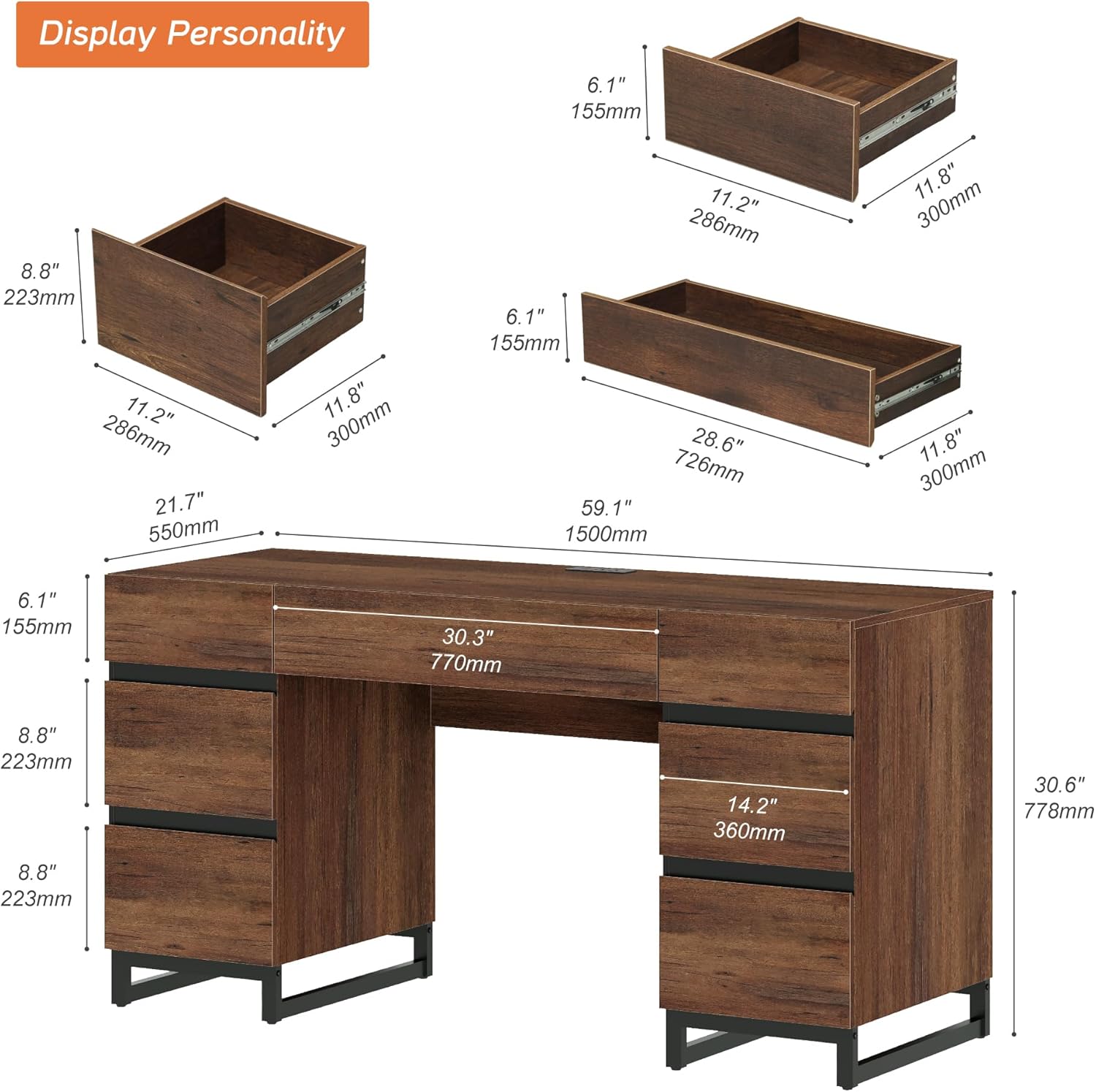
Image: An exploded diagram illustrating the various components and dimensions of the WAMPAT desk, including individual drawer sizes.
4. Operating Instructions
4.1. Using the Drawers
The desk features seven drawers for organized storage. The large file drawer is designed to accommodate letter-size documents. To open and close drawers, use the integrated handles or pull mechanisms. Ensure drawers are fully closed when not in use to prevent accidental opening.

Image: An aerial view of the WAMPAT desk with all seven drawers open, demonstrating the internal storage space and organization possibilities.
4.2. Using the Charging Station
The built-in charging station provides convenient power access for your electronic devices. It includes 2 AC outlets, 1 USB port, and 1 Type-C port.
- Plug the desk's power cord into a standard wall outlet.
- Connect your devices to the appropriate AC, USB, or Type-C ports.
- Ensure devices are compatible with the provided power specifications (125V/12A for AC, 5V/2.1A for USB).
- Unplug devices when fully charged or not in use.

Image: A detailed view of the desk's charging station, showing a smartphone connected to a USB port and a power adapter in an AC outlet.
5. Maintenance
To maintain the appearance and longevity of your WAMPAT Executive Desk, follow these simple care instructions:
- Cleaning: Wipe the desk surfaces with a dry cloth. Avoid abrasive cleaners or harsh chemicals that may damage the finish.
- Spills: Immediately wipe up any spills with a dry cloth to prevent water damage or staining.
- Drawer Slides: Periodically check drawer slides for smooth operation. If needed, a small amount of silicone lubricant can be applied to the slides.
- General Care: Avoid placing hot items directly on the desk surface without protection. Keep the desk away from direct sunlight and extreme temperature changes to prevent warping or fading.

Image: A close-up of the desk surface with a small liquid spill being wiped away by a checkered cloth, demonstrating proper cleaning.
6. Troubleshooting
If you encounter any issues with your WAMPAT Executive Desk, please refer to the following common troubleshooting tips:
- Wobbly Desk: Ensure all screws and fasteners are securely tightened. Check that the desk is on a level surface.
- Drawers Not Sliding Smoothly: Verify that the drawer slides are correctly installed and free from obstructions. Apply a small amount of lubricant if necessary.
- Charging Station Not Working:
- Check if the desk's main power cord is securely plugged into a functional wall outlet.
- Ensure your device's charging cable is properly connected to the charging station.
- Test the charging station with a different device or cable to rule out device-specific issues.
For issues not resolved by these steps, please contact WAMPAT customer support.
7. Specifications
| Feature | Detail |
|---|---|
| Brand | WAMPAT |
| Model Number | B0FK4VKF43 |
| Product Dimensions (D x W x H) | 21.7"D x 59"W x 30.6"H |
| Color | Dark Brown |
| Style | Modern |
| Base Material | Metal |
| Top Material Type | Engineered Wood |
| Number of Drawers | 7 |
| Special Feature | Built-In USB Outlet (2 AC outlets, 1 USB port, 1 Type-C port) |
| Required Assembly | Yes |
| Product Care Instructions | Wipe with Dry Cloth |
Image: A diagram showing the overall dimensions of the desk and the internal dimensions of its various drawers.
8. Warranty and Support
Warranty Type: Lifetime
WAMPAT provides a lifetime warranty for this product. For any questions, concerns, or to report missing/damaged parts, please contact WAMPAT customer support. Refer to your purchase documentation for specific contact details or visit the official WAMPAT website.
For assistance with assembly or product issues, please reach out to our support team. We are committed to providing a prompt and satisfactory solution.


