
Varstrom VD04
Varstrom VD04 Ebike Display User Manual
Model: VD04
1. Introduction
This manual provides comprehensive instructions for the installation, operation, maintenance, and troubleshooting of your Varstrom VD04 3.5" IPS Ebike Display. Designed for seamless integration with Bafang CAN protocol mid-drive motors, the VD04 offers a user-friendly interface to enhance your electric biking experience.

Figure 1.1: Varstrom VD04 Ebike Display and Control Unit. The display features a 3.5-inch IPS color screen, showing speed, power, trip distance, and total mileage. A separate control unit with plus, minus, and power buttons is connected to the display.
2. Product Features
The Varstrom VD04 Ebike Display is equipped with several features designed to provide a comprehensive and reliable riding experience:
- Universal Compatibility: Engineered for seamless integration with Bafang CAN protocol 12V-60V mid-drive motors.
- Multi-functional Display: A 3.5-inch vertical IPS screen provides real-time information including current speed, single trip distance, total mileage, and battery level.
- Error Identification: Automatically displays error codes for motor issues, facilitating quick diagnosis and resolution.
- IP67 Weatherproof Protection: Built to withstand heavy rain, dust, and extreme temperatures, ensuring year-round reliability.
- Smart App & Multi-Language Support: Syncs via Bluetooth to track real-time data and navigation on your smartphone. Supports 9 language options (English, French, German, etc.).
- Type-C Charging Port: Built-in 5V1A TYPE-C port for charging external devices like phones or speakers.
- Hidden Speed Lock: Features a hidden 25 km/h speed shortcut for quick compliance with traffic regulations.
- Adjustable Mount: Fits 22.2mm, 25.4mm, and 31.8mm handlebars.
- Automatic Headlight: The display can control an automatic headlight function.
- Custom Password: Option to set a custom password for security.
- Brightness Setting: Adjustable display brightness.

Figure 2.1: Overview of VD04 Digital Display features, including brightness setting, custom password, 3.5" IPS screen, PAS levels, handlebar holder sizes, nine languages, automatic headlight, error identification, navigation icon, headlight, brake icon, power assist level, single-trip mileage, Bluetooth connectivity, power assist level, real-time speed, cycling data, and Type-C charging port.
3. Compatibility
The Varstrom VD04 display is designed specifically for BAFANG CAN protocol mid-motor systems. It is compatible with the following BAFANG CAN Version mid-motors:
- BAFANG M200, M300, M400, M410, M420, M500, M560, M510, M600, M620, M800, M820.
Important Compatibility Note:
This display uses the CAN protocol and is NOT compatible with UART protocol motors (which typically have a 5-pin circular connector). Attempting to use an adapter cable or modifying connectors will not resolve compatibility issues. Always verify the connector type of your motor before purchase and installation. The 1T4 cable connector should be a 5PIN female triangle connector.
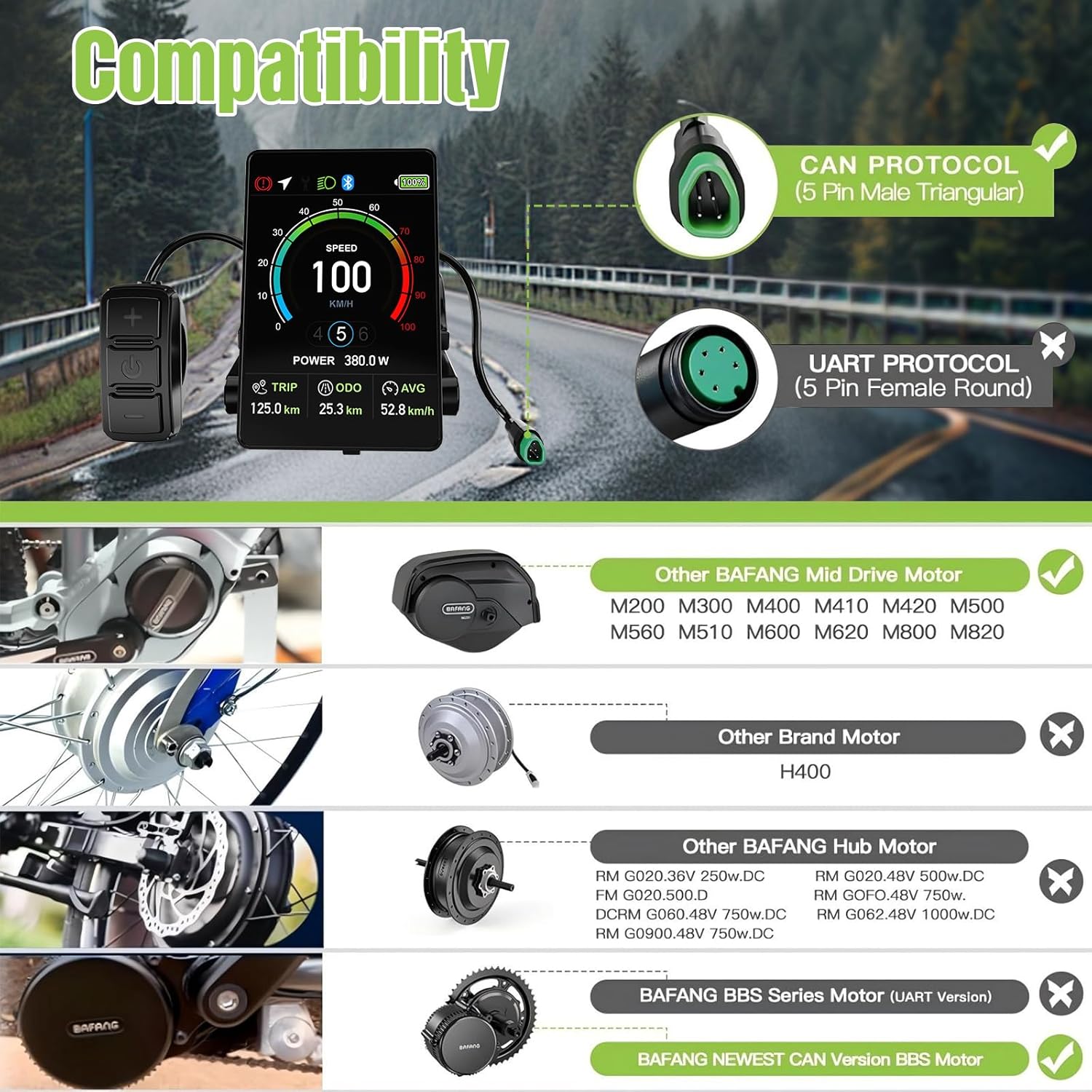
Figure 3.1: Compatibility overview showing the VD04 display with a CAN protocol (5-pin male triangular) connector, compatible with BAFANG M-series mid-drive motors. It explicitly states incompatibility with UART protocol (5-pin female round) motors, other brand motors, BAFANG Hub Motors, and BAFANG BBS Series Motors (UART Version).
4. Setup and Installation
Follow these steps to properly install your Varstrom VD04 Ebike Display:
4.1 Handlebar Mounting
The adjustable mount of the VD04 display is designed to fit various handlebar diameters. Ensure you select the correct size for a secure fit.
- Identify the diameter of your ebike handlebar. The VD04 mount is compatible with Ø22.2mm (0.8"), Ø25.4mm, and Ø31.8mm handlebars.
- Loosen the mounting screws on the display bracket.
- Position the display and control unit on your handlebar in a location that provides clear visibility and easy access to the buttons.
- Securely tighten the mounting screws. Do not overtighten to avoid damaging the handlebar or bracket.

Figure 4.1: The VD04 display mounted on handlebars of different diameters (Ø22.2mm, Ø25.4mm, Ø31.8mm), demonstrating its adjustable fit for most bicycles.
4.2 Cable Connection
Proper cable connection is crucial for the display's functionality. Refer to the wiring diagram below:
- Locate the 1T4 cable coming from your Bafang mid-drive motor. Ensure it has a 5PIN female triangle connector.
- Connect the male 5PIN display connector to the female 5PIN 1T4 cable connector. Ensure the pins align correctly.
- Verify the wiring colors: Green (CAN H), Black (GND), Brown (P+), Orange (Key signal), White (CAN L).
- Once connected, ensure the connection is secure and protected from water and debris.
Attention:
If the wiring diagram of your 1T4 cable is different from the one shown, the display will not work correctly. Please confirm with the motor seller if your cable matches this wiring diagram.
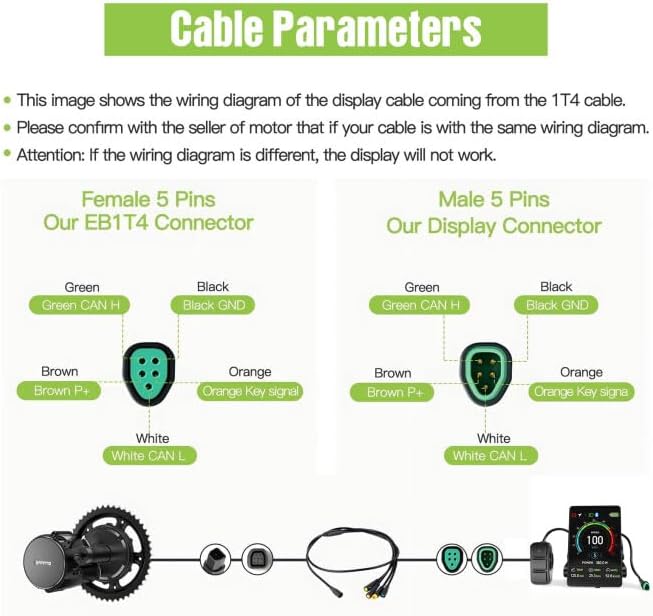
Figure 4.2: Detailed wiring diagram for the VD04 display cable, showing the female 5-pin 1T4 connector and the male 5-pin display connector with corresponding wire colors (Green CAN H, Black GND, Brown P+, Orange Key signal, White CAN L). An illustration shows the connection from the Bafang motor to the display via the 1T4 cable.
5. Operating Instructions
This section details how to operate your VD04 display and understand its various functions.
5.1 Powering On/Off
- To power on the display, press and hold the power button on the control unit.
- To power off the display, press and hold the power button again.
5.2 Display Interface Overview
The 3.5-inch IPS screen provides real-time data. Key indicators include:
- Speed: Current riding speed (KM/H or MPH).
- Power: Real-time motor power output (Watts).
- PAS Level: Power Assist System level (0-9 levels).
- Battery Level: Remaining battery charge.
- TRIP: Distance covered in the current trip.
- ODO: Total accumulated mileage.
- AVG: Average speed.
- Error Identification: Displays specific error codes if motor issues occur.
- Bluetooth Icon: Indicates Bluetooth connectivity status.
- Headlight Icon: Indicates headlight status.
- Brake Icon: Indicates brake status.
5.3 Adjusting Settings
Use the control unit buttons (+ and -) to navigate menus and adjust settings such as PAS levels, brightness, and unit preferences (KM/H vs. MPH).
- PAS Level Adjustment: Press the '+' or '-' buttons to increase or decrease the power assist level.
- Brightness Setting: Access the settings menu to adjust display brightness from 10% to 100%.
- Automatic Backlight: The display features an automatic backlight function that adjusts based on ambient light conditions (Day/Night mode).

Figure 5.1: The display's automatic backlight function, showing how it adapts between day and night conditions for optimal visibility.
5.4 Smart App Integration
Enhance your riding experience by connecting the VD04 display to your smartphone via Bluetooth using the dedicated app.
- Download the "BIKEGO+" app from the App Store (iOS) or Google Play (Android).
- Enable Bluetooth on your smartphone and open the BIKEGO+ app.
- Follow the in-app instructions to pair your VD04 display.
- Once connected, the app allows you to track real-time speed, distance, battery life, and navigation.
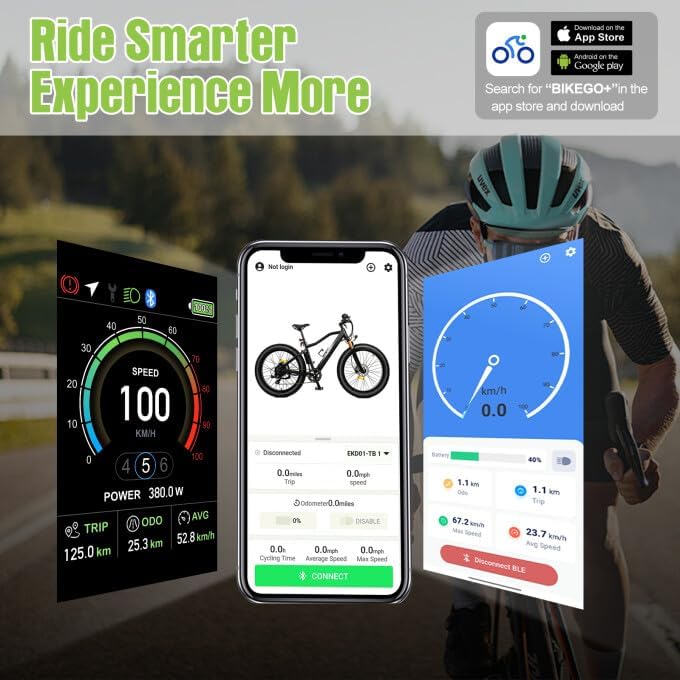
Figure 5.2: Illustration of the "BIKEGO+" app interface on a smartphone, showing real-time data tracking (speed, distance, battery) and navigation features, enhancing the riding experience with the VD04 display.
5.5 Type-C Charging Port
The display includes a 5V1A Type-C charging port for convenience.
- Connect your smartphone or other compatible USB-C devices to the port to charge them while riding.
5.6 Hidden Speed Lock
The display features a hidden shortcut to set the speed limit to 25 km/h for compliance with local traffic laws.
- Consult your local regulations for specific instructions on activating or deactivating this feature.
6. Maintenance
To ensure the longevity and optimal performance of your Varstrom VD04 Ebike Display, follow these maintenance guidelines:
- Cleaning: Wipe the display screen and body with a soft, damp cloth. Avoid using abrasive cleaners or solvents that could damage the screen or casing.
- Water Exposure: While the display is IP67 waterproof, avoid prolonged submersion. Ensure the Type-C charging port cover is securely closed when not in use to maintain water resistance.
- Cable Inspection: Periodically check all cables and connectors for signs of wear, fraying, or damage. Ensure connections remain secure.
- Storage: When not in use for extended periods, store the ebike and display in a cool, dry place, away from direct sunlight and extreme temperatures.
- Firmware Updates: Check the BIKEGO+ app or Varstrom's official website for any available firmware updates for the display to ensure optimal performance and access to new features.
7. Troubleshooting
This section provides solutions to common issues you might encounter with your VD04 display.
7.1 Error Codes
The display automatically shows error codes in case of motor issues. Refer to your Bafang motor manual for specific error code definitions. Common steps include:
- Note down the error code displayed.
- Consult your Bafang motor's user manual for the meaning of the error code and recommended troubleshooting steps.
- Check all cable connections between the motor, battery, and display for looseness or damage.
- If the issue persists after following the motor manual's advice, contact Varstrom customer support.
7.2 Display Not Powering On
- Ensure the ebike battery is charged and properly connected.
- Check the connection between the display and the 1T4 cable for security.
- Verify that the 1T4 cable is correctly connected to the motor.
- Confirm that your motor is a Bafang CAN protocol motor and not a UART protocol motor.
7.3 Inaccurate Readings (Speed, Distance)
- Ensure the wheel circumference setting in the display's menu (if adjustable) is correct for your ebike's wheel size.
- Check the speed sensor on your motor for proper alignment and cleanliness.
7.4 Bluetooth Connectivity Issues
- Ensure Bluetooth is enabled on your smartphone.
- Make sure the BIKEGO+ app is updated to the latest version.
- Restart both the display and your smartphone.
- Try unpairing and re-pairing the display in the app's Bluetooth settings.
8. Specifications
Detailed technical specifications for the Varstrom VD04 Ebike Display:

Figure 8.1: Diagram illustrating the physical dimensions and key specifications of the VD04 display and control unit.
| Feature | Specification |
|---|---|
| Model | VD04 |
| Screen Type | 3.5" IPS Color Screen |
| Protocol | CAN |
| Voltage | 12V-60V |
| PAS Levels | 0-3, 0-5, 0-9 (Configurable) |
| Speed Limit | 1-99 km/h (Configurable) |
| Brightness | 10%-100% |
| Waterproof Rating | IP67 |
| Charge Port | Type C 5V 1A |
| Operating Temperature | -20°C to 45°C (-4°F to 113°F) |
| Storage Temperature | -20°C to 60°C (-4°F to 140°F) |
| Auto Off | Off, Optional 1-9 min Off |
| Connector | Male 5PIN (CAN Protocol) |
| Button Holder Diameter | Ø22.2mm |
| Display Holder Diameter | Ø22.2mm / Ø25.4mm / Ø31.8mm |
| Dimensions (Display) | 89.3mm (3.51") Height x 60.8mm (2.39") Width |
| Cable Length | 200mm (7.87") |
9. Warranty and Support
Varstrom is committed to providing quality products and customer support.
9.1 Warranty Information
- 30 Days Return: Products can be returned within 30 days of purchase.
- 90 Days Replacement: A replacement is offered within 90 days for manufacturing defects.
9.2 Technical Guidance and Customer Service
- Lifetime Technical Guidance: Varstrom provides lifetime technical guidance for its products.
- For any technical assistance, troubleshooting not covered in this manual, or warranty claims, please contact Varstrom customer support.
- You can typically find contact information on the Varstrom official website or through the retailer where you purchased the product.
- When contacting support, please have your product model (VD04) and purchase details ready.
Related documentsVD04


Ask a question about this manual
Ask about setup, troubleshooting, compatibility, parts, safety, or missing instructions. Manuals+ will review the question and use this page’s manual context to help answer it.