
Introduction
This manual provides detailed instructions for the proper use and maintenance of your Monster Open Ear AC339 Earbuds. Please read this manual thoroughly before using the product to ensure optimal performance and longevity.
Product Overview
Key Features
- Open-Ear Design: Provides a comfortable fit without blocking the ear canal, allowing awareness of surroundings.
- High-Quality Audio: Delivers clear and immersive sound with rich bass and crisp highs.
- Multi-Function Touch Control: Intuitive touch sensors for managing calls, music, and voice assistant.
- IPX6 Water Resistance: Protected against strong water jets, suitable for workouts and outdoor use.
- Extended Battery Life: Up to 40 hours of total playback with the charging case.
- Bluetooth 6.0 Connectivity: Stable and efficient wireless connection.
- Lightweight Design: Each earbud weighs approximately 5.2g for enhanced comfort.
Package Contents
- Monster Open Ear AC339 Earbuds
- Wireless Charging Case
- USB Charging Cable
- User Manual (this document)
Setup
1. Charging the Earbuds and Case
Before first use, fully charge the earbuds and the charging case.
- Place the earbuds into the charging case.
- Connect the charging case to a power source using the provided USB charging cable.
- The digital display on the charging case will indicate the battery level. A full charge provides up to 40 hours of total listening time.

Image: The Monster Open Ear AC339 earbuds in their charging case, illustrating the 40-hour extended battery life and digital display.

Image: Visual representation of the earbuds and charging case highlighting the 40-hour total battery life.
2. Pairing with a Bluetooth Device
- Open the charging case. The earbuds will automatically enter pairing mode.
- On your device (smartphone, tablet, etc.), enable Bluetooth.
- Search for "Monster Open Ear AC339" in the list of available Bluetooth devices.
- Select "Monster Open Ear AC339" to connect. Once connected, you will hear a confirmation tone.

Image: A smartphone screen displaying the Bluetooth settings with "Monster Open Ear AC339" listed as a connected device.
Operating Instructions
Wearing the Earbuds
The Monster Open Ear AC339 earbuds feature an open-ear, clamp-over design for a secure and comfortable fit.
- Gently place the earbud onto your ear, ensuring the speaker portion rests near your ear canal opening.
- Rotate the earbud slightly to find a comfortable and stable position. The flexible ear hook should sit securely over the top of your ear.
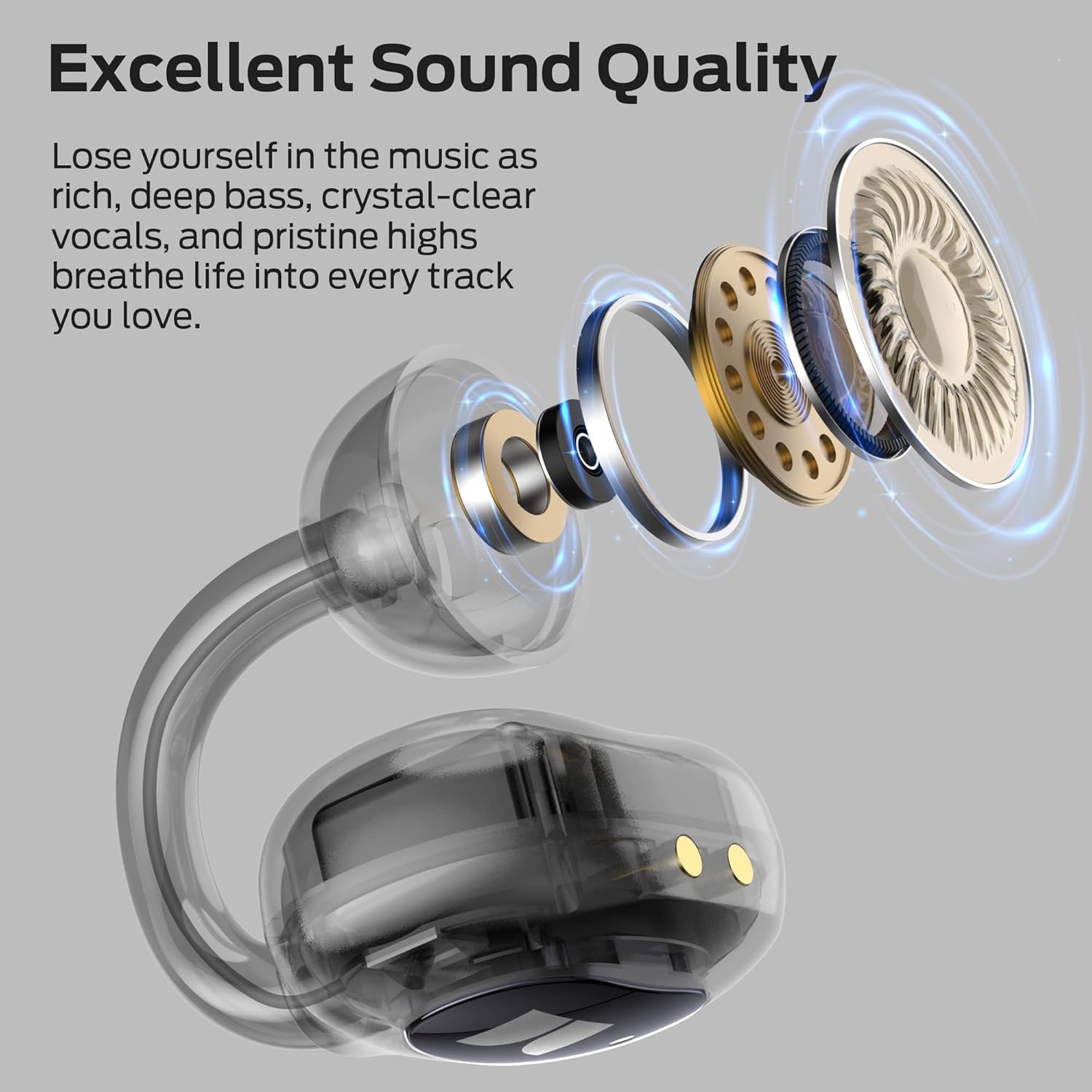
Image: A woman wearing a Monster Open Ear AC339 earbud, demonstrating the comfortable and lightweight fit.

Image: A visual guide demonstrating the correct method for wearing the Monster Open Ear AC339 earbuds.
Touch Controls
The earbuds feature sensitive touch controls on both the left and right earbuds for easy management of audio and calls.
| Action | Function |
|---|---|
| Double Tap (x2) | Answer/End Call, Play/Pause Music |
| Hold for 2 seconds | Reject Call, Activate Voice Assistant |
| Triple Tap (x3) (Left Earbud) | Previous Song |
| Triple Tap (x3) (Right Earbud) | Next Song |
| Single Tap (x1) (Left Earbud) | Volume Down |
| Single Tap (x1) (Right Earbud) | Volume Up |

Image: The Monster Open Ear AC339 earbuds highlighting the sensitive touch control areas.

Image: A detailed diagram showing the various touch control gestures and their corresponding functions for both left and right earbuds.
Maintenance
Cleaning
- Regularly clean the earbuds and charging case with a soft, dry, lint-free cloth.
- Do not use abrasive cleaners, alcohol, or chemical solvents.
- Ensure charging contacts on both earbuds and case are clean and dry to prevent charging issues.
Storage
- When not in use, store the earbuds in their charging case to protect them and keep them charged.
- Store in a cool, dry place away from extreme temperatures and direct sunlight.
Water Resistance (IPX6)
The earbuds are IPX6 water-resistant, meaning they can withstand strong jets of water. This makes them suitable for use during workouts or in light rain. However, they are not designed for submersion in water.
- Do not intentionally submerge the earbuds in water.
- If the earbuds get wet, wipe them dry thoroughly before placing them back in the charging case or attempting to charge them.

Image: The Monster Open Ear AC339 earbuds with water droplets, demonstrating their IPX6 water-resistant capability.

Image: A visual emphasizing the IPX6 water resistance of the Monster Open Ear AC339 earbuds, suitable for various conditions.
Troubleshooting
If you encounter issues with your earbuds, refer to the following common solutions:
- No Sound:
- Ensure earbuds are charged.
- Check if earbuds are properly paired with your device.
- Adjust volume on both your device and the earbuds.
- Try re-pairing the earbuds.
- Earbuds Not Charging:
- Ensure the charging cable is securely connected to both the case and power source.
- Verify the charging contacts on the earbuds and inside the case are clean and free of debris.
- Check the charging case battery level.
- Cannot Pair:
- Ensure Bluetooth is enabled on your device.
- Make sure the earbuds are in pairing mode (open the case).
- Turn off Bluetooth on other nearby devices that might be trying to connect.
- Try forgetting the device in your phone's Bluetooth settings and re-pairing.
- Intermittent Connection:
- Ensure there are no obstructions between the earbuds and your device.
- Move closer to your device.
- Avoid environments with strong Wi-Fi or other wireless interference.
Specifications
| Feature | Detail |
|---|---|
| Model Name | AC339 (E98) |
| Connectivity Technology | Wireless (Bluetooth 6.0) |
| Ear Placement | Open Ear |
| Control Method | Touch |
| Water Resistance Level | IPX6 |
| Battery Life (Total with Case) | Up to 40 Hours |
| Earbud Weight (Each) | Approximately 5.2g |
| Included Components | Wireless Charging Case |
| Material | Silicone |
| Compatible Devices | Smartphones, Laptops, Desktops, Tablets, Smart Speakers, Car Audio Systems |
Warranty and Support
Monster is committed to customer satisfaction. For any inquiries, feedback, or support regarding your Monster Open Ear AC339 Earbuds, please contact our professional customer service team. Refer to the product packaging or the official Monster website for specific warranty details and contact information.
Note: Warranty terms may vary by region. Please retain your proof of purchase for warranty claims.


