
Introduction
Thank you for purchasing the WSTER WS-1955 Classic Station Wagon Bluetooth Speaker. This manual provides essential information for setting up, operating, and maintaining your speaker. Please read it carefully before use to ensure optimal performance and longevity of your device.
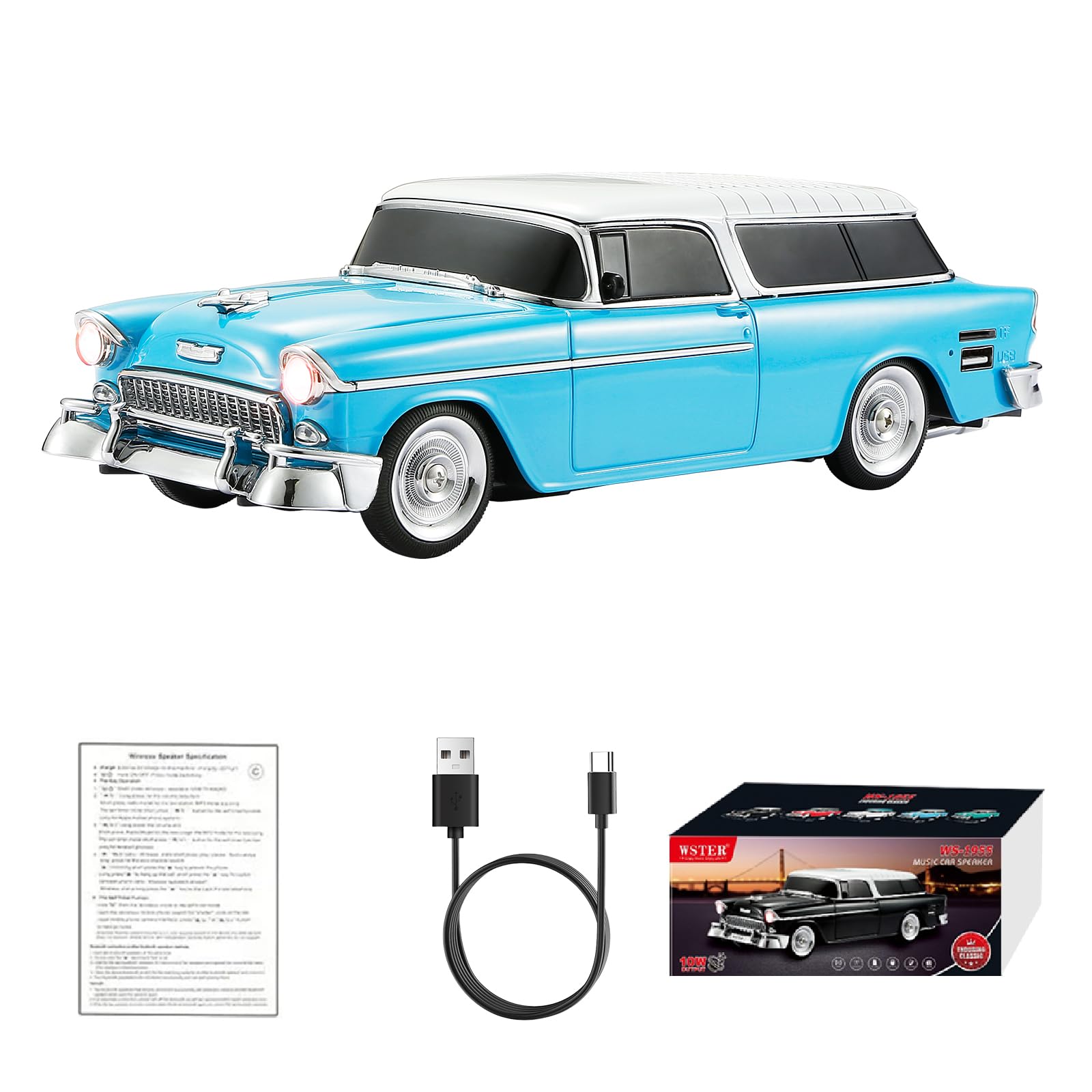
Image: The WSTER WS-1955 Classic Station Wagon Bluetooth Speaker, showcasing its retro design.
Package Contents
Ensure all items are present in the package:
- WSTER WS-1955 Bluetooth Speaker
- Power Cable (Type-C)
- Quick Start Guide
Product Overview
The WSTER WS-1955 is a portable Bluetooth speaker designed with a classic station wagon aesthetic. It combines vintage design with modern audio technology, offering multiple playback options and features for various uses.

Image: The speaker's classic retro car design, highlighting its detailed appearance.
Key Features:
- Retro Sedan Design: Vintage-inspired car model with movable wheels, suitable for desktop display.
- HD Sound + TWS Stereo Pairing: Delivers clear audio with punchy bass. Two units can connect for a broader stereo soundstage.
- Versatile Playback: Supports Bluetooth streaming, USB playback, TF card, and FM radio.
- LED Party Light & Built-in Microphone: Music-reactive LED lights and a microphone for hands-free calls.
- Type-C Charging + Portability: Modern Type-C charging, lightweight, and portable for various environments.

Image: Various color options available for the WS-1955 speaker.
Setup
Charging the Speaker
Before first use, fully charge the speaker. Connect the provided Type-C power cable to the charging port on the speaker and a compatible USB power adapter (not included). The charging indicator will show the charging status.
Powering On/Off
To power on the speaker, press and hold the power button (usually labeled M/○) located at the rear of the device. You will hear an audible prompt. To power off, press and hold the same button again.
Bluetooth Pairing
- Ensure the speaker is powered on and in Bluetooth mode. If not, briefly press the Mode button (M) to cycle through modes until 'Bluetooth' is announced or displayed.
- On your mobile device, enable Bluetooth and search for available devices.
- Select 'WS-1955' from the list of devices.
- Once paired, the speaker will indicate a successful connection, and you can begin playing audio.

Image: A smartphone screen showing a Bluetooth connection to the WS-1955 speaker.
Operating Instructions
Button Functions
Refer to the image below for the location of control buttons on the rear of the speaker:

Image: Rear view of the WSTER WS-1955 speaker, indicating the function of each control button.
- M/○ (Mode/Power): Press and hold to power on/off. Short press to switch between modes (Bluetooth, FM, USB, TF Card).
- ►►| (Next Track/Volume Up): Short press for next track. Press and hold to increase volume.
- ►|| (Play/Pause): Short press to play or pause audio. In FM mode, short press to auto-scan stations.
- |◄◄ (Previous Track/Volume Down): Short press for previous track. Press and hold to decrease volume.
TWS Stereo Pairing (Requires two WS-1955 speakers)
- Ensure both WS-1955 speakers are powered on and in Bluetooth mode, but not connected to any device.
- On one of the speakers, press and hold the Play/Pause button (►||) until you hear a pairing tone.
- The two speakers will automatically connect to each other. A confirmation tone will sound once connected.
- Now, connect your mobile device to one of the speakers via Bluetooth as described in the 'Bluetooth Pairing' section. Audio will play in stereo through both speakers.

Image: Two WS-1955 speakers demonstrating TWS (True Wireless Stereo) pairing for enhanced sound.
USB/TF Card Playback
Insert a USB drive or TF (MicroSD) card containing MP3 audio files into the respective port on the speaker. The speaker will automatically switch to USB or TF card mode and begin playing music. Use the track control buttons to navigate.

Image: Close-up of the speaker's rear, highlighting the USB and TF card input ports.
FM Radio
Press the Mode button (M) to switch to FM radio mode. Short press the Play/Pause button (►||) to auto-scan and save available FM stations. Use the track control buttons (►►| and |◄◄) to switch between saved stations.
Hands-Free Calling
When connected to your smartphone via Bluetooth, the built-in microphone allows for hands-free calling. When a call comes in, press the Play/Pause button (►||) to answer. Press it again to end the call.

Image: A user making a hands-free call using the WS-1955 speaker, demonstrating its built-in microphone feature.
LED Light Control
The speaker features music-reactive LED headlights. These lights typically activate automatically when music is playing. There is no specific button for controlling the LED lights independently.

Image: The WS-1955 speaker with its LED headlights illuminated, reacting to music.
Remote Photo Control
When connected via Bluetooth, the speaker can act as a remote shutter for your smartphone camera. Open your phone's camera app and press the Play/Pause button (►||) on the speaker to take a photo.

Image: Friends using the WS-1955 speaker to remotely trigger a smartphone camera for a group photo.
Instructional Videos
WS-1955 Retro Car Bluetooth Replica Speaker Overview
Video: A detailed overview of the WS-1955 Retro Car Bluetooth Replica Speaker, demonstrating its features and design. (Duration: 1:45)
WSTER Speaker Instructions
Video: General instructions for operating WSTER speakers, applicable to the WS-1955 model. (Duration: 2:08)
WSTER Speaker Instructions Part 2
Video: Further instructions for WSTER speakers, providing additional operational guidance. (Duration: 3:41)
Maintenance
To ensure the longevity and optimal performance of your WSTER WS-1955 speaker, follow these maintenance guidelines:
- Cleaning: Use a soft, dry cloth to wipe the exterior of the speaker. Avoid using abrasive cleaners, solvents, or strong chemicals, as these can damage the finish.
- Storage: Store the speaker in a cool, dry place away from direct sunlight and extreme temperatures.
- Water Exposure: This speaker is not waterproof. Avoid exposing it to water or high humidity to prevent damage to internal components.
- Handling: Handle the speaker with care to prevent physical damage. Avoid dropping it or subjecting it to strong impacts.
Troubleshooting
If you encounter issues with your speaker, refer to the following common problems and solutions:
- Speaker does not power on: Ensure the battery is charged. Connect the speaker to a power source using the Type-C cable and try again.
- No sound: Check the volume level on both the speaker and your connected device. Ensure the speaker is correctly paired via Bluetooth or that the USB/TF card is properly inserted and contains playable files.
- Bluetooth pairing fails: Make sure the speaker is in Bluetooth mode and not connected to another device. Disable and re-enable Bluetooth on your device, then try pairing again. Move closer to the speaker to ensure a strong signal.
- Poor FM radio reception: Try repositioning the speaker to improve signal reception. Obstacles or other electronic devices can interfere with the signal.
- TWS pairing issues: Ensure both speakers are fully charged and not connected to any other Bluetooth device before attempting TWS pairing. Follow the TWS pairing steps carefully.
Specifications
| Feature | Specification |
|---|---|
| Brand | WSTER |
| Model Number | WS-1955 |
| Speaker Maximum Output Power | 10 watts |
| Frequency Response | 18 KHz |
| Connectivity Technology | Bluetooth |
| Audio Output Mode | Stereo |
| Mounting Type | Tabletop Mount |
| Enclosure Material | Acrylonitrile Butadiene Styrene (ABS) |
| Speaker Type | Portable Speaker |
| Additional Features | Bluetooth Connection, Built-In Microphone, FM Radio, LED Light, TWS |
| Color | Blue |
| Is Waterproof | False |
| Specific Uses For Product | Home, Car, Outdoor, Desktop, Portable, Party, Travel |
| Wireless Technology | Bluetooth |
| Connectivity Protocol | Bluetooth |
| Number of Batteries | 1 Nonstandard Battery (included) |
| Item Weight | 650 g |
| Item Dimensions (D x W x H) | 10.55" x 3.94" x 3.07" (26.8cm x 10cm x 7.8cm) |
| Compatible Devices | MP3 Player, Smartphone, Tablet |

Image: Diagram showing the dimensions of the WS-1955 speaker.
Warranty Information
Based on the product specifications, there is no explicit warranty description provided for the WSTER WS-1955 speaker. Please refer to your retailer's return policy or contact WSTER customer support for further details regarding potential coverage or service options.
Customer Support
For any questions, technical assistance, or further support regarding your WSTER WS-1955 speaker, please refer to the contact information provided by your retailer or visit the official WSTER website. Keep your purchase receipt handy for any inquiries.
