
1. Introduction
Thank you for choosing the xdobo SINOBAND Alps Bluetooth Speaker. This manual provides essential information for setting up, operating, and maintaining your speaker to ensure optimal performance and longevity. Please read this manual thoroughly before using the product.
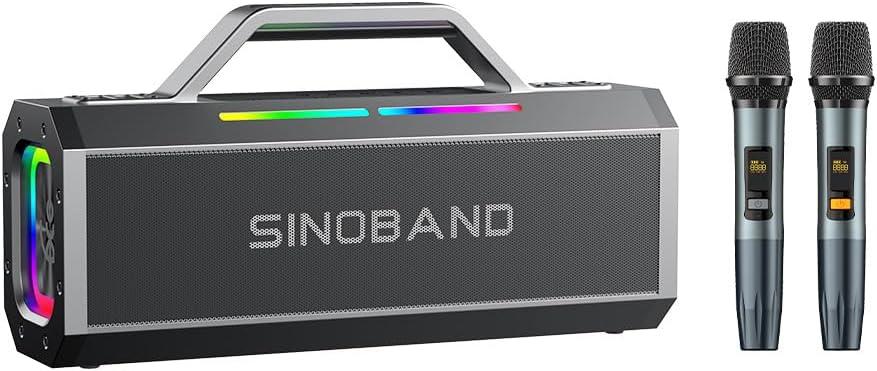
Image 1.1: The xdobo SINOBAND Alps Bluetooth Speaker shown with two wireless microphones.
2. Package Contents
Please check the package for the following items:
- xdobo SINOBAND Alps Bluetooth Speaker
- Charging Cable (Type-C)
- User Manual
- (Optional: Wireless Microphones, if included in your specific package)
3. Setup
3.1 Charging the Speaker
Before first use, fully charge the speaker. Connect the provided Type-C charging cable to the speaker's charging port and a compatible 5V/3A power adapter (not included). The charging indicator will show the charging status and turn off when fully charged.

Image 3.1: The speaker is designed for extended use, offering over 27 hours of battery life on a single charge.
3.2 Powering On/Off
- To Power On: Press and hold the Power button for approximately 3 seconds until the indicator lights illuminate.
- To Power Off: Press and hold the Power button for approximately 3 seconds until the indicator lights turn off.
3.3 Bluetooth Pairing
To connect your device via Bluetooth:
- Ensure the speaker is powered on and in Bluetooth pairing mode (the Bluetooth indicator light will flash).
- On your device (smartphone, tablet, etc.), enable Bluetooth and search for available devices.
- Select "xdobo SINOBAND Alps" from the list of devices.
- Once connected, the Bluetooth indicator light on the speaker will become solid.

Image 3.2: The speaker supports Bluetooth 5.3 for stable connections, shown here with connected microphones and a smartphone.
3.4 True Wireless Stereo (TWS) Interconnection
For an enhanced stereo experience, you can connect two xdobo SINOBAND Alps speakers together:
- Ensure both speakers are powered on and not connected to any Bluetooth device.
- On one speaker, press and hold the TWS button (refer to speaker controls for exact button). The speaker will enter TWS pairing mode.
- The two speakers will automatically connect to each other. A confirmation tone will sound, and the TWS indicator light will become solid on both speakers.
- Once TWS is established, connect your device to one of the speakers via Bluetooth as described in Section 3.3. Both speakers will then play audio in stereo.

Image 3.3: Two SINOBAND Alps speakers wirelessly interconnected to provide a stereo audio experience.
4. Operating Instructions
4.1 Basic Controls
The speaker features intuitive controls for audio playback:
- Power Button: Press and hold to power on/off. Short press for play/pause.
- Volume Up (+): Short press to increase volume.
- Volume Down (-): Short press to decrease volume.
- Next Track: Long press the Volume Up (+) button.
- Previous Track: Long press the Volume Down (-) button.
- Mode Button (M): Short press to switch between input modes (Bluetooth, AUX, USB, TF Card).
4.2 Karaoke and Live Streaming
The built-in sound card allows for professional audio input, making the speaker suitable for karaoke and live streaming applications.
- Connect a microphone to the designated microphone input port.
- Adjust microphone volume and echo effects using the dedicated controls on the speaker (if available).
- Ensure your streaming software or karaoke application is configured to use the speaker's audio output.
4.3 RGB Lighting Effects
The speaker features integrated RGB lights that enhance the listening experience. Use the dedicated light button (if available) to cycle through different lighting modes or turn them off.
5. Maintenance
To ensure the longevity and optimal performance of your xdobo SINOBAND Alps speaker, follow these maintenance guidelines:
- Cleaning: Use a soft, dry cloth to wipe the speaker's surface. Do not use abrasive cleaners, alcohol, or chemical solvents.
- Storage: Store the speaker in a cool, dry place away from direct sunlight and extreme temperatures.
- Water Resistance: While designed for outdoor use, avoid submerging the speaker in water. Ensure all port covers are securely closed to maintain water resistance.
- Battery Care: To preserve battery life, avoid fully discharging the battery frequently. Charge the speaker regularly, even if not in use for extended periods.
6. Troubleshooting
If you encounter issues with your speaker, refer to the following common problems and solutions:
| Problem | Possible Cause | Solution |
|---|---|---|
| Speaker does not power on | Low battery; Power button not pressed correctly | Charge the speaker; Press and hold the Power button for 3 seconds |
| No sound | Volume too low; Incorrect input mode; Device not paired | Increase volume; Press 'M' button to change mode; Re-pair Bluetooth device |
| Bluetooth pairing fails | Speaker already connected; Device too far; Interference | Disconnect from other devices; Move device closer; Restart speaker and device |
| TWS connection fails | Speakers already paired to a device; Speakers too far apart | Ensure both speakers are unpaired; Place speakers closer together and retry TWS pairing |
7. Specifications
Detailed technical specifications for the xdobo SINOBAND Alps Bluetooth Speaker:

Image 7.1: Internal component layout highlighting the high-pitched and bass speakers for powerful sound output.
- Brand: xdobo
- Model: SINOBAND Alps
- Connectivity Technology: Bluetooth
- Bluetooth Version: 5.3
- Power Output: 150W
- Frequency Response: 20Hz - 20KHz
- Impedance: 4 Ohms
- Power Source: Battery Powered
- Battery Life: Up to 27 hours (varies by volume and usage)
- Charging: Type-C, 5V/3A
- Material: Acrylonitrile Butadiene Styrene (ABS), Electronic Components, Metal
- Product Dimensions (L x W x H): 4.13 x 10.24 x 6.81 inches
- Item Weight: 6.09 pounds (2.77 Kilograms)
- Recommended Uses: Indoor, Outdoor
- Special Features: Built-in Sound Card, RGB Lights, TWS Interconnection
8. Warranty and Support
For warranty information and customer support, please refer to the warranty card included with your product or visit the official xdobo website. Keep your purchase receipt as proof of purchase for any warranty claims.
For further assistance, you may contact xdobo customer service through their official channels.


