
Moondrop MD-TWS-046
Moondrop Space Travel 2 TWS Earphone User Manual
Model: MD-TWS-046
Introduction
This manual provides comprehensive instructions for the setup, operation, and maintenance of your Moondrop Space Travel 2 True Wireless Stereo (TWS) Earphones. Please read this manual thoroughly before using the product to ensure proper function and longevity.
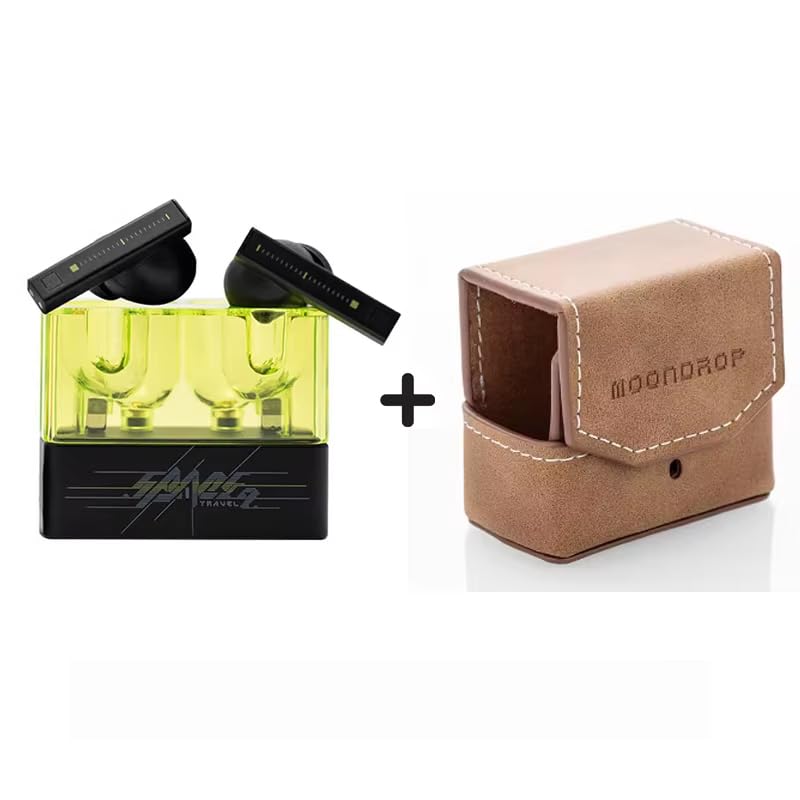
Figure 1: Moondrop Space Travel 2 TWS Earphones in their charging case, alongside the included leather protective case. The earphones are black with a transparent yellow charging case, and the leather case is light brown with "MOONDROP" embossed on it.
Package Contents
Verify that all items are present in the package:
- Moondrop Space Travel 2 Earphones
- Charging Case
- Charging Cable
- Eartips (Sizes: S, M, L)
- User Manual (this document)
- After-service Card
- Guidance Card
- Service Card
- Certificate
Setup
1. Charging the Earphones and Case
Before first use, fully charge the earphones and the charging case. Connect the provided charging cable to the charging case and a compatible USB power source (5V-1A input recommended). The indicator lights on the case will show charging status.
- Earphone Battery Life: Approximately 7 hours (AAC codec).
- Charging Case Battery Life: Provides approximately 24 hours of additional earphone charge (AAC codec).
2. Pairing with a Bluetooth Device
- Ensure the earphones are in the charging case and the case lid is open.
- On your device (smartphone, tablet, computer), enable Bluetooth.
- Search for new Bluetooth devices. Select "Moondrop Space Travel 2" from the list of available devices.
- Once connected, a confirmation sound or message will indicate successful pairing.
The earphones support Bluetooth Version 6.0 with a range of up to 10 meters in an open environment. Supported codecs include SBC and AAC, with distribution profiles A2DP, AVRCP, HFP, and HSP.
3. Selecting Eartips
Choose the eartip size (S, M, L) that provides the best seal and comfort for your ears. A proper seal is crucial for optimal sound quality and effective noise cancellation.
Operating Instructions
Basic Controls
The Moondrop Space Travel 2 earphones feature touch-sensitive controls on the earbud stems. Specific tap gestures control various functions:
- Play/Pause: Single tap on either earbud.
- Next Track: Double tap on the right earbud.
- Previous Track: Double tap on the left earbud.
- Answer/End Call: Single tap on either earbud.
- Reject Call: Press and hold either earbud.
- Activate Voice Assistant: Triple tap on either earbud.
Active Noise Cancellation (ANC)
The earphones utilize a single feedforward wide-band ANC system for effective noise reduction without negatively impacting sound quality. The built-in NPU with AI ENC algorithm further enhances clarity by eliminating environmental noise during calls.
- Toggle ANC/Transparency Mode: Press and hold the touch area on the earbud for approximately 2 seconds.
Game Mode
For a more responsive gaming experience, activate Game Mode, which reduces audio latency to as low as 55ms.
- Activate Game Mode: Tap the touch faceplate four times.
One-button EQ Setting (via MOONDROP APP)
The Moondrop APP allows for easy equalization adjustments. Users can select predefined target responses with a single click, eliminating the need for manual tuning.
- Download the official MOONDROP APP from your device's app store.
- Connect your Space Travel 2 earphones to the app.
- Navigate to the EQ settings and select your desired audio profile.
Maintenance
Proper maintenance ensures the longevity and optimal performance of your earphones.
- Cleaning: Regularly clean the earphones and charging case with a soft, dry, lint-free cloth. Do not use abrasive cleaners or immerse in liquids.
- Eartips: Remove and clean eartips periodically with mild soap and water. Ensure they are completely dry before reattaching.
- Storage: When not in use, store the earphones in their charging case to protect them and keep them charged.
- Temperature: Avoid exposing the earphones to extreme temperatures (hot or cold) or high humidity.
Troubleshooting
| Problem | Possible Cause | Solution |
|---|---|---|
| No sound from earphones. | Earphones not charged; Not paired; Volume too low. | Charge earphones; Re-pair with device; Increase volume on device. |
| Earphones not pairing. | Out of range; Bluetooth off; Interference. | Ensure earphones are close to device; Turn Bluetooth off/on; Move away from other wireless devices. |
| Poor sound quality or weak bass. | Improper eartip seal; Earbuds dirty. | Try different eartip sizes for a better seal; Clean eartips and earbud nozzles. |
| ANC not effective. | Improper fit; ANC not activated. | Adjust earbud position and eartips for a snug fit; Ensure ANC is toggled on. |
Specifications
| Feature | Detail |
|---|---|
| Product Name | MOONDROP Space Travel 2 |
| Model | MD-TWS-046 |
| Bluetooth Version | 6.0 |
| Bluetooth Range | 10 Meters (Open Environment) |
| Supported Codecs | SBC/AAC |
| Distribution Profile | A2DP/AVRCP/HFP/HSP |
| Earphone Battery Capacity | 3.7V/35mAh |
| Charging Case Battery Capacity | 3.7V/380mAh |
| Earphone Battery Life | About 7 Hours (AAC) |
| Charging Case Battery Life | About 24 Hours (AAC) |
| Input | 5V-1A |
| Output | 5V-0.25A |
| Driver | 13mm Dynamic Driver with Beryllium-plated dome |
| Noise Cancellation | Single Feedforward Wide-band ANC, NPU Hardware-level AI ENC |
| Low-latency Mode | 55ms Game Mode |
Warranty and Support
For warranty information and customer support, please refer to the "After-service Card" and "Service Card" included in your product package. You may also visit the official Moondrop website or contact their customer service directly for assistance.
Moondrop Store: Visit the Moondrop Store on Amazon
Related documentsMD-TWS-046


Ask a question about this manual
Ask about setup, troubleshooting, compatibility, parts, safety, or missing instructions. Manuals+ will review the question and use this page’s manual context to help answer it.