Introduction
This manual provides comprehensive instructions for the operation, maintenance, and troubleshooting of your Zostuic 4K Digital Camera. Please read this manual thoroughly before using the camera to ensure proper functionality and to maximize your photographic and videographic experience.

Figure 1: Zostuic 4K Digital Camera and included accessories.
What's in the Box
Upon unboxing your Zostuic 4K Digital Camera, please verify that all the following items are included:
- Zostuic 4K Digital Camera Body
- Wide-angle Lens (detachable)
- 2 x Nonstandard Battery (rechargeable)
- Battery Cradle Charger
- USB Cable
- 32GB Memory Card
- Camera Strap
- Lens Cap
- Camera Pouch
- Cleaning Cloth
- User Manual (this document)

Figure 2: All components included in the Zostuic 4K Digital Camera package.
Product Overview
The Zostuic 4K Digital Camera is designed for ease of use while offering advanced features for high-quality photography and videography. Key components include:
- Lens: Features autofocus and 16X digital zoom.
- 3-inch 180° Flip Screen: Ideal for vlogging and selfies.
- Built-in Flash: For improved low-light performance.
- Control Buttons: Intuitive layout for easy navigation and settings adjustment.
- Hot Shoe: For external accessories like microphones.
- 1/4 Screw Port: For tripod mounting.

Figure 3: Detailed diagram of the camera's external features and controls.
Setup
1. Battery Installation and Charging
- Open the battery compartment cover located on the bottom of the camera.
- Insert the battery, ensuring the correct orientation as indicated inside the compartment.
- Close the battery compartment cover securely.
- To charge the battery, insert one or both batteries into the provided battery cradle charger.
- Connect the USB cable to the charger and then to a power adapter (not included) or a computer's USB port.
- The indicator light on the charger will show charging status (e.g., red for charging, blue for fully charged).
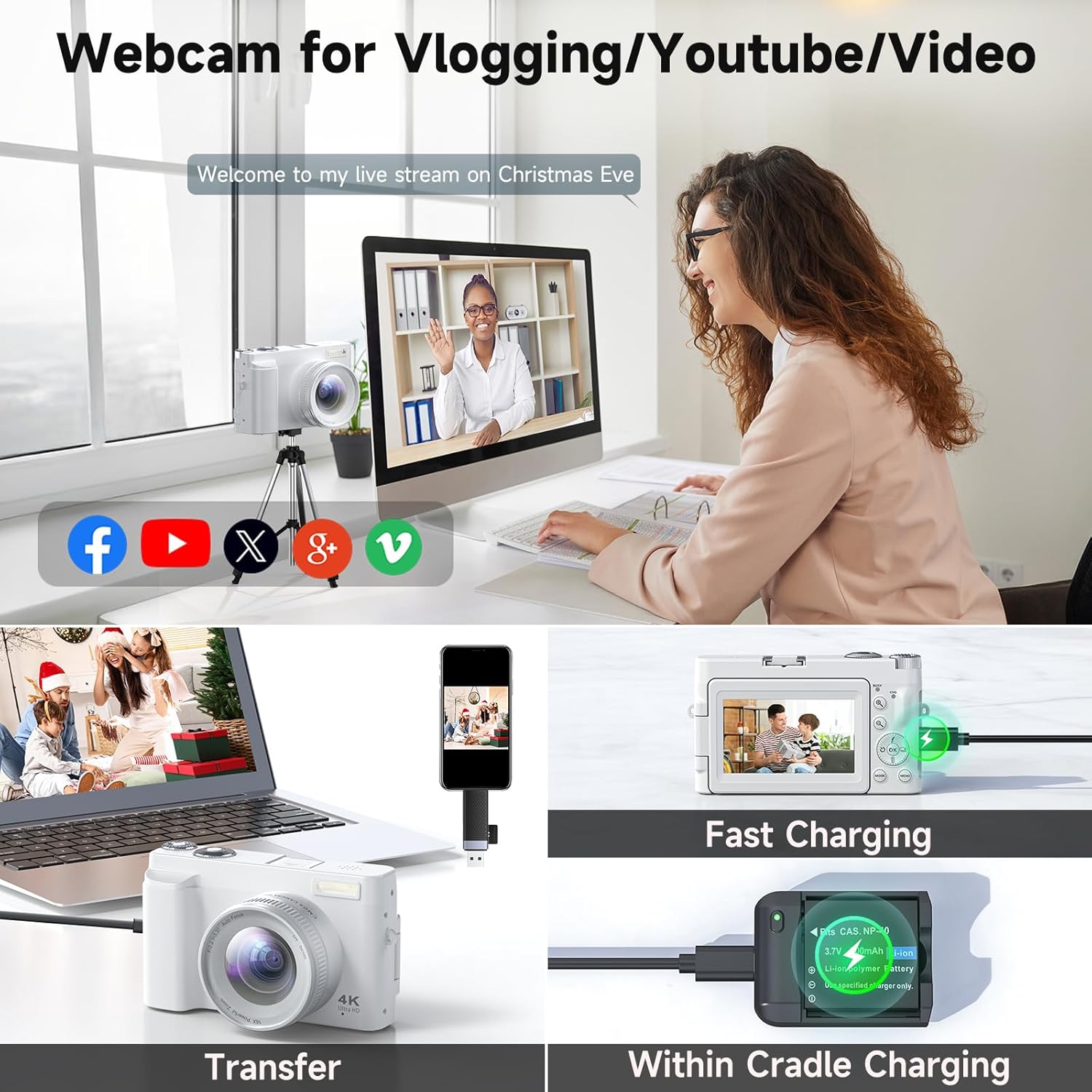
Figure 4: The camera can be charged directly or via the battery cradle charger. This image also shows file transfer capabilities.
2. Memory Card Installation
- Locate the memory card slot on the side of the camera.
- Insert the 32GB memory card (included) into the slot until it clicks into place. Ensure the correct orientation.
- To remove the card, gently push it in until it springs out.
3. Attaching Lenses
The camera comes with a detachable wide-angle lens. To attach it:
- Align the threads of the wide-angle lens with the threads on the camera's main lens.
- Gently twist the wide-angle lens clockwise until it is securely fastened.
- To remove, twist counter-clockwise.
Operating Instructions
1. Power On/Off
Press and hold the power button located on the top of the camera to turn it on or off.
2. Taking Photos
- Autofocus: The camera features autofocus for clear images. Half-press the shutter button to focus, then fully press to capture.
- Flash: Activate the built-in flash for low-light conditions.
- Zoom: Use the zoom controls to adjust the 16X digital zoom.
- Continuous Shooting: Capture a series of photos rapidly by enabling continuous shooting mode.
- Timing (Self-timer): Set a delay (2/5/10 seconds) before the photo is taken, useful for group shots or selfies.

Figure 5: The 48MP autofocus ensures clear photography, and the 180° flip screen is convenient for selfies.

Figure 6: Clear imaging technology with bright flash, anti-shake, and 1-16X digital zoom capabilities.
3. Recording Videos
- 4K Resolution: Record high-definition videos in 4K.
- Pause Function: Pause and resume video recording to save editing time.
- Time-lapse: Capture sequences of images over time to create time-lapse videos.
- Slow-motion: Record videos in slow-motion for dramatic effects.

Figure 7: The camera supports 4K UHD video recording with features like date stamp and pause/play.
4. Using as a Webcam
Connect the camera to your computer via the USB cable to use it as a webcam for live streaming or video calls.

Figure 8: The camera can function as a webcam for live streaming and video calls.
5. Transferring Files
Connect the camera to your computer using the USB cable to transfer photos and videos. The camera will appear as a removable disk drive.
6. Exposure Compensation
Adjust the exposure compensation settings to control the brightness of your images, allowing for brighter or darker results as desired.

Figure 9: Visual representation of exposure compensation, showing how different settings affect image brightness.
7. Filters
Utilize the various built-in filters to enhance the atmosphere and style of your photos.

Figure 10: The camera offers multiple filter options to customize the look of your photos.
Maintenance
- Keep the camera clean by wiping it with a soft, dry cloth.
- Avoid exposing the camera to extreme temperatures, dust, or moisture.
- Clean the lens with a specialized lens cleaning cloth and solution only.
- Store the camera in its protective pouch when not in use.
- Remove batteries if the camera will not be used for an extended period.
Troubleshooting
| Problem | Possible Cause | Solution |
|---|---|---|
| Camera does not power on. | Low or uncharged battery; incorrectly inserted battery. | Charge the battery fully. Ensure the battery is inserted correctly. |
| Images are blurry. | Lens is dirty; camera not focused; anti-shake off. | Clean the lens. Half-press the shutter to allow autofocus. Ensure anti-shake is enabled. |
| Cannot record video. | Memory card full; incorrect mode. | Delete unnecessary files or insert a new memory card. Switch to video recording mode. |
| Files not transferring to computer. | Loose USB connection; driver issue. | Ensure USB cable is securely connected. Try a different USB port or computer. |
Specifications
| Feature | Detail |
|---|---|
| Brand | Zostuic |
| Model Name | DC101 |
| Image Resolution | 48MP (Ultra HD) |
| Video Resolution | 4K |
| Zoom | 16X Digital Zoom |
| Screen | 3-inch 180° Flip Screen |
| Autofocus | Yes |
| Image Stabilization | Digital |
| Photo Sensor Technology | CMOS |
| Supported File Format | JPEG |
| Item Weight | 1.25 pounds |
| Batteries | 2 Nonstandard Battery (included) |
| Compatible Mountings | Tripod |
Warranty and Support
Zostuic provides a 2-year warranty for the 4K Digital Camera (Model: DC101). We also offer a worry-free 18-month replacement and refund warranty.
For customer support, please contact our team. We aim to assist you within 12 hours.
For more information and product registration, please visit the Zostuic Store on Amazon.