
HelloBaby HB6363
HelloBaby Baby Monitor User Manual
Model: HB6363 | Brand: HelloBaby
1. Product Overview
The HelloBaby HB6363 is an advanced video baby monitor system designed to provide peace of mind with its large 6-inch LCD display and comprehensive monitoring features. It operates without WiFi, ensuring a secure and stable connection for monitoring babies, pets, or elderly family members.

Image: The HelloBaby HB6363 baby monitor system, showing the monitor unit with a 6-inch IPS LCD screen displaying a baby, and the pan-tilt camera unit.
2. Key Features
- Unique 6-inch IPS Screen: Large, colorful, and clear display with 2x digital zoom for detailed viewing.
- 320° Pan-Tilt Camera: Remote control for 320° horizontal and 120° vertical rotation, providing a wide view of the room.
- Automatic Night Vision: Switches automatically to black and white mode in low light, with a viewing distance of up to 5 meters.
- Two-Way Talk: Built-in microphone and speaker for real-time voice interaction with your baby.
- 8 Lullabies: Selection of natural white noise and lullabies with single song or loop playback modes.
- Long Battery Life: 4000mAh battery offering 16-30 hours of use (up to 30 hours in ECO mode).
- Secure FHSS Transmission: 2.4GHz FHSS encryption technology for anti-interference, privacy, and security, with a range of up to 1000ft (outdoor) / 165ft (indoor).
- Intelligent Environmental Monitoring: Real-time room temperature monitoring with alerts for over-temperature or under-temperature.
- Sound Level LED Indicator: Visual indication of environmental noise intensity (green/yellow/red).
- Multi-Camera Expansion: Supports connection of up to 4 cameras (additional cameras sold separately).
- 150 Language Options: Versatile language support for global families.

Image: An infographic highlighting the key features of the HelloBaby HB6363 monitor, including 4000mAh battery, ECO mode, auto night vision, 2-way talk, multi-camera support, pan/tilt/zoom, long range, temperature alarm, 8 lullabies, and 150 languages.
3. Setup Guide
3.1 Charging the Units
Before first use, fully charge both the monitor unit and the camera unit. The monitor unit has a built-in rechargeable battery, while the camera unit is powered by a corded electric connection.
- Connect the power adapter to the DC-Jack on the monitor unit and plug it into a power outlet.
- Connect the power adapter to the camera unit and plug it into a power outlet.
- Allow both units to charge until the battery indicator on the monitor shows a full charge.
3.2 Camera Placement
Place the camera unit in a location that provides a clear view of your baby, ensuring it is out of reach of children. The camera can be freestanding, screw-mounted, or placed on a shelf or bassinet.
- Ensure the camera is placed at least 3 feet (1 meter) away from the baby to avoid potential hazards.
- For optimal night vision, avoid placing the camera directly facing a light source.
- Consider the camera's pan-tilt capabilities when choosing its position to maximize coverage.
3.3 Powering On
- Press and hold the Power Key on the monitor unit until the screen turns on.
- Ensure the camera unit is plugged in and powered on. The monitor should automatically connect to the camera.
- If the connection is not established automatically, refer to the Troubleshooting section for pairing instructions.
4. Operating Instructions
4.1 Pan, Tilt, and Zoom
The camera offers remote pan, tilt, and digital zoom functions to adjust your viewing angle.
- Use the directional buttons on the monitor to pan (move horizontally) and tilt (move vertically) the camera.
- Press the 'Scan / Zoom' button to activate the 2x digital zoom. Use directional buttons to navigate the zoomed image.

Image: The HelloBaby HB6363 monitor displaying a baby sleeping in a crib, illustrating the automatic night vision feature transitioning from day to night mode.
4.2 Two-Way Talk
Communicate with your baby or partner through the monitor's two-way talk feature.
- Press and hold the 'Two Way Talk' button on the monitor to speak. Release the button to listen.
- Ensure the speaker on the baby unit is not obstructed.
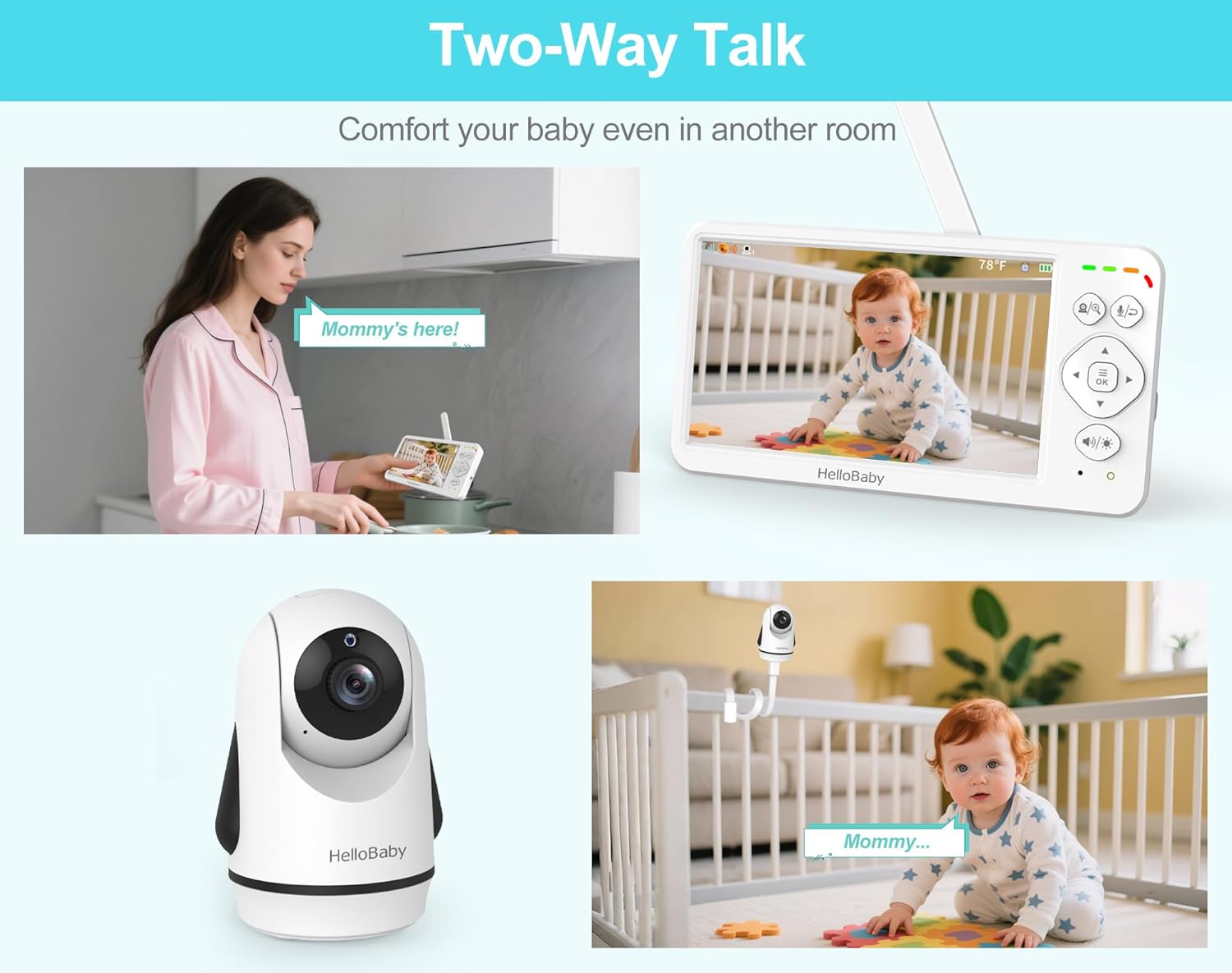
Image: A visual representation of the two-way talk feature, showing a parent speaking into the monitor and a baby hearing the voice from the camera unit.
4.3 Night Vision
The monitor automatically switches to night vision mode in low light conditions.
- The screen will display a black and white image when night vision is active.
- The maximum viewing distance in night vision is 5 meters.
4.4 ECO Mode (Power Saving)
Activate ECO mode to conserve battery life on the monitor unit.
- In ECO mode, the screen will turn off when no sound is detected from the baby unit.
- The screen will automatically turn back on when sound is detected.
- This mode significantly extends battery life, up to 30 hours on a single charge.

Image: A comparison showing 18 hours of screen-on time versus 30 hours in ECO mode for the HelloBaby HB6363 monitor, highlighting its 4000mAh battery.
4.5 Lullabies and Language Settings
Access and control lullabies and adjust language settings through the monitor's menu.
- Navigate to the 'Lullaby' icon on the main menu to select from 8 built-in lullabies. You can choose single play or loop play mode.
- Navigate to the 'Language' icon to select from 150 available languages.

Image: Screenshots of the HelloBaby HB6363 monitor's interface showing the selection of 8 lullabies and various language options, indicating support for 150 languages.
4.6 Volume and Brightness Adjustment
Adjust the monitor's volume and screen brightness directly using dedicated buttons.
- Use the 'Volume / Brightness' button to cycle through adjustment modes.
- Use the directional buttons to increase or decrease the volume or brightness.
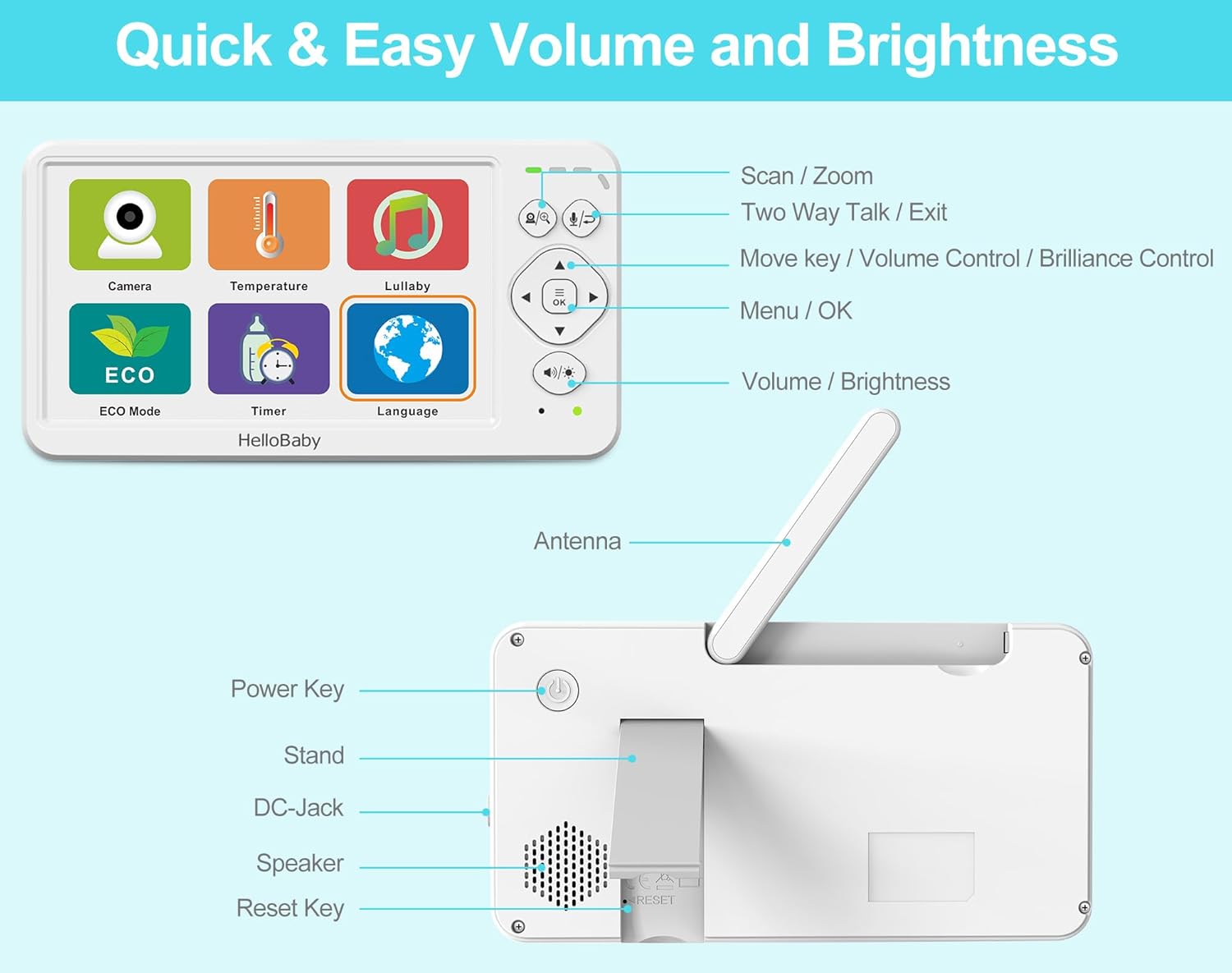
Image: A detailed diagram of the HelloBaby HB6363 monitor's controls, labeling buttons for scan/zoom, two-way talk, menu/OK, volume/brightness, and physical components like the antenna, power key, stand, DC-jack, speaker, and reset key.
4.7 Temperature Monitoring
The camera unit includes a built-in temperature sensor to monitor the room temperature.
- The temperature reading is displayed on the monitor screen.
- The system can trigger an alarm if the temperature goes above or below a set range (refer to menu settings for adjustment).
5. Maintenance
5.1 Cleaning
- Wipe the monitor and camera units with a dry, soft cloth.
- Do not use cleaning sprays or liquid cleaners directly on the units.
- Avoid exposing the units to water or excessive moisture.
5.2 Battery Care
- To prolong battery life, avoid fully discharging the monitor unit frequently.
- If storing the unit for an extended period, charge the battery to approximately 50% and store in a cool, dry place.
- Use only the provided power adapters for charging.
6. Troubleshooting
6.1 No Signal / Connection Issues
- Ensure both the monitor and camera units are powered on and within range. The maximum outdoor range is 1000ft, and indoor is 165ft.
- Reduce the distance between the monitor and camera.
- Avoid placing units near other electronic devices that may cause interference (e.g., microwaves, Wi-Fi routers).
- If connection is lost, try re-pairing the units. Refer to the manual's pairing section (if available) or contact support.

Image: An illustration demonstrating the secure and stable FHSS transmission of the HelloBaby HB6363 monitor, showing its range within a home environment without relying on Wi-Fi or apps.
6.2 No Audio or Poor Audio Quality
- Increase the volume on the monitor unit.
- Ensure the camera's microphone is not obstructed.
- Move the monitor closer to the camera to improve signal strength.
6.3 Screen is Black / No Video
- Check if the monitor is in ECO mode; sound will reactivate the screen.
- Ensure the camera unit is powered on and connected.
- Check the monitor's brightness settings.
7. Specifications
| Feature | Specification |
|---|---|
| Model Name | Hellobaby 6'' Baby Monitor HB6363 |
| Screen Size | 6-inch IPS LCD |
| Video Capture Resolution | 480p |
| Pan Angle | 320° |
| Tilt Angle | 120° |
| Digital Zoom | 2x |
| Night Vision Range | 5 Metres |
| Battery Capacity (Monitor) | 4000mAh |
| Battery Life (ECO Mode) | Up to 30 hours |
| Wireless Technology | No WiFi 2.4GHz FHSS Technology |
| Transmission Range | 1000ft (outdoor) / 165ft (indoor) |
| Number of Channels | 1 (supports up to 4 cameras) |
| Item Dimensions (L x W x H) | 13 x 4.6 x 10.2 Centimeters |
| Item Weight | 739 g |
| Material | Plastic Electronic Components |
| Power Source | Battery-Powered (Screen) & Corded Electric (Camera) |
| Installation Type | Freestanding / Screw-In / Upright on desktop / Ceiling Mount / Wall Mount / Floor-Mounted / Stand / Shelf / Bassinet |
| Water Resistance Level | Not Water Resistant |

Image: A diagram illustrating the dimensions of both the HelloBaby HB6363 monitor and camera units in centimeters and inches.
8. Warranty and Support
The HelloBaby HB6363 Baby Monitor comes with a 1-year coverage from the date of purchase. This warranty covers manufacturing defects and ensures the product meets its specified performance standards under normal use.
For technical support, warranty claims, or any inquiries regarding your HelloBaby product, please contact our customer service team. Refer to the product packaging or the official HelloBaby website for the most current contact information.
When contacting support, please have your product model number (HB6363) and proof of purchase readily available.
Related documentsHB6363


Ask a question about this manual
Ask about setup, troubleshooting, compatibility, parts, safety, or missing instructions. Manuals+ will review the question and use this page’s manual context to help answer it.