
1. Introduction
Thank you for choosing the Energizer UE27062PQ Power Bank. This device is designed to provide reliable and fast charging for a wide range of electronic devices, including laptops, smartphones, and tablets. With its high capacity, multiple output ports, and advanced safety features, the UE27062PQ ensures your devices stay powered on the go. Please read this manual carefully to understand the product's features, setup, operation, and maintenance for optimal performance and safety.
2. Product Overview
2.1 Package Contents
- Energizer UE27062PQ Power Bank
- USB-C to USB-C Charging Cable
- User Manual
2.2 Device Layout
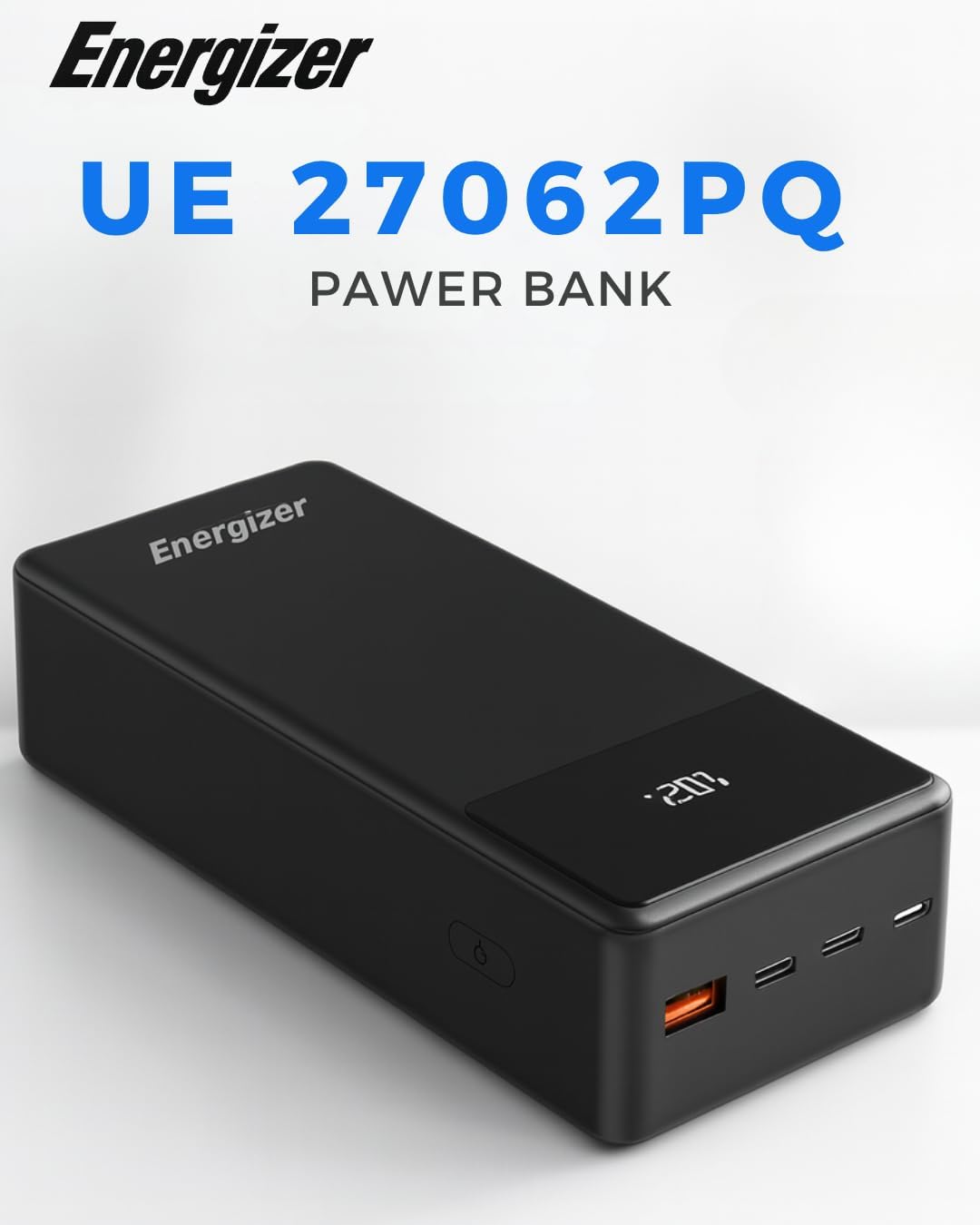
A front-angle view of the Energizer UE27062PQ Power Bank, showcasing its sleek black design, digital LED display, and the USB-A and USB-C output ports on the side.
- Digital LED Display: Shows real-time battery percentage.
- Power Button: Activates the display and initiates charging.
- USB-C Output/Input Ports (x2): Supports Power Delivery (PD) up to 65W for fast charging and recharging the power bank.
- USB-A Output Port (x1): Supports Smart Output up to 18W for fast charging.
2.3 Key Features
- High Capacity: 27000mAh battery provides extended power for multiple devices.
- 65W USB-C Power Delivery: Rapidly charges high-power devices like laptops and MacBooks.
- Triple Output Ports: Charge up to three devices simultaneously (2x USB-C, 1x USB-A).
- Digital LED Display: Accurate battery level indication.
- PowerSafe Protection: Integrated system against short circuits, overcurrent, overcharge, and excessive discharge.

This image highlights the 27000mAh high capacity of the power bank, indicating it can provide approximately 98 hours extra for smartphones, 32 hours for small tablets, and 21 hours for large tablets. The digital display shows '100%' charge.

The power bank is shown connected to three devices (a smartphone and a tablet are visible) via its USB-A and two USB-C ports, demonstrating its capability for simultaneous triple charging.
3. Setup
3.1 Initial Charge
Before first use, fully charge your Energizer UE27062PQ Power Bank. This ensures the battery is calibrated and ready for optimal performance.
- Connect the provided USB-C to USB-C cable to one of the USB-C ports on the power bank.
- Connect the other end of the USB-C cable to a compatible USB-C Power Delivery (PD) wall charger (not included). For fastest charging, use a 65W PD charger.
- The digital LED display will show the charging progress. The power bank is fully charged when the display shows '100%'.
Note: The initial full charge may take several hours depending on the charger's output.
4. Operating Instructions
4.1 Charging the Power Bank
To recharge your power bank:
- Connect a USB-C cable to either USB-C port on the power bank.
- Connect the other end of the cable to a USB-C wall charger.
- The digital display will show the current battery percentage increasing as it charges.
4.2 Charging Your Devices
The UE27062PQ can charge up to three devices simultaneously.
- Connect your device's charging cable to the appropriate port on the power bank (USB-C or USB-A).
- Connect the other end of the cable to your device.
- Press the power button on the power bank to initiate charging if it doesn't start automatically.
- The digital display will show the remaining battery level.

The power bank is depicted next to a laptop and a smartphone, emphasizing its 65W Power Delivery feature for rapid charging of high-power devices like laptops, smartphones, and tablets.

This image focuses on the 18W Smart USB-A port, illustrating its fast charging capability for smartphones, capable of charging a phone from 0% to 80% in approximately 35 minutes.
4.3 Checking Battery Level
Press the power button once to activate the digital LED display, which will show the current battery percentage.

A detailed view of the power bank's digital LED display, clearly showing the battery percentage (e.g., '100%') for easy monitoring of the remaining charge.
5. Maintenance
5.1 Cleaning
To clean the power bank, use a soft, dry cloth. Do not use liquid cleaners or aerosols.
5.2 Storage
Store the power bank in a cool, dry place away from direct sunlight and extreme temperatures. For long-term storage, it is recommended to charge the power bank to about 50-70% every three months to maintain battery health.
5.3 Battery Care
Avoid fully discharging the power bank regularly. Recharge it before it drops to very low levels to prolong battery lifespan.
6. Troubleshooting
- Power Bank Not Charging:
Ensure the charging cable is securely connected to both the power bank and the wall charger. Verify that the wall charger is functional and provides sufficient power (preferably 65W PD). - Devices Not Charging:
Press the power button on the power bank to activate it. Ensure your device's charging cable is properly connected to both the power bank and your device. Check if the cable is damaged. - Slow Charging:
Ensure you are using a compatible fast-charging cable and that your device supports fast charging. For laptops, use a USB-C to USB-C cable with a 65W PD port. - Digital Display Not Working:
Press the power button. If the display remains off, the power bank might be completely discharged or require a reset by connecting it to a power source.
7. Specifications
| Model | UE27062PQ |
| Battery Cell | Lithium Polymer |
| Capacity | 27000mAh / 99.9Wh |
| Input (USB-C) | 5V/3A, 9V/3A, 12V/3A, 15V/3A, 20V/3.25A (65W Max) |
| Output 1 (USB-C PD) | 5V/3A, 9V/3A, 12V/3A, 15V/3A, 20V/3.25A (65W Max) |
| Output 2 (USB-C PD) | 5V/3A, 9V/2.22A, 12V/1.67A (20W Max) |
| Output 3 (USB-A) | 5V/3A, 9V/2A, 12V/1.5A (18W Max) |
| Total Output | 65W Max |
| Dimensions | 151 x 64 x 38 mm (approx.) |
| Weight | Approx. 490g |

An image showing the compact size of the power bank (151*64*38MM) next to a smartphone, illustrating its portability.
8. Safety Information
Please observe the following safety precautions when using your power bank:
- Do not expose the power bank to extreme temperatures, direct sunlight, or fire.
- Do not immerse the power bank in water or other liquids.
- Do not disassemble, modify, or attempt to repair the device.
- Keep out of reach of children.
- Avoid dropping or subjecting the power bank to strong impacts.
- Dispose of the power bank responsibly according to local regulations.
- Do not use if the power bank is visibly damaged, swollen, or leaking.

This image illustrates the PowerSafe management system, detailing its protective features: overcurrent protection, overheating protection, overcharge protection, short-circuit protection, and premium cell quality.
9. Warranty and Support
Energizer products are designed and manufactured to the highest quality standards. For warranty information or technical support, please refer to the official Energizer website or contact your local retailer. Keep your purchase receipt as proof of purchase.


