
Important Safety Information
Before operating your ZapRun Electric Scooter W9, please read this manual thoroughly to ensure safe and proper use. Failure to follow instructions may result in serious injury or product damage. Always wear appropriate safety gear, including a helmet, knee pads, and elbow pads.
- Always check the scooter before each ride for loose parts, tire pressure, and brake functionality.
- Do not ride in wet conditions, heavy rain, or through puddles deeper than 1 inch. The scooter has an IPX4 waterproof rating, meaning it is resistant to splashing water from any direction, but not submersion.
- Adhere to local laws and regulations regarding electric scooter usage.
- Do not perform stunts or sudden maneuvers.
- Ensure the battery is fully charged before your first ride and regularly thereafter.
- The maximum weight limit for this scooter is 264 lbs (120 kg).
Product Overview
The ZapRun Electric Scooter W9 is designed for adults, featuring a powerful 1000W motor, dual disc brakes, and dual shock suspension for a smooth and safe ride. It offers a top speed of 28 MPH and a range of up to 28 miles.
Key Features:
- 1000W Powerful Motor: Provides strong acceleration and hill-climbing capability.
- 10" Pneumatic Off-road Tires: Enhances ride comfort and traction on various terrains.
- Dual Disc Brakes: Ensures reliable and responsive stopping power.
- Dual Shock Absorption: Improves ride quality by absorbing bumps and vibrations.
- Adjustable Handlebar: Accommodates riders of different heights for ergonomic comfort.
- Foldable Design: Allows for easy storage and portability.
- Smart App Integration: Monitor speed, battery, and trip distance via a smartphone app.
- LED Lighting System: Includes headlights, brake lights, and turn signals for enhanced visibility.

Figure 1: Key features of the ZapRun Electric Scooter W9.

Figure 2: Adult rider demonstrating the ZapRun Electric Scooter W9.
Setup and Assembly
Your ZapRun Electric Scooter W9 comes partially assembled. Follow these steps to complete the assembly and prepare for your first ride.
1. Unboxing and Inspection:
- Carefully remove all components from the packaging.
- Inspect for any damage that may have occurred during shipping. Contact customer support immediately if any damage is found.
- Ensure all accessories are present: charger, user manual, and tools.
2. Handlebar Installation:
- Carefully connect the handlebar cables to the main stem. Ensure the connectors are aligned and securely fastened.
- Insert the handlebar into the main stem.
- Secure the handlebar using the provided screws and tools. Tighten all screws evenly to ensure stability.
- Adjust the handlebar height to a comfortable position and lock it in place.

Figure 3: The scooter features a quick-folding mechanism and adjustable handlebar for portability.
3. Initial Battery Charge:
- Before the first ride, fully charge the scooter battery.
- Connect the charger to the charging port on the scooter.
- Plug the charger into a standard wall outlet. The indicator light on the charger will turn red during charging and green when fully charged.
- Charging time is approximately 8 hours. Do not overcharge.
Operating Instructions
1. Power On/Off:
- To power on, press and hold the power button on the display for a few seconds.
- To power off, press and hold the power button again until the display turns off.
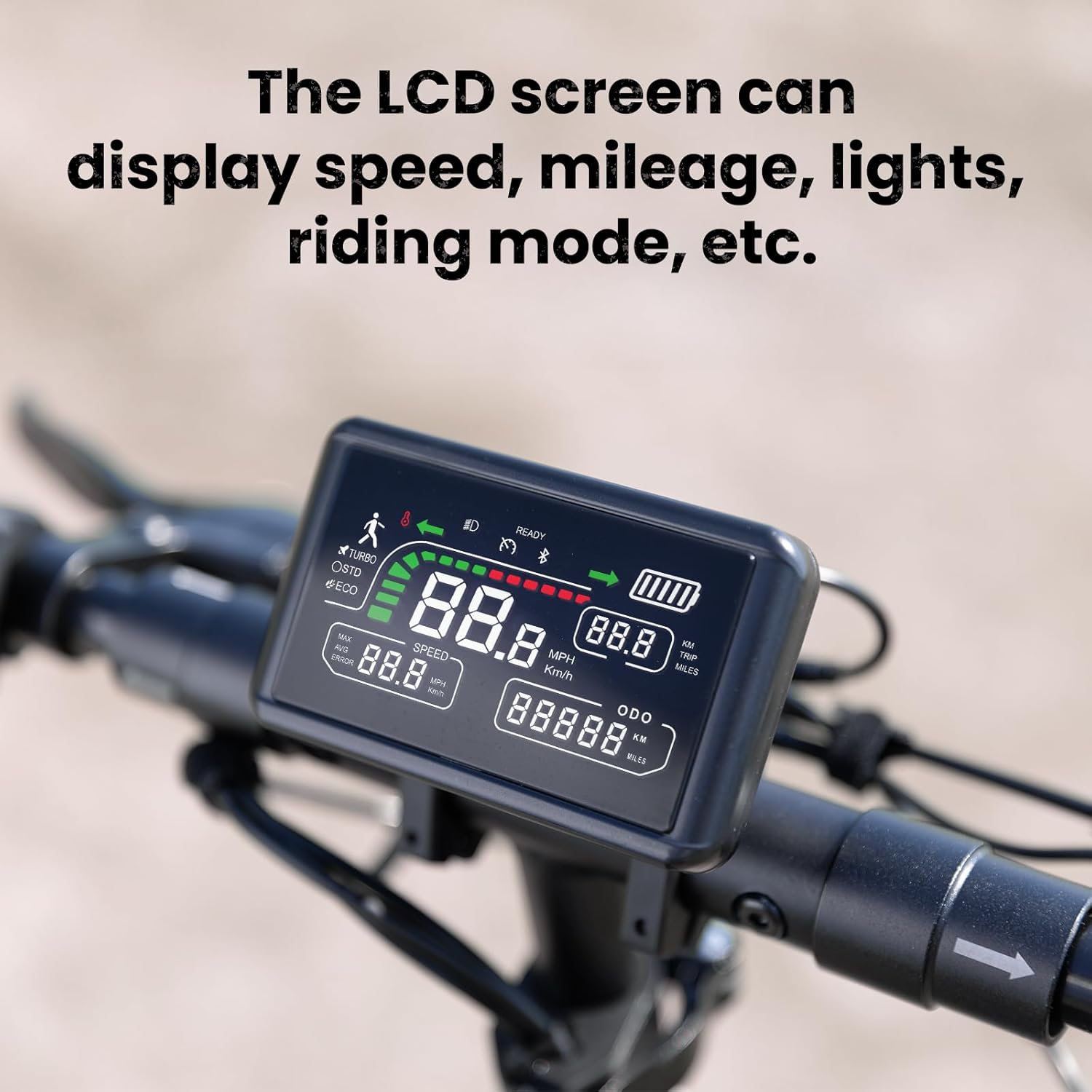
Figure 4: The LCD screen provides essential ride information.
2. Speed Modes:
The scooter offers three intelligent speed modes:
- ECO Mode: Up to 10 MPH for maximum battery efficiency.
- STD Mode: Up to 18 MPH for balanced cruising.
- TURBO Mode: Up to 28 MPH for maximum performance.
Press the mode button on the handlebar to cycle through the speed modes.

Figure 5: Select your preferred speed mode for optimal riding experience.
3. Acceleration and Braking:
- To accelerate, gently press the thumb throttle on the right handlebar.
- To brake, squeeze the brake levers on either side of the handlebar. The scooter features dual disc brakes and electronic braking for effective stopping.
4. Lighting and Turn Signals:
- The scooter is equipped with ultra-bright LED headlights, brake lights, and turn signals.
- Activate headlights via the control panel. Turn signals are operated by dedicated buttons on the handlebar.

Figure 6: The powerful LED headlight ensures visibility during night rides.

Figure 7: Rear wheel with dual disc brake for enhanced safety.
5. Smart App Integration:
Download the dedicated smartphone app to connect with your scooter. The app allows you to:
- Monitor real-time speed, battery level, and trip distance.
- Track your rides and receive maintenance alerts.
- Adjust settings such as braking intensity and driving mode.
- Lock/unlock the scooter for added security.

Figure 8: The ZapRun app provides comprehensive control and monitoring features.
Maintenance
Regular maintenance ensures the longevity and safe operation of your ZapRun Electric Scooter W9.
1. Cleaning:
- Wipe the scooter with a soft, damp cloth after each ride.
- Do not use high-pressure water jets or corrosive cleaning agents.
2. Tire Pressure:
- Check tire pressure regularly. Maintain recommended PSI for optimal performance and safety.
- The 10" pneumatic off-road tires require proper inflation.

Figure 9: The 10-inch pneumatic off-road tire and 1000W motor are key components.
3. Brake System:
- Regularly inspect brake pads and discs for wear. Replace if necessary.
- Ensure brake levers are responsive and cables are not frayed.
4. Suspension:
- Periodically check the dual shock absorbers for any signs of damage or leaks.
- Keep suspension components clean to prevent debris from affecting performance.

Figure 10: Front wheel with dual shock suspension for a comfortable ride.
Troubleshooting
This section addresses common issues you might encounter with your ZapRun Electric Scooter W9.
1. Scooter Not Powering On:
- Check if the battery is charged. Connect the charger and observe the indicator light.
- Ensure all cable connections, especially to the handlebar, are secure.
2. Loss of Power/Reduced Range:
- Verify the battery is fully charged. Battery performance can decrease in cold weather.
- Check tire pressure. Under-inflated tires can significantly reduce range.
- Riding uphill frequently or carrying heavy loads will reduce range.
3. Braking Issues:
- If brakes feel loose, adjust the brake cable tension.
- Inspect brake pads for wear and replace if worn out.
4. Unusual Noises:
- Check for loose screws or components, especially around the wheels and suspension.
- Inspect tires for foreign objects.
Specifications
| Feature | Specification |
|---|---|
| Brand | ZapRun |
| Model Name | W9 |
| Motor Power | 1000W |
| Top Speed | 28 MPH |
| Max Distance Range | 28 Miles |
| Battery Capacity | 14Ah |
| Charging Time | 8 Hours |
| Tire Type | 10" Pneumatic Off-road Tires |
| Suspension Type | Dual Suspension |
| Brake Style | Dual Disc Brakes |
| Weight Limit | 264 Pounds |
| Item Weight | 48.5 Pounds |
| Product Dimensions | 45.2"L x 23.6"W x 50.4"H |
| Frame Material | Aluminum |
| Waterproof Rating | IPX4 |
Warranty & Support
ZapRun offers a comprehensive warranty for your Electric Scooter W9:
- 365 Days Warranty: For major components.
- 180 Days Warranty: For other parts.
For any questions, technical assistance, or warranty claims, please contact ZapRun customer support. Refer to the contact information provided in the original product packaging or on the official ZapRun website.


