
1. Product Overview
The TERRAMASTER F2-425 is a 2-bay Network Attached Storage (NAS) device designed for home users. It features an Intel x86 quad-core CPU and 4GB of RAM, providing robust performance for various tasks including 4K transcoding and multi-user access. Equipped with 2.5GbE LAN, it ensures high-speed data transfers. This NAS functions as a multimedia server, supporting popular applications like Plex, Emby, and Jellyfin, and offers advanced data management and security features.

Figure 1: TERRAMASTER F2-425 NAS highlighting its Intel Quad-Core CPU, UHD Graphics, 4GB RAM, and 2.5GbE LAN port.
2. Key Features
- Powerful Performance: Intel x86 quad-core CPU and 4GB RAM for 4K transcoding and multitasking.
- Ultra-Fast Connectivity: 2.5GbE LAN port for rapid file transfers and multi-user concurrent access.
- Home Multimedia Hub: Hardware-level 4K H.265 decoding, compatible with Plex, Emby, and Jellyfin for smooth HD video playback, and DLNA for multi-device streaming.
- AI-Powered Photo Management: Photos app with AI smart album features for efficient organization of millions of photos.
- TNAS Mobile Control: Initialize setup and manage your NAS via the TNAS Mobile app, supporting automatic photo/video backups and real-time synchronization.
- Quiet Operation: Operates at just 19dB(A), suitable for noise-sensitive environments.
- Tool-Free Installation: Push-Lock design HDD trays allow for hard drive installation in approximately 10 seconds.
- Massive Storage & Security: Supports up to 60TB storage (2 x 30TB bays), 50+ independent user accounts, flexible TRAID arrays for data redundancy, SPC security module, and CloudSync for data protection.
3. Setup Guide
3.1 Hardware Installation
The F2-425 features a tool-free Push-Lock design for easy hard drive installation.
- Gently press the release button on the HDD tray to unlock it.
- Pull the tray out from the NAS enclosure.
- Mount your 3.5-inch hard drive into the tray. The Push-Lock design secures the drive without the need for screws.
- Slide the loaded tray back into the NAS until it clicks securely into place.

Figure 2: Tool-free hard drive installation using the Push-Lock tray.

Figure 3: Step-by-step guide for 100% tool-free HDD installation.
3.2 Initial Software Setup
The TERRAMASTER F2-425 utilizes the TOS 6 operating system, which can be set up and managed via the TNAS Mobile app.
- Connect the NAS to your network via the 2.5GbE LAN port and power it on.
- Download and install the TNAS Mobile app on your smartphone or tablet.
- Follow the in-app instructions to discover your F2-425 NAS and complete the initial setup, including creating user accounts and configuring storage arrays (e.g., TRAID).

Figure 4: TNAS Mobile App interface for managing your NAS from a smartphone.

Figure 5: Overview of the TOS 6 operating system desktop interface.
4. Operating Instructions
4.1 Multimedia Server
The F2-425 excels as a multimedia server, supporting 4K video decoding and integration with popular media platforms.
- Install Plex, Emby, or Jellyfin from the TOS App Center to stream your media library.
- Utilize DLNA for seamless streaming to compatible devices on your network.
- The Photos app features AI capabilities to automatically organize your images into smart albums.

Figure 6: The F2-425 supports hardware-accelerated 4K video decoding for lag-free streaming.

Figure 7: The F2-425 functions as a multimedia server, supporting Plex, Emby, and Jellyfin.
4.2 Data Management and Synchronization
Manage your data efficiently with built-in backup and synchronization tools.
- TerraSync: Establish two-way synchronization between your F2-425 and PCs/Macs for real-time updates and version history.
- CloudSync: Integrate with cloud storage services like Google Drive, OneDrive, and Dropbox for off-site backups and data redundancy.
- TRAID Arrays: Utilize flexible TRAID arrays to optimize storage space and ensure data redundancy, protecting against drive failure.

Figure 8: TerraSync enables two-way data synchronization between your NAS and other devices.
4.3 User Accounts and Security
The F2-425 supports multiple user accounts and robust security features.
- Create over 50 independent user accounts with shared access controls for family members or small teams.
- The SPC security module and TOS Multi-Shield Defense System actively protect against ransomware, hackers, and unauthorized access.
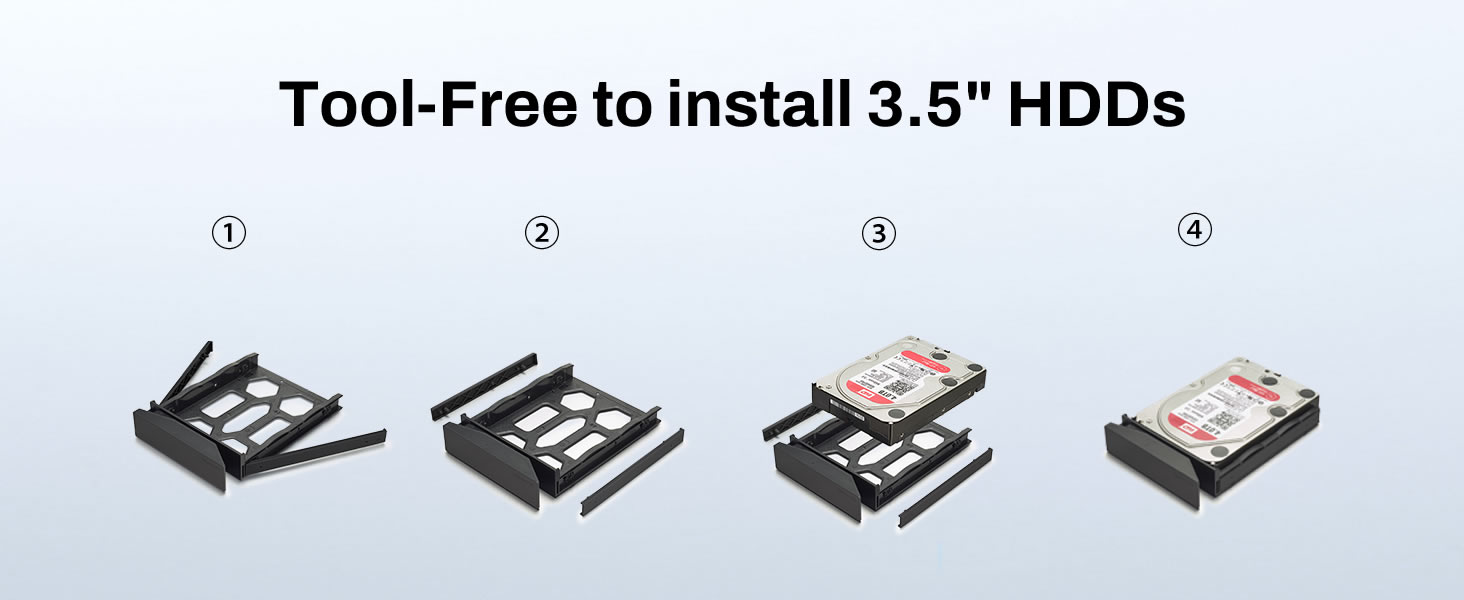
Figure 9: Secure user accounts and shared access ensure data privacy.

Figure 10: The TOS Multi-Shield Defense System provides robust security for your data.
5. Maintenance
5.1 Quiet Operation
The F2-425 is engineered for quiet operation, producing only 19dB(A) of noise, making it suitable for home environments.

Figure 11: The F2-425 NAS operates at a whisper-quiet 19dB(A).
5.2 Cooling System
The device incorporates smart fan and vent designs to enhance airflow, ensuring optimal operating temperatures and extending the lifespan of your hard drives.

Figure 12: Smart fan and vents provide efficient cooling for extended device lifespan.
6. Troubleshooting
If you encounter issues with your TERRAMASTER F2-425, consider the following general troubleshooting steps:
- Connectivity Issues: Ensure all network cables are securely connected and your router is functioning correctly. Verify the NAS has a valid IP address.
- Drive Recognition: If a hard drive is not recognized, ensure it is properly seated in its tray and the tray is fully inserted into the bay. Check the drive's health status via the TOS interface.
- Performance Problems: High CPU or RAM usage can affect performance. Check the resource monitor in TOS. Ensure your network infrastructure (router, cables) supports 2.5GbE speeds.
- Software Access: If you cannot access the TOS interface or TNAS Mobile app, try restarting the NAS and your network devices. Ensure the app is updated to the latest version.
- Data Loss Concerns: Always maintain regular backups using TRAID, CloudSync, or external drives to prevent data loss.
7. Specifications
| Feature | Detail |
|---|---|
| Model | F2-425 |
| Processor | Intel x86 Quad-Core CPU |
| RAM | 4GB |
| LAN Ports | 2.5GbE |
| Drive Bays | 2 |
| Max Storage Capacity | 60TB (2 x 30TB) |
| Product Dimensions | 8.74 x 4.69 x 6.06 inches |
| Item Weight | 2.86 pounds |
| Color | Black |
| Material | Plastic |
8. Warranty and Support
The TERRAMASTER F2-425 typically comes with a 2-year limited warranty. For detailed warranty information, technical support, or service requests, please visit the official TERRAMASTER website or contact their customer support directly. Ensure you have your product model number and purchase date available when seeking support.
9. Product Videos
TERRAMASTER F2-425 2-Bay NAS Server Overview
This video provides a comprehensive overview of the TERRAMASTER F2-425 2-Bay NAS Server, highlighting its features and capabilities for home users.
TERRAMASTER F2-425 Plus 2-Bay NAS Overview
This video showcases the features of the TERRAMASTER F2-425 Plus, a similar 2-bay NAS model, demonstrating its performance and functionalities.