
Fanttik X10 APEX
Fanttik X10 APEX Portable Air Compressor
User Manual
Introduction
Thank you for choosing the Fanttik X10 APEX Portable Air Compressor. This device is designed for efficient and accurate inflation of various items, including vehicle tires, bicycle tires, and sports balls. Please read this manual thoroughly before use to ensure proper operation and to maximize the product's lifespan.
Safety Information
- Keep the device away from children.
- Do not operate the device in wet conditions or near flammable liquids or gases.
- Avoid prolonged continuous operation to prevent overheating. Allow the device to cool down if it becomes hot.
- Ensure the correct pressure setting for the item being inflated to prevent over-inflation and potential damage or injury.
- Do not point the air nozzle at people or animals.
- Use only the provided accessories and charging cable.
Package Contents
Verify that all items are present in the package:
- Fanttik X10 APEX Tire Inflator
- Air Hose with Schrader Valve (23.6 inches)
- Presta Adapter
- Ball Needle
- Charging Cable (USB-A to USB-C)
- Storage Pouch
- User Manual

Product Features
- Fast Inflation: Equipped with the V8 Acercore Pump, capable of inflating a 195/55 R15 tire from 28 to 33 PSI in approximately 35 seconds.
- High-Capacity Battery: Can inflate up to 6 car tires (195/55 R15) on a single charge or provide 2.5 full charges for an iPhone 15.
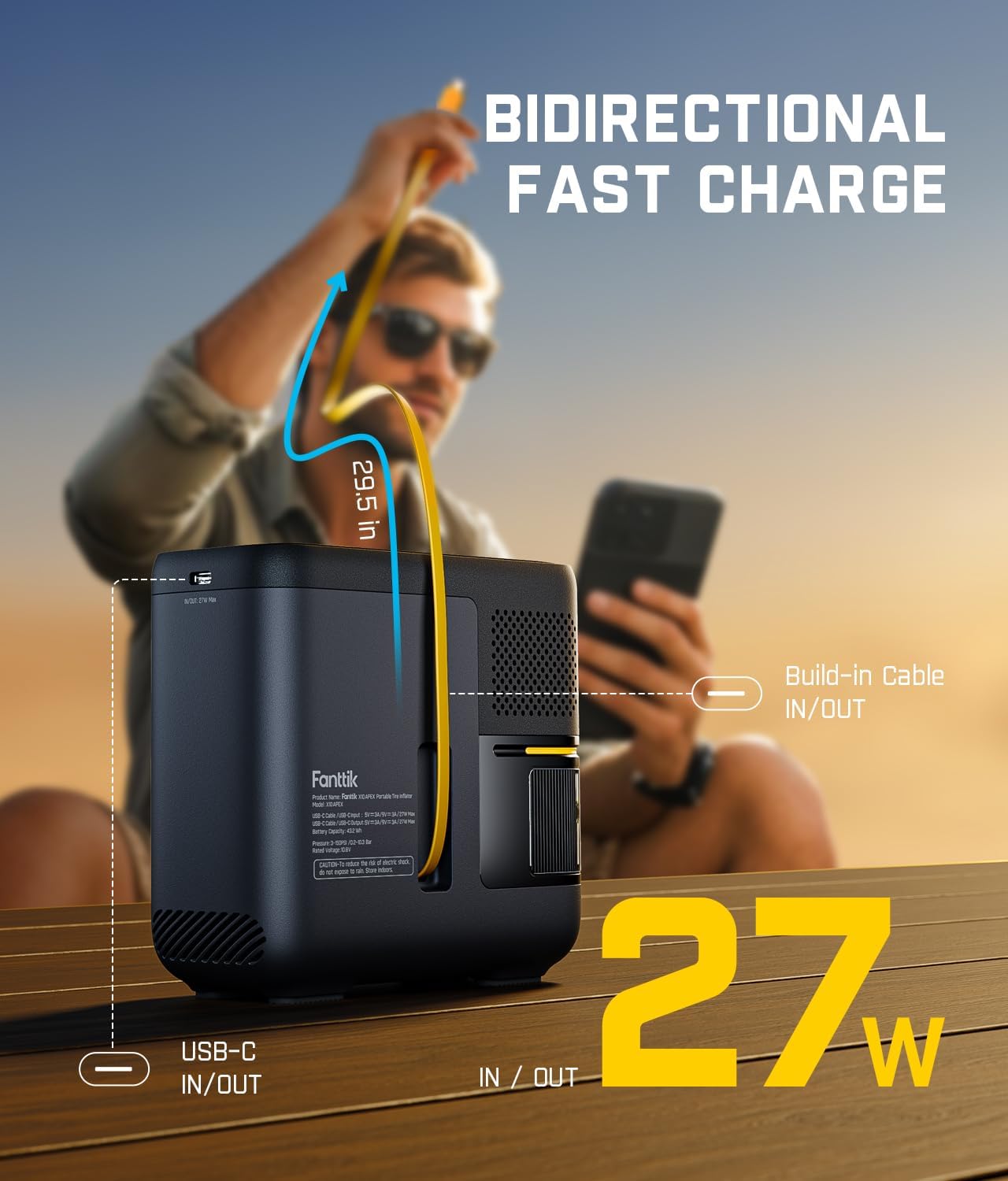
- 27W Bidirectional Fast Charging: Features a retractable 29.5-inch cable and a dedicated Type-C port for simultaneous fast charging of the inflator and external devices.
- Accuinflate Technology & One-click Preset: High-precision sensors and compensation technology ensure accurate inflation. The device automatically stops when the preset pressure is reached.
- Bright Flashlight: A 300-lumen work light provides visibility for nighttime or low-light repairs, including an SOS signal mode.
- Durable Air Hose: The 23.6-inch hose is made from premium nylon braided material, offering abrasion resistance, heat resistance, and burst-proof durability.
Setup
1. Charging the Device
Before first use, fully charge the Fanttik X10 APEX. Connect the provided USB-C charging cable to the device's Type-C port and a suitable USB power adapter (not included). The battery indicator on the display will show charging progress. A full charge ensures optimal performance.

2. Attaching the Air Hose
Screw the air hose securely onto the inflation port of the Fanttik X10 APEX. Ensure it is tightened to prevent air leakage during operation.
Operating Instructions
- Power On: Press and hold the power button (usually the center button on the control dial) for a few seconds to turn on the device. The digital display will illuminate.
- Connect to Item: Screw the Schrader valve connector of the air hose onto the valve stem of the tire or item you wish to inflate. For Presta valves or sports balls, attach the appropriate adapter first.
- Select Mode: Short press the mode button (often indicated by an icon next to the power button) to cycle through preset modes: Car, Motorcycle, Bike, Ball, and Manual. Each mode has a default pressure range.
- Set Target Pressure: Use the '+' and '-' buttons to adjust the desired target pressure. The current pressure of the connected item will be displayed, along with the target pressure.
- Change Pressure Units: Long press the mode button to switch between pressure units: PSI, KPA, and BAR.
- Start Inflation: Once the desired pressure is set, press the power button to begin inflation. The device will automatically stop when the target pressure is reached.
- Stop Inflation: To manually stop inflation at any time, press the power button again.
- Disconnect: Carefully unscrew the air hose from the valve stem. A small amount of air may escape, which is normal.
- Power Off: Press and hold the power button to turn off the device. It will also automatically power off after a period of inactivity.
Using the Flashlight
With the device powered on, short press the flashlight button (often indicated by a light bulb icon) to cycle through flashlight modes: illumination, SOS signal, and off.

Using as a Power Bank
The Fanttik X10 APEX can charge external devices. Connect your device to the built-in retractable USB-C cable or the dedicated USB-C port. The inflator will automatically begin charging your device.
Maintenance
- Cleaning: Wipe the device with a soft, dry cloth. Do not use harsh chemicals or abrasive cleaners.
- Storage: Store the inflator and its accessories in the provided storage pouch in a cool, dry place, away from direct sunlight and extreme temperatures.
- Battery Care: For optimal battery life, charge the device at least once every three months if not in regular use.
Troubleshooting
| Problem | Possible Cause | Solution |
|---|---|---|
| Device does not turn on. | Low battery. | Charge the device fully. |
| Inflation is slow or not working. | Hose not securely connected; valve stem blocked; incorrect mode selected. | Ensure hose is tight. Check valve stem for obstructions. Select appropriate inflation mode. |
| Device overheats and shuts off. | Prolonged continuous use. | Allow the device to cool down for at least 15-20 minutes before resuming use. |
| Inaccurate pressure reading. | Loose connection; sensor calibration issue. | Ensure a tight connection. If issues persist, contact customer support. |
Specifications
| Feature | Detail |
|---|---|
| Brand | Fanttik |
| Model Name | X10 APEX |
| Special Feature | Cordless |
| Max Pressure | 150 PSI |
| Item Weight | 3.05 pounds |
| Package Dimensions | 7.28 x 7.13 x 4.25 inches |
| Battery Type | Lithium Ion (12V, included) |
| Charging Port | USB-C (27W Bidirectional Fast Charging) |
| Flashlight Brightness | 300 lumens |
| Hose Length | 23.6 inches |
Warranty
The Fanttik X10 APEX Portable Air Compressor comes with a 1 Year Manufacturer Warranty. This warranty covers defects in materials and workmanship under normal use. It does not cover damage caused by misuse, accidents, unauthorized modifications, or normal wear and tear. Please retain your proof of purchase for warranty claims.
Support
For technical assistance, warranty claims, or general inquiries, please contact Fanttik customer support:
- Website: www.fanttik.com
- Email: support@fanttik.com
Related documentsX10 APEX


Ask a question about this manual
Ask about setup, troubleshooting, compatibility, parts, safety, or missing instructions. Manuals+ will review the question and use this page’s manual context to help answer it.