
Introduction
This manual provides instructions for the ESR 3-in-1 Charging Station, designed to simultaneously charge your iPhone, AirPods, and Apple Watch. It features Qi2.2 certification, 25W MagSafe charging, and CryoBoost phone-cooling technology for efficient and safe charging.

Image: The ESR 3-in-1 Charging Station, showcasing its ability to charge an iPhone, Apple Watch, and AirPods simultaneously. The image also highlights the 25W charging capability and the CryoBoost fan component.
Package Contents
- ESR 3-in-1 Charging Station
- 50W Power Adapter
- USB-C Cable
- User Manual
Setup
- Unpack: Carefully remove all components from the packaging.
- Connect Power: Insert the USB-C cable into the charging station's power input port. Connect the other end of the USB-C cable to the provided 50W power adapter.
- Plug In: Plug the power adapter into a wall outlet. The charging station is now ready for use.

Image: A visual representation of the charging station setup, illustrating the connection of the USB-C cable to the station and the 50W power adapter, which is then plugged into a power outlet.
Operating Instructions
Charging Your iPhone
- Place your MagSafe-compatible iPhone onto the magnetic charging pad. The magnets will automatically align your device for optimal charging.
- The CryoBoost technology will activate automatically to cool your phone during charging, enhancing charging speed and battery longevity.
- The charging station supports both portrait and landscape orientations for your iPhone.

Image: An iPhone is shown magnetically attached to the charging station, displaying a charging icon and the 25W charging speed. The image emphasizes the "Wired-Speed in a Snap" feature.

Image: A detailed diagram showing the CryoBoost technology in action, with a fan actively cooling the iPhone during 25W magnetic charging. It highlights a 6.5°F heat reduction.
Charging Your Apple Watch
- Place your Apple Watch onto the dedicated watch charging module. Ensure it is properly seated for charging to begin.
- The Apple-certified watch charger supports fast charging, reaching 50% charge in approximately 30 minutes for compatible models.
- The watch charging module is detachable and can be used independently via a USB-C port for portable charging.

Image: An Apple Watch is shown charging on the station, with an overlay indicating "Charges to 50% in 30 min*". The image also mentions compatibility with WatchOS updates.

Image: This image demonstrates the detachable Apple Watch charging module. One panel shows a person placing the module into a pocket, highlighting its portability. Other panels show the module plugged into a laptop's USB-C port and a wall adapter, illustrating its versatile use.
Charging Your AirPods
- Place your AirPods charging case onto the designated wireless charging pad at the base of the station.
- Ensure the AirPods case is centered on the pad for efficient charging.
Quiet Mode
The charging station features a fan-off mode for quiet operation, ideal for use at night. Locate the fan/light switch on the base to activate this mode.
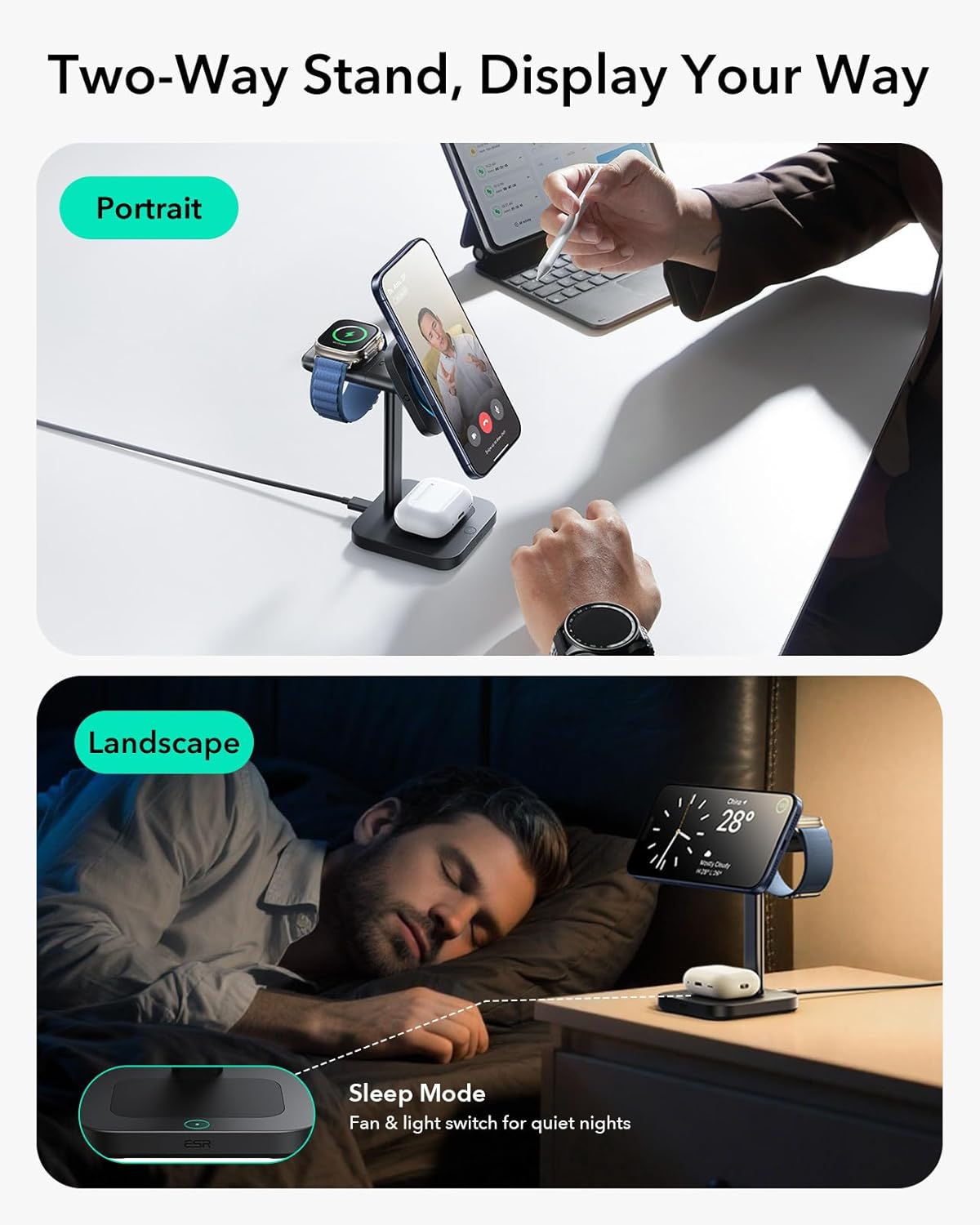
Image: The charging station is depicted in two orientations: portrait mode for video calls and landscape mode for use as a nightstand clock display. An inset shows the "Sleep Mode" with a fan and light switch for quiet operation.
Maintenance
- Cleaning: Disconnect the power before cleaning. Use a soft, dry cloth to wipe the surface of the charging station. Avoid liquid cleaners or aerosols.
- Storage: Store the charging station in a cool, dry place when not in use for extended periods.
- Cable Care: Avoid bending or crimping the power cable excessively to prevent damage.
Troubleshooting
| Issue | Possible Solution |
|---|---|
| Device not charging |
|
| Slow charging |
|
| Fan noise is too loud |
|
| Detachable watch charger not working |
|
Specifications
- Model Number: 2C588
- Product Dimensions: 3.31 x 3.39 x 6.69 inches
- Item Weight: 12.2 ounces
- Brand: ESR
- Connector Type: USB Type C
- Input Voltage: 15 Volts
- Output Current: 2.09 Amps
- Special Features: Fast Charging, Magnetic, MagSafe Compatible, Wireless Charging, CryoBoost Phone Cooling
- Compatibility (iPhone):
- QI2.2 25W for iPhone 17, iPhone 17 Pro, iPhone 17 Pro Max, iPhone 16 Plus, iPhone 16 Pro Max (with iOS 26 or Later)
- QI2.2 20W for iPhone 17 Air, iPhone 16, iPhone 16 Pro
- QI2 15W for iPhone 15, iPhone 15 Plus, iPhone 15 Pro, iPhone 15 Pro Max, iPhone 14, iPhone 14 Plus, iPhone 14 Pro, iPhone 14 Pro Max, iPhone 13, iPhone 13 Pro, iPhone 13 Pro Max, iPhone 13 mini, iPhone 12, iPhone 12 Pro, iPhone 12 Pro Max
- Compatibility (Apple Watch): All series, including Apple Watch Ultra 2/Ultra
- Compatibility (AirPods): AirPods 4/3, AirPods Pro 2/Pro
- Incompatible Devices: Motorola, OnePlus, Google phones

Image: A detailed compatibility chart showing supported iPhone models (17/16 series, 15/14/13/12 series), all Apple Watch models, and AirPods models. It also illustrates magnetic compatibility requirements, such as magnetic cases (≤2mm) and incompatibility with irregular-shaped cases, non-magnetic cases, grips/stands, metal accessories, and wallets.
Warranty and Support
ESR provides a comprehensive 12-month protection plan for this product. For detailed setup videos, FAQs, and personalized assistance, please visit the official ESR support website or contact customer service.
Lifetime Support: ESR offers lifetime support for its products.
For further assistance, please refer to the contact information provided on the ESR official website: ESR Store

