
Baseus Baseus Eli Sport 2
Baseus Eli Sport 2 Open-Ear Headphones Instruction Manual
Model: Baseus Eli Sport 2
Introduction
The Baseus Eli Sport 2 Open-Ear Headphones are designed for comfort and performance, offering a secure fit and high-quality audio for active lifestyles. These wireless earbuds feature an open-ear design for situational awareness, IP57 water resistance, and extended battery life, making them suitable for various activities including workouts, running, and cycling.
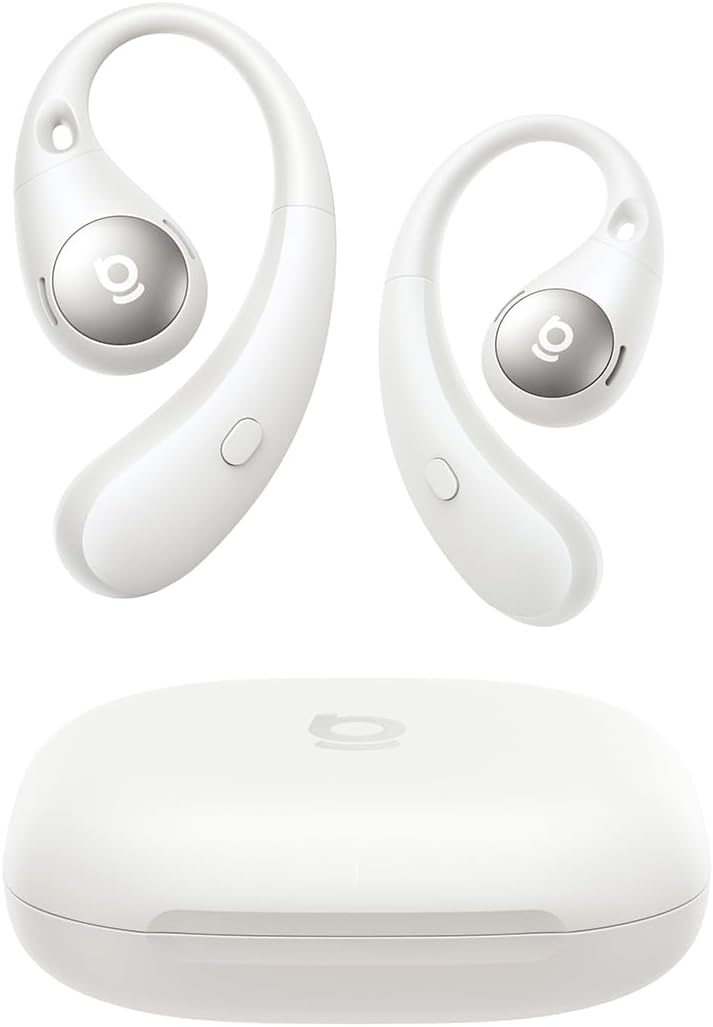
Image: Baseus Eli Sport 2 Open-Ear Headphones and their charging case.
Product Overview
The Eli Sport 2 headphones combine advanced audio technology with a user-centric design. Key features include:
- Hi-Res Audio & SuperBass 2.0: Delivers enhanced audio detail with LDAC codec and deep bass through a 17x12mm titanium-coated diaphragm.
- Open-Ear Comfort & Lightweight Design: Features ultra-soft 3mm silicone ear hooks and a 0.6mm memory steel wire for a secure, breathable fit, weighing only 7.5g per earbud.
- Extended Battery Life: Provides up to 8 hours of continuous playback, extendable to 45 hours with the charging case. Rapid Charge offers 2 hours of playtime from a 10-minute charge.
- Seamless Dual-Device Bluetooth 6.0: Offers ultra-fast, low-latency connection and automatic pairing with two devices simultaneously.
- IP57 Sweatproof & Waterproof: Designed to resist sweat, dust, and water, suitable for various outdoor and indoor activities.
- 4-Mic AI Clear Calls: Equipped with dual talk mics and dual ENC noise-filtering mics for clear voice capture and background noise reduction.
- Anti-Mistouch Button Control: Tactile physical buttons prevent accidental touches and provide reliable control during movement.

Image: The Baseus Eli Sport 2 earbuds offer a ZeroSense Snug Fit, weighing approximately 7.5g per earbud for comfortable, extended wear.
What's in the Box
Upon unboxing your Baseus Eli Sport 2 Open-Ear Headphones, you will find the following components:
- Baseus Eli Sport 2 Open Ear Headphones ×1
- Baseus Eli Sport 2 Charging Case ×1
- Baseus Eli Sport 2 USB-C Cable ×1
- Baseus Eli Sport 2 Quick Start Guide ×1

Image: All items included in the Baseus Eli Sport 2 product package.
Setup
1. Charging the Earbuds and Case
Before first use, fully charge the earbuds and the charging case. Connect the provided USB-C cable to the charging case and a power source. The charging time for the earbuds is approximately 1.5 hours. The case provides multiple charges, extending total playtime to 45 hours.

Image: The earbuds and charging case highlighting the 8-hour playtime per charge and 45-hour total playtime.
2. Wearing the Earbuds
The Eli Sport 2 features an open-ear design with flexible ear hooks. Gently place the ear hook over your ear, ensuring the sound unit rests comfortably near your ear canal without entering it. Adjust the ear hook for a secure and comfortable fit. This design allows for situational awareness while listening to audio.

Image: Detailed view of the earbud's ergonomic design for a snug and stable fit.
3. Bluetooth Pairing
- Open the charging case. The earbuds will automatically enter pairing mode.
- On your device (smartphone, tablet, laptop), navigate to the Bluetooth settings.
- Select "Baseus Eli Sport 2" from the list of available devices.
- Once connected, you will hear an audio prompt, and the indicator light on the earbuds will change.
The earbuds support Smart Dual-Connect, allowing them to pair with two devices simultaneously. This enables seamless switching between, for example, a phone and a laptop without manual reconnection.

Image: The Instant Multipoint Connection feature allows effortless switching between two paired devices.
Operating Instructions
Button Controls
The Baseus Eli Sport 2 earbuds feature physical buttons for precise control, minimizing accidental touches during activity.
| Action | Function |
|---|---|
| L or R ×1 | Play/Pause music, Answer/End calls |
| L or R (2s) | Reject calls |
| R (2s) | Volume Up |
| L (2s) | Volume Down |
| L ×3 | Previous Track |
| R ×3 | Next Track |

Image: Visual guide to the button functions on the earbuds.
Smart App Control
For a personalized listening experience, download the dedicated Baseus app. The app allows you to:
- Adjust EQ Modes
- Activate Bass Boost
- Control Spatial Acoustics
- Locate your earbuds using the "Find Your Earbuds" feature (requires GPS access).

Image: The Baseus app provides comprehensive control over your Eli Sport 2 earbuds.
Making and Receiving Calls
The 4-Mic AI Clear Calls feature ensures clear communication. The earbuds use dual talk mics and dual ENC noise-filtering mics to capture your voice and reduce background noise.
- Answer/End Call: Press either earbud button once.
- Reject Call: Press and hold either earbud button for 2 seconds.

Image: The 4-Mic AI Clear Calls system ensures clear voice transmission even in noisy environments.
Maintenance
- Cleaning: Regularly wipe the earbuds and charging case with a soft, dry cloth. Avoid using abrasive materials or harsh chemicals.
- Water Resistance: The earbuds are IP57 rated, meaning they are protected against dust and can withstand immersion in water up to 1 meter for 30 minutes. However, they are not designed for swimming or prolonged submersion. Ensure the earbuds are dry before placing them back in the charging case to prevent damage.
- Storage: Store the earbuds in their charging case when not in use to protect them and keep them charged.

Image: The IP57 rating ensures the earbuds are protected against sweat and water splashes.
Troubleshooting
- Earbuds not pairing:
- Ensure the earbuds are charged and the charging case lid is open. Turn off and on your device's Bluetooth, then try pairing again. If issues persist, try resetting the earbuds (refer to the quick start guide for specific reset instructions).
- No sound or low volume:
- Check the volume levels on both your device and the earbuds. Ensure the earbuds are properly seated on your ears. Verify that the earbuds are connected to the correct device.
- Charging issues:
- Ensure the USB-C cable is securely connected to both the case and the power source. Check if the charging port is clean and free of debris. Try a different charging cable or power adapter.
- Call quality issues:
- Ensure the microphones are not obstructed. Move to a quieter environment if experiencing excessive background noise. Check your device's call settings.
Specifications
| Feature | Detail |
|---|---|
| Model Name | Baseus Eli Sport 2 |
| Connectivity Technology | Wireless (Bluetooth) |
| Bluetooth Version | 6.0 |
| Ear Placement | Open Ear |
| Water Resistance Level | IP57 Waterproof |
| Battery Life (Earbuds) | 8 Hours |
| Total Playtime (with Case) | 45 Hours |
| Charging Time | 1.5 Hours |
| Control Type | Button Control |
| Audio Driver Type | Dynamic Driver |
| Impedance | 16 Ohm |
| Item Weight | 7.4 ounces (total package) |
Official Product Video
Video: An overview of the Baseus Eli Sport 2 Open-Ear Headphones, showcasing their design, features, and use in various activities.
Related documentsBaseus Eli Sport 2


Ask a question about this manual
Ask about setup, troubleshooting, compatibility, parts, safety, or missing instructions. Manuals+ will review the question and use this page’s manual context to help answer it.