
1. Product Overview
The Raycon Essential Open Earbuds are true wireless open-ear Bluetooth headphones designed for comfort and awareness. Their ultra-lightweight design, comfort hook, and IPX5 water resistance make them ideal for active lifestyles, allowing you to enjoy high-quality audio while remaining aware of your surroundings.

Image: A pair of purple Raycon Essential Open Earbuds, showcasing their sleek design and ear hook.
2. What's in the Box
- Raycon Essential Open Earbuds
- Charging Case
- USB Charging Cable
- User Manual

Image: The purple Raycon Essential Open Earbuds nestled within their compact charging case.
3. Key Features
- Open-Ear Design: Delivers clear sound while allowing you to stay aware of your surroundings.
- Featherlight Fit: Ultra-lightweight and comfortable for extended wear.
- IPX5 Water Resistant: Built to withstand sweat and light splashes, suitable for workouts and outdoor activities.
- Long Battery Life: Up to 36 hours of total battery life with the charging case.
- Compact Design: Portable and easy to carry.
- Multipoint Connection: Connect to two devices simultaneously and switch seamlessly.

Image: A graphic demonstrating the open-ear design, highlighting how the earbuds allow ambient sound.

Image: A graphic emphasizing the 36-hour battery life, indicating extended usage.
4. Setup
4.1 Charging the Earbuds and Case
- Place the earbuds into the charging case. Ensure they are properly seated.
- Connect the USB charging cable to the charging port on the case and plug the other end into a USB power source (e.g., wall adapter, computer).
- The LED indicator on the case will show charging status. A full charge is indicated when the light turns solid or off, depending on the model.
4.2 Pairing with Your Device
- Ensure the earbuds are charged.
- Open the charging case. The earbuds will automatically enter pairing mode, indicated by a flashing LED light on the earbuds.
- On your device (smartphone, tablet, computer), go to Bluetooth settings.
- Select "Raycon Essential Open Earbuds" from the list of available devices.
- Once connected, the LED indicator on the earbuds will stop flashing or change to a solid light.
5. Operating Instructions
5.1 Power On/Off
- Power On: Open the charging case, and the earbuds will automatically power on.
- Power Off: Place the earbuds back into the charging case and close the lid. They will automatically power off and begin charging.
5.2 Music Playback
- Play/Pause: Tap either earbud once.
- Next Track: Double-tap the right earbud.
- Previous Track: Double-tap the left earbud.
5.3 Call Management
- Answer/End Call: Tap either earbud once.
- Reject Call: Press and hold either earbud for 2 seconds.
5.4 Voice Assistant
- Activate Voice Assistant: Triple-tap either earbud.
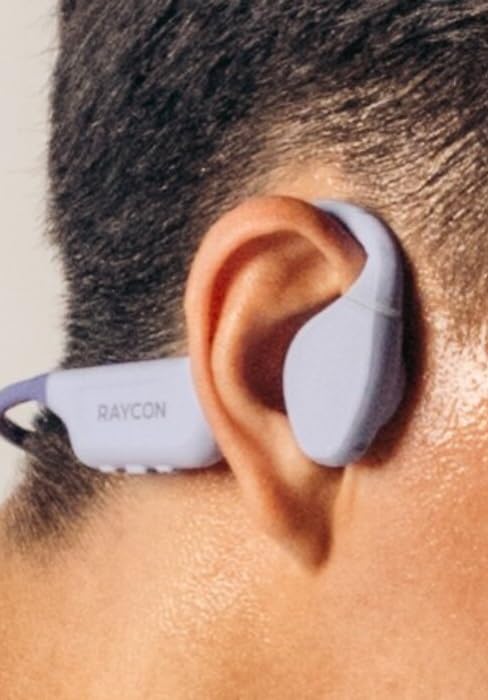
Image: A close-up of the Raycon Essential Open Earbud worn comfortably on a person's ear.
6. Maintenance
6.1 Cleaning
Regularly clean your earbuds and charging case to ensure optimal performance and hygiene. Use a soft, dry, lint-free cloth. Do not use abrasive cleaners or solvents.
6.2 Water Resistance (IPX5)
The Essential Open Earbuds are IPX5 water resistant, meaning they can withstand sweat and light splashes of water. They are not designed for submersion in water. Do not expose them to running water or wear them while swimming or showering.

Image: A graphic depicting the earbuds being splashed with water, symbolizing their IPX5 water resistance.
6.3 Storage
When not in use, store the earbuds in their charging case to protect them and keep them charged. Avoid storing them in extreme temperatures or humid environments.
7. Troubleshooting
| Problem | Possible Solution |
|---|---|
| Earbuds not pairing | Ensure earbuds are charged. Turn off and on your device's Bluetooth. Forget the device in Bluetooth settings and re-pair. |
| No sound | Check volume levels on both earbuds and connected device. Ensure earbuds are properly connected. |
| Earbuds not charging | Ensure charging cable is securely connected. Try a different USB port or power adapter. Clean charging contacts on earbuds and case. |
| Poor audio quality | Move closer to your device to reduce interference. Ensure no physical obstructions between earbuds and device. |
8. Specifications
| Feature | Detail |
|---|---|
| Model Name | Raycon Essential Open Earbuds |
| Item Model Number | RBO715 |
| Connectivity Technology | Wireless (Bluetooth 6.0) |
| Ear Placement | Open Ear |
| Water Resistance Level | IPX5 Water Resistant |
| Control Type | Touch Control |
| Item Weight | 5 ounces |
| Included Components | Cable |
9. Official Product Video
Video: An official product video showcasing the Raycon Essential Open Earbuds, their design, and features.
10. Warranty and Support
Raycon products are designed for durability and performance. For specific warranty information and support inquiries, please refer to the official Raycon website or contact their customer service directly. You can also visit the Raycon Store on Amazon for additional resources.


