
Raycon RBO715
Raycon Essential Open Earbuds User Manual
Model: RBO715 | Brand: Raycon
Introduction
Welcome to the user manual for your Raycon Essential Open Earbuds. These true wireless open-ear Bluetooth headphones are designed for comfort and awareness, allowing you to enjoy high-quality audio while staying connected to your surroundings. Featuring an ultra-lightweight design, comfort hook, IPX5 water resistance, and up to 36 hours of battery life, these earbuds are perfect for an active lifestyle.

Figure 1: Raycon Essential Open Earbuds (Black)
Package Contents
Please ensure all items are present in your package:
- Raycon Essential Open Earbuds (Left and Right)
- Charging Case
- USB Charging Cable
- User Manual (this document)

Figure 2: Earbuds in Charging Case
Key Features
- Open-Ear Design: Experience crystal-clear sound while staying fully aware of your surroundings. The open-ear design delivers high-quality audio without blocking your environment — perfect for workouts, outdoor runs, or multitasking throughout the day.

Figure 3: Open-Ear Design for Environmental Awareness
- Featherlight Fit: The Essential Open Earbuds are so lightweight and comfortable, you might forget you're even wearing them. The minimalist, ear-hugging design ensures a secure fit that won’t budge during intense movement, all while keeping you stylish and streamlined.

Figure 4: Ultra-Lightweight Design (13.3g)
- Built for On-The-Go (IPX5 Water Resistant): Sweat-resistant and made for motion, these wireless earbuds are ideal for gym sessions, cycling, and daily hustle. They’re pocket-sized and portable – the perfect essential earbuds that fit into your life with zero bulk. The IPX5 rating means they are resistant to splashes and sweat.

Figure 5: IPX5 Water Resistance
- Long Battery Life + Easy Charging: Stay powered through your day with all-day battery life and a sleek charging case that fits in the palm of your hand. Fast charging means less downtime and more freedom to move. Enjoy up to 8 hours of non-stop playback and a total of 36 hours with the charging case.

Figure 6: Extended Battery Life
- Flexible Ear Hook: The ergonomic ear hook bends to fit the shape of any ear, ensuring a secure and comfortable fit.

Figure 7: Flexible Ear Hook Design
- Compact Design: Slide in your pocket or toss in your bag. Portable, fun-sized, and ready for any adventure.

Figure 8: Compact and Portable Design
- Multipoint Connection: Connect to two devices and switch between them seamlessly — without the juggling.

Figure 9: Multipoint Connection Capability
Setup Guide
1. Charging Your Earbuds
Before first use, fully charge your Raycon Essential Open Earbuds and their charging case.
- Place both earbuds into the charging case. Ensure they are seated correctly.
- Connect the provided USB charging cable to the charging port on the case and plug the other end into a USB power source (e.g., wall adapter, computer USB port).
- The indicator light on the charging case will show charging status. Once fully charged, the light will change or turn off.
Video 1: Demonstrates charging the earbuds and case, as well as wearing them. This video is provided by the seller and is relevant for setup and operation.
2. Pairing with Your Device
The earbuds will automatically enter pairing mode when taken out of the case for the first time.
- Open the charging case and remove both earbuds. They will automatically power on and enter pairing mode.
- On your device (smartphone, tablet, computer), go to Bluetooth settings.
- Search for "Raycon Essential Open Earbuds" in the list of available devices.
- Select the earbuds to connect. You will hear an audible confirmation once connected.
For subsequent connections, the earbuds will automatically connect to the last paired device when removed from the case, if Bluetooth is enabled on the device.
Operating Instructions
Wearing the Earbuds
Gently loop the ear hook over your ear and position the earbud speaker near your ear canal. Adjust for a comfortable and secure fit.
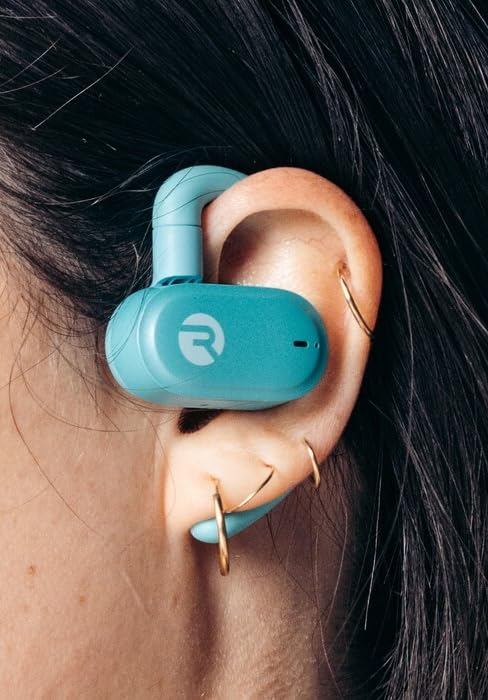
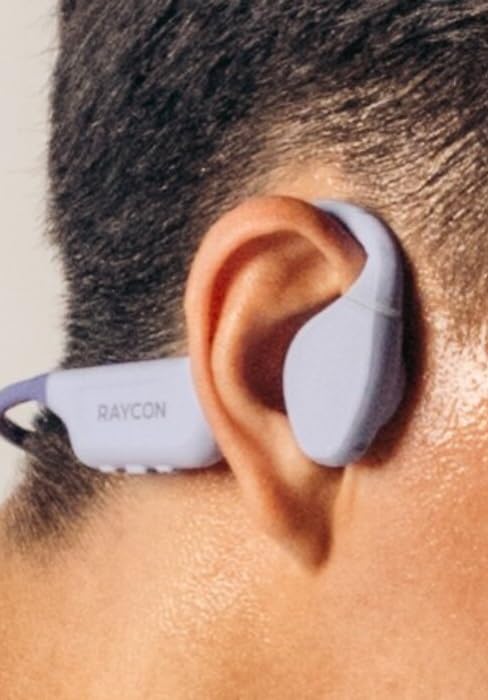
Figure 10: Proper Wearing of Essential Open Earbuds
Touch Controls
The Essential Open Earbuds feature touch controls for various functions. Please note that the touch controls are sensitive. Refer to the quick start guide or the Raycon app for a full list of touch control functions, as specific actions (e.g., play/pause, skip track, answer call) are typically managed via taps on the earbud surface.
| Action | Function |
|---|---|
| Single Tap | Play/Pause Music, Answer/End Call |
| Double Tap (Right Earbud) | Next Track |
| Double Tap (Left Earbud) | Previous Track |
| Long Press | Activate Voice Assistant |
Note: Specific touch control gestures may vary. Consult the official Raycon support resources for the most accurate and up-to-date information.
Maintenance
Cleaning
To maintain optimal performance and hygiene, regularly clean your earbuds and charging case.
- Use a soft, dry, lint-free cloth to wipe the earbuds and charging case.
- For stubborn dirt, slightly dampen the cloth with water. Avoid excessive moisture.
- Do not use abrasive cleaners, solvents, or aerosol sprays.
- Ensure the charging contacts on both the earbuds and the case are clean and dry before charging.
Storage
When not in use, store your earbuds in their charging case to protect them and keep them charged.
- Store in a cool, dry place, away from extreme temperatures and direct sunlight.
- Avoid storing in humid environments.
Battery Care
To prolong battery life:
- Avoid fully draining the battery frequently.
- Charge the earbuds regularly, even if not used for extended periods.
- Use only the provided charging cable or a certified equivalent.
Troubleshooting
If you encounter issues with your Raycon Essential Open Earbuds, try the following solutions:
| Problem | Possible Solution |
|---|---|
| Earbuds won't turn on. | Ensure the earbuds and charging case are fully charged. Place earbuds in the case, close it, then open it again. |
| Earbuds won't pair with device. |
|
| Sound breaks up or is intermittent. |
|
| Touch controls are too sensitive or unresponsive. |
|
| One earbud has no sound. |
|
Specifications
| Feature | Detail |
|---|---|
| Model Name | Raycon Essential Open Earbuds |
| Model Number | RBO715 |
| Connectivity Technology | Wireless (Bluetooth 6.0) |
| Ear Placement | Open Ear |
| Form Factor | Over Ear (with hook design) |
| Control Type | Touch Control |
| Water Resistance Level | IPX5 (Water Resistant) |
| Battery Life (Earbuds) | Up to 8 hours |
| Total Battery Life (with Case) | Up to 36 hours |
| Item Weight | 5 ounces (earbuds + case) |
| Earbud Weight | Approx. 13.3g per earbud |
| Manufacturer | Raycon Global |
| ASIN | B0FHJ7G4WF |
| UPC | 811162032989 |
Warranty and Support
Warranty Information
Raycon products typically come with a limited manufacturer's warranty. Please refer to the official Raycon website or the warranty card included with your product for specific terms, conditions, and duration of the warranty.
Customer Support
For further assistance, technical support, or warranty claims, please contact Raycon customer support:
- Website: Visit the official Raycon website for FAQs, support articles, and contact options. (www.rayconglobal.com)
- Email/Phone: Specific contact details can usually be found on the support section of their website.
Please have your product model number (RBO715) and purchase information ready when contacting support.
Related documentsRBO715


Ask a question about this manual
Ask about setup, troubleshooting, compatibility, parts, safety, or missing instructions. Manuals+ will review the question and use this page’s manual context to help answer it.