Introduction
The Mighty 3 is a compact, screen-free portable music player designed for offline listening of Spotify Premium and Amazon Music Unlimited playlists and podcasts. It offers a distraction-free audio experience, compatible with both Bluetooth and wired headphones.
Key Features:
- Offline playback for Spotify Premium and Amazon Music Unlimited.
- Screen-free design for reduced distractions.
- Over 8 hours of battery life.
- Storage for over 1,000 songs (8 GB internal memory).
- Supports Bluetooth and 3.5mm wired headphones/speakers.
- Durable and IPX4 water-resistant construction.
- Voice UI for playlist navigation.
What's in the Box
- Mighty 3 Player
- Type-C Charging Cable
- Quick Start Guide
Product Overview
The Mighty 3 features a minimalist design with essential controls for music playback. It includes a clip for easy attachment to clothing or accessories.
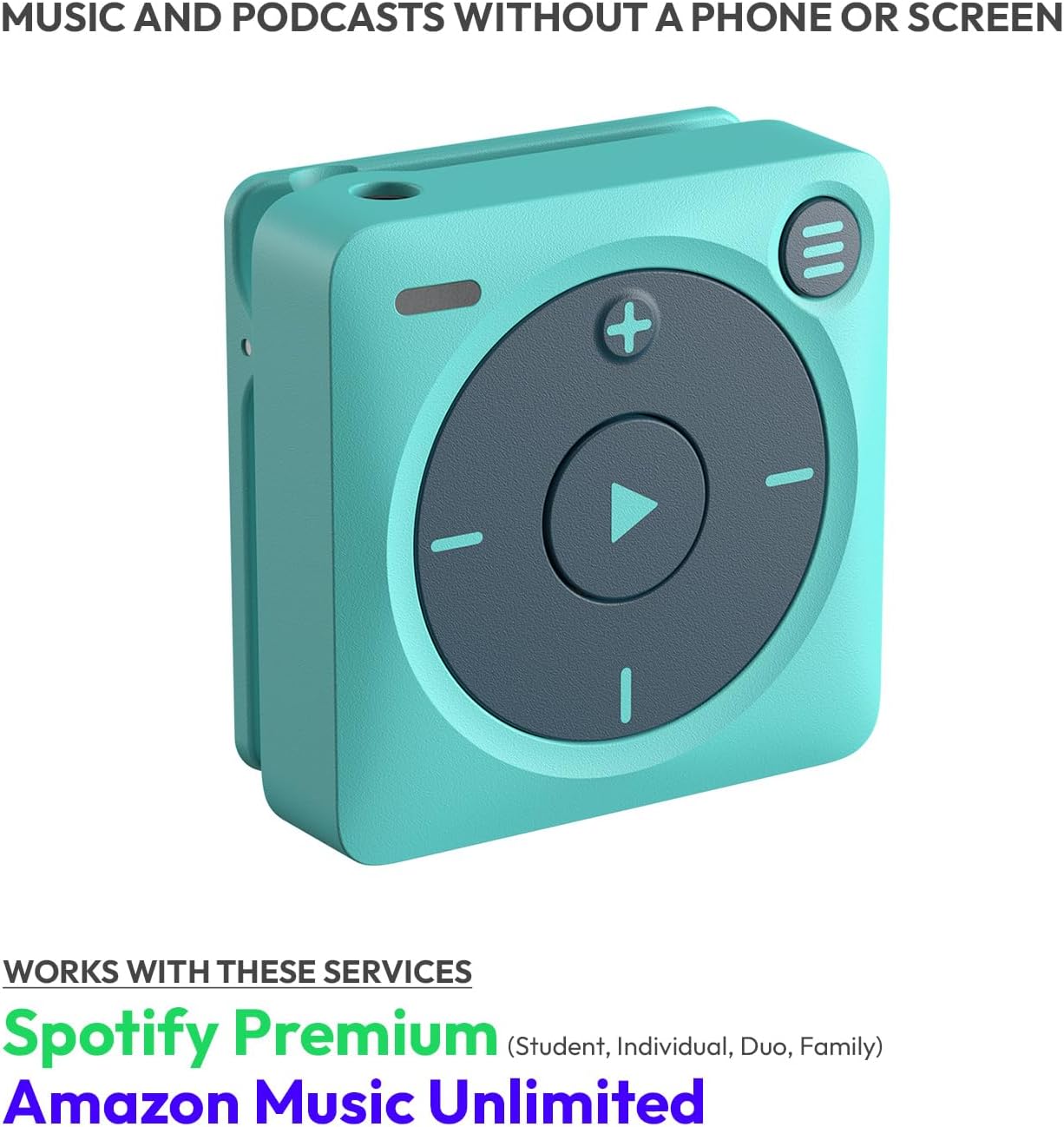
Front view of the Mighty 3 player, showing the central play button, volume controls, and menu button.

Various angles of the Mighty 3 player, highlighting its compact size (1.5 x 1.5 x 0.64 inches) and integrated clip for portability.

Three Mighty 3 players in lavender, blue, and black, demonstrating their small size when held in a hand.
Setup
To begin using your Mighty 3, you will need to install the Mighty app on your smartphone (iOS or Android) and connect your device.
Initial Setup Steps:
- Install the Mighty App: Scan the QR code below or search for "Mighty Audio" in your device's app store.
- Power On and Connect: Follow the on-screen instructions in the app to power on your Mighty 3, connect it to the app, and sync your playlists.
- Account Creation/Login: Create a Mighty account or log in using your existing credentials.
- Music Service Selection: Choose your preferred music service (Spotify or Amazon Music) and connect your account.
- Sync Playlists: Select the playlists you wish to sync to your Mighty 3. Ensure your Mighty is connected to Wi-Fi during the syncing process.

Visual guide for setting up the Mighty 3, showing steps to install the app, connect, and sync playlists. Includes QR codes for app download: App Store QR and Google Play QR.
Video demonstrating the step-by-step process of setting up a new Mighty 3 device, including app installation, account linking, and initial playlist synchronization.
Operating Instructions
Once your Mighty 3 is set up and playlists are synced, you can enjoy your music and podcasts without a phone or internet connection.
Basic Controls:
- Play/Pause: Press the central play button.
- Volume Up/Down: Use the '+' and '-' buttons.
- Skip Track: Press the forward arrow button.
- Previous Track: Press the backward arrow button.
- Playlist Navigation: Use the menu button (three horizontal lines) to cycle through playlists. The voice UI will announce playlist names.
The 'Stay Fresh' feature automatically updates your playlists while charging overnight, ensuring your content is current without manual intervention for up to 30 days offline.
Video showcasing the Mighty 3 as a Spotify music player, demonstrating its use for listening to music and podcasts without requiring a phone or internet connection.
Connectivity
The Mighty 3 offers flexible connectivity options for your audio accessories.
Headphone Connections:
- Bluetooth: Pair your Mighty 3 with Bluetooth headphones or speakers for wireless listening.
- Wired: Use the integrated 3.5mm audio jack for traditional wired headphones.

Image illustrating the Mighty 3's compatibility with both wired headphones (via 3.5mm jack) and wireless Bluetooth headphones.
Battery and Charging
The Mighty 3 provides over 8 hours of continuous playback on a full charge. To charge your device, use the provided Type-C charging cable.
Charging Instructions:
- Connect the Type-C end of the charging cable to the Mighty 3.
- Connect the USB-A end to a compatible USB power adapter or computer port.
- The LED indicator on the Mighty 3 will show charging status (blinking white for charging, solid white for fully charged).

The Mighty 3 player connected to a wall charger via its Type-C cable, indicating the charging process.
Maintenance
The Mighty 3 is designed for durability and is IPX4 rated, meaning it is resistant to water splashes, sweat, and light rain. It is not intended for swimming or submersion.
Care and Cleaning:
- Wipe the device with a soft, dry cloth.
- Avoid using harsh chemicals or abrasive materials for cleaning.
- Store in a cool, dry place when not in use.
Troubleshooting
If you encounter issues with your Mighty 3, refer to the following common solutions:
- Syncing Issues: Ensure your Mighty 3 is connected to a stable Wi-Fi network and plugged into its charger during syncing. Verify your Spotify Premium or Amazon Music Unlimited subscription is active.
- Bluetooth Connectivity: If Bluetooth connection drops frequently, try refreshing the Bluetooth connection weekly. Ensure your headphones' software is up to date.
- No Music Playback: Confirm playlists have been successfully synced. Check battery level.
- App Issues: Ensure the Mighty app is updated to the latest version.
For further assistance, please contact customer support.
Specifications
| Product Dimensions | 0.63 x 1.5 x 1.5 inches |
| Item Weight | 0.705 ounces |
| Model Number | MD-M325 |
| Memory Storage Capacity | 8 GB (stores 1,000+ songs) |
| Battery Life | 8+ hours |
| Connectivity Technology | Bluetooth |
| Supported Standards | Spotify Premium, Amazon Music Prime, Amazon Music Unlimited |
| Water Resistance | IPX4 rated (water, sweat, light rain, splash resistant) |
Warranty and Support
Mighty offers customer support to assist with any questions or issues you may encounter. Your product is covered by a standard return policy.
Contact Support:
- Email: heyo@bemighty.com
- Online Help: Visit the Mighty support center on our website.
Return Policy:
The Mighty 3 is eligible for a 30-day refund or replacement policy from the date of purchase.


