
1. Introduction
This manual provides detailed instructions for the setup, operation, and maintenance of your JINSHANGZI CDS10 4G Android Smartwatch. Please read this manual thoroughly before using the device to ensure proper functionality and to maximize your user experience. The CDS10 smartwatch features a 2.2-inch AMOLED display, a 180-degree rotating camera, 4G connectivity, GPS, and runs on Android 9.0.
2. Package Contents
Verify that all the following items are included in your product package:
- JINSHANGZI CDS10 Smartwatch (with 1 original strap)
- Screen Protector
- Watch Manual (this document)
- SIM Card Pin
- Charging Cable
- Original Box

Image: The retail box of the JINSHANGZI CDS10 Smartwatch, indicating included accessories.
3. Product Overview
The JINSHANGZI CDS10 is a feature-rich 4G Android smartwatch designed for communication, navigation, and health monitoring. Key components include:
- Display: 2.2-inch AMOLED high-definition touchscreen.
- Camera: 180-degree telescopic rotating camera for versatile photo, video, and video call functionality.
- Connectivity: Supports 2G, 3G, and 4G cellular networks (via SIM card), Wi-Fi, and Bluetooth 4.1.
- Operating System: Android 9.0, providing access to the Google Play Store.
- Sensors: GPS, Heart Rate Sensor, Accelerometer, Gyroscope, Barometer, Compass for comprehensive tracking and navigation.
- Memory: Available in 3GB RAM + 32GB ROM, 4GB RAM + 64GB ROM, or 8GB RAM + 128GB ROM configurations.
- Battery: 1280mAh capacity.
4. Setup
4.1. SIM Card Installation
- Locate the SIM card slot on the side of the smartwatch.
- Insert the provided SIM card pin into the small hole next to the SIM tray to eject it.
- Place a Nano-SIM card into the tray with the gold contacts facing down, ensuring it is correctly oriented.
- Gently push the SIM tray back into the smartwatch until it clicks into place.
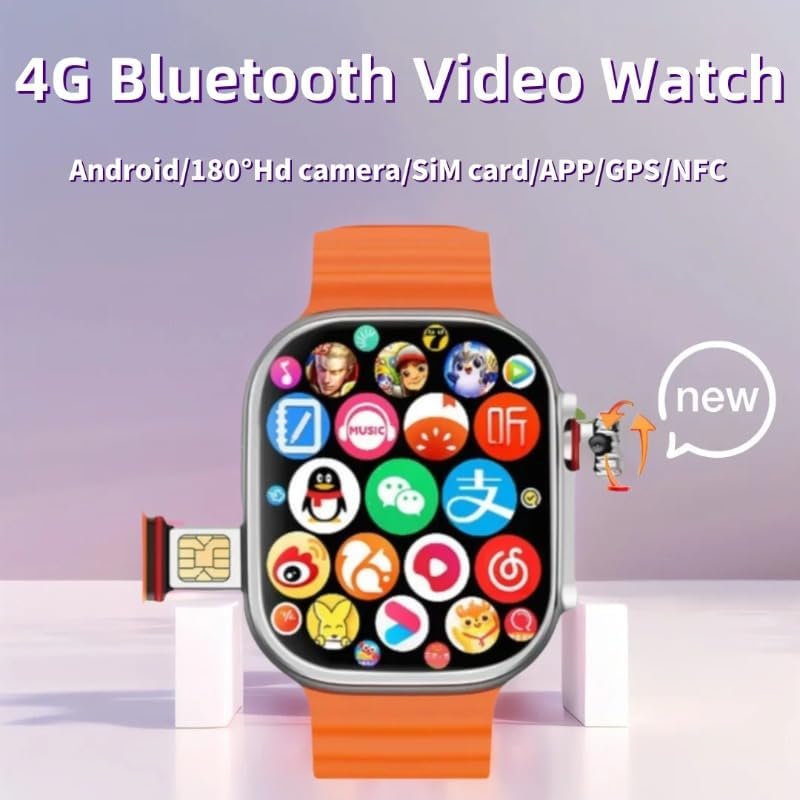
Image: The JINSHANGZI CDS10 Smartwatch displaying its SIM card slot and interface.
4.2. Charging the Device
- Connect the magnetic charging cable to the charging port on the back of the smartwatch.
- Connect the other end of the charging cable to a USB power adapter (not included) or a computer's USB port.
- The screen will display a charging indicator. Allow the device to charge fully before first use.
4.3. Powering On/Off
- To Power On: Press and hold the power button (usually located on the side) until the JINSHANGZI logo appears.
- To Power Off: Press and hold the power button, then select "Power Off" from the options on the screen.
4.4. Initial Setup and Connectivity
- Upon first power-on, follow the on-screen prompts to select your language, region, and time zone.
- Connect to a Wi-Fi network by navigating to Settings > Network & Internet > Wi-Fi. Select your network and enter the password.
- Sign in with your Google account to access the Google Play Store and other Google services.
- To pair Bluetooth devices (e.g., earphones), go to Settings > Connected devices > Bluetooth, turn Bluetooth on, and select your device from the list.
5. Operating Instructions
5.1. Basic Navigation
- Touchscreen: Tap to select, swipe to scroll, pinch to zoom (where supported). The 2.2-inch AMOLED screen supports multi-touch input.
- Side Button: Typically acts as a power button, screen on/off, or a back button depending on the context. A long press usually brings up power options.
5.2. Making Calls and Sending Messages
With a Nano-SIM card installed and active, you can use your smartwatch for direct communication:
- Open the Phone app to dial numbers or access contacts.
- Open the Messages app to send and receive SMS.
5.3. Using the Rotating Camera
The CDS10 features a unique 180-degree telescopic rotating camera:
- Open the Camera application from the app drawer.
- Physically rotate the camera module to adjust the viewing angle for selfies, forward-facing shots, or video calls.
- Tap the shutter button on the screen to capture photos or start/stop video recording.
5.4. GPS and Navigation
The integrated GPS allows for location tracking and navigation:
- Access location services through compatible mapping or fitness applications.
- The built-in compass provides directional guidance.
5.5. Health Monitoring
The smartwatch includes a heart rate sensor and step counting functionality:
- Open the Heart Rate app to measure your heart rate. Ensure the watch is snug on your wrist.
- The Step app automatically tracks your daily steps.
5.6. Installing Applications
As an Android smartwatch, you can download and install applications:
- Open the Play Store app.
- Browse or search for desired applications.
- Tap "Install" to download and set up new apps.

Image: The JINSHANGZI CDS10 Smartwatch demonstrating multi-touch control during a gaming application.
6. Maintenance
6.1. Cleaning
- Wipe the screen and body of the smartwatch with a soft, lint-free cloth.
- Avoid using harsh chemicals, abrasive materials, or excessive moisture.
6.2. Battery Care
- To prolong battery life, avoid exposing the device to extreme temperatures.
- Charge the battery regularly and avoid letting it fully discharge frequently.
6.3. Software Updates
Periodically check for software updates to ensure optimal performance and access to new features:
- Go to Settings > About Watch > System Update.
- Follow the on-screen instructions to download and install any available updates. Ensure the device is sufficiently charged before starting an update.
7. Troubleshooting
If you encounter issues with your smartwatch, refer to the following common solutions:
- Device Not Powering On: Ensure the battery is charged. Connect the charging cable and wait a few minutes before attempting to power on again.
- Connectivity Issues (Wi-Fi/Bluetooth/4G): Restart the smartwatch. Check network settings and ensure Wi-Fi or Bluetooth is enabled. For 4G, verify the SIM card is correctly inserted and active.
- Apps Crashing or Freezing: Close the problematic app and reopen it. If the issue persists, restart the smartwatch. You may also try clearing the app's cache via Settings > Apps & notifications > App info.
- Inaccurate Sensor Readings: Ensure the smartwatch is worn snugly on your wrist. Clean the sensor area on the back of the watch.
- Touchscreen Unresponsive: Restart the device. If the issue continues, ensure the screen is clean and dry.
For persistent issues, contact customer support.
8. Specifications
| Feature | Specification |
|---|---|
| Model | CDS10 |
| Brand | JINSHANGZI |
| Operating System | Android 9.0 |
| Display Size | 2.2 Inches |
| Display Type | AMOLED |
| RAM | 3GB / 4GB / 8GB |
| Internal Storage | 32GB / 64GB / 128GB |
| Battery Capacity | 1280 mAh |
| Camera | 180-degree telescopic rotating camera |
| Cellular Technology | 2G, 3G, 4G (GSM, WCDMA, LTE bands specified in product description) |
| Connectivity | Bluetooth 4.1, Wi-Fi |
| Sensors | GPS, Heart Rate Sensor, Accelerometer, Gyroscope, Barometer, Compass |
| Compatible Devices | Smartphones |
| Weight | 100 g |
9. Warranty and Support
Warranty information for your JINSHANGZI CDS10 Smartwatch is typically provided at the time of purchase or included with the product packaging. Please refer to these documents for details regarding warranty coverage and terms.
For technical support, service, or further inquiries, please contact the manufacturer or your point of purchase. Ensure you have your product model number (CDS10) and proof of purchase available when seeking support.