
1. Introduction
This manual provides detailed instructions for the operation, maintenance, and troubleshooting of your EF ECOFLOW Rapid Pro Power Bank (Model EF-HB-140). Please read this manual thoroughly before using the product to ensure proper function and safety. Keep this manual for future reference.
2. Product Overview
The EF ECOFLOW Rapid Pro Power Bank is a high-capacity portable charger designed for fast and efficient power delivery to a wide range of electronic devices. It features X-VELO battery technology for superior performance, ultra-fast recharging capabilities, and multiple output ports including a built-in retractable USB-C cable.
2.1 Key Features
- X-VELO Batteries: Innovative multipole technology for faster charging speeds and excellent temperature control.
- Ultra-Fast Recharging: Achieve 0-80% charge in as little as 20 minutes with the EcoFlow RAPID Pro Desktop Charger (sold separately).
- Ultra-Fast Multi-Charging: 300W total output across 4 ports, including one 140W USB-C port and two 65W USB-C ports.
- Integrated 140W USB-C Cable: A built-in, retractable 60 cm USB-C cable for convenience.
- Superior Safety: Features a temperature sensor for overheating protection, VO-level fireproof shell, and intelligent BMS/EMS systems.
- Compact Design: Portable and air-travel-friendly with a 27,650mAh (99.54Wh) capacity.
- 1.54-inch LCD Smart Display: Provides real-time power status, battery health, temperature, and cycle count.
2.2 Product Components

Figure 1: EF ECOFLOW Rapid Pro Power Bank. This image shows the main unit with its display screen and port layout.

Figure 2: Detailed view of the 1.54-inch LCD Smart Display, showing power status, charging rate, battery health, temperature, and cycle count.
3. Setup
3.1 Initial Charging
Before first use, fully charge the EF ECOFLOW Rapid Pro Power Bank. Connect the power bank to a suitable power source using the integrated USB-C cable or an external USB-C cable. The LCD display will indicate the charging status.
- Single-port input (140W): 0-80% in approximately 40 minutes.
- Multi-port input (280W): 0-80% in approximately 26 minutes.
- With EcoFlow RAPID Pro Desktop Charger (320W, sold separately): 0-80% in approximately 20 minutes.
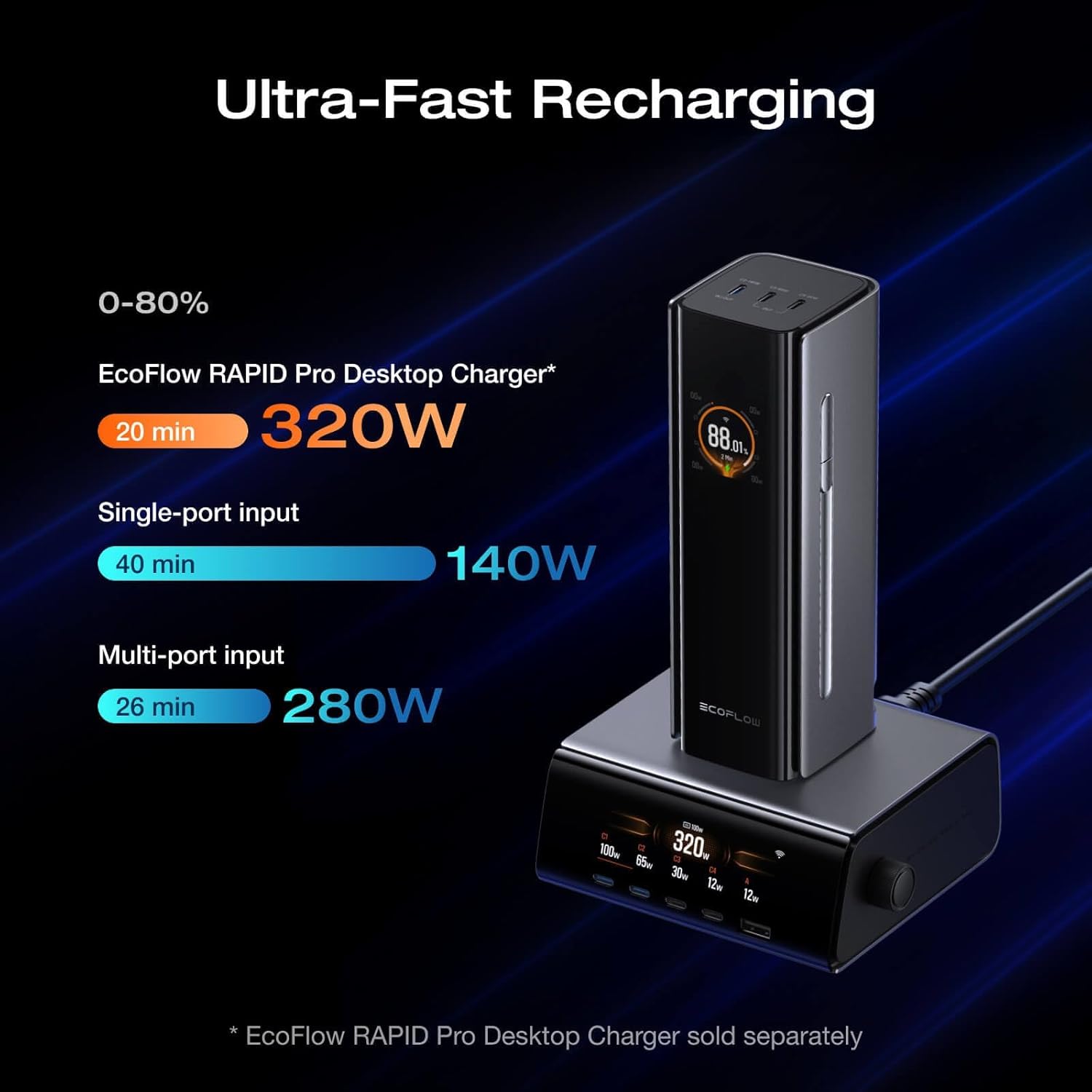
Figure 3: Illustration of ultra-fast recharging times using various input methods, including the optional desktop charger.
3.2 Connecting to the EcoFlow App
For enhanced control and monitoring, download the EcoFlow app from your device's app store. Follow the in-app instructions to pair your Rapid Pro Power Bank. The app allows you to view power status, battery health, and other settings.
4. Operating Instructions
4.1 Charging Your Devices
The Rapid Pro Power Bank offers multiple output options to charge various devices simultaneously.
- Built-in USB-C Cable (C1): Provides up to 140W output. Retract the cable from its housing and connect it to your device.
- USB-C Ports (C2, C3, C4):
- Port C2: Up to 140W output.
- Ports C3 & C4: Up to 65W output each.
- Total Output: The power bank can deliver a combined output of up to 300W across all four ports.
Figure 4: The power bank charging a laptop, phone, and earbuds simultaneously using its multiple ports and integrated cable.

Figure 5: Diagram illustrating single-port charging scenarios, highlighting the 140W output from USB-C1 and USB-C2, and 65W from USB-C3 and USB-C4.
Figure 6: Diagram showing various two-port charging configurations and their respective power outputs.

Figure 7: Diagram illustrating different three-port charging configurations and their power distribution.
4.2 Universal Compatibility
The Rapid Pro Power Bank is compatible with a wide range of devices, including smartphones (iPhone, Samsung, Google Pixel), laptops (MacBook Pro), drones (DJI), and handheld game consoles (Steam Deck, ASUS ROG Ally).
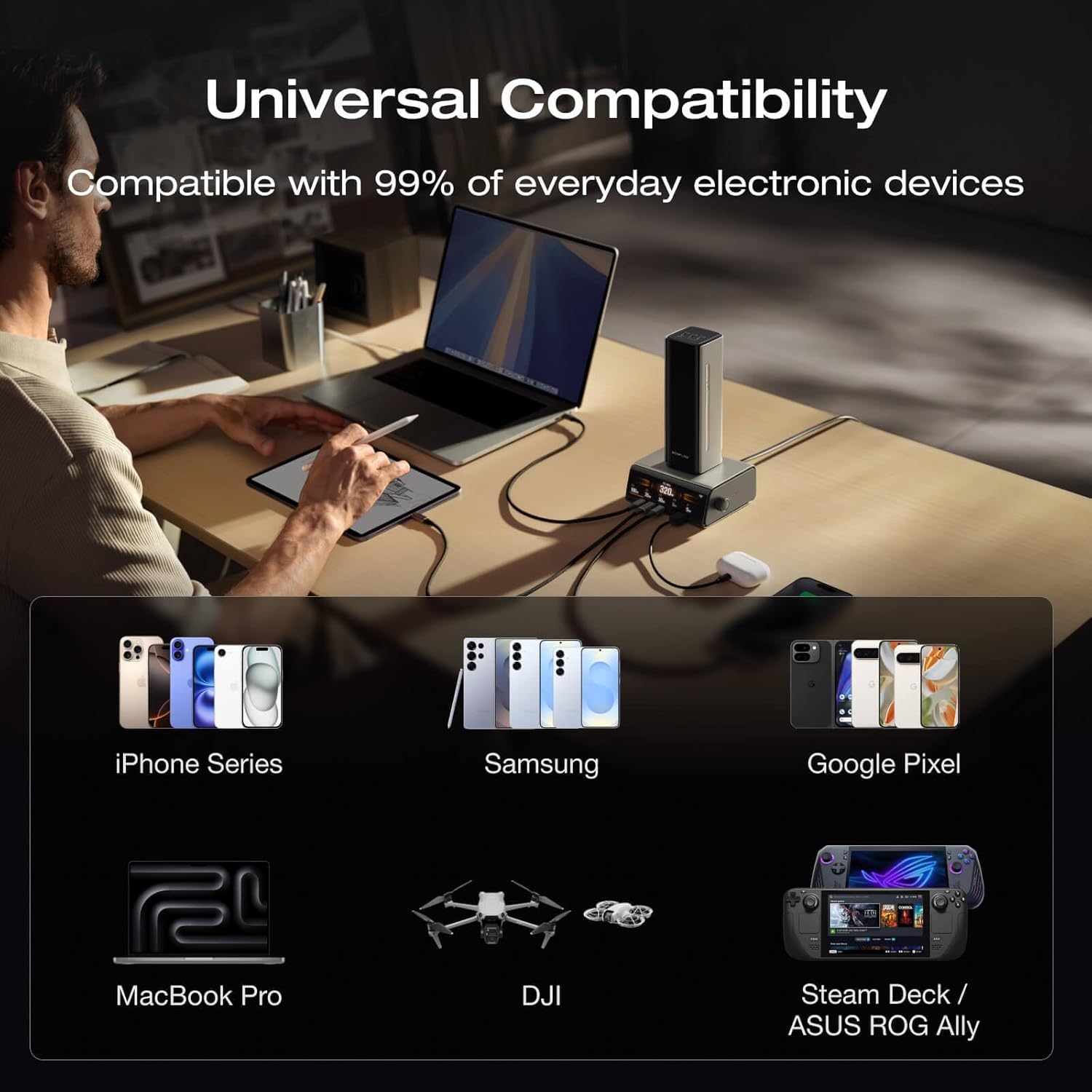
Figure 8: Visual representation of the power bank's compatibility with various electronic devices, including phones, laptops, drones, and handheld gaming consoles.
5. Maintenance
5.1 Cleaning
To clean the power bank, use a soft, dry cloth. Avoid using abrasive cleaners, solvents, or harsh chemicals. Ensure all ports are free from dust and debris.
5.2 Storage
Store the power bank in a cool, dry place away from direct sunlight, extreme temperatures, and moisture. For long-term storage, it is recommended to charge the power bank to approximately 50-80% every three months to maintain battery health.
6. Troubleshooting
- Device not charging:
- Ensure the power bank is sufficiently charged.
- Verify the charging cable is securely connected to both the power bank and the device.
- Check if the device requires a specific charging protocol or wattage that the power bank can provide.
- Try a different port or cable.
- Power bank not recharging:
- Ensure the charging adapter and cable are functioning correctly and provide adequate power (e.g., 140W for optimal speed).
- Check the connection to the power source.
- Power bank getting warm during use:
- It is normal for the power bank to generate some heat during high-power charging or discharging.
- If it becomes excessively hot, disconnect all devices and allow it to cool down. Refer to the safety section.
- Power bank not appearing in EcoFlow app:
- Ensure the power bank is connected to a power source (charging) for it to be discoverable by the app.
- Verify Bluetooth is enabled on your mobile device and the power bank is within range.
- Restart both the power bank and the EcoFlow app.
7. Specifications
| Model Number | EF-HB-140 |
| Capacity | 27,650mAh (99.54Wh) |
| Dimensions | 6 x 2 x 2 inches (152 x 51 x 51 mm) |
| Weight | 2.24 pounds (approx. 1.02 kg) |
| Total Output | 300W Max |
| USB-C Output (C1, C2) | 140W Max per port |
| USB-C Output (C3, C4) | 65W Max per port |
| Input (Single-Port) | 140W Max |
| Input (Multi-Port) | 280W Max |
| Input (with Desktop Charger) | 320W Max (Desktop Charger sold separately) |
| Operating Temperature | -20°C to 45°C (-4°F to 113°F) |
8. Safety Information
- Do not disassemble, repair, or modify the product.
- Keep the product away from fire, heat sources, and direct sunlight.
- Do not expose the product to water or other liquids.
- Avoid dropping, puncturing, or subjecting the product to strong impacts.
- Use only approved chargers and cables.
- Airline Travel: The 27,650mAh (99.54Wh) capacity is generally air-travel-friendly. However, airline regulations vary by region and carrier. Always confirm battery restrictions with your airline before travel.
- Temperature Monitoring: The power bank includes a temperature sensor that performs continuous safety checks. If the unit becomes excessively hot, discontinue use and allow it to cool.
- Fire Safety: The product features a VO-level fireproof shell for external protection.
9. Warranty and Support
For warranty information or technical support, please refer to the official EF ECOFLOW website or contact their customer service directly. Keep your purchase receipt as proof of purchase.
Website: www.ecoflow.com


