
Introduction
This manual provides essential information for setting up, operating, maintaining, and troubleshooting your Razer BlackWidow V4 Low Profile TKL HyperSpeed Wireless Gaming Keyboard. Please read thoroughly to ensure optimal performance and longevity of your device.
What's in the Box
- Razer BlackWidow V4 Low-profile Tenkeyless HyperSpeed Keyboard
- HyperSpeed Wireless Dongle + USB Dongle Adapter
- USB Type A to USB Type C Cable
- User Guide (this document)
Setup
1. Initial Charging
Before first use, it is recommended to fully charge your keyboard using the provided USB Type A to USB Type C cable. Connect the USB-C end to the keyboard and the USB-A end to a powered USB port on your computer or a wall adapter.
2. Connectivity Options
Your Razer BlackWidow V4 Low Profile TKL keyboard offers three connectivity modes:
- HyperSpeed Wireless (2.4GHz): For a lag-free gaming experience with a 1000Hz polling rate. Use the included HyperSpeed Wireless Dongle.
- Bluetooth: Connect up to three Bluetooth-enabled devices simultaneously for multi-tasking efficiency.
- Wired (USB-C): Connect directly to your PC using the USB Type A to USB Type C cable for a stable, wired connection and simultaneous charging.

Image: Rear view of the keyboard, highlighting the USB-C port and the wired/wireless switch.
3. Software Installation (Razer Synapse 4 & Chroma App)
For full customization of lighting, macros, and other features, download and install Razer Synapse 4 and the Chroma App from the official Razer website. These applications allow you to:
- Remap keys and create macro layers.
- Customize RGB lighting effects (Chroma effects).
- Link profiles to specific applications or games.
- Manage onboard memory for settings.
Operating Your Keyboard
Key Features and Controls

Image: Close-up of three keyboards displaying the different low-profile mechanical switch types.
- Low Profile Orange Mechanical Switches: Experience quick, quiet actuation with a tactile bump. These switches have a 1.6 mm actuation point and require 45g of force.
- Ultra-Low 18.5mm Front Height: Designed for ergonomic comfort, reducing wrist strain during extended use. The keyboard features a solid 5052 aluminum alloy top case for durability.

Image: Side profile of the keyboard demonstrating its ultra-low 18.5mm front height.
- Textured Doubleshot PBT Keycaps: Durable and fade-resistant keycaps with optimized legends for enhanced backlight illumination.
- Optimized Typing Experience: Features lubricated stabilizers and dual sound-dampening foams for clean keystrokes and improved acoustics.
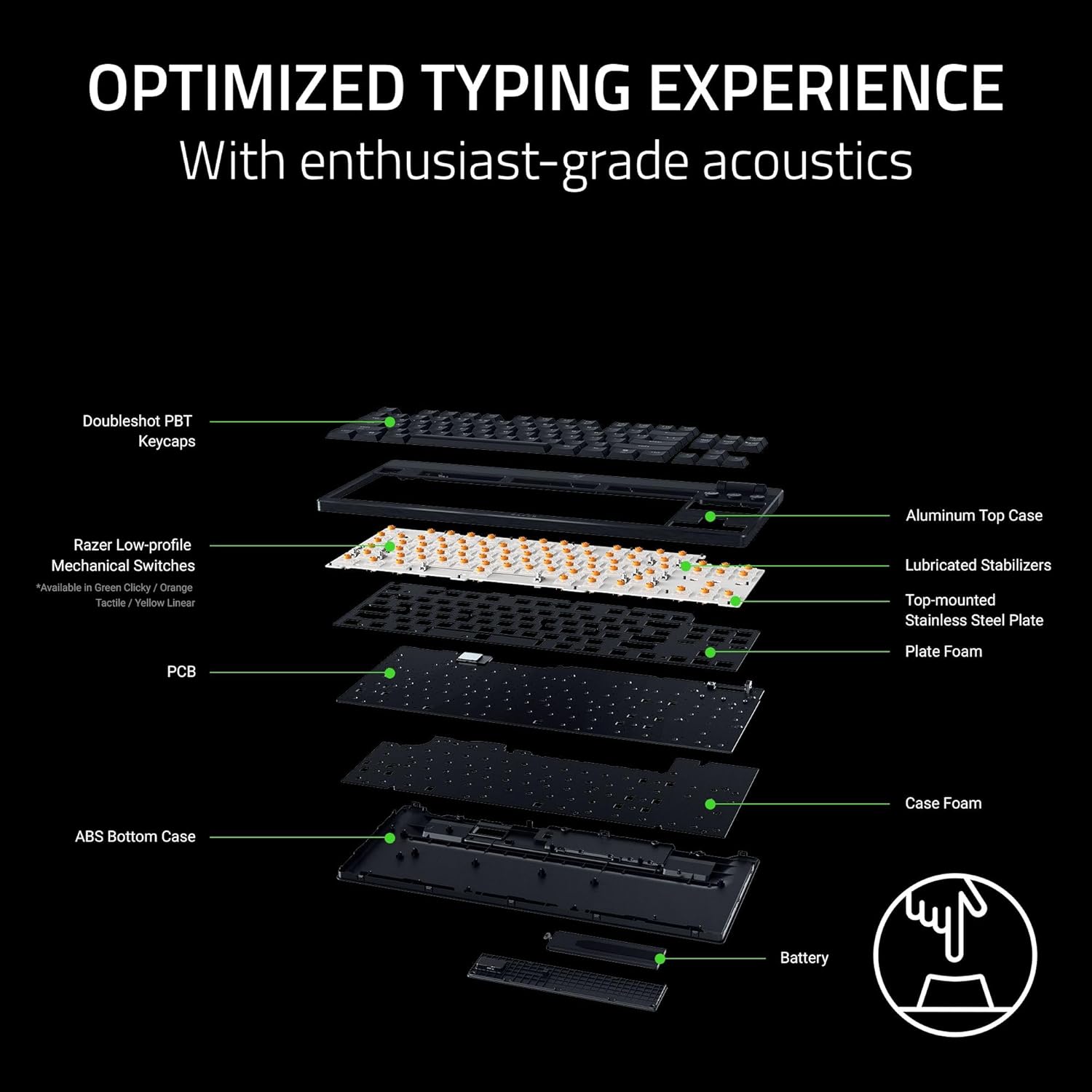
Image: Exploded view of the keyboard's internal construction, showing layers for optimized typing.
Dedicated Controls

Image: Detail of the multi-function roller and dedicated control buttons.
- Multi-Function Roller: Adjust volume or remap to other functions via Razer Synapse.
- Media Control Buttons: Dedicated buttons for play/pause, next track, and previous track.
- Connectivity Buttons: Toggle between 2.4GHz HyperSpeed Wireless and Bluetooth modes.
- AI Prompt Button: Launch the AI Prompt Master via Synapse for quick AI interactions.
- Battery Status Button: Press to display the current battery level on the number row.
Power Saving Mode
To conserve battery life, press and hold the Battery Status button for 3 seconds to activate Power Saving Mode. In this mode, the keyboard:
- Pauses communication with Synapse.
- Shuts down RGB lighting.
- Reduces the polling rate to 250Hz.
This mode extends battery life significantly, up to 980 hours in idle state when fully charged.

Image: Keyboard highlighting its ultra-long battery life capability.
Maintenance
Cleaning
Regular cleaning helps maintain the keyboard's appearance and functionality:
- Use a soft, lint-free cloth slightly dampened with water to wipe down the keycaps and chassis.
- For stubborn dirt, a small amount of isopropyl alcohol can be used on the cloth.
- Avoid spraying cleaners directly onto the keyboard.
- Use compressed air to remove debris from between keycaps.
Keycap Care
The Doubleshot PBT keycaps are designed for durability. If removal is necessary for deep cleaning or replacement, use a keycap puller to avoid damage. Apply gentle, even pressure when removing and reattaching keycaps.
Troubleshooting
Connectivity Issues
- Wireless (2.4GHz/Bluetooth): Ensure the keyboard is charged and within range of the receiver/device. Check that the correct connectivity mode is selected on the keyboard. Re-pair the device if necessary.
- Wired: Verify the USB-C cable is securely connected to both the keyboard and the PC. Try a different USB port or cable.
Lighting Malfunctions
- Ensure Razer Synapse and Chroma App are running and updated.
- Check lighting settings within the Chroma App for any disabled effects or low brightness.
- If specific keys are not lighting up, check for physical damage or software conflicts.
Battery Life Concerns
- Activate Power Saving Mode when not actively gaming or requiring full RGB lighting.
- Ensure the keyboard is fully charged. Battery life can vary based on usage, lighting intensity, and polling rate.
Software Issues
- Ensure Razer Synapse and Chroma App are updated to the latest version.
- Restart the applications or your computer.
- If issues persist, consider reinstalling the Razer software.
Specifications
| Feature | Detail |
|---|---|
| Brand | Razer |
| Model Name | BlackWidow V4 Low Profile TKL HyperSpeed Wireless Gaming Keyboard |
| Model Number | RZ03-05450800-R3U1 |
| Connectivity Technology | 2.4GHz Wireless, Bluetooth, USB-C Wired |
| Keyboard Description | Low Profile Mechanical Gaming Keyboard |
| Switch Type | Razer Low Profile Orange Mechanical Switches (Tactile & Quiet) |
| Actuation Force | 45g |
| Actuation Point | 1.2mm |
| Total Travel | 2.8mm |
| Keycap Material | Textured Doubleshot PBT |
| Front Height | 18.5mm |
| Top Case Material | 5052 Aluminum Alloy |
| Battery Life | Up to 980 hours (in Power Saving Mode) |
| Polling Rate | 1000Hz (Wireless), 250Hz (Power Saving Mode) |
| Number of Keys | 87 (Tenkeyless) |
| Keyboard Layout | QWERTY |
| Keyboard Backlighting | RGB |
| Product Dimensions (L x W x H) | 5.48" x 14.07" x 1.12" |
| Item Weight | 3.1 Pounds |
| Compatible Devices | PC |
Warranty Information
The Razer BlackWidow V4 Low Profile TKL HyperSpeed Wireless Gaming Keyboard comes with a 2-Year Manufacturer's Warranty. Please retain your proof of purchase for warranty claims. For detailed terms and conditions, refer to the official Razer warranty policy on their website.
Support
For further assistance, technical support, or to access additional resources, please visit the official Razer Support website:
You can also find FAQs, driver downloads, and community forums on the support portal.


