
1. Introduction
This manual provides essential instructions for the safe and efficient operation, installation, and maintenance of your Jackery HomePower 2000 Ultra Solar Kit. Please read this manual thoroughly before using the product and retain it for future reference.
The Jackery HomePower 2000 Ultra is an all-in-one AC-coupled energy storage system designed for daily use, featuring a 2048Wh capacity, an integrated micro-inverter, and compatibility with flexible solar panels for up to 2800W solar input.

Figure 1.1: Jackery HomePower 2000 Ultra Solar Kit components.
2. Safety Instructions
Always observe the following safety precautions to prevent injury, electric shock, fire, or damage to the product:
- Do not disassemble, repair, or modify the unit. Incorrect reassembly may cause fire or electric shock.
- Keep the unit away from fire and direct sunlight.
- Do not charge, use, or store the unit in a bathroom or an area exposed to water.
- Use only the provided or approved accessories.
- Ensure proper ventilation during use. Do not block ventilation openings.
- Keep out of reach of children and pets.
- Operate within the specified temperature range (-20°C to 55°C).
- The unit is IP65 rated for water and dust protection, but avoid submerging it.
3. Package Contents
Verify that all items are present in your package:
- Jackery HomePower 2000 Ultra Unit
- 800W Flexible Solar Panel Set (e.g., 4 x 200W panels)
- Necessary connection cables
- User Manual (this document)
If any components are missing or damaged, please contact customer support.
4. Setup Instructions
The Jackery HomePower 2000 Ultra is designed for plug-and-play installation. Follow these steps for initial setup:
4.1 Unpacking and Placement
- Carefully remove all components from the packaging.
- Place the HomePower 2000 Ultra unit on a stable, flat surface in a well-ventilated area, away from direct sunlight and heat sources.
- Ensure the unit is accessible for connections and operation.

Figure 4.1: The Jackery HomePower 2000 Ultra as a plug-and-play energy storage system for residential use.
4.2 Connecting Solar Panels
- Unfold and position the flexible solar panels in an area with maximum sun exposure.
- Connect the solar panels to the designated solar input ports on the HomePower 2000 Ultra. The system supports up to 2000W via dual MPPT solar inputs.
- Ensure all connections are secure.

Figure 4.2: Illustration of 2000W DC solar input and 800W AC input for off-grid configurations.
4.3 AC-Coupled Connection (On-Grid)
- Connect the HomePower 2000 Ultra to your home's AC grid using the provided micro-inverter connection. The system is compatible with micro-inverters up to 800W.
- This allows the system to deliver power to the grid while simultaneously powering household appliances.
- For optimal energy management and to prevent grid feedback, it is recommended to use the Jackery Home App in conjunction with a smart meter (developed with Shelly).

Figure 4.3: The HomePower 2000 Ultra integrated with an 800W micro-inverter for AC-coupled operation.
4.4 Initial Power On
- Press and hold the power button on the HomePower 2000 Ultra for a few seconds to turn it on.
- The display will illuminate, indicating the unit is active.

Figure 4.4: Simple one-click start for plug-and-play operation.
5. Operating Instructions
5.1 Powering Devices
- Connect your appliances to the AC output ports on the HomePower 2000 Ultra.
- The system can deliver up to 800W to the grid while simultaneously powering various household appliances.
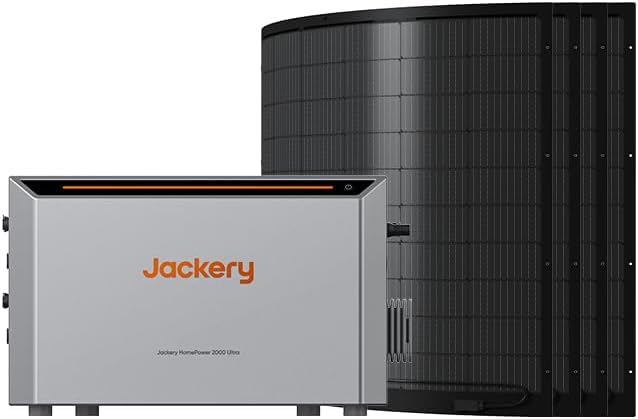
Figure 5.1: The HomePower 2000 Ultra providing 800W AC on-grid input and powering household appliances.
5.2 Smart Energy Management with Jackery Home App
- Download the Jackery Home App from your device's app store.
- Connect the HomePower 2000 Ultra to the app via Wi-Fi or Bluetooth.
- The app allows for smart energy saving by automatically charging when electricity prices are low and discharging during peak hours.
- When paired with a compatible smart meter, the system precisely controls energy flow to prevent grid feedback and maximize self-consumption.
5.3 Expanding Capacity
One HomePower 2000 Ultra unit can be combined with up to three additional batteries, expanding the total capacity to a maximum of 8 kWh.
6. Maintenance
6.1 Cleaning
- Ensure the unit is powered off and disconnected from all power sources before cleaning.
- Wipe the exterior with a soft, dry, or slightly damp cloth. Do not use abrasive cleaners or solvents.
- Keep ventilation openings clear of dust and debris.
6.2 Storage
- If storing for an extended period, charge the unit to approximately 60-80% every 3-6 months to prolong battery life.
- Store in a cool, dry place, away from direct sunlight and extreme temperatures.
7. Troubleshooting
| Problem | Possible Cause | Solution |
|---|---|---|
| Unit does not power on. | Battery depleted; power button not pressed correctly. | Charge the unit; press and hold the power button firmly for a few seconds. |
| No power output from AC ports. | AC output not enabled; overload protection activated. | Ensure AC output is turned on; reduce connected load; restart the unit. |
| Solar panels not charging the unit. | Insufficient sunlight; incorrect panel connection; faulty panel/cable. | Ensure panels are in direct sunlight; check all connections; test panels/cables if possible. Note: Very low wattage input may not be displayed on the unit. |
| App connection issues. | Wi-Fi/Bluetooth interference; incorrect pairing. | Ensure unit is within range; restart unit and app; re-pair device. |
If the problem persists, please contact Jackery customer support.
8. Technical Specifications
| Feature | Specification |
|---|---|
| Model Number | HP 2000 Ultra |
| Part Number | JAS-IN1k5-BA4K-DEA1 |
| Energy Storage Capacity | 2048Wh (expandable up to 8 kWh with additional batteries) |
| AC Output (Micro-inverter) | 800W (bidirectional) |
| Solar Input (DC) | Up to 2000W (dual MPPT) |
| Total Solar Input (DC + AC) | Up to 2800W |
| Operating Temperature | -20°C to 55°C |
| Protection Rating | IP65 (water and dust protection) |
| Product Dimensions | 36 x 38.2 x 58 cm |
| Weight | 25.5 kg |
| Included Components | HomePower 2000 Ultra, 800W flexible solar panel set |

Figure 8.1: Illustration of the solar panel's 23.5% conversion efficiency.
9. Warranty Information
Jackery products come with a limited warranty. Please refer to the official Jackery website or your purchase documentation for detailed warranty terms and conditions, including coverage period and claim procedures. Keep your proof of purchase for warranty service.
10. Customer Support
For technical assistance, troubleshooting, or warranty inquiries, please contact Jackery customer support:
- Website: www.jackery.com (Check for local support contact information)
- Email: Refer to your product packaging or website for specific email addresses.
- Phone: Refer to your product packaging or website for specific phone numbers.
Please have your model number (HP 2000 Ultra) and purchase date ready when contacting support.


