
1. Important Safety Information
Please read all instructions carefully before operating the dehumidifier. Keep this manual for future reference.
- Ensure the unit is placed on a stable, level surface to prevent tipping.
- Do not operate the dehumidifier near flammable gases or combustible materials.
- Always unplug the unit before cleaning or performing any maintenance.
- Keep children and pets away from the unit during operation.
- Do not block the air inlet or outlet. Maintain at least 8 inches (20 cm) clearance around the unit.
- Use only the power supply specified on the rating label.
- Do not use if the power cord or plug is damaged. Contact customer support for assistance.
2. Product Overview
The DORTALA 150 Pints Dehumidifier is designed to efficiently remove excess moisture from large rooms up to 7000 sq.ft. It features multiple operating modes, flexible drainage options, and user-friendly controls.
Key Features:
- High-Efficiency Moisture Removal: Capable of removing up to 150 pints of moisture daily.
- Two Working Modes: Normal and Continuous modes for varied dehumidification needs.
- Quiet Operation: Operates at a low noise level of 45 dB.
- Multiple Drainage Options: Manual, Auto, and Pump drainage for convenience.
- Smart LED Touch Control Panel: Easy-to-use interface with digital display.
- 24-Hour Timer: Program the unit to turn on or off automatically.
- Child Lock Function: Prevents accidental changes to settings.
- Auto Defrost & Memory Restart: Enhances performance and user convenience.
- Portable Design: Equipped with recessed handles and universal wheels for easy movement.
- Washable Filter: For easy maintenance and improved air quality.
- Certified: ETL and DOE certified for efficiency and safety.
Components:
Familiarize yourself with the main components of your dehumidifier.
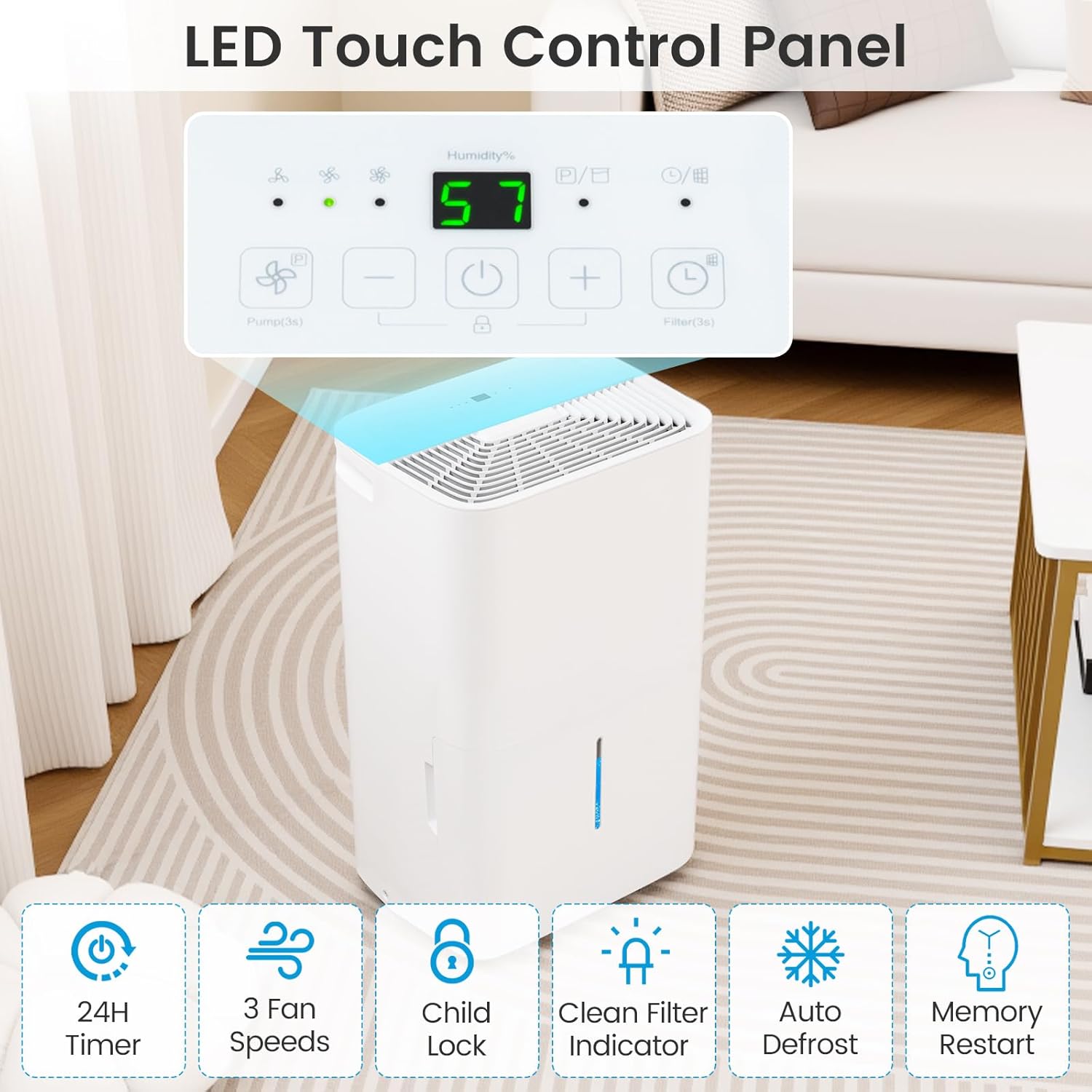
Image: The dehumidifier's top-mounted LED touch control panel, showing humidity display and various function buttons like fan speed, child lock, timer, and filter indicator.
- Control Panel: Located on the top, features LED display and touch buttons for all functions.
- Air Inlet/Outlet: Grilles for air circulation.
- Water Tank: Removable 2.4-gallon (9.2 L) tank with visible water level.
- Drainage Ports: Connections for continuous drain hose and pump drain hose.
- Handles & Wheels: For easy portability.
- Air Filter: Removable and washable, located at the air inlet.
3. Setup and Installation
Unpacking:
- Carefully remove the dehumidifier from its packaging.
- Remove all packing materials, including any tape or protective films.
- Inspect the unit for any shipping damage. If damaged, do not operate and contact customer support.
Placement:
- Place the dehumidifier on a firm, level surface that can support its weight when the water tank is full.
- Ensure there is at least 8 inches (20 cm) of space on all sides of the unit for proper air circulation.
- Avoid placing the unit near heat sources, such as heaters or ovens, or in direct sunlight.
- For optimal performance, close all doors and windows in the room where the dehumidifier is operating.
Power Connection:
- Plug the power cord into a grounded electrical outlet (115V, 60Hz).
- Do not use extension cords or power strips.
4. Operating Instructions
Control Panel Functions:
The LED touch control panel allows you to manage all settings.
- Power Button: Turns the unit on or off.
- Humidity Setting Buttons (+/-): Adjusts the desired humidity level (30%-80%).
- Mode Button: Switches between Normal and Continuous modes.
- Fan Speed Button: Selects between 3 fan speeds.
- Timer Button: Sets the 24-hour timer for automatic operation.
- Child Lock Button: Activates/deactivates child lock (press and hold).
- Filter Indicator: Lights up when the filter needs cleaning.
Operating Modes:

Image: A visual representation of the two working modes: Normal mode allows setting humidity between 30%-80%, while Continuous mode is activated by pressing the '-' key until 'CO' appears on the panel.
- Normal Mode: In this mode, you can set your desired humidity level between 30% and 80%. The unit will operate until the room humidity reaches the set level, then cycle on and off to maintain it.
- Continuous Mode: To activate, press the 'Mode' button until 'CO' appears on the display. In Continuous mode, the unit will run constantly regardless of the room's humidity level, providing maximum dehumidification. This mode is ideal for very damp conditions or for drying clothes.
Setting Humidity:
Press the '+' or '-' buttons to adjust the desired humidity level. The display will show the target humidity, then revert to showing the current room humidity.
Timer Function:
Press the 'Timer' button to set a delay for the unit to turn on or off (1-24 hours). Each press increases the time by one hour.
Child Lock:
Press and hold the 'Child Lock' button for 3 seconds to activate or deactivate the child lock. When active, other buttons will not respond.
Drainage Options:

Image: The dehumidifier illustrating three methods for water removal: manual drainage using the 2.4-gallon water tank, auto drainage with a 23.5-inch drain hose, and pump drainage with a 16.4-foot drain hose.
- 1. Manual Drainage (Water Tank): When the 2.4-gallon water tank is full, the unit will automatically shut off and an indicator light will illuminate. Carefully remove the tank using its handle and empty the water. Reinsert the tank securely to resume operation.
- 2. Auto Drainage (Gravity Drain): For continuous operation without emptying the tank, attach the included 23.5-inch (60 cm) drain hose to the continuous drain port on the back of the unit. Ensure the hose is sloped downwards to a floor drain or suitable container.
- 3. Pump Drainage: For draining water upwards or over longer distances, connect the included 16.4 ft (5 m) pump drain hose to the pump drain port. The internal pump will automatically discharge water when needed.
5. Maintenance
Regular maintenance ensures optimal performance and extends the lifespan of your dehumidifier.
Cleaning the Air Filter:
The 'Filter' indicator light will illuminate after approximately 250 hours of operation, signaling that the filter needs cleaning. Clean the filter every two weeks or more often depending on usage and air quality.
- Unplug the dehumidifier from the power outlet.
- Remove the air filter from the back of the unit.
- Wash the filter with warm, soapy water. Rinse thoroughly.
- Allow the filter to air dry completely before reinstalling. Do not expose to direct sunlight or high heat.
- Reinsert the dry filter into the unit.
- Plug in the unit and press the 'Filter' button for 3 seconds to reset the filter timer.
Cleaning the Unit:
- Wipe the exterior of the unit with a soft, damp cloth. Do not use harsh chemicals or abrasive cleaners.
- Clean the water tank regularly to prevent mold and mildew growth. Rinse with clean water and dry thoroughly.
Storage:
If storing the unit for an extended period:
- Empty and clean the water tank.
- Clean the air filter.
- Coil the power cord neatly.
- Store the unit upright in a cool, dry place, away from direct sunlight.
6. Troubleshooting
Review the following common issues and solutions before contacting customer support.
| Problem | Possible Cause | Solution |
|---|---|---|
| Dehumidifier does not turn on. | No power; Water tank full or not properly inserted; Temperature too low. | Check power connection; Empty and reinsert water tank; Ensure room temperature is above 41°F (5°C). |
| No water collected. | Humidity setting too high; Room temperature too low; Air filter clogged; Doors/windows open. | Lower humidity setting; Ensure room temperature is adequate; Clean air filter; Close doors and windows. |
| Unit is noisy. | Unit not on a level surface; Air filter clogged. | Place on a level surface; Clean air filter. |
| Frost appears on coils. | Low room temperature. | This is normal. The unit has an Auto Defrost function that will automatically clear the frost. |
| Error Codes (e.g., E1, E2). | Sensor malfunction or other internal issue. | Unplug the unit for 10 minutes, then plug back in. If the error persists, contact customer support. |
7. Specifications
Detailed technical specifications for the DORTALA 150 Pints Dehumidifier.

Image: The dehumidifier with its dimensions (14.5" x 11" x 24") and a chart detailing dehumidification capacity under different environmental conditions: 50 Pints/Day (65°F, 60% RH), 116 Pints/Day (86°F, 80% RH), and 150 Pints/Day (95°F, 90% RH).
| Feature | Specification |
|---|---|
| Model Number | DOUS-ES10480US-WH |
| Dehumidification Capacity | 150 Pints/Day (95°F, 90% RH) / 71 L/day (35°C, 90% RH) |
| Rated Voltage | 115V |
| Rated Frequency | 60Hz |
| Total Input Current | 9.8A |
| Water Tank Capacity | 2.4 Gallon / 9.2 L |
| Humidity Setting Range | 30% - 80% |
| Max Coverage Area | 7000 Sq.Ft / 700 m² |
| Drain Hose Length (Gravity) | 23.5" / 60 cm |
| Pump Drain Hose Length | 16.4 ft / 5 m |
| Power Cord Length | 6 ft / 185 cm |
| Noise Level | 45 dB |
| Product Dimensions (L x W x H) | 14.5" x 11" x 24" / 37 x 27.5 x 61 cm |
| Net Weight | 39.5 lbs / 18 kg |
| Certifications | ETL, DOE |
8. Warranty and Support
For warranty information and customer support, please refer to the documentation included with your product or contact DORTALA customer service. Ensure you have your model number (DOUS-ES10480US-WH) and purchase date available when seeking support.