
1. Introduction
The Razer Wolverine V3 Tournament Edition 8K PC Wired Gaming Controller is engineered for competitive PC gaming, offering ultra-responsive performance and extensive customization options. This manual provides essential information for setting up, operating, maintaining, and troubleshooting your controller to ensure optimal performance.

Image 1.1: The Razer Wolverine V3 Tournament Edition controller highlighting its 8K Hz HyperPolling Technology for ultra-low latency response.
2. Setup
2.1 Package Contents
- Razer Wolverine V3 Tournament Edition 8K PC Wired Gaming Controller
- Detachable 2-meter Braided USB-C to USB-A Cable
- Swappable Thumbstick Caps (if included with your model)
- Important Product Information Guide
2.2 Connecting the Controller
- Connect the USB-C end of the provided braided cable to the USB-C port on the top of the Razer Wolverine V3 controller.
- Connect the USB-A end of the cable to an available USB-A port on your PC.
- The controller will automatically be detected by your PC.
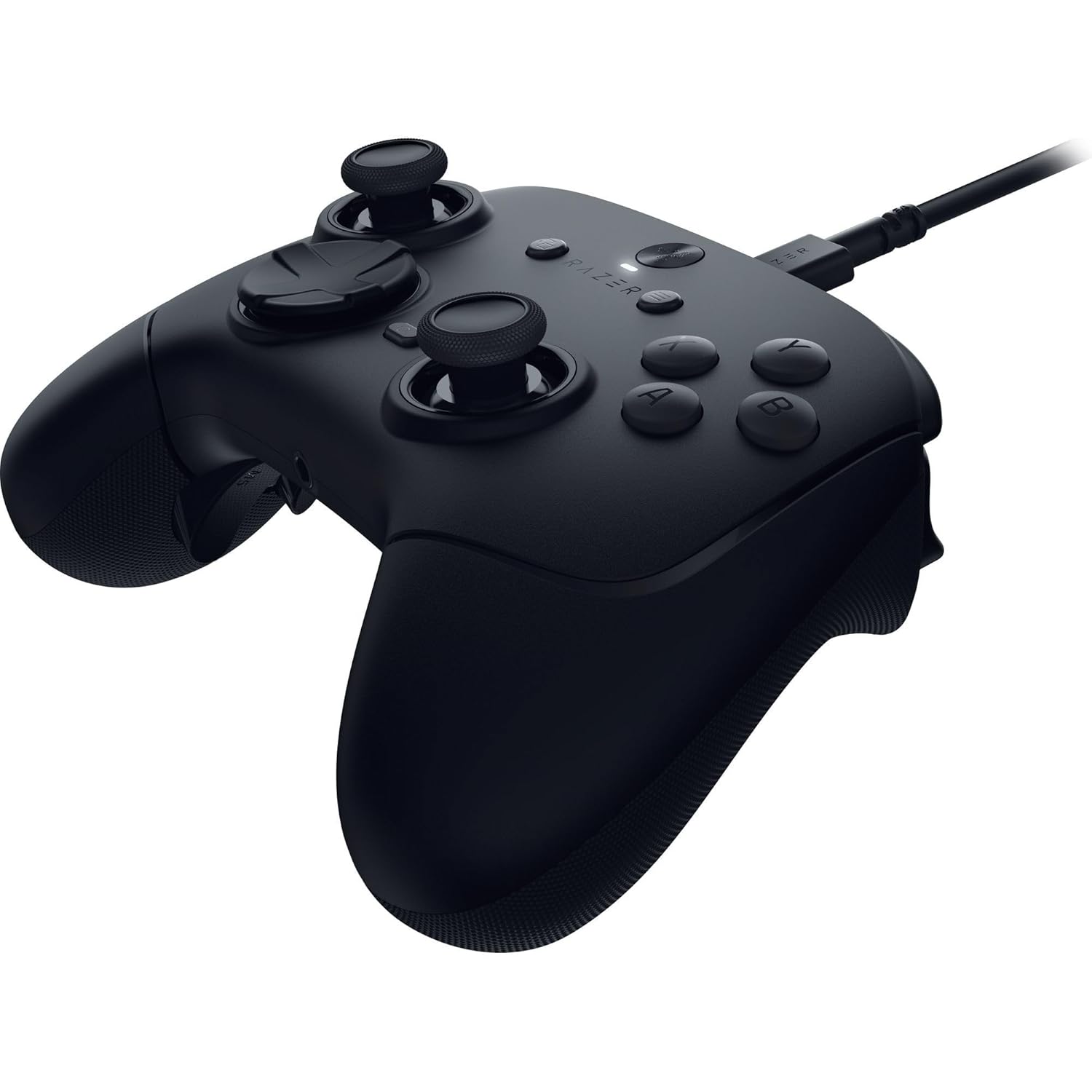
Image 2.1: The Razer Wolverine V3 controller with its detachable braided USB-C cable connected.
2.3 Software Installation (Razer Synapse 4)
For full customization and advanced features, install Razer Synapse 4 software on your PC. This software allows you to remap buttons, adjust thumbstick sensitivity, create profiles, and manage other controller settings.
- Visit the official Razer support website.
- Download and install the latest version of Razer Synapse 4.
- Follow the on-screen instructions to complete the installation.
- Once installed, launch Razer Synapse 4 and ensure your controller is connected and recognized.
3. Operating the Controller
The Razer Wolverine V3 Tournament Edition features several advanced components designed for competitive play.
3.1 Key Features Overview
- 8K Hz HyperPolling Technology: Provides an 8000 Hz polling rate for ultra-low latency and responsive inputs.
- TMR Thumbsticks with Swappable Caps: Magnetic thumbsticks designed for precision and anti-drift, with options for different cap styles.
- Lightweight Ergonomic Build: Optimized for extended gaming sessions without hand fatigue.
- 4 Mouse Click Back Buttons & 2 Claw Grip Bumpers: Six fully remappable buttons for quick access to commands.
- Razer Pro HyperTriggers: Offers instant actuation with a mouse-click feel or full analog control with a flick of a switch.
- Razer Mecha-Tactile Action Buttons & 8-Way Floating D-Pad: Combines microswitch speed with cushioned comfort for tactile feedback and quick inputs.
3.2 Customization with Razer Synapse 4
Razer Synapse 4 unlocks the full potential of your controller, allowing for personalized settings.
- Button Remapping: Assign any button, including the 4 back buttons and 2 claw grip bumpers, to other controller inputs or keyboard keys.
- Thumbstick Sensitivity: Fine-tune the response curve and dead zones of the thumbsticks for precise aiming and movement.
- Trigger Modes: Adjust the actuation point of the Pro HyperTriggers between instant mouse-click mode and full analog travel.
- Onboard Profiles: Save up to 4 custom profiles directly onto the controller for quick switching between different game configurations.

Image 3.1: TMR Thumbsticks with Swappable Caps, engineered for precise control.

Image 3.2: Rear view of the controller, illustrating the placement of the 4 mouse-click back buttons and 2 claw grip bumpers.
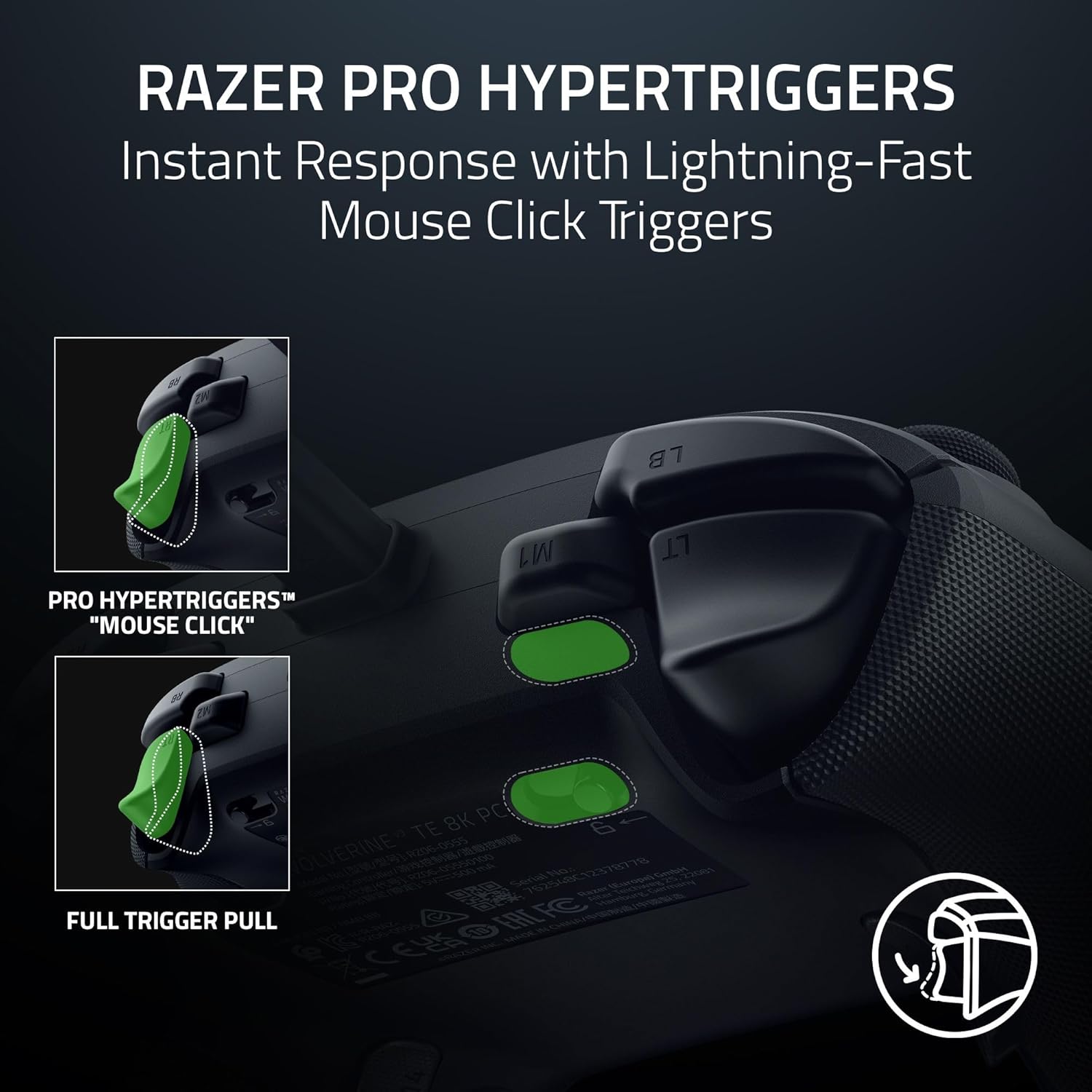
Image 3.3: Razer Pro HyperTriggers, offering instant response with mouse-click actuation or full analog control.
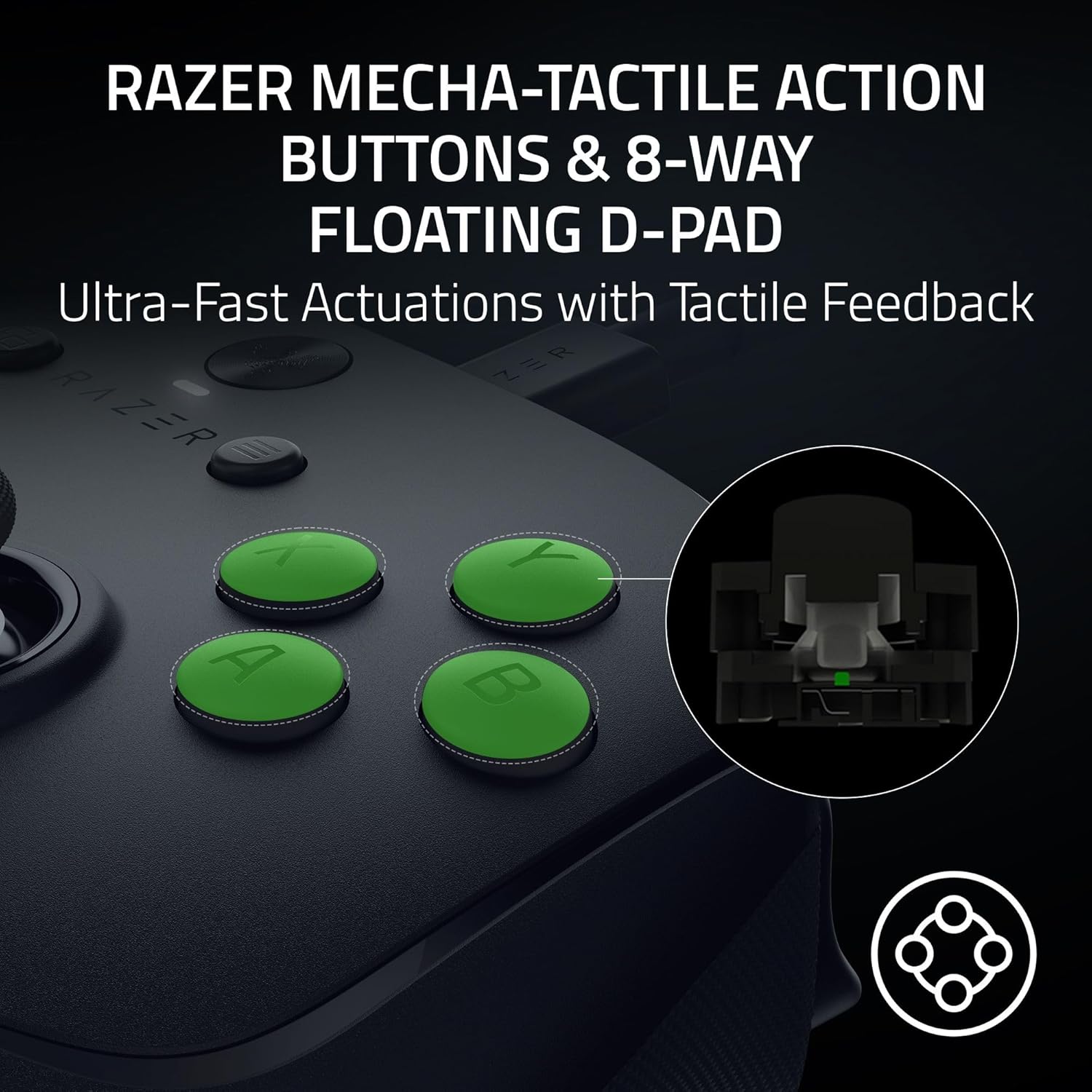
Image 3.4: Razer Mecha-Tactile Action Buttons and 8-Way Floating D-Pad for ultra-fast actuations with tactile feedback.
3.3 Official Product Video
Video 3.1: An official overview of the Razer Wolverine V3 8K PC Gaming Controllers, showcasing its features and design.
4. Maintenance
Proper maintenance ensures the longevity and performance of your Razer Wolverine V3 controller.
4.1 Cleaning
- Use a soft, dry cloth to wipe down the controller's surface.
- For stubborn dirt, lightly dampen the cloth with water. Avoid harsh chemicals or abrasive materials.
- Do not allow moisture to enter any openings on the controller.
4.2 Storage
When not in use, store the controller in a cool, dry place away from direct sunlight and extreme temperatures. Disconnect the cable to prevent strain.
5. Troubleshooting
If you encounter issues with your Razer Wolverine V3 controller, refer to the following common solutions.
5.1 Controller Not Detected
- Ensure the USB-C cable is securely connected to both the controller and your PC.
- Try connecting the controller to a different USB-A port on your PC.
- Test the controller on another PC to determine if the issue is with the controller or your system.
- Restart your PC.
5.2 Buttons or Thumbsticks Not Responding
- Verify that Razer Synapse 4 is installed and updated. Check for any conflicting profiles or remappings.
- Clean around the affected buttons or thumbsticks to remove any debris.
- Perform a factory reset of the controller through Razer Synapse 4, if available.
5.3 Software Issues (Razer Synapse 4)
- Ensure Razer Synapse 4 is updated to the latest version.
- Try reinstalling Razer Synapse 4.
- Check Razer's official support website for known issues or compatibility updates.
For further assistance, please contact Razer Support.
6. Specifications
| Feature | Detail |
|---|---|
| Model Name | Wolverine V3 Tournament Edition 8K PC Gaming Controller |
| Model Number | RZ06-05550100-R3U1 |
| Brand | Razer |
| Connectivity Technology | Wired |
| Compatible Devices | PC |
| Controller Type | Gamepad |
| Polling Rate | 8000 Hz HyperPolling |
| Remappable Buttons | 6 (4 back buttons, 2 claw grip bumpers) |
| Thumbsticks | TMR Thumbsticks with Swappable Caps |
| Triggers | Razer Pro HyperTriggers |
| Action Buttons | Razer Mecha-Tactile Action Buttons |
| D-Pad | 8-Way Floating D-Pad |
| Cable Length | 2 meters (detachable, braided) |
| Item Weight | 1.2 pounds |
| Item Dimensions (L x W x H) | 8.03 x 3.35 x 7.87 inches |
| UPC | 840272921845 |
7. Warranty
Razer products are built to the highest standards and undergo rigorous testing. In the unlikely event of any issues, Razer provides a limited warranty. Please refer to the official Razer website or the Important Product Information Guide included with your controller for detailed warranty terms and conditions specific to your region.
8. Support
For technical support, driver downloads, FAQs, and additional product information, please visit the official Razer Support website:
You can also find community forums and contact customer service through the support portal.


