
1. Introduction
This manual provides essential information for the safe operation, setup, and maintenance of your DEKOPRO 1.4-Amp Power Hand Rotary Tool Kit. Please read these instructions thoroughly before using the tool to ensure proper function and safety.
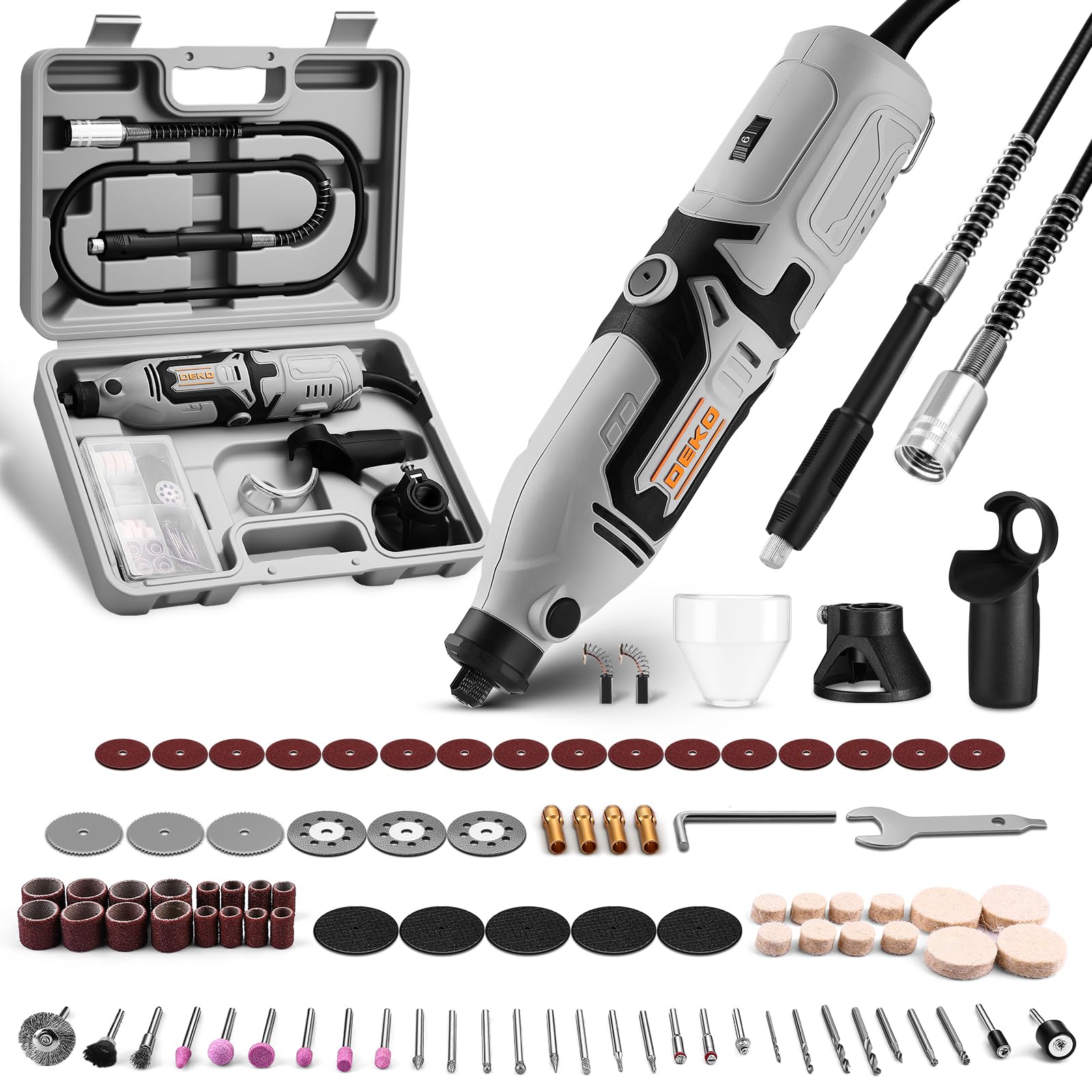
Image 1.1: The DEKOPRO 1.4-Amp Power Hand Rotary Tool Kit, showcasing the main tool and its compact design.
2. Safety Instructions
Always follow basic safety precautions when using electrical tools to reduce the risk of fire, electric shock, and personal injury.
- Read All Instructions: Familiarize yourself with the tool's operation and safety guidelines.
- Wear Eye Protection: Always wear safety goggles or safety glasses with side shields.
- Secure Workpiece: Use clamps or a vise to hold the workpiece. This frees both hands to operate the tool.
- Avoid Accidental Starting: Ensure the switch is in the OFF position before plugging in the tool.
- Do Not Overreach: Maintain proper footing and balance at all times.
- Use Correct Tool: Do not force a small tool or attachment to do the job of a heavy-duty tool.
- Maintain Tools With Care: Keep cutting tools sharp and clean. Follow instructions for lubricating and changing accessories.
- Disconnect Power: Always disconnect the tool from the power source before changing accessories, making adjustments, or storing.
- Keep Work Area Clean: Cluttered areas and benches invite injuries.
- Do Not Operate in Explosive Atmospheres: Do not use power tools in the presence of flammable liquids or gases.
Warning: Always ensure the collet nut is securely tightened with a wrench. An improperly tightened collet can cause the attachment to detach during use, leading to injury or damage.

Image 2.1: Visual warning emphasizing the importance of tightening the collet with a wrench to prevent accessories from coming loose during operation.
3. Package Contents
Your DEKOPRO Rotary Tool Kit includes the following items:
- DEKOPRO 1.4-Amp Rotary Tool
- Flexible Shaft Attachment
- 127-piece Accessory Set (including sanding drums, sanding paper, abrasive stones, drill bits, diamond cutting wheels, mini HSS cutting wheels, cut-off wheels, diamond burr bits, rotary burrs, pen brushes, wire brushes, felt polishing wheels)
- Assist Handle
- Dust Cover
- Cutting/Drilling Guide
- Collets (1/8", 2x 1/16", 3/32")
- L-Pin
- Spanner
- Carbon Brushes
- Storage Case
- Instruction Manual

Image 3.1: All components of the DEKOPRO Rotary Tool Kit, including the main tool, flexible shaft, various attachments, and storage case.
4. Product Features
The DEKOPRO Rotary Tool is designed for versatility and precision in various crafting and DIY tasks.
- Powerful Motor: Equipped with a 1.4-Amp motor for consistent performance.
- Variable Speed Control: Features 6-speed adjustment, ranging from 8,000 to 35,000 RPM, allowing precise control for different applications.
- Flexible Shaft: Provides enhanced control and reduced vibration for detailed work and reaching tight spaces.
- Ergonomic Design: Soft rubber grip ensures comfort during extended use. Ventilation holes dissipate heat, extending tool life.
- Accessory Compatibility: Includes 4 collets (1/8", 2x 1/16", 3/32") and a 3-jaw universal chuck for wide compatibility with various accessories.
- Spindle Lock: Facilitates quick and easy accessory changes.
- External Brush Cover: Allows for convenient carbon brush replacement.

Image 4.1: Close-up view of the rotary tool highlighting the 6-speed variable gear, spindle lock button, external brush cover, and ON/OFF switch.
5. Setup
5.1. Installing Accessories
- Ensure the rotary tool is unplugged from the power source.
- Press and hold the shaft lock button.
- Unscrew the collet nut.
- Select the appropriate collet for your accessory and insert it into the collet nut.
- Insert the desired accessory into the collet.
- Tighten the collet nut firmly with the provided wrench.
- Release the spindle lock button.

Image 5.1: Step-by-step guide illustrating how to disassemble and install accessories on the rotary tool by using the shaft lock button and collet nut.
5.2. Installing the Flexible Shaft
- Ensure the rotary tool is unplugged.
- Turn and remove the umbrella cover from the front of the rotary tool.
- Insert the inner shaft of the flexible shaft into the collet nut of the rotary tool.
- Secure the end of the flexible shaft housing to the front of the rotary tool.
- To attach an accessory to the flexible shaft, lock the flexible shaft head with the spanner and L-pin, then insert the accessory and tighten.
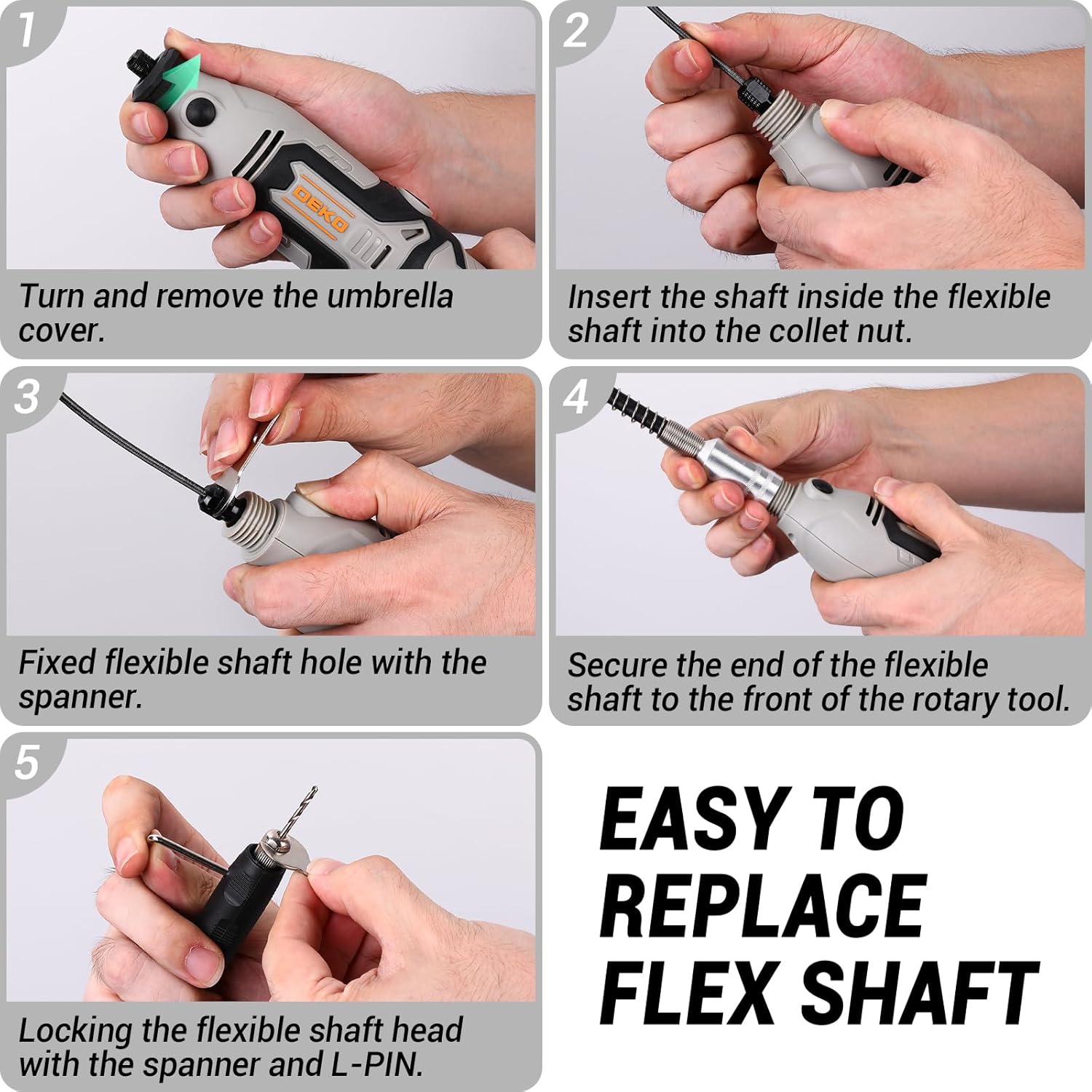
Image 5.2: Detailed steps showing how to attach the flexible shaft to the rotary tool and how to install accessories into the flexible shaft head.
6. Operating Instructions
6.1. Power On/Off and Speed Adjustment
- To turn on the tool, slide the ON/OFF switch to the 'ON' position.
- Adjust the rotational speed using the 6-speed adjustment dial located on the tool. Start with a lower speed for delicate tasks and increase as needed for more aggressive applications.
- To turn off the tool, slide the ON/OFF switch to the 'OFF' position.
6.2. Applications
The DEKOPRO Rotary Tool is suitable for a wide range of tasks:
- Sanding: Use sanding drums or sanding paper for smoothing surfaces.
- Grinding: Abrasive stones are ideal for sharpening, deburring, and general grinding.
- Drilling: Utilize drill bits for creating holes in various materials.
- Carving/Engraving: Diamond burr bits and rotary burrs are used for detailed carving and engraving work.
- Cutting: Diamond cutting wheels, mini HSS cutting wheels, and cut-off wheels are for precise cutting of different materials.
- Polishing/Cleaning: Felt polishing wheels, pen brushes, and wire brushes are used for polishing, cleaning, and surface preparation.

Image 6.1: A collage demonstrating the rotary tool performing various tasks such as sanding, carving, cutting, polishing, and drilling on different materials.
Video 6.1: An official product video demonstrating the DEKOPRO 170W Rotary Tool Kit in action, showcasing its variable speed and various accessories for different tasks.
7. Maintenance
7.1. Cleaning
- Always unplug the tool before cleaning.
- Use a soft cloth to wipe down the tool's exterior. Do not use harsh chemicals or abrasive cleaners.
- Periodically clear dust and debris from the ventilation openings to ensure proper heat dissipation.
7.2. Carbon Brush Replacement
The rotary tool is equipped with external brush covers for easy access to the carbon brushes. If the tool experiences reduced power or intermittent operation, the carbon brushes may need replacement.
- Ensure the tool is unplugged.
- Locate the external brush covers on the sides of the tool housing.
- Unscrew the brush covers and carefully remove the old carbon brushes.
- Insert new carbon brushes, ensuring they are seated correctly.
- Replace and tighten the brush covers.
8. Troubleshooting
If you encounter issues with your DEKOPRO Rotary Tool, refer to the following common problems and solutions:
| Problem | Possible Cause | Solution |
|---|---|---|
| Tool does not start | No power supply; Faulty switch; Worn carbon brushes | Check power connection; Test switch; Replace carbon brushes. |
| Reduced power or intermittent operation | Worn carbon brushes; Overload; Loose connection | Replace carbon brushes; Reduce pressure on tool; Check power cord. |
| Excessive vibration | Bent accessory shaft; Improperly installed accessory; Damaged flexible shaft | Replace bent accessory; Reinstall accessory correctly; Inspect flexible shaft for damage. |
| Tool overheats | Blocked ventilation; Continuous heavy load | Clean ventilation openings; Allow tool to cool; Reduce load or operating time. |
If the problem persists after attempting these solutions, please contact customer support.
9. Specifications
| Feature | Specification |
|---|---|
| Brand | DEKOPRO |
| Model Number | Rotary Tool Kit |
| Voltage | 120 Volts |
| Power Source | Corded Electric |
| Minimum Speed | 8000 RPM |
| Maximum Rotational Speed | 35000 RPM |
| Special Features | Flex Shaft, 6 Variable Speed |
| Included Components | Case, 127 Accessories |
10. Warranty and Support
For warranty information or technical support, please refer to the documentation included with your product or contact DEKOPRO customer service. Keep your purchase receipt as proof of purchase for any warranty claims.