
1. Introduction
The VAR TECH 3010 S Slim DC Power Supply is a high-performance, variable power source designed for a wide range of electronic applications. It offers precise control over voltage and current output, ensuring stable and reliable power delivery. This manual provides essential information for the safe and efficient operation of your device.
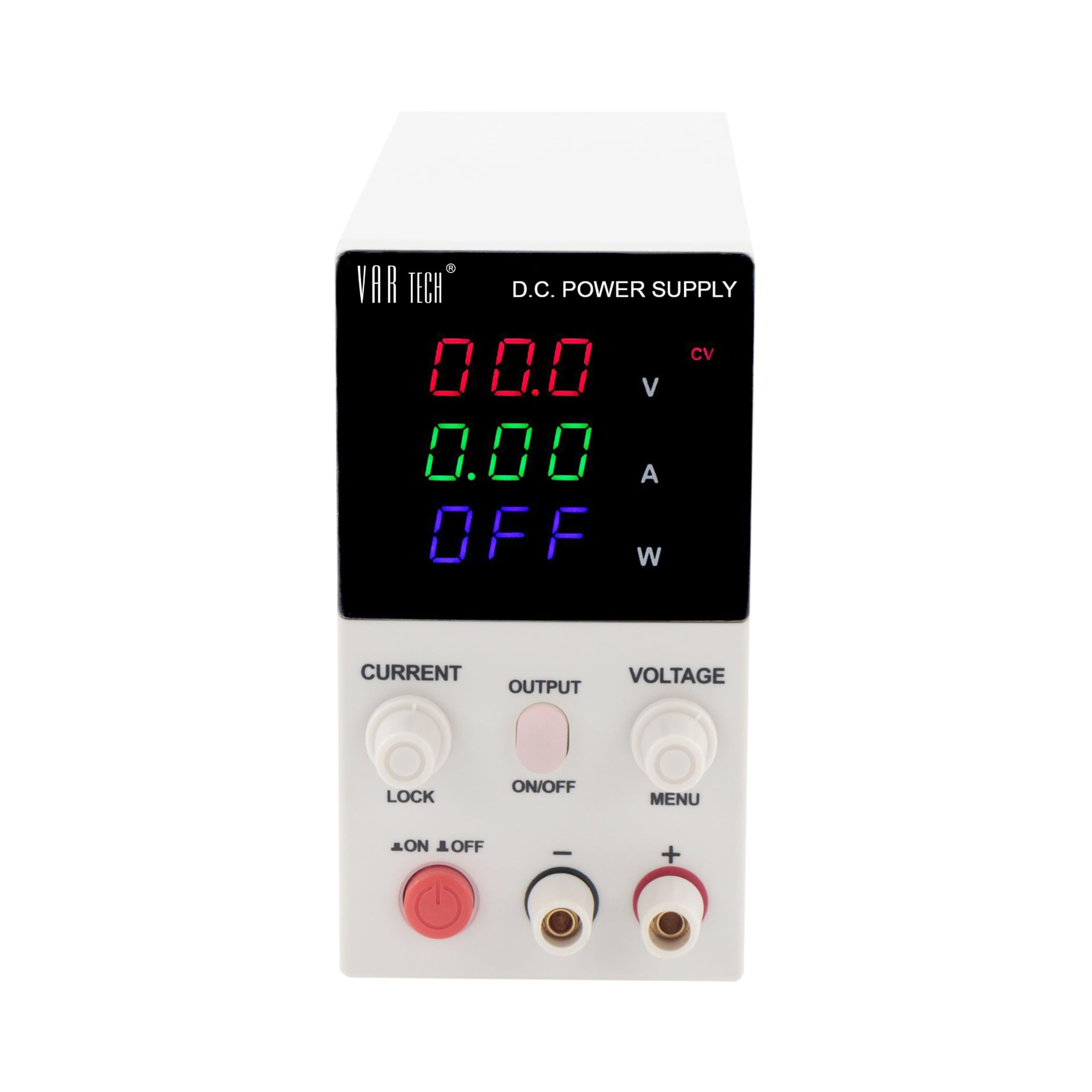
Figure 1: Front view of the VAR TECH 3010 S Slim DC Power Supply.
2. Safety Instructions
To ensure safe operation and prolong the life of your power supply, please observe the following safety precautions:
- Power Source: Connect the unit only to a grounded power outlet with the correct voltage rating.
- Environment: Do not operate the power supply in wet, damp, or dusty environments. Ensure adequate ventilation to prevent overheating.
- Ventilation: Do not block the ventilation openings on the unit.
- Short Circuits: Avoid short-circuiting the output terminals, especially when the unit is powered on.
- Servicing: Do not attempt to open or service the unit yourself. Refer all servicing to qualified personnel.
- Handling: Handle the unit with care. Avoid dropping or subjecting it to strong impacts.
3. Product Features
The VAR TECH 3010 S offers a range of advanced features for precise power control:
- Variable Output: 0-30V and 0-10A fully variable power supply.
- Output Control: Dedicated Output on/off switch for safety and convenience.
- Operating Modes: Automatic Constant Voltage (CV) and Constant Current (CC) modes.
- Digital Displays: Three 3-digit displays for simultaneous voltage, current, and wattage readings.
- Precision Control: Fine and Coarse adjustment controls for both voltage and current.
- Panel Lock: Panel Lock facility to prevent accidental changes to settings.
- Protection Features: Adjustable Over Voltage Protection (OVP), Over Current Protection (OCP), and Over Power Protection (OPP) ranges.
- Comprehensive Protection: Includes Over Current, Over Voltage, Over Power, and Over Temperature Protection.
4. Setup
4.1 Unpacking and Inspection
- Carefully remove the power supply from its packaging.
- Inspect the unit for any signs of physical damage that may have occurred during transit. If damage is found, contact your supplier immediately.
- Ensure all accessories, such as the power cord, are present.
4.2 Power Connection
- Connect the provided power cord to the AC input socket on the rear of the power supply.
- Plug the other end of the power cord into a grounded AC power outlet.
4.3 Output Terminal Connection
The front panel features output terminals for connecting your load:

Figure 2: Front panel controls and output terminals.
- Connect the positive (+) lead of your load to the red output terminal.
- Connect the negative (-) lead of your load to the black output terminal.
- Ensure connections are secure to prevent intermittent operation or damage.
5. Operating Instructions
5.1 Powering On/Off
- To power on the unit, press the main power switch located on the front panel. The displays will illuminate.
- To power off, press the main power switch again.
5.2 Adjusting Voltage and Current
The power supply features separate controls for voltage and current adjustment:
- Voltage Adjustment: Use the VOLTAGE knob to set the desired output voltage. The Coarse control makes large adjustments, while the Fine control allows for precise tuning.
- Current Adjustment: Use the CURRENT knob to set the desired output current limit. The Coarse control makes large adjustments, while the Fine control allows for precise tuning.
The displays will show the set voltage and current values. When a load is connected and the output is enabled, the displays will show the actual output voltage, current, and calculated wattage.

Figure 3: Power supply display showing voltage, current, and wattage during operation.
5.3 Output On/Off Switch
The OUTPUT ON/OFF switch allows you to enable or disable the power output without turning off the entire unit. This is useful for making connections or adjustments to your circuit without disconnecting power from the supply.
5.4 Constant Voltage (CV) and Constant Current (CC) Modes
The power supply automatically switches between Constant Voltage (CV) and Constant Current (CC) modes:
- CV Mode: When the load resistance is high, the output voltage remains constant at the set value, and the output current is determined by the load.
- CC Mode: When the load resistance is low, the output current remains constant at the set value (current limit), and the output voltage drops accordingly.
5.5 Panel Lock Facility
The LOCK button on the front panel allows you to lock the current settings to prevent accidental changes during operation. Press the LOCK button to activate/deactivate this feature.
5.6 Setting Protection Limits (OVP, OCP, OPP)
The VAR TECH 3010 S includes adjustable Over Voltage Protection (OVP), Over Current Protection (OCP), and Over Power Protection (OPP). Refer to the detailed instructions in the full user manual for specific steps on how to set these protection limits using the MENU button.
6. Maintenance
Regular maintenance helps ensure the longevity and optimal performance of your power supply:
- Cleaning: Disconnect the power supply from the AC outlet before cleaning. Use a soft, dry cloth to wipe the exterior. Do not use abrasive cleaners or solvents.
- Ventilation: Periodically check that the ventilation openings are clear of dust and debris. Blocked vents can lead to overheating.
- Storage: When not in use for extended periods, store the power supply in a cool, dry place, away from direct sunlight and extreme temperatures.
7. Troubleshooting
If you encounter issues with your VAR TECH 3010 S, refer to the following common problems and solutions:
| Problem | Possible Cause | Solution |
|---|---|---|
| Unit does not power on. | No AC power, faulty power cord, internal fuse blown. | Check AC power connection. Replace power cord if damaged. If fuse is suspected, contact support. |
| No output voltage/current. | Output switch off, OCP/OVP triggered, incorrect settings. | Ensure OUTPUT switch is ON. Check OCP/OVP settings and reset if necessary. Verify voltage/current settings. |
| Output voltage/current is unstable. | Loose connections, faulty load, internal issue. | Check all output connections. Test with a different load. If problem persists, contact support. |
| Unit overheats. | Blocked ventilation, excessive load. | Ensure vents are clear. Reduce load or operating time. |
If the problem persists after attempting these solutions, please contact VAR TECH customer support.
8. Specifications
Detailed technical specifications for the VAR TECH 3010 S Slim DC Power Supply:
- Model Name: Slim DC regulated power supply 30V 10A
- Brand: VAR TECH
- Compatible Devices: Various electronic devices requiring DC power input
- Output Voltage Range: 0-30 Volts (DC)
- Output Current Range: 0-10 Amperes
- Output Wattage: 300 Watts
- Form Factor: Slim
- Cooling Method: Air
- Item Dimensions (L x W x H): 20.5 x 7.3 x 14 Centimeters
- Item Weight: 2 Kilograms
- Country of Origin: China
9. Warranty and Support
9.1 Warranty Information
The VAR TECH 3010 S Slim DC Power Supply comes with a 1 Year warranty against manufacturing defects from the date of purchase. This warranty covers defects in materials and workmanship under normal use. It does not cover damage caused by misuse, accident, unauthorized modification, or improper installation.
9.2 Customer Support
For technical assistance, service, or spare parts support, please contact VAR TECH directly:
- Email: info@var-tech.com
- Manufacturer/Importer: V A R TECH, Bengaluru
Please have your product model number (3010 S) and purchase details ready when contacting support.


