
1. Introduction
This manual provides detailed instructions for the assembly, operation, and maintenance of your Tribesigns 83-Inch Large L Shaped Desk. Designed for home office, gaming, or general workstation use, this desk offers a spacious and versatile workspace. Please read these instructions carefully before beginning assembly and retain them for future reference.
2. Safety Information
- Keep all packaging materials, especially plastic bags, away from children and pets to prevent suffocation hazards.
- Assemble the desk on a soft, clean surface (e.g., carpet or cardboard) to prevent scratches.
- Ensure all screws and fasteners are tightened securely before using the desk. Periodically check and re-tighten as necessary.
- Do not overload the desk. Distribute weight evenly across the surface.
- Avoid standing or sitting on the desk.
- Use caution when moving the assembled desk to prevent injury or damage.
3. Package Contents
Before assembly, verify that all components are present and undamaged. If any parts are missing or damaged, please contact customer support.
- Desktop Panels (Engineered Wood)
- Metal Frame Components (Legs, Support Beams)
- Hardware Pack (Screws, bolts, washers, Allen wrench)
- Adjustable Foot Pads
- Assembly Instructions Manual
4. Setup and Assembly Instructions
The Tribesigns L Shaped Desk features a modular design for straightforward assembly. All necessary tools are included.
4.1 Reversible Configuration
This desk offers a reversible design, allowing you to configure the longer section on either the left or right side to best suit your room layout.

Image: Reversible L Shaped Desk configuration options.
4.2 Assembly Steps
- Unpack Components: Carefully remove all parts from the packaging and lay them out on a protected surface. Identify each part using the provided parts list in the separate assembly manual.
- Assemble the Frame: Follow the step-by-step diagrams in the included assembly manual to connect the metal frame components. Ensure all screws are finger-tightened initially.
- Attach Desktop Panels: Secure the engineered wood desktop panels to the assembled metal frame. Pay attention to the orientation for your desired left or right configuration.
- Tighten All Fasteners: Once all parts are in place, systematically tighten all screws and bolts using the provided Allen wrench. Do not overtighten.
- Attach Adjustable Foot Pads: Screw the adjustable foot pads into the bottom of each leg. These pads help stabilize the desk on uneven floors.

Image: Key features including thick wooden board, heavy-duty metal frame, and adjustable foot pads.
5. Operating Instructions
Your Tribesigns L Shaped Desk is designed to provide a functional and spacious workspace.
- Placement: Position the desk in your desired location, utilizing its L-shape to fit seamlessly into room corners or against walls.
- Workspace Utilization: The generous desktop dimensions (83"L x 63"W x 24"D x 30"H) accommodate multiple monitors, laptops, printers, and other office essentials.
- Legroom: The design provides ample legroom for comfortable use during extended periods.
- Stability: Ensure the adjustable foot pads are properly set to prevent wobbling and maintain a stable work surface.
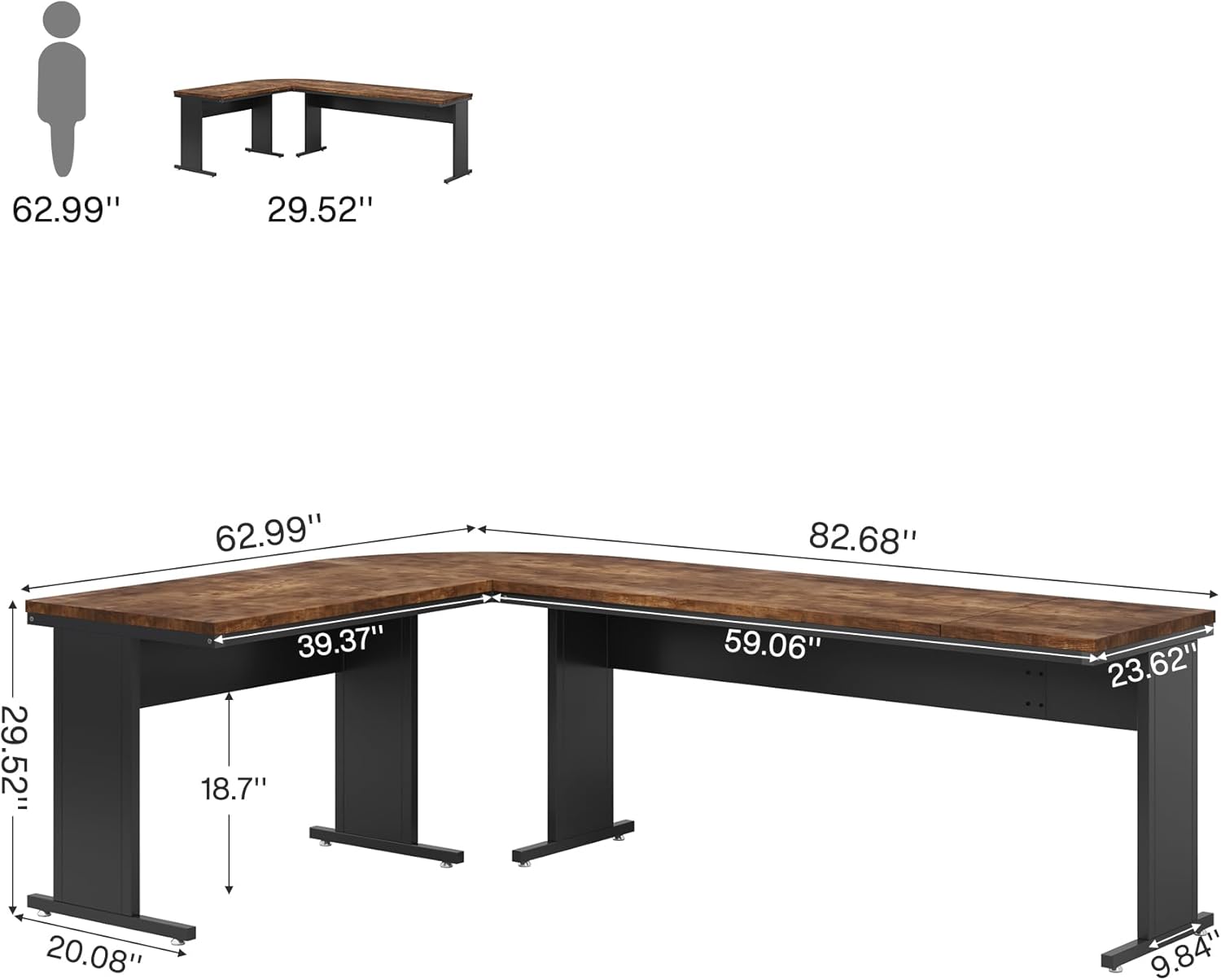
Image: Desk dimensions for planning your workspace.
6. Maintenance
Proper care will extend the life and appearance of your desk.
- Cleaning: Wipe the desk surfaces with a dry, soft cloth. Avoid using abrasive cleaners, harsh chemicals, or excessive moisture, which can damage the laminated finish.
- Fasteners: Periodically check all screws and bolts to ensure they remain tight. Re-tighten as needed to maintain structural integrity.
- Spills: Clean up spills immediately with a dry cloth to prevent staining or damage to the wood finish.
- Heat Protection: Use coasters or protective pads under hot items to prevent heat marks.
7. Troubleshooting
- Desk is Wobbly: Check that all assembly screws are securely tightened. Adjust the foot pads on the bottom of the legs to level the desk on uneven floors.
- Parts Missing or Damaged: If you find any parts missing or damaged upon opening the package, do not proceed with assembly. Contact Tribesigns customer support for assistance.
- Difficulty with Assembly: Refer to the detailed assembly manual provided with the product. Ensure you are following each step carefully and using the correct hardware for each connection.
8. Specifications
| Feature | Detail |
|---|---|
| Brand | Tribesigns |
| Model Number | hl0261-L DESK |
| Shape | L-Shape |
| Desk Design | Computer Desk, Executive Desk |
| Product Dimensions (D x W x H) | 63"D x 83"W x 30"H |
| Item Weight | 84 Pounds |
| Color | Brown |
| Style | Modern |
| Base Material | Metal |
| Top Material Type | Engineered Wood |
| Finish Type | Laminated |
| Special Feature | Large, Reversible |
| Room Type | Bedroom, Office, Study Room |
| Recommended Uses | Studying, Working, Writing |
| Required Assembly | Yes |
| Includes All Assembly Tools | Yes |
9. Warranty Information
Specific warranty details for your Tribesigns L Shaped Desk are typically provided with the product packaging or can be obtained directly from the manufacturer. Please refer to the documentation included with your purchase for comprehensive warranty terms and conditions.
10. Customer Support
For any questions, assistance with assembly, or to report missing/damaged parts, please contact Tribesigns customer support. You can often find contact information on the product packaging, the manufacturer's website, or through your retailer.
For more information about Tribesigns products, visit the official Tribesigns Store.


