
1. Product Overview
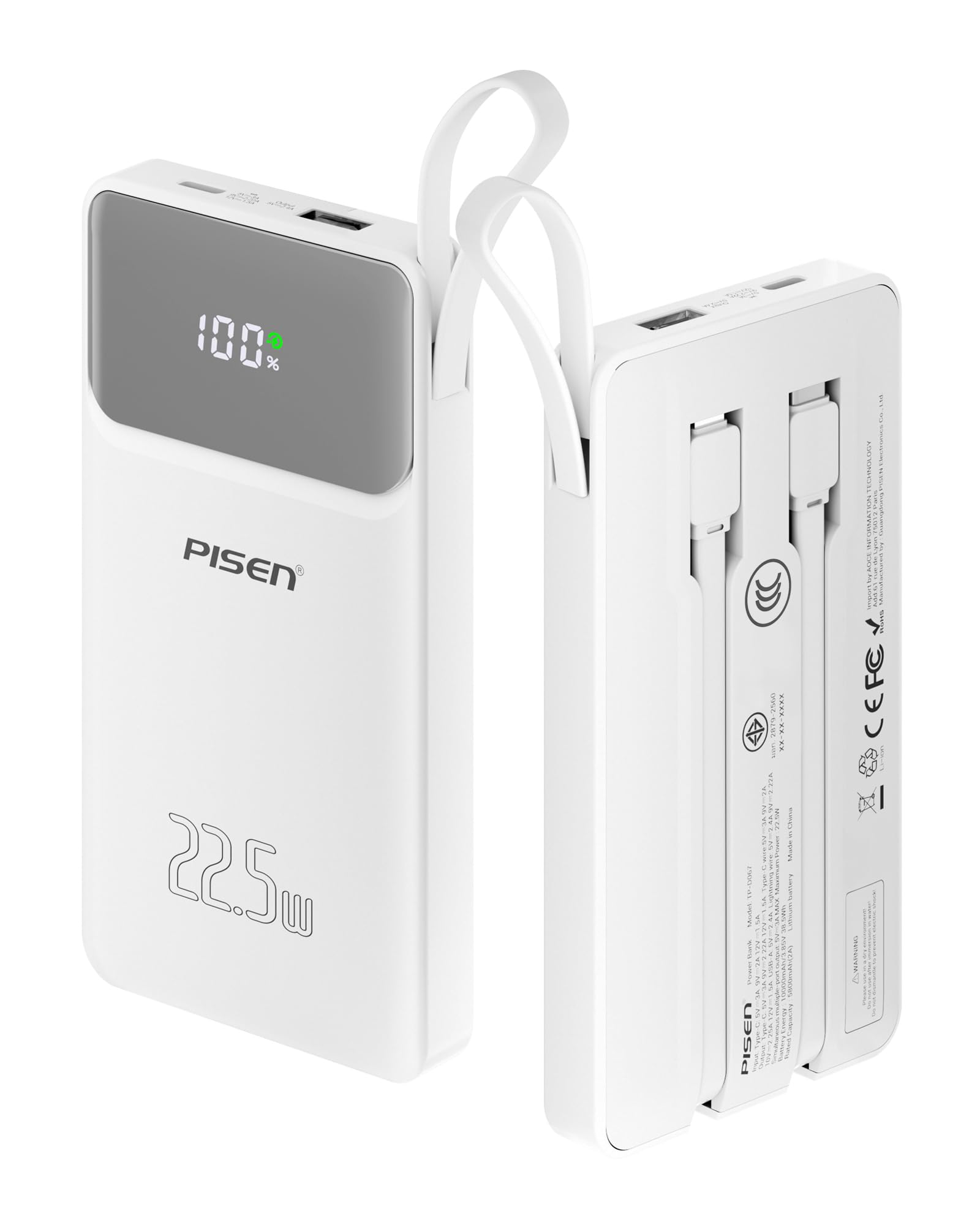
The PISEN 10000mAh 22.5W Power Bank (Model TP-D067) is a portable charging device designed for various electronic devices. It features integrated USB-C and Lightning cables, along with additional USB-A and USB-C ports, allowing for simultaneous charging of multiple devices. The power bank is equipped with an intelligent LED display to show the remaining battery percentage and incorporates multi-layered safety protections.
Key features include:
- PD3.0 22.5W Fast Charging: Supports fast charging for compatible devices.
- Built-in Cables: Includes integrated USB-C (22.5W output) and Lightning (20W output) cables.
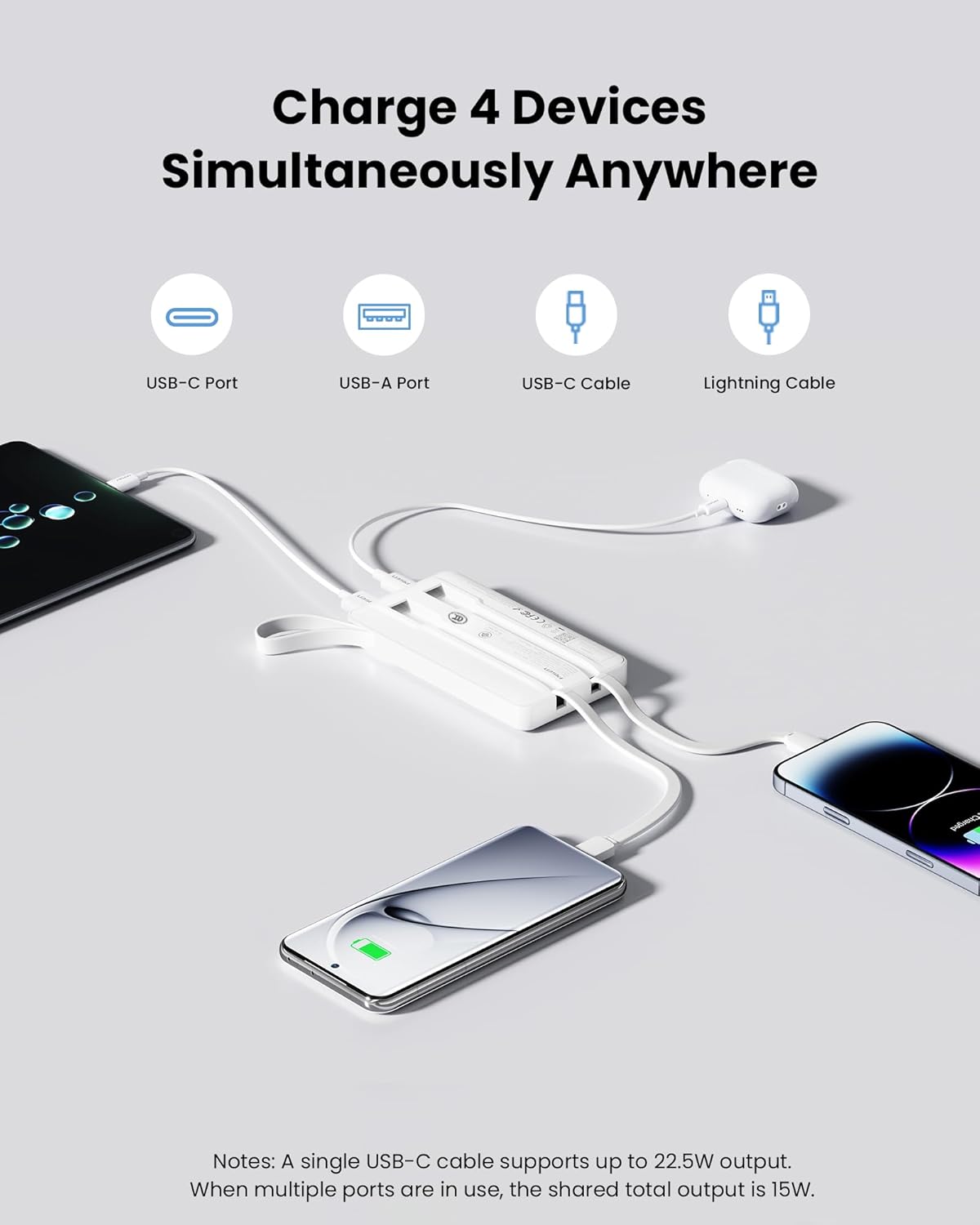
- Multiple Outputs: Features an additional USB-C port (18W output/input) and a USB-A port (12W output) for charging up to four devices concurrently.
- Intelligent LED Display: Provides an accurate percentage display of the remaining power.
- Safety Certifications: CCC, CE, FCC, ROHS, and UL test reports ensure comprehensive protection against over-discharge, input voltage issues, short-circuits, over-current, and over-temperature.
- Portable Design: Compact (4.9 x 2.7 x 0.7 inches) and lightweight (7 oz) with a portable lanyard, making it suitable for travel and flight-approved.
2. Package Contents
The package includes:
- PISEN 10000mAh 22.5W Power Bank (Model TP-D067)
- Integrated USB-C Output Cable
- Integrated Lightning Output Cable
- User Manual (this document)
3. Setup
3.1 Initial Charging of the Power Bank
- Locate the USB-C input port on the power bank.
- Connect a USB-C charging cable (not included, but the power bank has a built-in USB-C cable that can be used for input if connected to a power adapter) to the power bank's USB-C input port.
- Connect the other end of the USB-C cable to a compatible USB wall adapter (not included).
- Plug the wall adapter into a power outlet.
- The LED display will show the charging progress. Charge the power bank fully before first use.
3.2 Storing Built-in Cables
The power bank features two built-in cables (USB-C and Lightning) that are securely stored on the back of the device when not in use. To access them, gently pull the desired cable from its slot. To store them, carefully guide the cable back into its designated groove until it clicks into place.
4. Operating Instructions
4.1 Charging Devices
The PISEN Power Bank can charge up to four devices simultaneously using its various output options:
- Built-in USB-C Cable: Connect directly to devices with a USB-C port.
- Built-in Lightning Cable: Connect directly to Apple devices with a Lightning port.
- USB-C Port: Use your own USB-C to USB-C cable to connect to compatible devices. This port also functions as an input for recharging the power bank.
- USB-A Port: Use your own USB-A cable to connect to compatible devices.
When multiple ports are in use, the total shared output is 15W.

4.2 LED Display
The intelligent LED display on the power bank shows the remaining battery percentage, allowing you to monitor its charge level accurately.

5. Maintenance
- Keep the power bank away from water, fire, and extreme temperatures.
- Avoid dropping or subjecting the device to strong impacts.
- Clean the power bank with a dry, soft cloth. Do not use corrosive cleaners.
- Store the power bank in a cool, dry place when not in use.
- Recharge the power bank at least once every three months to maintain battery health if not used regularly.
6. Troubleshooting
- Device not charging:
- Ensure the power bank is sufficiently charged. Check the LED display.
- Verify that the charging cable is securely connected to both the power bank and the device.
- Try a different cable or port on the power bank.
- Ensure your device is compatible with the power bank's output specifications.
- Power bank not recharging:
- Ensure the USB-C input cable is properly connected to a working power adapter and outlet.
- Try a different USB-C cable or power adapter.
- Check if the power outlet is functional.
- Slow charging:
- Ensure you are using a fast-charging compatible cable and adapter for recharging the power bank.
- When charging multiple devices, the total output is shared, which may result in slower charging for individual devices.
- Check if your device supports fast charging.
7. Specifications
| Feature | Detail |
|---|---|
| Brand | PISEN |
| Model Number | TP-D067 |
| Battery Capacity | 10000 Milliamp Hours |
| Battery Cell Type | Lithium Ion |
| Integrated USB-C Cable Output | 22.5W Max |
| Integrated Lightning Cable Output | 20W Max |
| USB-C Port Output/Input | 18W Max |
| USB-A Port Output | 12W Max |
| Total Shared Output (Multiple Ports) | 15W |
| Dimensions (L x W x Thickness) | 4.96"L x 2.72"W x 0.7"Th (12.6 x 6.9 x 1.78 cm) |
| Weight | 7 Oz (198 grams) |
| Special Features | Built-in Cables, Digital Display, Portable Lanyard |
| Certifications | 3C, CE, FCC, ROHS, UL2056 |
| Compatible Devices | Smartphone, Tablets, Earbuds, etc. |
Video 1: Official product video highlighting the features and specifications of the PISEN 3C Certified 10000mAh 22.5W Power Bank.
8. Safety Information
The PISEN Power Bank is designed with multiple safety features to protect both the device and your connected electronics. These include:
- Over Discharge Protection
- Input Voltage Protection
- Short-circuit Protection
- Over Current Protection
- Output and Input Short Connection Protection
- Charge/Discharge Over Temperature Protection
- Electromagnetic Field Protection
Always use the product as intended and avoid unauthorized modifications or repairs.

9. Warranty and Support
The PISEN 10000mAh 22.5W Power Bank comes with a 1-year warranty from the date of purchase. For any product-related inquiries, technical support, or warranty claims, please contact PISEN customer service. Refer to the product packaging or the official PISEN website for the most up-to-date contact information.
PISEN is committed to providing quality products and user-centric services. They offer a 30-day refund and 12-month replacement policy, along with 24/7 online support.


