
PISEN TP-D183
PISEN 10000mAh 22.5W Portable Power Bank (Model TP-D183) User Manual
Model: TP-D183 | Brand: PISEN
1. Introduction
This manual provides essential instructions for the safe and efficient use of your PISEN 10000mAh 22.5W Portable Power Bank, Model TP-D183. Please read this manual thoroughly before using the product and retain it for future reference.
2. Safety Information
Your PISEN power bank is designed with multiple safety features and is certified by 3C, CE, FCC, ROHS, and UL2056 standards. Adhere to the following guidelines to ensure safe operation:
- Do not expose the power bank to extreme temperatures (above 60°C/140°F or below 0°C/32°F).
- Avoid dropping, disassembling, or attempting to repair the device yourself.
- Keep away from water, moisture, and flammable materials.
- Use only compatible charging cables and adapters.
- Do not short-circuit the output ports.
- Keep out of reach of children.
- Dispose of the power bank responsibly according to local regulations.
The power bank includes comprehensive protection mechanisms:
- Over Discharge Protection
- Input Voltage Protection
- Short-circuit Protection
- Over Current Protection
- Output And Input Short Connection protection
- Charge/Discharge Over Temperature Protection

Image: Internal view of the PISEN power bank highlighting its multi-layered safety protection systems.
3. Product Overview
The PISEN 10000mAh 22.5W Portable Power Bank (Model TP-D183) is a compact and efficient charging solution. It features fast charging capabilities, multiple output ports, and an intelligent LED display.

Image: Front and back view of the PISEN 10000mAh 22.5W Power Bank, showing the LED display and specifications.

Image: Detailed view of the power bank's ports, including one USB-C (input/output) and two USB-A (output) ports.
Key Features:
- High Capacity: 10000mAh internal battery.
- Fast Charging: Supports PD3.0 & QC3.0 with up to 22.5W output.
- Versatile Ports: One USB-C port (20W output, 18W input) and two USB-A ports (22.5W output).
- Simultaneous Charging: Capable of charging up to three devices concurrently.
- Intelligent LED Display: Shows remaining power percentage for precise monitoring.
- Compact Design: Measures 5.8 x 2.7 x 0.67 inches and weighs 10.2 ounces, making it travel-friendly and flight-approved.
- Certified Safety: 3C, CE, FCC, ROHS, and UL2056 certified for reliable and safe operation.

Image: The power bank's compact size and airline-approved status, shown with a smartphone and an airplane.
4. Setup and Initial Use
Charging the Power Bank:
- Connect a USB-C charging cable to the power bank's USB-C port.
- Connect the other end of the cable to a compatible USB wall adapter (not included).
- The LED display will show the charging progress, indicating the battery percentage.
- Charge the power bank fully before its first use.

Image: The power bank connected to a smartphone, demonstrating its 22.5W fast charging capability.
5. Operating Instructions
Charging Your Devices:
- Connect your device's charging cable to one of the power bank's output ports (USB-C or USB-A).
- Connect the other end of the cable to your device.
- The power bank will automatically begin charging your device. The LED display will show the power bank's remaining charge.
- To stop charging, simply disconnect the cable from your device or the power bank.
Simultaneous Charging:
The power bank can charge up to three devices simultaneously using its USB-C and two USB-A ports. Note that when multiple ports are in use, the total output power may be distributed, potentially affecting individual charging speeds.
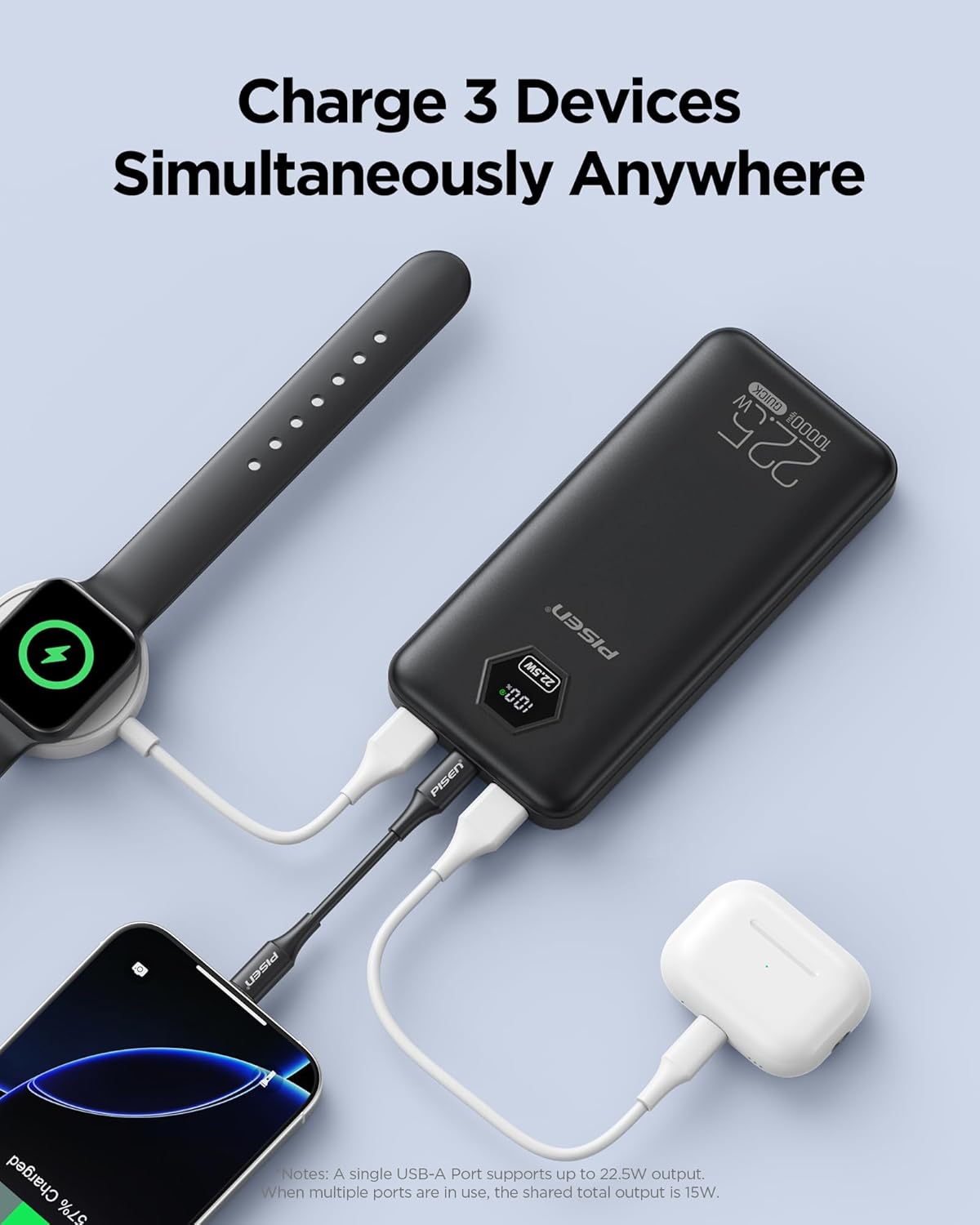
Image: The power bank connected to and charging three devices: a smartphone, a smartwatch, and wireless earbuds.
Checking Battery Level:
The intelligent LED display shows the remaining battery percentage of the power bank. This allows you to monitor the charge level accurately and plan your recharges.

Image: Examples of devices and the approximate number of charges provided by the 10000mAh power bank.

Image: The power bank's wide compatibility with a range of electronic devices.
6. Maintenance
- Clean the power bank with a soft, dry cloth. Do not use harsh chemicals or abrasive materials.
- Store the power bank in a cool, dry place away from direct sunlight and extreme temperatures.
- If not used for extended periods, charge the power bank at least once every three months to maintain battery health.
7. Troubleshooting
| Problem | Possible Cause | Solution |
|---|---|---|
| Power bank not charging devices. | Low battery on power bank; faulty cable; incompatible device. | Recharge the power bank. Try a different charging cable. Ensure your device is compatible. |
| Power bank not recharging. | Faulty charging cable or adapter; power bank internal issue. | Try a different USB-C cable and wall adapter. If the issue persists, contact customer support. |
| Slow charging. | Cable not supporting fast charging; multiple devices charging; device not supporting fast charging. | Use a fast-charging compatible cable. Charge fewer devices simultaneously. Verify device fast charging compatibility. |
| LED display not working. | Power bank is off; internal malfunction. | Ensure the power bank is on. If it remains unresponsive, contact customer support. |
8. Specifications
| Feature | Detail |
|---|---|
| Model Number | TP-D183 |
| Battery Capacity | 10000mAh |
| USB-C Output | 20W (PD3.0) |
| USB-C Input | 18W |
| USB-A Output (A1/A2) | 22.5W (QC3.0) |
| Dimensions | 5.8 x 2.7 x 0.67 inches |
| Weight | 10.2 ounces |
| Special Features | Intelligent LED Digital Display |
| Certifications | 3C, CE, FCC, ROHS, UL2056 |
| Battery Type | Internal Lithium-ion Battery |
9. Warranty and Support
PISEN offers the following support for your product:
- 30-Day Refund: For any dissatisfaction with the product.
- 12-Month Replacement: For eligible product issues.
- 24/7 Online Support: For assistance with product inquiries or troubleshooting.
For further assistance, please visit the official PISEN website or contact their customer service directly.
10. Product Video Overview
Video: An official overview of the PISEN 3C Certified 10000mAh 22.5W Power Bank, demonstrating its features and benefits.
Related documentsTP-D183


Ask a question about this manual
Ask about setup, troubleshooting, compatibility, parts, safety, or missing instructions. Manuals+ will review the question and use this page’s manual context to help answer it.