
FiiO QX13
FiiO QX13 Portable DAC Amplifier User Manual
Comprehensive instructions for setup, operation, and maintenance of your FiiO QX13 Portable DAC Amplifier.
1. Introduction
The FiiO QX13 is a high-performance portable Digital-to-Analog Converter (DAC) and headphone amplifier designed to deliver exceptional audio quality. Featuring a flagship ESS ES9027PRO 8-channel DAC, powerful TI op-amps, and a vibrant color display, the QX13 enhances your listening experience across various devices.
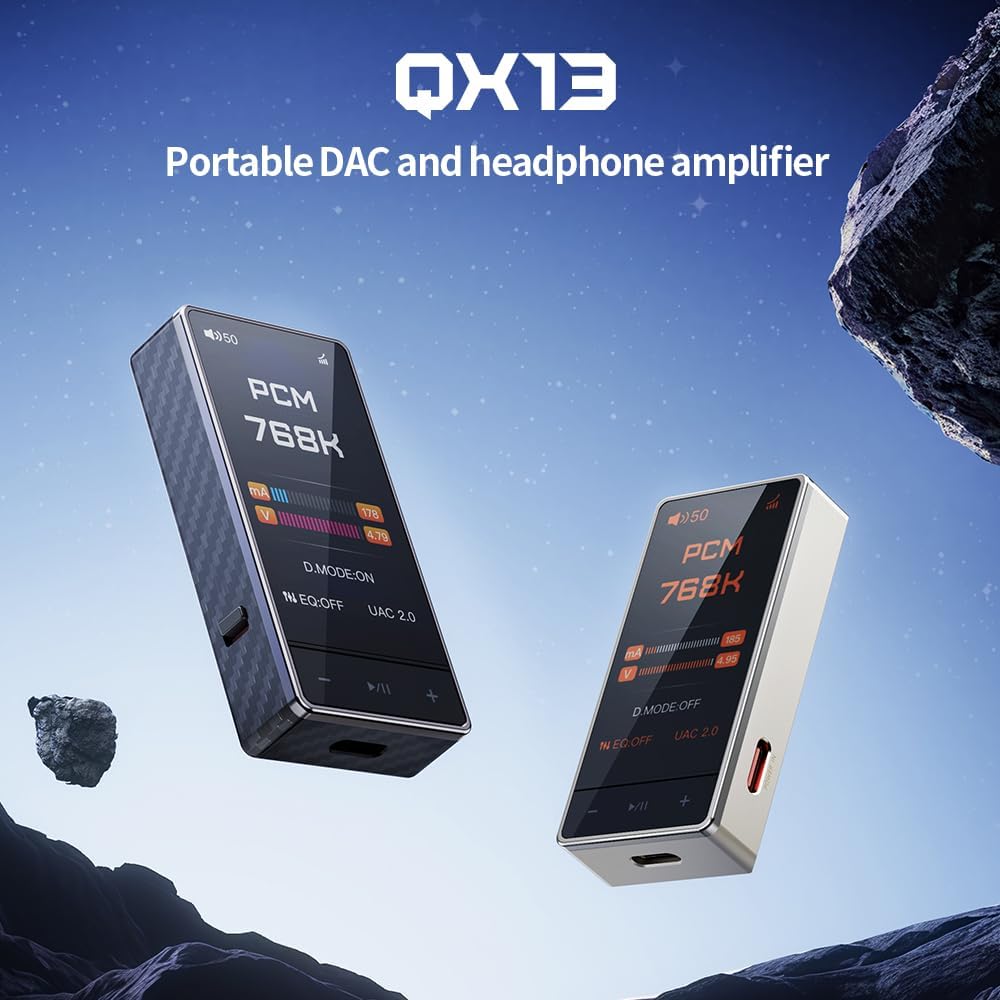
Figure 1: FiiO QX13 Portable DAC Amplifier in Titanium Gold and Black finishes. This image showcases the compact design of the device.
2. Package Contents
Please ensure all items are present in the package:
- FiiO QX13 Portable DAC Amplifier
- USB-C to USB-C cable
- Magnetic leather case
- 8-strand decoding cable
- User Manual (this document)
3. Device Overview
Familiarize yourself with the main components and features of your FiiO QX13.

Figure 2: Front view of the FiiO QX13, highlighting its 1.99-inch color display. The display shows "PCM 768K" indicating high-resolution audio playback.
Key Features:
- Flagship ESS ES9027PRO 8-Channel DAC: Utilizes a fully differential 8-channel parallel design for ultra-low distortion and studio-level signal accuracy.
- 1.99-Inch Large Color Display: Full-color touchscreen with Corning Gorilla Glass 3 for scratch resistance, supporting dynamic UI themes.
- Powerful Output: 6x TI High-Performance Op-Amps delivering 900mW per channel, capable of driving high-impedance headphones.
- Magnetic Ecosystem: Compatible with magnetic leather case and E-Stick Power Bank (sold separately) for enhanced portability and desktop setup.
- XMOS 16-Core XU316: Supports up to 768kHz/32bit PCM and DSD512 native decoding, with 10-band high-precision PEQ.
4. Setup
4.1 Connecting to a Source Device
The FiiO QX13 can be connected to various devices such as laptops, desktops, tablets, and smartphones.
- Connect the USB-C cable: Use the provided USB-C to USB-C cable to connect the QX13 to your source device's USB-C port.
- Connect Headphones: Plug your headphones into the appropriate audio output port (3.5mm or 4.4mm balanced) on the QX13.
- Power On: The QX13 will typically power on automatically when connected to a powered source device.

Figure 3: The magnetic ecosystem allows for easy attachment to smartphones and compatibility with external power banks for extended use.
4.2 Driver Installation (Windows/Mac)
For optimal performance on Windows or Mac, it may be necessary to install specific drivers. Please visit the official FiiO website for the latest driver downloads and installation instructions for your operating system.
5. Operating Instructions
5.1 Basic Operation
- Power On/Off: The device powers on automatically when connected. To power off, disconnect from the source or use the dedicated power button if available (refer to device specific controls).
- Volume Control: Adjust the volume using the physical buttons on the device or through the connected source device.
- Display Navigation: Use the touchscreen display to navigate through menus and settings.
5.2 Desktop Mode
The QX13 features a patented Desktop Mode for enhanced performance. When connected to an external dedicated power supply (e.g., E-Stick Power Bank), the device can deliver up to 900mW output power per channel.

Figure 4: Illustration of the Patented Desktop Mode, showing increased output power (900mW) compared to non-desktop mode (570mW) and power consumption reduction.
5.3 Equalizer (EQ) Settings
The QX13 supports a 10-band high-precision Parametric Equalizer (PEQ). EQ settings can be adjusted via the device's touchscreen or through the FiiO Control App (available for Android).
- Custom PEQ: Create and save personalized EQ profiles.
- Built-in Presets: Utilize pre-configured sound adjustments.
- Online Sharing: Access and share EQ settings with the FiiO community.

Figure 5: Overview of various features including 3.5mm output, UAC1.0 mode for gaming consoles, 60-step and 120-step volume adjustment, and support for the FiiO Control App.
6. Maintenance
- Cleaning: Use a soft, dry cloth to clean the device. Avoid using harsh chemicals or abrasive materials.
- Storage: Store the device in a cool, dry place away from direct sunlight and extreme temperatures.
- Power Source: The FiiO QX13 is powered by the connected source device or an external power bank (sold separately). It does not contain an internal battery.
- Firmware Updates: Periodically check the official FiiO website for firmware updates to ensure optimal performance and access to new features.
7. Troubleshooting
| Problem | Possible Cause | Solution |
|---|---|---|
| No sound output |
|
|
| Distorted audio |
|
|
| Device not recognized by computer |
|
|
8. Specifications
| Feature | Detail |
|---|---|
| Model Name | QX13 |
| Connectivity Technology | Wired |
| Material | Carbon Fiber |
| Control Method | Touch |
| Special Feature | Flagship ESS ES9027PRO 8-Channel DAC, 1.99-inch Color Display, 6x TI High-Performance Op-Amps, Magnetic Ecosystem, Carbon Fiber Body, 10-Band High-Precision PEQ |
| Item Weight | 8.4 ounces |
| Item Model Number | QX13 |
| Date First Available | July 3, 2025 |
| Color | Titanium Gold (variant) |
| Headphones Jack | 3.5 mm Jack |
| Compatible Devices | Laptops, Desktops, Tablets, Telephones, Smart Speakers, Televisions, Car Audio Systems, Cellphones |
9. Warranty and Support
For warranty information and technical support, please refer to the official FiiO website or contact your local distributor. Keep your purchase receipt for warranty claims.
Online Resources:
- Official FiiO Website: www.fiio.com
- Product Support Page: (Check FiiO website for specific QX13 support page)
Related documentsQX13


Ask a question about this manual
Ask about setup, troubleshooting, compatibility, parts, safety, or missing instructions. Manuals+ will review the question and use this page’s manual context to help answer it.